
ASP.NET Core中间件(Middleware)实现WCF SOAP服务端解析
ASP.NET Core中间件(Middleware)进阶学习实现SOAP 解析。
本篇将介绍实现ASP.NET Core SOAP服务端解析,而不是ASP.NET Core整个WCF host。
因为WCF中不仅仅只是有SOAP, 它还包含很多如消息安全性,生成WSDL,双工信道,非HTTP传输等。
ASP.NET Core 官方推荐大家使用RESTful Web API的解决方案提供网络服务。
SOAP 即 Simple Object AccessProtocol 也就是简单对象访问协议。
SOAP 呢,其指导理念是“唯一一个没有发明任何新技术的技术”,
是一种用于访问 Web 服务的协议。
因为 SOAP 基于XML 和 HTTP ,其通过XML 来实现消息描述,然后再通过 HTTP 实现消息传输。
SOAP 是用于在应用程序之间进行通信的一种通信协议。
因为是基于 XML 和HTTP 的,所以其独立于语言,独立于平台,并且因为 XML 的扩展性很好,所以基于 XML 的 SOAP 自然扩展性也不差。
通过 SOAP 可以非常方便的解决互联网中消息互联互通的需求,其和其他的 Web 服务协议构建起 SOA 应用的技术基础。
下面来正式开始 ASP.NET Core 实现SOAP 服务端解析。
新建项目
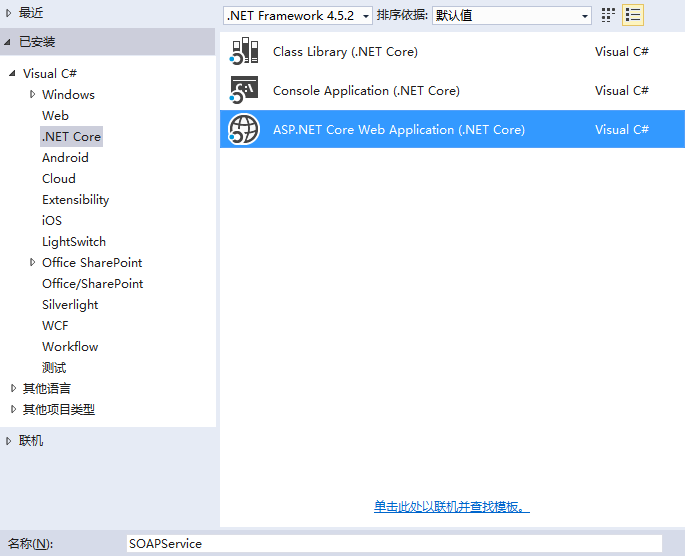
首先新建一个ASP.NET Core Web Application -》 SOAPService 然后再模板里选择 Web API。
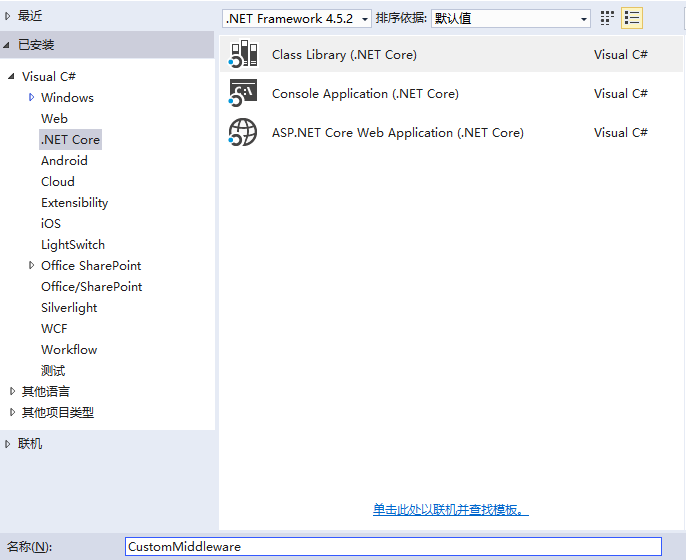
然后我们再添加一个Class Library -》 CustomMiddleware
实现
下面我们来实现功能,首先在类库项目中添加以下引用
Install-Package Microsoft.AspNetCore.Http.Abstractions

Install-Package System.ServiceModel.Primitives

Install-Package System.Reflection.TypeExtensions

Install-Package System.ComponentModel
首先新建一个 ServiceDescription、ContractDescription和OperationDescription 类,这里需要注意的是ServiceDescription,ContractDescription和OperationDescription这里使用的是不能使用 System.ServiceModel.Description命名空间中的类型。它们是示例中简单的新类型。
ServiceDescription.cs
    public class ServiceDescription

    {

        public Type ServiceType { get; private set; }

        public IEnumerable<ContractDescription> Contracts { get; private set; }

        public IEnumerable<OperationDescription> Operations => Contracts.SelectMany(c => c.Operations);

        public ServiceDescription(Type serviceType)

        {

            ServiceType = serviceType;

            var contracts = new List<ContractDescription>();

            foreach (var contractType in ServiceType.GetInterfaces())

            {

                foreach (var serviceContract in contractType.GetTypeInfo().GetCustomAttributes<ServiceContractAttribute>())

                {

                    contracts.Add(new ContractDescription(this, contractType, serviceContract));

                }

            }

            Contracts = contracts;

        }

    }
ContractDescription.cs
    public class ContractDescription

    {

        public ServiceDescription Service { get; private set; }

        public string Name { get; private set; }

        public string Namespace { get; private set; }

        public Type ContractType { get; private set; }

        public IEnumerable<OperationDescription> Operations { get; private set; }

        public ContractDescription(ServiceDescription service, Type contractType, ServiceContractAttribute attribute)

        {

            Service = service;

            ContractType = contractType;

            Namespace = attribute.Namespace ?? "http://tempuri.org/"; // Namespace defaults to http://tempuri.org/

            Name = attribute.Name ?? ContractType.Name; // Name defaults to the type name

            var operations = new List<OperationDescription>();

            foreach (var operationMethodInfo in ContractType.GetTypeInfo().DeclaredMethods)

            {

                foreach (var operationContract in operationMethodInfo.GetCustomAttributes<OperationContractAttribute>())

                {

                    operations.Add(new OperationDescription(this, operationMethodInfo, operationContract));

                }

            }

            Operations = operations;

        }

    }
OperationDescription.cs
    public class OperationDescription

    {

        public ContractDescription Contract { get; private set; }

        public string SoapAction { get; private set; }

        public string ReplyAction { get; private set; }

        public string Name { get; private set; }

        public MethodInfo DispatchMethod { get; private set; }

        public bool IsOneWay { get; private set; }

        public OperationDescription(ContractDescription contract, MethodInfo operationMethod, OperationContractAttribute contractAttribute)

        {

            Contract = contract;

            Name = contractAttribute.Name ?? operationMethod.Name;

            SoapAction = contractAttribute.Action ?? $"{contract.Namespace.TrimEnd('/')}/{contract.Name}/{Name}";

            IsOneWay = contractAttribute.IsOneWay;

            ReplyAction = contractAttribute.ReplyAction;

            DispatchMethod = operationMethod;

        }

    }
添加完成后下面来新建一个中间件 SOAPMiddleware ,对于新建中间件可以参考我之前的文章:http://www.cnblogs.com/linezero/p/5529767.html
SOAPMiddleware.cs 代码如下:
    public class SOAPMiddleware

    {

        private readonly RequestDelegate _next;

        private readonly Type _serviceType;

        private readonly string _endpointPath;

        private readonly MessageEncoder _messageEncoder;

        private readonly ServiceDescription _service;

        private IServiceProvider serviceProvider;

        public SOAPMiddleware(RequestDelegate next, Type serviceType, string path, MessageEncoder encoder,IServiceProvider _serviceProvider)

        {

            _next = next;

            _serviceType = serviceType;

            _endpointPath = path;

            _messageEncoder = encoder;

            _service = new ServiceDescription(serviceType);

            serviceProvider = _serviceProvider;

        }

        public async Task Invoke(HttpContext httpContext)

        {

            if (httpContext.Request.Path.Equals(_endpointPath, StringComparison.Ordinal))

            {

                Message responseMessage;

                //读取Request请求信息

                var requestMessage = _messageEncoder.ReadMessage(httpContext.Request.Body, 0x10000, httpContext.Request.ContentType);

                var soapAction = httpContext.Request.Headers["SOAPAction"].ToString().Trim('\"');

                if (!string.IsNullOrEmpty(soapAction))

                {

                    requestMessage.Headers.Action = soapAction;

                }

                //获取操作

                var operation = _service.Operations.Where(o => o.SoapAction.Equals(requestMessage.Headers.Action, StringComparison.Ordinal)).FirstOrDefault();

                if (operation == null)

                {

                    throw new InvalidOperationException($"No operation found for specified action: {requestMessage.Headers.Action}");

                }

                //获取注入的服务

                var serviceInstance = serviceProvider.GetService(_service.ServiceType);

                //获取操作的参数信息

                var arguments = GetRequestArguments(requestMessage, operation);

                // 执行操作方法

                var responseObject = operation.DispatchMethod.Invoke(serviceInstance, arguments.ToArray());

                var resultName = operation.DispatchMethod.ReturnParameter.GetCustomAttribute<MessageParameterAttribute>()?.Name ?? operation.Name + "Result";

                var bodyWriter = new ServiceBodyWriter(operation.Contract.Namespace, operation.Name + "Response", resultName, responseObject);

                responseMessage = Message.CreateMessage(_messageEncoder.MessageVersion, operation.ReplyAction, bodyWriter);

                httpContext.Response.ContentType = httpContext.Request.ContentType;

                httpContext.Response.Headers["SOAPAction"] = responseMessage.Headers.Action;

                _messageEncoder.WriteMessage(responseMessage, httpContext.Response.Body);

            }

            else

            {

                await _next(httpContext);

            }

        }

        private object[] GetRequestArguments(Message requestMessage, OperationDescription operation)

        {

            var parameters = operation.DispatchMethod.GetParameters();

            var arguments = new List<object>();

            // 反序列化请求包和对象

            using (var xmlReader = requestMessage.GetReaderAtBodyContents())

            {

                // 查找的操作数据的元素

                xmlReader.ReadStartElement(operation.Name, operation.Contract.Namespace);

                for (int i = ; i < parameters.Length; i++)

                {

                    var parameterName = parameters[i].GetCustomAttribute<MessageParameterAttribute>()?.Name ?? parameters[i].Name;

                    xmlReader.MoveToStartElement(parameterName, operation.Contract.Namespace);

                    if (xmlReader.IsStartElement(parameterName, operation.Contract.Namespace))

                    {

                        var serializer = new DataContractSerializer(parameters[i].ParameterType, parameterName, operation.Contract.Namespace);

                        arguments.Add(serializer.ReadObject(xmlReader, verifyObjectName: true));

                    }

                }

            }

            return arguments.ToArray();

        }

    }

    public static class SOAPMiddlewareExtensions

    {

        public static IApplicationBuilder UseSOAPMiddleware<T>(this IApplicationBuilder builder, string path, MessageEncoder encoder)

        {

            return builder.UseMiddleware<SOAPMiddleware>(typeof(T), path, encoder);

        }

        public static IApplicationBuilder UseSOAPMiddleware<T>(this IApplicationBuilder builder, string path, Binding binding)

        {

            var encoder = binding.CreateBindingElements().Find<MessageEncodingBindingElement>()?.CreateMessageEncoderFactory().Encoder;

            return builder.UseMiddleware<SOAPMiddleware>(typeof(T), path, encoder);

        }

    }
这里对于输出的消息做了一个封装,以输出具有正确的元素名称的消息的主体。
添加一个 ServiceBodyWriter 类。
    public class ServiceBodyWriter : BodyWriter

    {

        string ServiceNamespace;

        string EnvelopeName;

        string ResultName;

        object Result;

        public ServiceBodyWriter(string serviceNamespace, string envelopeName, string resultName, object result) : base(isBuffered: true)

        {

            ServiceNamespace = serviceNamespace;

            EnvelopeName = envelopeName;

            ResultName = resultName;

            Result = result;

        }

        protected override void OnWriteBodyContents(XmlDictionaryWriter writer)

        {

            writer.WriteStartElement(EnvelopeName, ServiceNamespace);

            var serializer = new DataContractSerializer(Result.GetType(), ResultName, ServiceNamespace);

            serializer.WriteObject(writer, Result);

            writer.WriteEndElement();

        }

    }
这里对于中间件整个就完成了。
服务端
在服务端使用,这里你也可以新建一个Web 项目。
因为刚刚我们已经新建好了一个Web API项目,我们就直接拿来使用。
首先添加 CustomMiddleware 引用
在 SOAPService 中添加一个 CalculatorService 类
    public class CalculatorService : ICalculatorService

    {

        public double Add(double x, double y) => x + y;

        public double Divide(double x, double y) => x / y;

        public double Multiply(double x, double y) => x * y;

        public double Subtract(double x, double y) => x - y;

        public string Get(string str) => $"{str} Hello World!";

    }

    [ServiceContract]

    public interface ICalculatorService

    {

        [OperationContract]

        double Add(double x, double y);

        [OperationContract]

        double Subtract(double x, double y);

        [OperationContract]

        double Multiply(double x, double y);

        [OperationContract]

        double Divide(double x, double y);

        [OperationContract]

        string Get(string str);

    }
这里我为了方便将接口契约也放在CalculatorService 中,你也可以新建一个接口。
然后在 Startup.cs 的 ConfigureServices 中注入 CalculatorService
        public void ConfigureServices(IServiceCollection services)

        {

            // Add framework services.

            services.AddMvc();

            services.AddScoped<CalculatorService>();

        }
在Configure 方法中加入中间件
        public void Configure(IApplicationBuilder app, IHostingEnvironment env, ILoggerFactory loggerFactory)

        {

            loggerFactory.AddConsole(Configuration.GetSection("Logging"));

            loggerFactory.AddDebug();

            //加入一个/CalculatorService.svc 地址,绑定Http

            app.UseSOAPMiddleware<CalculatorService>("/CalculatorService.svc", new BasicHttpBinding());

            app.UseMvc();

        }
这样就完成了服务端编写。
客户端
新建一个 Console Application -》SOAPClient

添加如下引用:
Install-Package System.ServiceModel.Primitives

Install-Package System.Private.ServiceModel

Install-Package System.ServiceModel.Http
Program代码如下:
    public class Program

    {

        public static void Main(string[] args)

        {

            Random numGen = new Random();

            double x = numGen.NextDouble() * ;

            double y = numGen.NextDouble() * ;

            var serviceAddress = "http://localhost:5000/CalculatorService.svc";

            var client = new CalculatorServiceClient(new BasicHttpBinding(), new EndpointAddress(serviceAddress));

            Console.WriteLine($"{x} + {y} == {client.Add(x, y)}");

            Console.WriteLine($"{x} - {y} == {client.Subtract(x, y)}");

            Console.WriteLine($"{x} * {y} == {client.Multiply(x, y)}");

            Console.WriteLine($"{x} / {y} == {client.Divide(x, y)}");

            client.Get("Client");

        }

    }

    class CalculatorServiceClient : ClientBase<ICalculatorService>

    {

        public CalculatorServiceClient(Binding binding, EndpointAddress remoteAddress) : base(binding, remoteAddress) { }

        public double Add(double x, double y) => Channel.Add(x, y);

        public double Subtract(double x, double y) => Channel.Subtract(x, y);

        public double Multiply(double x, double y) => Channel.Multiply(x, y);

        public double Divide(double x, double y) => Channel.Divide(x, y);

        public void Get(string str)

        {

            Console.WriteLine(Channel.Get(str));

        }

    }

    [ServiceContract]

    public interface ICalculatorService

    {

        [OperationContract]

        double Add(double x, double y);

        [OperationContract]

        double Subtract(double x, double y);

        [OperationContract]

        double Multiply(double x, double y);

        [OperationContract]

        double Divide(double x, double y);

        [OperationContract]

        string Get(string str);

    }
编写好以后,分别对应到目录使用dotnet run执行程序。

成功建立了连接,也有返回。也就实现SOAP 的解析。
示例代码GitHub:https://github.com/linezero/Blog/tree/master/SOAPService
参考文档:https://blogs.msdn.microsoft.com/dotnet/2016/09/19/custom-asp-net-core-middleware-example/
如果你觉得本文对你有帮助,请点击“推荐”,谢谢。
ASP.NET Core中间件(Middleware)实现WCF SOAP服务端解析的更多相关文章
- ASP.NET Core 入门教程 9、ASP.NET Core 中间件(Middleware)入门
一.前言 1.本教程主要内容 ASP.NET Core 中间件介绍 通过自定义 ASP.NET Core 中间件实现请求验签 2.本教程环境信息 软件/环境 说明 操作系统 Windows 10 SD ...
- ASP.NET Core 入门笔记10,ASP.NET Core 中间件(Middleware)入门
一.前言 1.本教程主要内容 ASP.NET Core 中间件介绍 通过自定义 ASP.NET Core 中间件实现请求验签 2.本教程环境信息 软件/环境 说明 操作系统 Windows 10 SD ...
- ASP.NET Core -中间件(Middleware)使用
ASP.NET Core开发,开发并使用中间件(Middleware). 中间件是被组装成一个应用程序管道来处理请求和响应的软件组件. 每个组件选择是否传递给管道中的下一个组件的请求,并能之前和下一组 ...
- ASP.NET Core 中间件Diagnostics使用
ASP.NET Core 中间件(Middleware)Diagnostics使用.对于中间件的介绍可以查看之前的文章ASP.NET Core 开发-中间件(Middleware). Diagnost ...
- ASP.NET Core 中间件Diagnostics使用 异常和错误信息
ASP.NET Core 中间件(Middleware)Diagnostics使用.对于中间件的介绍可以查看之前的文章ASP.NET Core 开发-中间件(Middleware). Diagnost ...
- ASP.NET Core 中间件自定义全局异常处理
目录 背景 ASP.NET Core过滤器(Filter) ASP.NET Core 中间件(Middleware) 自定义全局异常处理 .Net Core中使用ExceptionFilter .Ne ...
- [转帖]ASP.NET Core 中间件(Middleware)详解
ASP.NET Core 中间件(Middleware)详解 本文为官方文档译文,官方文档现已非机器翻译 https://docs.microsoft.com/zh-cn/aspnet/core/ ...
- 在ASP.NET Core使用Middleware模拟Custom Error Page功能
一.使用场景 在传统的ASP.NET MVC中,我们可以使用HandleErrorAttribute特性来具体指定如何处理Action抛出的异常.只要某个Action设置了HandleErrorAtt ...
- [转]ASP.NET Core 中间件详解及项目实战
本文转自:http://www.cnblogs.com/savorboard/p/5586229.html 前言 在上篇文章主要介绍了DotNetCore项目状况,本篇文章是我们在开发自己的项目中实际 ...
随机推荐
- SQL Server 数据变更时间戳(timestamp)在复制中的运用
一.本文所涉及的内容(Contents) 本文所涉及的内容(Contents) 背景(Contexts) 方案(Solution) 方案一(Solution One) 方案二(Solution Two ...
- MySQL 主主复制
200 ? "200px" : this.width)!important;} --> 介绍 环境 OS:CentOS 6.7,MySQL 5.6 Master:192.16 ...
- [每日电路图] 10、两种MOS管的典型开关电路
下图是两种MOS管的典型应用:其中第一种NMOS管为高电平导通,低电平截断,Drain端接后面电路的接地端:第二种为PMOS管典型开关电路,为高电平断开,低电平导通,Drain端接后面电路的VCC端. ...
- Worktile 技术架构概要
其实早就该写这篇博客了,一直说忙于工作没有时间,其实时间挤挤总会有的,可能就是因为懒吧!从2013年11月一直拖到现在,今天就简单谈谈 Worktile 的技术架构吧 . Worktile 自上线到现 ...
- PHP运行及语句及逻辑
php开发网页需要存放在wamp根目录下的www文件夹中才可运行成功.同时wamp要处于运行状态. 无站点情况下打开方式: 网址栏中输入:localhost/文件名称 代码规范: 用 <?p ...
- EF优缺点的理解
原先用的是三层架构中ADO.NET做底层开发,纯手工sql语句拼装.后来遇到一个MVC+EF项目,体会到了EF的强大性. 它是微软封装好一种ADO.NET数据实体模型,将数据库结构以ORM模式映射到应 ...
- Java中Eclipse的使用
Eclipse是跨平台的自由集成开发环境(IDE),初衷主要为Java语言的定制.第一次使用就喜欢上了它.它可以帮我们导入包,而不需要我们导入,有很多快捷键提供我们使用,方便节省时间:最值得我喜欢的是 ...
- UpdateData(TRUE)与UpdateData(FALSE)的使用
二者是更新对话框的控件与变量. 1.先要建立对应关系 如 编辑框IDC_Edit 和 变量 m_name DDX_Text(pDX, IDC_EDIT, m_name); 2.若是在编辑框输入名字 ...
- JavaSE高级之GUI编程
下面主要用到了java中的swing进行界面设计,当然java的GUI不如C#的设计的好看,不过原理还是要会的. 1. GUI Graphical User Interface 用户图形界面 a) 主 ...
- 编写简单的ramdisk(无请求队列)
最近在研究块设备驱动的编写,看了赵磊大牛的<写一个块设备驱动>,受益匪浅,虽然能看懂里面说的,但动手写写代码还是能加深理解的,下面实现的ramdisk写的很简单,如果有错误,欢迎大牛们指正 ...