
【BBED】编译及基本命令(1)
【BBED】编译及基本命令(1)
一.1 BLOG文档结构图
一.2 前言部分
一.2.1 导读和注意事项
各位技术爱好者,看完本文后,你可以掌握如下的技能,也可以学到一些其它你所不知道的知识,~O(∩_∩)O~:
① BBED的安装(编译)
② BBED的基本命令
Tips:
① 若文章代码格式有错乱,推荐使用搜狗、QQ或360浏览器,也可以下载pdf格式的文档来查看,pdf文档下载地址:http://yunpan.cn/cdEQedhCs2kFz (提取码:ed9b)
② 本篇BLOG中命令的输出部分需要特别关注的地方我都用灰色背景和粉红色字体来表示,比如下边的例子中,thread 1的最大归档日志号为33,thread 2的最大归档日志号为43是需要特别关注的地方;而命令一般使用黄色背景和红色字体标注;对代码或代码输出部分的注释一般采用蓝色字体表示。
List of Archived Logs in backup set 11
Thrd Seq Low SCN Low Time Next SCN Next Time
---- ------- ---------- ------------------- ---------- ---------
1 32 1621589 2015-05-29 11:09:52 1625242 2015-05-29 11:15:48
1 33 1625242 2015-05-29 11:15:48 1625293 2015-05-29 11:15:58
2 42 1613951 2015-05-29 10:41:18 1625245 2015-05-29 11:15:49
2 43 1625245 2015-05-29 11:15:49 1625253 2015-05-29 11:15:53
[ZFXXDB1:root]:/>lsvg -o
T_XDESK_APP1_vg
rootvg
[ZFXXDB1:root]:/>
00:27:22 SQL> alter tablespace idxtbs read write;
====》2097152*512/1024/1024/1024=1G
本文如有错误或不完善的地方请大家多多指正,ITPUB留言或QQ皆可,您的批评指正是我写作的最大动力。
一.2.2 相关参考文章链接
完整内容参考David Dai的blog:http://blog.csdn.net/tianlesoftware/article/details/5006580#
一.3 我的一个编译例子
oracle@ZTGXPADDB1:/oracle$ ls -l $ORACLE_HOME/rdbms/lib/*sbbd*
-rw-r--r-- 1 oracle dba 1671 May 26 2010 /oracle/app/oracle/product/10.2.0/db/rdbms/lib/sbbdpt.o
-rw-r--r-- 1 oracle dba 900 May 26 2010 /oracle/app/oracle/product/10.2.0/db/rdbms/lib/ssbbded.o
oracle@ZTGXPADDB1:/oracle$ ls -l $ORACLE_HOME/rdbms/mesg/bbed*
-rw-r--r-- 1 oracle dba 8704 May 27 2010 /oracle/app/oracle/product/10.2.0/db/rdbms/mesg/bbedus.msb
-rw-r--r-- 1 oracle dba 10270 Jul 25 2000 /oracle/app/oracle/product/10.2.0/db/rdbms/mesg/bbedus.msg
oracle@ZTGXPADDB1:/oracle$
oracle@ZTGXPADDB1:/oracle$ scp $ORACLE_HOME/rdbms/lib/*sbbd* oracle@22.188.194.64:/oracle/app/oracle/product/11.2.0/db/rdbms/lib/
The authenticity of host '22.188.194.64 (22.188.194.64)' can't be established.
RSA key fingerprint is 17:0d:6f:34:a8:0b:15:20:ca:ab:35:83:58:bb:aa:4f.
Are you sure you want to continue connecting (yes/no)?yes
Warning: Permanently added '22.188.194.64' (RSA) to the list of known hosts.
************************************************************
* *
* *
* ATTENTION:You have logged onto a secured server. *
* *
* All accesses logged! *
* *
* *
************************************************************
oracle@22.188.194.64's password:
sbbdpt.o 100% 1671 1.6KB/s 00:00
ssbbded.o 100% 900 0.9KB/s 00:00
oracle@ZTGXPADDB1:/oracle$ scp $ORACLE_HOME/rdbms/mesg/bbed* oracle@22.188.194.64:/oracle/app/oracle/product/11.2.0/db/rdbms/mesg/
************************************************************
* *
* *
* ATTENTION:You have logged onto a secured server. *
* *
* All accesses logged! *
* *
* *
************************************************************
oracle@22.188.194.64's password:
bbedus.msb 100% 8704 8.5KB/s 00:00
bbedus.msg 100% 10KB 10.0KB/s 00:00
oracle@ZTGXPADDB1:/oracle$
[oracle@ZFFR4CB1101:/u01/app/oracle/product/11.2.0/dbhome_1/rdbms/lib]$ cd $ORACLE_HOME/rdbms/lib
[oracle@ZFFR4CB1101:/u01/app/oracle/product/11.2.0/dbhome_1/rdbms/lib]$ make -f ins_rdbms.mk $ORACLE_HOME/rdbms/lib/bbed
Linking BBED utility (bbed)
rm -f /u01/app/oracle/product/11.2.0/dbhome_1/rdbms/lib/bbed
ld -b64 -o /u01/app/oracle/product/11.2.0/dbhome_1/rdbms/lib/bbed -L/u01/app/oracle/product/11.2.0/dbhome_1/rdbms/lib/ -L/u01/app/oracle/product/11.2.0/dbhome_1/lib/ /u01/app/oracle/product/11.2.0/dbhome_1/lib/s0main.o /u01/app/oracle/product/11.2.0/dbhome_1/rdbms/lib/ssbbded.o /u01/app/oracle/product/11.2.0/dbhome_1/rdbms/lib/sbbdpt.o -bI:/usr/lib/aio.exp `cat /u01/app/oracle/product/11.2.0/dbhome_1/lib/ldflags` -lncrypt11 -lnsgr11 -lnzjs11 -ln11 -lnl11 -ldbtools11 `cat /u01/app/oracle/product/11.2.0/dbhome_1/lib/ldflags` -lncrypt11 -lnsgr11 -lnzjs11 -ln11 -lnl11 -lnro11 `cat /u01/app/oracle/product/11.2.0/dbhome_1/lib/ldflags` -lncrypt11 -lnsgr11 -lnzjs11 -ln11 -lnl11 -lnnz11 -lzt11 -lztkg11 -lztkg11 -lclient11 -lnnetd11 -lvsn11 -lcommon11 -lgeneric11 -lmm -lsnls11 -lnls11 -lcore11 -lsnls11 -lnls11 -lcore11 -lsnls11 -lnls11 -lxml11 -lcore11 -lunls11 -lsnls11 -lnls11 -lcore11 -lnls11 `cat /u01/app/oracle/product/11.2.0/dbhome_1/lib/ldflags` -lncrypt11 -lnsgr11 -lnzjs11 -ln11 -lnl11 -lnro11 `cat /u01/app/oracle/product/11.2.0/dbhome_1/lib/ldflags` -lncrypt11 -lnsgr11 -lnzjs11 -ln11 -lnl11 -lclient11 -lnnetd11 -lvsn11 -lcommon11 -lgeneric11 -lpls11 -lrt -lsnls11 -lnls11 -lcore11 -lsnls11 -lnls11 -lcore11 -lsnls11 -lnls11 -lxml11 -lcore11 -lunls11 -lsnls11 -lnls11 -lcore11 -lnls11 -lclient11 -lnnetd11 -lvsn11 -lcommon11 -lgeneric11 -lsnls11 -lnls11 -lcore11 -lsnls11 -lnls11 -lcore11 -lsnls11 -lnls11 -lxml11 -lcore11 -lunls11 -lsnls11 -lnls11 -lcore11 -lnls11 -lld -lm `cat /u01/app/oracle/product/11.2.0/dbhome_1/lib/sysliblist` -lm -lsql11 /u01/app/oracle/product/11.2.0/dbhome_1/lib/nautab.o /u01/app/oracle/product/11.2.0/dbhome_1/lib/naeet.o /u01/app/oracle/product/11.2.0/dbhome_1/lib/naect.o /u01/app/oracle/product/11.2.0/dbhome_1/lib/naedhs.o
ld: 0711-224 WARNING: Duplicate symbol: .aio_nwait_timeout64
ld: 0711-224 WARNING: Duplicate symbol: aio_nwait_timeout64
ld: 0711-224 WARNING: Duplicate symbol: .aio_nwait64
ld: 0711-224 WARNING: Duplicate symbol: aio_nwait64
ld: 0711-345 Use the -bloadmap or -bnoquiet option to obtain more information.
ld: 0711-773 WARNING: Object /u01/app/oracle/product/11.2.0/dbhome_1/lib//libgeneric11.a[sdbgrfu.o], imported symbol timezone
Symbol was expected to be local. Extra instructions
are being generated to reference the symbol.
[oracle@ZFFR4CB1101:/u01/app/oracle/product/11.2.0/dbhome_1/rdbms/lib]$
[oracle@ZFFR4CB1101:/u01/app/oracle/product/11.2.0/dbhome_1/rdbms/lib]$ bbed
Password:
BBED: Release 2.0.0.0.0 - Limited Production on Wed Mar 23 11:12:18 2016
Copyright (c) 1982, 2011, Oracle and/or its affiliates. All rights reserved.
************* !!! For Oracle Internal Use only !!! ***************
BBED>
一.4 我的命令
ls -l $ORACLE_HOME/rdbms/lib/*sbbd*
ls -l $ORACLE_HOME/rdbms/mesg/bbed*
chown oracle:dba /u01/app/oracle/product/11.2.0/dbhome_1/rdbms/lib/*sbbd*
chown oracle:dba /u01/app/oracle/product/11.2.0/dbhome_1/rdbms/mesg/bbed*
--cd $ORACLE_HOME/rdbms/lib
--make -f ins_rdbms.mk $ORACLE_HOME/rdbms/lib/bbed
--make -f $ORACLE_HOME/rdbms/lib/ins_rdbms.mk $ORACLE_HOME/rdbms/lib/bbed
make -f $ORACLE_HOME/rdbms/lib/ins_rdbms.mk BBED=$ORACLE_HOME/bin/bbed $ORACLE_HOME/bin/bbed
一.5 总结
11g以下可以直接编译使用,11g及以后需要从相应平台的10g中拷贝4个文件到11g相应目录,如下,bbedar.msb可以不用拷贝。然后执行编译命令即可,编译的bbed命令可以直接生成在$ORACLE_HOME/bin下,命令为:make -f $ORACLE_HOME/rdbms/lib/ins_rdbms.mk BBED=$ORACLE_HOME/bin/bbed $ORACLE_HOME/bin/bbed
$ORACLE_HOME/rdbms/lib/ssbbded.o
$ORACLE_HOME/rdbms/lib/sbbdpt.o
$ORACLE_HOME/rdbms/mesg/bbedus.msb
$ORACLE_HOME/rdbms/mesg/bbedus.msg
$ORACLE_HOME/rdbms/mesg/bbedar.msb
------------------------以下是摘自网络内容---------------------------
第二章 BBED 的安装和使用
The name bbed is an acronym for Block Browser and Editor and it is shipped with thedatabase. It is intended for Oracle internal use only and the company neverpublishes any details about it. It is a very powerful tool but also extremelydangerous since it can change and/or corrupt data blocks of any Oracledatabase.
Ifyou use this tool, you do so at your own risk. Any modifications made with thistool render the database unsupported by Oracle.
BBED(Oracle Block Browerand EDitor Tool),用来直接查看和修改数据文件数据的一个工具,是Oracle一款内部工具,可以直接修改Oracle数据文件块的内容,在一些极端恢复场景下比较有用。该工具不受Oracle支持,所以默认是没有生成可执行文件的,在使用前需要重新连接。
虽然bbed 可以在db open 状态来进行修改,但是建议在做任何修改操作之前先shutdown db。 这样避免checkpoint 进程重写bbed 对block 的修改。 也避免oracle 在bbed 修改完成之前读block 或者申明block 为corrupt。
二.1 BBED 安装
Oracle8i 的BBED在windows 平台下的$ORACLE_HOME/bin下可以找到,9i中似乎未随软件发布,故在windows没有这个工具,在linux上面有,需要编译。
二.1.1 9i或10g中
cd $ORACLE_HOME/rdbms/lib
make -f ins_rdbms.mk $ORACLE_HOME/rdbms/lib/bbed
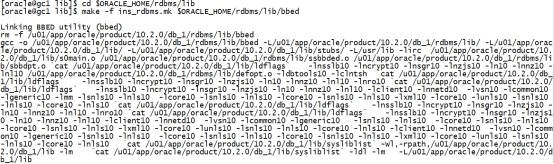
[oracle@redhat4 dul]$ cd $ORACLE_HOME/rdbms/lib
[oracle@redhat4 lib]$ make -f ins_rdbms.mk $ORACLE_HOME/rdbms/lib/bbed
Linking BBED utility (bbed)
rm -f /u01/app/oracle/product/10.2.0/db_1/rdbms/lib/bbed
gcc -o /u01/app/oracle/product/10.2.0/db_1/rdbms/lib/bbed -L/u01/app/oracle/product/10.2.0/db_1/rdbms/lib/ -L/u01/app/oracle/product/10.2.0/db_1/lib/ -L/u01/app/oracle/product/10.2.0/db_1/lib/stubs/ /u01/app/oracle/product/10.2.0/db_1/lib/s0main.o /u01/app/oracle/product/10.2.0/db_1/rdbms/lib/ssbbded.o /u01/app/oracle/product/10.2.0/db_1/rdbms/lib/sbbdpt.o `cat /u01/app/oracle/product/10.2.0/db_1/lib/ldflags` -lnsslb10 -lncrypt10 -lnsgr10 -lnzjs10 -ln10 -lnnz10 -lnl10 /u01/app/oracle/product/10.2.0/db_1/rdbms/lib/defopt.o -ldbtools10 -lclntsh `cat /u01/app/oracle/product/10.2.0/db_1/lib/ldflags` -lnsslb10 -lncrypt10 -lnsgr10 -lnzjs10 -ln10 -lnnz10 -lnl10 -lnro10 `cat /u01/app/oracle/product/10.2.0/db_1/lib/ldflags` -lnsslb10 -lncrypt10 -lnsgr10 -lnzjs10 -ln10 -lnnz10 -lnl10 -lclient10 -lnnetd10 -lvsn10 -lcommon10 -lgeneric10 -lmm -lsnls10 -lnls10 -lcore10 -lsnls10 -lnls10 -lcore10 -lsnls10 -lnls10 -lxml10 -lcore10 -lunls10 -lsnls10 -lnls10 -lcore10 -lnls10 `cat /u01/app/oracle/product/10.2.0/db_1/lib/ldflags` -lnsslb10 -lncrypt10 -lnsgr10 -lnzjs10 -ln10 -lnnz10 -lnl10 -lnro10 `cat /u01/app/oracle/product/10.2.0/db_1/lib/ldflags` -lnsslb10 -lncrypt10 -lnsgr10 -lnzjs10 -ln10 -lnnz10 -lnl10 -lclient10 -lnnetd10 -lvsn10 -lcommon10 -lgeneric10 -lsnls10 -lnls10 -lcore10 -lsnls10 -lnls10 -lcore10 -lsnls10 -lnls10 -lxml10 -lcore10 -lunls10 -lsnls10 -lnls10 -lcore10 -lnls10 -lclient10 -lnnetd10 -lvsn10 -lcommon10 -lgeneric10 -lsnls10 -lnls10 -lcore10 -lsnls10 -lnls10 -lcore10 -lsnls10 -lnls10 -lxml10 -lcore10 -lunls10 -lsnls10 -lnls10 -lcore10 -lnls10 `cat /u01/app/oracle/product/10.2.0/db_1/lib/sysliblist` -Wl,-rpath,/u01/app/oracle/product/10.2.0/db_1/lib -lm `cat /u01/app/oracle/product/10.2.0/db_1/lib/sysliblist` -ldl -lm -L/u01/app/oracle/product/10.2.0/db_1/lib
然后把这个路径添加到环境变量,注意:aix下为 ~/.profile文件:
cd ~
vi .bash_profile
export PATH=$ORACLE_HOME/bin:$PATH:$ORACLE_HOME/jdk/bin:$ORACLE_HOME/rdbms/lib

source ~/.bash_profile
oracle@ZTGXPADDB1:/oracle$ . ~/.profile
oracle@ZTGXPADDB1:/oracle$ bbed
Password:
BBED: Release 2.0.0.0.0 - Limited Production on Fri Sep 30 10:42:45 2022
Copyright (c) 1982, 2007, Oracle. All rights reserved.
************* !!! For Oracle Internal Use only !!! ***************
BBED>
以上生成的bbed可执行文件在$ORACLE_HOME/rdbms/lib目录,可以复制到其他位置或者其他同Oracle版本的机器上运行。
也可通过以下命令将bbed生成到$ORACLE_HOME/bin目录
[oracle@db2 lib]$ make -f ins_rdbms.mk BBED=$ORACLE_HOME/bin/bbed $ORACLE_HOME/bin/bbed
Linking BBED utility (bbed)
rm -f /u01/app/oracle/product/10.2.0/db_1/bin/bbed
gcc -o/u01/app/oracle/product/10.2.0/db_1/bin/bbed-L/u01/app/oracle/product/10.2.0/db_1/rdbms/lib/-L/u01/app/oracle/product/10.2.0/db_1/lib/-L/u01/app/oracle/product/10.2.0/db_1/lib/stubs/ -L/usr/lib -lirc /u01/app/oracle/product/10.2.0/db_1/lib/s0main.o/u01/app/oracle/product/10.2.0/db_1/rdbms/lib/ssbbded.o/u01/app/oracle/product/10.2.0/db_1/rdbms/lib/sbbdpt.o `cat/u01/app/oracle/product/10.2.0/db_1/lib/ldflags` -lnsslb10 -lncrypt10 -lnsgr10 -lnzjs10-ln10 -lnnz10 -lnl10 /u01/app/oracle/product/10.2.0/db_1/rdbms/lib/defopt.o-ldbtools10 -lclntsh `cat/u01/app/oracle/product/10.2.0/db_1/lib/ldflags` -lnsslb10 -lncrypt10 -lnsgr10 -lnzjs10-ln10 -lnnz10 -lnl10 -lnro10 `cat/u01/app/oracle/product/10.2.0/db_1/lib/ldflags` -lnsslb10 -lncrypt10 -lnsgr10 -lnzjs10-ln10 -lnnz10 -lnl10 -lclient10 -lnnetd10 -lvsn10 -lcommon10 -lgeneric10 -lmm -lsnls10 -lnls10 -lcore10 -lsnls10 -lnls10 -lcore10 -lsnls10 -lnls10-lxml10 -lcore10 -lunls10 -lsnls10 -lnls10 -lcore10 -lnls10 `cat /u01/app/oracle/product/10.2.0/db_1/lib/ldflags` -lnsslb10 -lncrypt10 -lnsgr10 -lnzjs10-ln10 -lnnz10 -lnl10 -lnro10 `cat/u01/app/oracle/product/10.2.0/db_1/lib/ldflags` -lnsslb10 -lncrypt10 -lnsgr10 -lnzjs10-ln10 -lnnz10 -lnl10 -lclient10 -lnnetd10 -lvsn10 -lcommon10 -lgeneric10 -lsnls10 -lnls10 -lcore10-lsnls10 -lnls10 -lcore10 -lsnls10 -lnls10 -lxml10 -lcore10 -lunls10 -lsnls10-lnls10 -lcore10 -lnls10 -lclient10 -lnnetd10 -lvsn10 -lcommon10 -lgeneric10 -lsnls10 -lnls10 -lcore10 -lsnls10 -lnls10 -lcore10 -lsnls10-lnls10 -lxml10 -lcore10 -lunls10 -lsnls10 -lnls10 -lcore10 -lnls10 `cat/u01/app/oracle/product/10.2.0/db_1/lib/sysliblist`-Wl,-rpath,/u01/app/oracle/product/10.2.0/db_1/lib -lm `cat/u01/app/oracle/product/10.2.0/db_1/lib/sysliblist` -ldl -lm -L/u01/app/oracle/product/10.2.0/db_1/lib
[oracle@db2 lib]$ ls -lrt bbed
-rwxr-xr-x 1 oracle oinstall 536161 Aug 1118:30 bbed
[oracle@db2 lib]$ cd $ORACLE_HOME/bin
[oracle@db2 bin]$ ls -lrt bbed
-rwxr-xr-x 1 oracle oinstall 536161 Aug 11 18:33bbed
二.1.2 11g及以上
cd $ORACLE_HOME/rdbms/lib
make -f ins_rdbms.mk $ORACLE_HOME/rdbms/lib/bbed
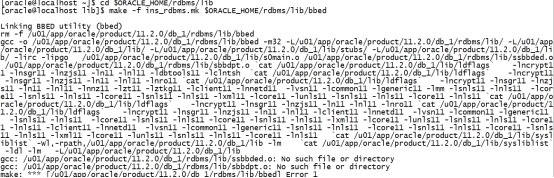
[oracle@rhel6_lhr ~]$ cd $ORACLE_HOME/rdbms/lib
[oracle@rhel6_lhr lib]$ make -f ins_rdbms.mk $ORACLE_HOME/rdbms/lib/bbed
Linking BBED utility (bbed)
rm -f /u01/app/oracle/product/11.2.0/dbhome_1/rdbms/lib/bbed
gcc -o /u01/app/oracle/product/11.2.0/dbhome_1/rdbms/lib/bbed -m64 -L/u01/app/oracle/product/11.2.0/dbhome_1/rdbms/lib/ -L/u01/app/oracle/product/11.2.0/dbhome_1/lib/ -L/u01/app/oracle/product/11.2.0/dbhome_1/lib/stubs/ /u01/app/oracle/product/11.2.0/dbhome_1/lib/s0main.o /u01/app/oracle/product/11.2.0/dbhome_1/rdbms/lib/ssbbded.o /u01/app/oracle/product/11.2.0/dbhome_1/rdbms/lib/sbbdpt.o `cat /u01/app/oracle/product/11.2.0/dbhome_1/lib/ldflags` -lncrypt11 -lnsgr11 -lnzjs11 -ln11 -lnl11 -ldbtools11 -lclntsh `cat /u01/app/oracle/product/11.2.0/dbhome_1/lib/ldflags` -lncrypt11 -lnsgr11 -lnzjs11 -ln11 -lnl11 -lnro11 `cat /u01/app/oracle/product/11.2.0/dbhome_1/lib/ldflags` -lncrypt11 -lnsgr11 -lnzjs11 -ln11 -lnl11 -lnnz11 -lzt11 -lztkg11 -lclient11 -lnnetd11 -lvsn11 -lcommon11 -lgeneric11 -lmm -lsnls11 -lnls11 -lcore11 -lsnls11 -lnls11 -lcore11 -lsnls11 -lnls11 -lxml11 -lcore11 -lunls11 -lsnls11 -lnls11 -lcore11 -lnls11 `cat /u01/app/oracle/product/11.2.0/dbhome_1/lib/ldflags` -lncrypt11 -lnsgr11 -lnzjs11 -ln11 -lnl11 -lnro11 `cat /u01/app/oracle/product/11.2.0/dbhome_1/lib/ldflags` -lncrypt11 -lnsgr11 -lnzjs11 -ln11 -lnl11 -lclient11 -lnnetd11 -lvsn11 -lcommon11 -lgeneric11 -lsnls11 -lnls11 -lcore11 -lsnls11 -lnls11 -lcore11 -lsnls11 -lnls11 -lxml11 -lcore11 -lunls11 -lsnls11 -lnls11 -lcore11 -lnls11 -lclient11 -lnnetd11 -lvsn11 -lcommon11 -lgeneric11 -lsnls11 -lnls11 -lcore11 -lsnls11 -lnls11 -lcore11 -lsnls11 -lnls11 -lxml11 -lcore11 -lunls11 -lsnls11 -lnls11 -lcore11 -lnls11 `cat /u01/app/oracle/product/11.2.0/dbhome_1/lib/sysliblist` -Wl,-rpath,/u01/app/oracle/product/11.2.0/dbhome_1/lib -lm `cat /u01/app/oracle/product/11.2.0/dbhome_1/lib/sysliblist` -ldl -lm -L/u01/app/oracle/product/11.2.0/dbhome_1/lib
gcc: /u01/app/oracle/product/11.2.0/dbhome_1/rdbms/lib/ssbbded.o: No such file or directory
gcc: /u01/app/oracle/product/11.2.0/dbhome_1/rdbms/lib/sbbdpt.o: No such file or directory
make: *** [/u01/app/oracle/product/11.2.0/dbhome_1/rdbms/lib/bbed] Error 1
AIX下:
[ZFXDESKDB1:oracle]:/oracle>cd $ORACLE_HOME/rdbms/lib
[ZFXDESKDB1:oracle]:/oracle/app/oracle/product/11.2.0/db/rdbms/lib>make -f ins_rdbms.mk $ORACLE_HOME/rdbms/lib/bbed
Linking BBED utility (bbed)
rm -f /oracle/app/oracle/product/11.2.0/db/rdbms/lib/bbed
ld -b64 -o /oracle/app/oracle/product/11.2.0/db/rdbms/lib/bbed -L/oracle/app/oracle/product/11.2.0/db/rdbms/lib/ -L/oracle/app/oracle/product/11.2.0/db/lib/ /oracle/app/oracle/product/11.2.0/db/lib/s0main.o /oracle/app/oracle/product/11.2.0/db/rdbms/lib/ssbbded.o /oracle/app/oracle/product/11.2.0/db/rdbms/lib/sbbdpt.o -bI:/usr/lib/aio.exp `cat /oracle/app/oracle/product/11.2.0/db/lib/ldflags` -lncrypt11 -lnsgr11 -lnzjs11 -ln11 -lnl11 -ldbtools11 `cat /oracle/app/oracle/product/11.2.0/db/lib/ldflags` -lncrypt11 -lnsgr11 -lnzjs11 -ln11 -lnl11 -lnro11 `cat /oracle/app/oracle/product/11.2.0/db/lib/ldflags` -lncrypt11 -lnsgr11 -lnzjs11 -ln11 -lnl11 -lnnz11 -lzt11 -lztkg11 -lztkg11 -lclient11 -lnnetd11 -lvsn11 -lcommon11 -lgeneric11 -lmm -lsnls11 -lnls11 -lcore11 -lsnls11 -lnls11 -lcore11 -lsnls11 -lnls11 -lxml11 -lcore11 -lunls11 -lsnls11 -lnls11 -lcore11 -lnls11 `cat /oracle/app/oracle/product/11.2.0/db/lib/ldflags` -lncrypt11 -lnsgr11 -lnzjs11 -ln11 -lnl11 -lnro11 `cat /oracle/app/oracle/product/11.2.0/db/lib/ldflags` -lncrypt11 -lnsgr11 -lnzjs11 -ln11 -lnl11 -lclient11 -lnnetd11 -lvsn11 -lcommon11 -lgeneric11 -lpls11 -lrt -lsnls11 -lnls11 -lcore11 -lsnls11 -lnls11 -lcore11 -lsnls11 -lnls11 -lxml11 -lcore11 -lunls11 -lsnls11 -lnls11 -lcore11 -lnls11 -lclient11 -lnnetd11 -lvsn11 -lcommon11 -lgeneric11 -lsnls11 -lnls11 -lcore11 -lsnls11 -lnls11 -lcore11 -lsnls11 -lnls11 -lxml11 -lcore11 -lunls11 -lsnls11 -lnls11 -lcore11 -lnls11 -lld -lm `cat /oracle/app/oracle/product/11.2.0/db/lib/sysliblist` -lm -lsql11 /oracle/app/oracle/product/11.2.0/db/lib/nautab.o /oracle/app/oracle/product/11.2.0/db/lib/naeet.o /oracle/app/oracle/product/11.2.0/db/lib/naect.o /oracle/app/oracle/product/11.2.0/db/lib/naedhs.o
ld: 0706-005 Cannot find or open file: /oracle/app/oracle/product/11.2.0/db/rdbms/lib/ssbbded.o
ld:open(): A file or directory in the path name does not exist.
ld: 0706-005 Cannot find or open file: /oracle/app/oracle/product/11.2.0/db/rdbms/lib/sbbdpt.o
ld:open(): A file or directory in the path name does not exist.
make: 1254-004 The error code from the last command is 255.
Stop.
需要从10g里面考:
sz $ORACLE_HOME/rdbms/lib/ssbbded.o
sz $ORACLE_HOME/rdbms/lib/sbbdpt.o
sz $ORACLE_HOME/rdbms/mesg/bbedus.msb
sz $ORACLE_HOME/rdbms/mesg/bbedus.msg
sz $ORACLE_HOME/rdbms/mesg/bbedar.msb
考出来。

su – oracle
export ORACLE_SID=PROD
pwd

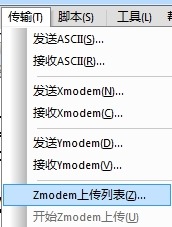
选administrator下的下载。窗口一定要在/home/oracle路径下(不能在上面的窗口)。
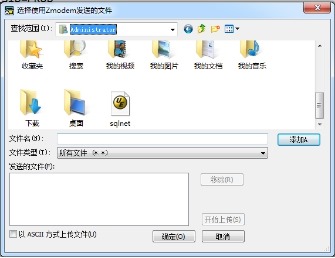
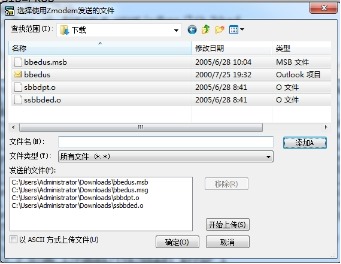
点击添加和确定。
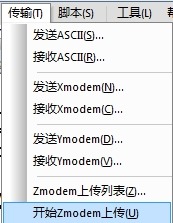

cp bbedus.msb $ORACLE_HOME/rdbms/mesg
cp bbedus.msg $ORACLE_HOME/rdbms/mesg
cp *.o $ORACLE_HOME/rdbms/lib
再次执行:
cd $ORACLE_HOME/rdbms/lib
make -f ins_rdbms.mk $ORACLE_HOME/rdbms/lib/bbed
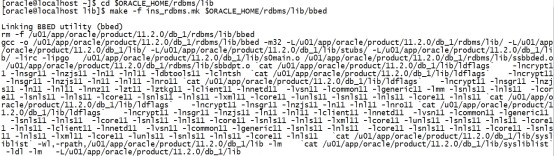
搞定。
cd /home/oracle
vi .bash_profile
export PATH=$ORACLE_HOME/bin:$PATH:$ORACLE_HOME/jdk/bin:/u01/app/oracle/product/11.2.0/db_1/rdbms/lib

source /home/oracle/.bash_profile
二.3 使用BBED
一般使用bbed,都是将一些配置信息写入到一个参数文本里,在调用bbed时,指定该参数文件。如:
$bbed parfile=bbed.par
bbed help=y
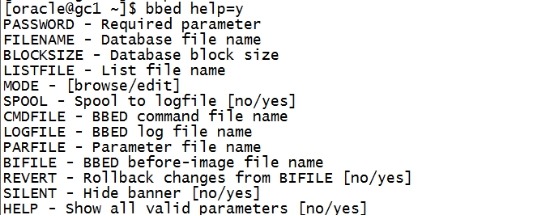
这里我们先演示一个示例。
(1)先获取datafile 的信息
将datafile 的信息写入一个文件,格式为:文件编号 文件名字 文件大小。可以通过如下SQL 获取:
set line 9999 pagesize 9999
select file#||' '||name||' '||bytes from v$datafile;

注意,这里的file id。 我们这里的file id 和 oracle 系统内部的file id 相同。 当然这个id 我们也可以自己指定。 当我们在bbed 里设置file id 时,就是根据这个参数文件中的的设置来的。 最好设置为相同,不然以后可能会混淆。
将上面查询出来的datafile信息保存到文本里。
cd /home/oracle
vi file.txt
1 /u01/app/oracle/oradata/PROD/disk3/system01.dbf 340787200
2 /u01/app/oracle/oradata/PROD/disk4/sysaux01.dbf 340787200
3 /u01/app/oracle/oradata/PROD/disk5/undotbs01.dbf 209715200
4 /u01/app/oracle/oradata/PROD/disk3/users01.dbf 524288000
5 /u01/app/oracle/oradata/PROD/disk3/cuug01.dbf 52428800

vi bbed.par
blocksize=8192
listfile=/home/oracle/file.txt
mode=edit
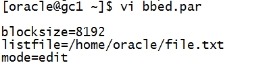
source /home/oracle/.bash_profile
bbed parfile=/home/oracle/bbed.par
blockedit
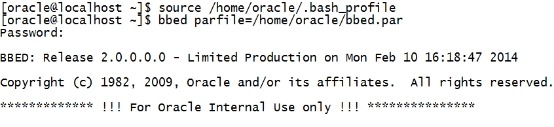
BBED是Oracle 内部使用的命令,所以Oracle 不提供技术支持。 为了安全,BBED设置了口令保护,默认密码为blockedit。
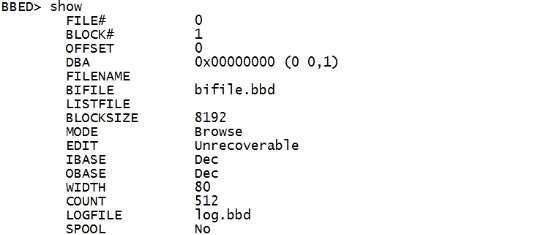
show
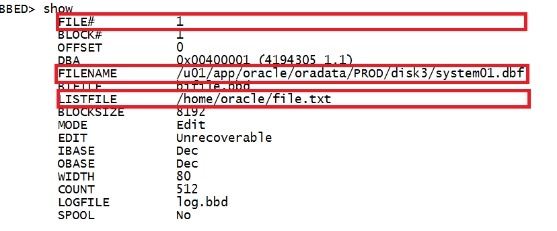
如果没有设置参数文件,显示:
------------------------以上是摘自网络内容---------------------------
About Me
...........................................................................................................................................................................................
本文作者:小麦苗,只专注于数据库的技术,更注重技术的运用
ITPUB BLOG:http://blog.itpub.net/26736162
本文地址:http://blog.itpub.net/26736162/viewspace-2075216/
本文pdf版:http://yunpan.cn/cdEQedhCs2kFz (提取码:ed9b)
QQ:642808185 若加QQ请注明您所正在读的文章标题
于 2016-04-04 10:00~ 2016-04-04 19:00 在唐镇完成
<版权所有,文章允许转载,但须以链接方式注明源地址,否则追究法律责任!>
...........................................................................................................................................................................................
【BBED】编译及基本命令(1)的更多相关文章
- 【BBED】BBED模拟并修复ORA-08102错误
[BBED]BBED模拟并修复ORA-08102错误 1.1 BLOG文档结构图 1.2 前言部分 1.2.1 导读和注意事项 各位技术爱好者,看完本文后,你可以掌握如下的技能,也可以学到一些其 ...
- 使用bbed编辑研究oracle数据块结构
bbed是随oracle软件公布的一款数据块查看和编辑工具,作为一款内部工具.bbed的功能很强大,可是假设使用不当可能给数据库造成无法挽回的损失.因此.我们建议在使用bbed改动数据块前备份被改动的 ...
- Linux 2.6内核Makefile浅析
1 概述 Makefile由五个部分组成: Makefile:根目录Makefile,它读取.config文件,并负责创建vmlinux(内核镜像)和modules(模块文件). .config:内核 ...
- magento性能优化
magento性能优化 14个快速加载web页面的技巧: 减少HTTP请求数使用CDN增加过期头信息gzip压缩传输内容将css样式表放在页首将js文件放在页尾不使用css表达式尽量少用内联式的css ...
- [置顶] Android JNI必须掌握的五点
1:JNI是什么? Java NativeInterface(JNI)是Java提供的一个很重要的特性.它使得用诸如C/C++等语言编写的代码可以与运行于Java虚拟机(JVM)中的 Java代码 ...
- Linux 2.6内核Makefile浅析【转】
转自:http://blog.csdn.net/tommy_wxie/article/details/7280463 版权声明:本文为博主原创文章,未经博主允许不得转载. 目录(?)[-] 概述 ...
- 使用valgrind进行内存泄漏和非法内存操作检测
valgrind是一个强大的工具,最常用的功能是用它来检测内存泄漏和非法内存的使用.要想让valgrind报告的更加细致,请使用-g进行编译. 基本命令如下: $ valgrind --tool=me ...
- Oracle 11g 编译使用BBED
环境:RHEL 6.4 + Oracle 11.2.0.4 1. 拷贝缺失文件 2. 编译BBED 3. BBED使用测试 Reference 1. 拷贝缺失文件 11g中缺失几个相关文件,但我们实际 ...
- 基本命令行操作1(java编译)
1. 设置环境变量,具体:https://www.cnblogs.com/shinge/p/5500002.html "cd + 文件名" 可进入指定文件,"cd..&q ...
随机推荐
- linux环境下安装python 3
说明: 在linux环境下,都默认安装python 2的环境,由于python3在python2的基础上升级较大,所以安装python 3环境用于使用最新的python 3的语法. 安装过程: 1.下 ...
- 【漫谈数据仓库】 如何优雅地设计数据分层 ODS DW DM层级
转载http://bigdata.51cto.com/art/201710/554810.htm 一.文章主题 本文主要讲解数据仓库的一个重要环节:如何设计数据分层!其它关于数据仓库的内容可参考之前的 ...
- oracle 统计成绩
set serveroutput on; declare cursor c1 is select dno,dname from dep; pdno dep.dno%TYPE; pdname dep.d ...
- Elasticsearch学习之集群常见状况处理(干货)
1. 集群健康状况处理 当集群处于yellow或者red状态的时候,整体处理步骤如下: (1) 首先查看集群状态 localhost:/_cluster/health?pretty { "c ...
- 一次升级jar包遇到的空指针异常
今天自己在升级公司的一个jar后,一直报空指针异常.代码如下 package com.zhuanche.http; import com.alibaba.fastjson.JSON; import c ...
- GPRS 智能门禁控制器
本模块居于GPRS 2G网络,信号覆盖广,而且好. 主要用于微信门禁等,提供用户服务端搭建及相关接口. 您可以向门禁发送开门信号,并提醒开门成功的信号反馈. 同时支持发送开门ID号,并反馈成功ID号
- A记录(主机名解析)、CNAME(别名解析)和URL转发(域名转发)
什么是 A记录(主机名解析).CNAME(别名解析)和URL转发(域名转发)? A记录(主机名解析)是最普通的域名解析,是把某一主机名解析到一个IP. 例如www.***.com-> 20.10 ...
- .NET Core sdk和runtime区别
SDK和runtime区别 .net core Runtime[跑netcore 程序的] (CoreCLR) .net core SDK (开发工具包 [runtime(jre) + Rolysn( ...
- 基于layUI调用后台数据实现区域信息级联查询
基于layUI调用后台数据实现区域信息级联查询 1.基本思路 后台提供根据区域编码查询区域列表公共接口 页面初始化调用后台接口加载所有省份 点击省份将省份区域编码传入后台查询该省份下所有地市信息,以此 ...
- CKEditor图片上传问题(默认安装情况下编辑器无法处理图片),通过Base64编码字符串解决
准备做一个文章内容网站,网页编辑器采用CKEditor,第一次用,默认安装情况下,图片无法插入,提示没有定义上传适配器(adapter),错误码提示如下: 根据提示,在官网看到有两种途径:一使用CKE ...