
weblogic解密工具
import org.bouncycastle.jce.provider.BouncyCastleProvider;

import sun.misc.BASE64Decoder;

import javax.crypto.*;

import javax.crypto.spec.IvParameterSpec;

import javax.crypto.spec.PBEKeySpec;

import javax.crypto.spec.PBEParameterSpec;

import javax.crypto.spec.SecretKeySpec;

import java.io.FileInputStream;

import java.io.IOException;

import java.io.InputStream;

import java.security.InvalidAlgorithmParameterException;

import java.security.InvalidKeyException;

import java.security.NoSuchAlgorithmException;

import java.security.Security;

import java.security.spec.InvalidKeySpecException;

public class WebLogicPasswordDecryptor {

    public static void main(String args[]) throws IOException, NoSuchPaddingException, NoSuchAlgorithmException, InvalidKeyException, BadPaddingException, IllegalBlockSizeException, InvalidKeySpecException, InvalidAlgorithmParameterException {

        Security.addProvider(new BouncyCastleProvider());

        String serializedSystemIniPath = args[0];

        String ciphertext = args[1];

        String cleartext = "";

        if (ciphertext.startsWith("{AES}")){

            ciphertext = ciphertext.replaceAll("^[{AES}]+", "");

            cleartext = decryptAES(serializedSystemIniPath,ciphertext);

        } else if (ciphertext.startsWith("{3DES}")){

            ciphertext = ciphertext.replaceAll("^[{3DES}]+", "");

            cleartext = decrypt3DES(serializedSystemIniPath, ciphertext);

        }

        System.out.println(cleartext);

    }

    public static String decryptAES(String SerializedSystemIni, String ciphertext) throws NoSuchAlgorithmException, InvalidKeySpecException, NoSuchPaddingException, InvalidAlgorithmParameterException, InvalidKeyException, BadPaddingException, IllegalBlockSizeException, IOException {

        byte[] encryptedPassword1 = new BASE64Decoder().decodeBuffer(ciphertext);

        byte[] salt = null;

        byte[] encryptionKey = null;

        String key = "0xccb97558940b82637c8bec3c770f86fa3a391a56";

        char password[] = new char[key.length()];

        key.getChars(0, password.length, password, 0);

        FileInputStream is = new FileInputStream(SerializedSystemIni);

        try {

            salt = readBytes(is);

            int version = is.read();

            if (version != -1) {

                encryptionKey = readBytes(is);

                if (version >= 2) {

                    encryptionKey = readBytes(is);

                }

            }

        } catch (IOException e) {

        }

        SecretKeyFactory keyFactory = SecretKeyFactory.getInstance("PBEWITHSHAAND128BITRC2-CBC");

        PBEKeySpec pbeKeySpec = new PBEKeySpec(password, salt, 5);

        SecretKey secretKey = keyFactory.generateSecret(pbeKeySpec);

        PBEParameterSpec pbeParameterSpec = new PBEParameterSpec(salt, 0);

        Cipher cipher = Cipher.getInstance("PBEWITHSHAAND128BITRC2-CBC");

        cipher.init(Cipher.DECRYPT_MODE, secretKey, pbeParameterSpec);

        SecretKeySpec secretKeySpec = new SecretKeySpec(cipher.doFinal(encryptionKey), "AES");

        byte[] iv = new byte[16];

        System.arraycopy(encryptedPassword1, 0, iv, 0, 16);

        int encryptedPasswordlength = encryptedPassword1.length - 16 ;

        byte[] encryptedPassword2 = new byte[encryptedPasswordlength];

        System.arraycopy(encryptedPassword1, 16, encryptedPassword2, 0, encryptedPasswordlength);

        IvParameterSpec ivParameterSpec = new IvParameterSpec(iv);

        Cipher outCipher = Cipher.getInstance("AES/CBC/PKCS5Padding");

        outCipher.init(Cipher.DECRYPT_MODE, secretKeySpec, ivParameterSpec);

        byte[] cleartext = outCipher.doFinal(encryptedPassword2);

        return new String(cleartext, "UTF-8");

    }

    public static String decrypt3DES(String SerializedSystemIni, String ciphertext) throws NoSuchAlgorithmException, InvalidKeySpecException, NoSuchPaddingException, InvalidAlgorithmParameterException, InvalidKeyException, BadPaddingException, IllegalBlockSizeException, IOException {

        byte[] encryptedPassword1 = new BASE64Decoder().decodeBuffer(ciphertext);

        byte[] salt = null;

        byte[] encryptionKey = null;

        String PW = "0xccb97558940b82637c8bec3c770f86fa3a391a56";

        char password[] = new char[PW.length()];

        PW.getChars(0, password.length, password, 0);

        FileInputStream is = new FileInputStream(SerializedSystemIni);

        try {

            salt = readBytes(is);

            int version = is.read();

            if (version != -1) {

                encryptionKey = readBytes(is);

                if (version >= 2) {

                    encryptionKey = readBytes(is);

                }

            }

        } catch (IOException e) {

        }

        SecretKeyFactory keyFactory = SecretKeyFactory.getInstance("PBEWITHSHAAND128BITRC2-CBC");

        PBEKeySpec pbeKeySpec = new PBEKeySpec(password, salt, 5);

        SecretKey secretKey = keyFactory.generateSecret(pbeKeySpec);

        PBEParameterSpec pbeParameterSpec = new PBEParameterSpec(salt, 0);

        Cipher cipher = Cipher.getInstance("PBEWITHSHAAND128BITRC2-CBC");

        cipher.init(Cipher.DECRYPT_MODE, secretKey, pbeParameterSpec);

        SecretKeySpec secretKeySpec = new SecretKeySpec(cipher.doFinal(encryptionKey),"DESEDE");

        byte[] iv = new byte[8];

        System.arraycopy(salt, 0, iv, 0, 4);

        System.arraycopy(salt, 0, iv, 4, 4);

        IvParameterSpec ivParameterSpec = new IvParameterSpec(iv);

        Cipher outCipher = Cipher.getInstance("DESEDE/CBC/PKCS5Padding");

        outCipher.init(Cipher.DECRYPT_MODE, secretKeySpec, ivParameterSpec);

        byte[] cleartext = outCipher.doFinal(encryptedPassword1);

        return new String(cleartext, "UTF-8");

    }

    public static byte[] readBytes(InputStream stream) throws IOException {

        int length = stream.read();

        byte[] bytes = new byte[length];

        int in = 0;

        int justread;

        while (in < length) {

            justread = stream.read(bytes, in, length - in);

            if (justread == -1) {

                break;

            }

            in += justread;

        }

        return bytes;

    }

}
代码如上(https://github.com/sevck/WebLogicPasswordDecryptor)
还需要:需要下载一个bcprov-ext-jdk16-146.jar包,拷贝到$PATH\jre\lib\ext\
环境配置:修改C:\Program Files\Java\jdk1.7.0_55\jre\lib\security\java.security文件,增加一行
security.provider.11=org.bouncycastle.jce.provider.BouncyCastleProvider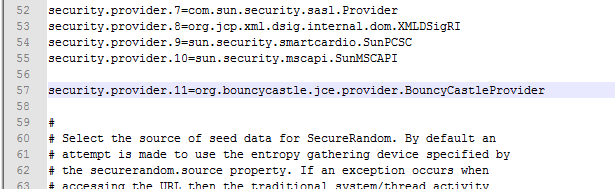
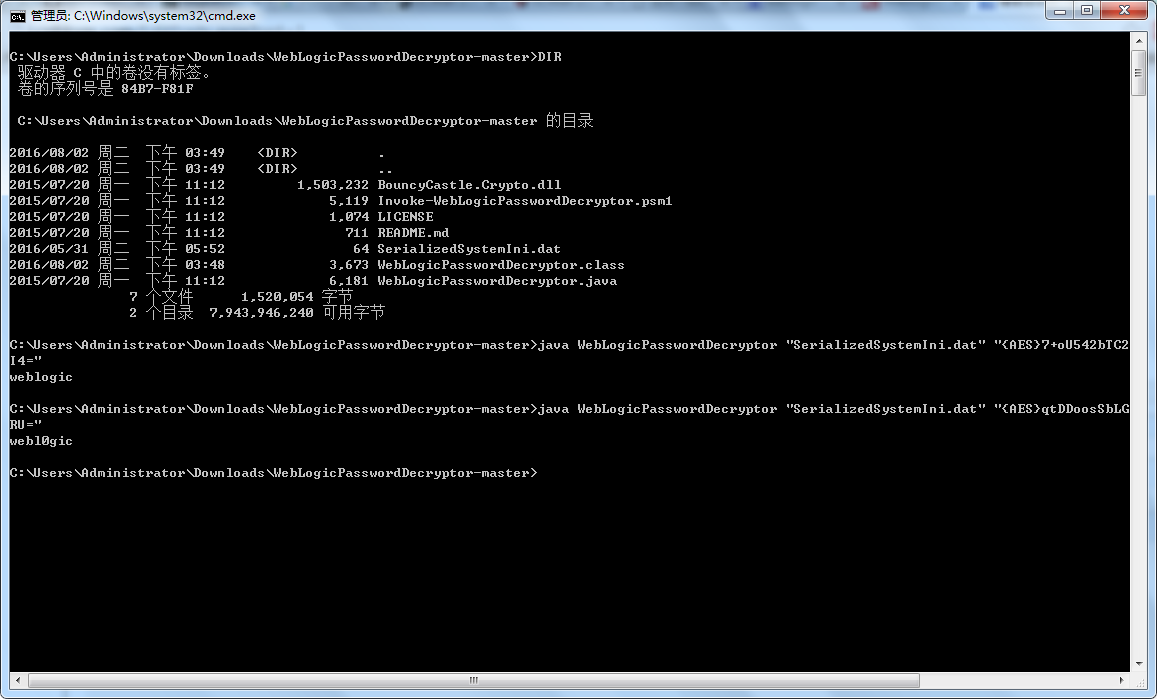
然后就是编译JAVA文件,输入bat和密钥:
weblogic解密工具的更多相关文章
- 自己写的AES和RSA加密解密工具
package com.sdyy.common.utils; import java.security.Key; import java.security.KeyFactory; import jav ...
- 【Java】通过DES加密和解密工具,对字符串进行加密和解密操作
分享一个非常不错的字符串加密和解密的程序. 可以指定不同的密钥对同一字符串进行不同的加密操作,增强加密性能. Java代码如下: package com.app; import java.securi ...
- RSA加解密工具类RSAUtils.java,实现公钥加密私钥解密和私钥解密公钥解密
package com.geostar.gfstack.cas.util; import org.apache.commons.codec.binary.Base64; import javax.cr ...
- RSA加密和解密工具类
import org.apache.commons.codec.binary.Base64; import javax.crypto.Cipher; import java.security.*; i ...
- 使用jframe编写一个base64加密解密工具
该工具可以使用exe4j来打包成exe工具(如何打包自己百度) 先上截图功能 运行main方法后,会弹出如下窗口 输入密文 然后点击解密,在点格式化 代码分享 package tools;import ...
- Base64加密解密工具类
使用Apache commons codec类Base64进行加密解密 maven依赖 <dependency> <groupId>commons-codec</grou ...
- PHP 神盾解密工具
前两天分析了神盾的解密过程所用到的知识点,昨晚我把工具整理了下,顺便用神盾加密了.这都是昨天说好的,下面看下调用方法吧. 先下载 decryption.zip然后解压放到一个文件夹里,把你要解密的文件 ...
- Java中的AES加解密工具类:AESUtils
本人手写已测试,大家可以参考使用 package com.mirana.frame.utils.encrypt; import com.mirana.frame.constants.SysConsta ...
- Java中的RSA加解密工具类:RSAUtils
本人手写已测试,大家可以参考使用 package com.mirana.frame.utils.encrypt; import com.mirana.frame.utils.log.LogUtils; ...
随机推荐
- 数据库性能优化:SQL索引
SQL索引在数据库优化中占有一个非常大的比例, 一个好的索引的设计,可以让你的效率提高几十甚至几百倍,在这里将带你一步步揭开他的神秘面纱. 1.1 什么是索引? SQL索引有两种,聚集索引和非聚集索引 ...
- 改Bug总结
[1]屏蔽取舍法 屏蔽取舍,即所谓与问题无关的前后“语境”完全可以忽略,首先屏蔽掉,再根据问题复现路径查看问题发生的区间,然后逐近锁定“病灶”,确定需要修改的目标. [2]追溯原形法 追溯原形,即需要 ...
- android 项目学习随笔二十(屏幕适配)
1.图片适配 放入相同名称的资源文件,机器根据不同分辨率找相近的资源 240*320 ldpi 320*480 mdpi 480*800 hdpi 720*1280 xhdpi 2.布局适配 在不同的 ...
- bash
unix - Unlimited Bash History - Stack Overflowhttp://stackoverflow.com/questions/9457233/unlimited-b ...
- scala简单的文件操作
1.scala写入文件操作 package com.test import java.io.File import java.io.PrintWriter /** * scala文件写入 */ obj ...
- 高并发 php uniqid 用md5生成不重复唯一标识符方案
高并发 php uniqid 用md5生成不重复唯一标识符方案uniqid() 函数基于以微秒计的当前时间,生成一个唯一的 ID.uniqid(prefix,more_entropy)prefix 可 ...
- 正确配置Linux系统ulimit值的方法【转】
转自:http://www.cnblogs.com/ibook360/archive/2012/05/11/2495405.html 在Linux下面部署应用的时候,有时候会遇上Socket/File ...
- React Native 开发笔记
ReactNativeDemo 学习ReactNative开发,搭建ReactNative第一个项目 React Native 开发笔记 1.安装Homebrew $ /usr/bin/ruby -e ...
- Viewpaer+fragment
1.碎片的动态切换: 1-1:页面填写 <FrameLayout android:id="@+id/fl_layout" android:layout_weight=&quo ...
- java 用socket制作一个简易多人聊天室
代码: 服务器端Server import java.io.*; import java.net.*; import java.util.ArrayList; public class Server{ ...