
关于android中EditText边框的问题 下划线
方法1
将edittext的style设置成?android:attr/textViewStyle 取消掉默认的样式,在设置background为@null
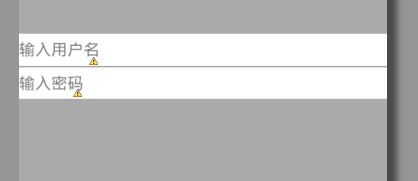
接下来就是一个空空的edittext了, 在两个edittext中间加一个view,设置background为灰色,宽度match_parent,高度2dip看看。
如果可以了就采纳吧。不行的话我再看
|
1
2
3
4
5
6
7
8
9
10
11
12
13
14
15
16
17
18
19
20
21
22
23
24
25
26
27
28
29
30
31
32
33
34
35
36
37
38
39
|
<RelativeLayout xmlns:android="http://schemas.android.com/apk/res/android" xmlns:tools="http://schemas.android.com/tools" android:layout_width="match_parent" android:layout_height="match_parent" android:background="@android:color/darker_gray" > <LinearLayout android:layout_width="match_parent" android:layout_height="wrap_content" android:layout_centerInParent="true" android:background="@android:color/white" android:orientation="vertical" > <EditText style="?android:attr/textViewStyle" android:layout_width="wrap_content" android:layout_height="wrap_content" android:background="@null" android:hint="输入用户名" android:paddingBottom="5dip" android:paddingTop="5dip" /> <View android:layout_width="match_parent" android:layout_height="1dip" android:background="@android:color/darker_gray" /> <EditText style="?android:attr/textViewStyle" android:layout_width="wrap_content" android:layout_height="wrap_content" android:background="@null" android:hint="输入密码" android:inputType="textPassword" android:paddingBottom="5dip" android:paddingTop="5dip" /> </LinearLayout></RelativeLayout> |
效果图:
方法2:
自定义android控件EditText边框背景
在我们进行Android应用界面设计和时候,为了界面风格的统一,我们需要对一些控件进行自定义。比如我们的应用采用的蓝色风格,但是android的EditText控制获得焦点后显示的却是黄色的边框背景。那么如何让EditText在获得焦点的时候显示的是我们自定义的蓝色的背景呢?
首先准备两张图片,一张是EditText获得焦点后的边框背景,一张是没有获得焦点时的背景,注意制作成9.png样式的图片,然后在drawable里添加一个selector_edittext_bg.xml文件,内容如下:
<?xml version="1.0" encoding="utf-8"?>

<selector xmlns:android="http://schemas.android.com/apk/res/android">

    <item android:drawable="@drawable/edit_pressed" android:state_focused="true"/>

    <item android:drawable="@drawable/edit_normal"/>

</selector>
然后在values文件夹下新建一个style.xml文件,内容如下:
<?xml version="1.0" encoding="utf-8"?>

<resources>

    <style name="my_edittext_style" parent="@android:style/Widget.EditText">

        <item name="android:background">@drawable/selector_edittext_bg</item>

    </style>

</resources>
最后在EditTex上使用我们新建的样式就可以了:
<EditText

            android:id="@+id/v_value"

            style="@style/my_edittext_style"

            android:layout_width="0.0dip"

            android:layout_height="wrap_content"

            android:layout_weight="1"

            android:hint="@string/edit_key"

            android:imeOptions="actionDone"

            android:inputType="" />

方法3
是重写的onDraw()方法
关于android中EditText边框的问题 下划线的更多相关文章
- Android 去除EditText边框,添加下划线,
首先:重写EditText //请在这里添加您的包名 import android.content.Context; import android.graphics.Canvas; import an ...
- Android--去除EditText边框,加入下划线
<span style="font-family: Arial, Helvetica, sans-serif;"><?xml version="1.0& ...
- 【我的Android进阶之旅】如何隐藏Android中EditText控件的默认下划线
Android EditText控件是经常使用的控件,但是有时候我们并不需要它的一些默认的属性,比如说下划线,因为有时候这样的默认下划线看起来特别怪异,和其他控件在一起搭配的时候不协调,因此有时候就需 ...
- Android中EditText显示明文与密文的两种方式
版权声明:本文为HaiyuKing原创文章,转载请注明出处! 前言 记录输入框显示.隐藏密码的简单布局以及实现方式. 效果图 代码分析 方式一 /**方式一:*/ private void sh ...
- 【整理】Android中EditText中的InputType类型含义与如何定义( 转 )
转自:[整理]Android中EditText中的InputType类型含义与如何定义 用到的时候查到了这篇文章觉得很不错,就在此记录下. [背景] 经过一些Android中EditText方面的折腾 ...
- 【转】Android中EditText中的InputType类型含义与如何定义
原文网址:http://www.crifan.com/summary_android_edittext_inputtype_values_and_meaning_definition/ 经过一些And ...
- Springboot 之 自定义配置文件及读取配置文件注意:配置文件中的字符串不要有下划线 .配置中 key不能带下划线,value可以(下划线的坑,坑了我两天..特此纪念)
注意:配置文件中的字符串不要有下划线 .配置中 key不能带下划线,value可以 错误的.不能读取的例子: mySet .ABAP_AS_POOLED = ABAP_AS_WITH_P ...
- PHP接收表单(GET/POST)时,表单名中的点变成了下划线怎么办?
如果开发中发现,从表单中传递上来的表单名称后端接不到值,不要惊慌,很有可能是表单名称中带有特殊字符(.和空格) PHP接收参数时,发现表单名中如果是 句号(.)或者空格( ),会被转换成下划线(_) ...
- xml中单词下面有提示下划线
xml中单词下面有提示下划线,表示单词拼写错误或者大小写错误
随机推荐
- susy 学习之进阶
由于现在对susy的教程有限,只有官网指南性质的文档,然后就是w3cplus对她的翻译,所以我从零安装susy并调试项目到与从github上克隆susy项目同时进行,主要是为了参考susy放在git上 ...
- Windows桌面快捷方式图标全部变成同一个图标的解决方法
今天来个客人,说是电脑的所有程序打开都变成 Adobe Reader 了,打开看了下,刚开始是以为EXE文件关联被修改了,用注册表修复工具弄了下,重启电脑,还是老样子.仔细看了下,原来只是快捷方式变成 ...
- URl中文转ASCII
编码 System.Web.HttpUtility.UrlEncode("中国", System.Text.Encoding.GetEncoding("GB2312&qu ...
- C# <%@ Register %>指令
将别名与命名空间及类名关联起来,以便在自定义服务器控件语法中使用简明的表示法. <%@ register tagprefix="tagprefix" namespace=&q ...
- IOS7新特性 edgesForExtendedLayout
edgesForExtendedLayout是一个类型为UIExtendedEdge的属性,指定边缘要延伸的方向. 因为iOS7鼓励全屏布局,它的默认值很自然地是UIRectEdgeAll,四周边缘均 ...
- 跟开涛老师学shiro -- shiro简介
1.1 简介 Apache Shiro是Java的一个安全框架.目前,使用Apache Shiro的人越来越多,因为它相当简单,对比Spring Security,可能没有Spring Securi ...
- Sqlserver CheckPoint 在三种恢复模式中的不同表现
准备: 日志截断在下列情况下发生: 1.执行完 BACKUP LOG 语句时.2.在每次处理检查点时(如果数据库使用的是简单恢复模式).这包括 CHECKPOINT 语句所产生的显式检查点和系统生成的 ...
- 7-zip的压缩的时候排除某目录
安装暂且不说了. 看一下帮助. [root@localhost Server]# 7z -Zip [] - Igor Pavlov -- p7zip Version ,Utf16=on,HugeFil ...
- ANTLR3完全参考指南读书笔记[06]
前言 这段时间在公司忙的跟狗似的,但忙的是没多少技术含量的活儿. 终于将AST IR和tree grammar过了一遍,计划明天写完这部分的读书笔记. 内容 1 内部表示AST构建 2 树文法 ...
- Sprint第二个冲刺(第六天)
一.Sprint 计划会议: 因为这两天课程较多的原因,表面上进度可能可能没有太大的变化,其实组员们都有完善之前做的功能,正在做的功能也在抓紧时间完成.俗话说得好,慢工出细活 ,不能因为赶进度就随便做 ...