
Unity3D Script KeynoteII
【Unity3D Script KeynoteII】
1、使用代码操作Particle。
     //粒子对象

     GameObject particle = null;

     //粒子X轴方向速度

     float velocity_x = 0.0f;

     //粒子Y轴方向速度

     float velocity_y = 0.0f;

     //粒子Z轴方向速度

     float velocity_z = 0.0f;

     void Start ()

     {

         //获得粒子对象

         particle = GameObject.Find("ParticleSystem");

     }

     void OnGUI()

     {

         //拖动设置粒子的最大尺寸

         GUILayout.Label("粒子最大尺寸");

         particle.particleEmitter.maxSize = GUILayout.HorizontalSlider (particle.particleEmitter.maxSize, 0.0f, 10.0f,GUILayout.Width());

         //拖动设置粒子的最大消失时间

         GUILayout.Label("粒子消失时间");

         particle.particleEmitter.maxEnergy = GUILayout.HorizontalSlider (particle.particleEmitter.maxEnergy, 0.0f, 10.0f,GUILayout.Width());

         //拖动设置粒子的最大生成数量

         GUILayout.Label("粒子的最大生成数量");

         particle.particleEmitter.maxEmission = GUILayout.HorizontalSlider (particle.particleEmitter.maxEmission, 0.0f, 100.0f,GUILayout.Width());

         //拖动设置粒子X轴的移动速度

         GUILayout.Label("粒子x轴的移动速度");

         velocity_x= GUILayout.HorizontalSlider (velocity_x, 0.0f, 10.0f,GUILayout.Width());

         particle.particleEmitter.worldVelocity = new Vector3(velocity_x, particle.particleEmitter.worldVelocity.y, particle.particleEmitter.worldVelocity.z);

         //拖动设置粒子Y轴的移动速度

         GUILayout.Label("粒子y轴的移动速度");

         velocity_y= GUILayout.HorizontalSlider (velocity_y, 0.0f, 10.0f,GUILayout.Width());

         particle.particleEmitter.worldVelocity = new Vector3( particle.particleEmitter.worldVelocity.x,velocity_y, particle.particleEmitter.worldVelocity.z);

         //拖动设置粒子Z轴的移动速度

         GUILayout.Label("粒子z轴的移动速度");

         velocity_z= GUILayout.HorizontalSlider (velocity_z, 0.0f, 10.0f,GUILayout.Width());

         particle.particleEmitter.worldVelocity = new Vector3( particle.particleEmitter.worldVelocity.x, particle.particleEmitter.worldVelocity.y,velocity_z);

     }
2、布料是Unity3.x引入的特色组件,是柔软的,可以变成任意形状,比如随风飘扬的旗子呈窗户上的窗帘。
3、Trail Renderer
The Trail Renderer is used to make trails behind objects in the scene as they move about.
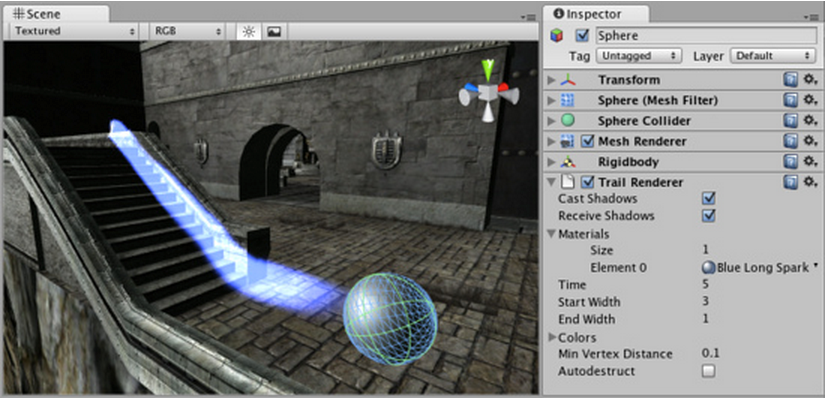
可以通过以下类似代码来操作TrailRender:
     //路径渲染对象

     private TrailRenderer trialRender;

     void Start ()

     {

         //获取路径渲染对象

         trialRender = gameObject.GetComponent<TrailRenderer>();

     }

     void OnGUI()

     {

         if(GUILayout.Button("增加宽度",GUILayout.Height()))

         {

             trialRender.startWidth +=;

             trialRender.endWidth   +=;

         }

         if(GUILayout.Button("显示路径",GUILayout.Height()))

         {

             trialRender.enabled = true;

         }

         if(GUILayout.Button("隐藏路径",GUILayout.Height()))

         {

             trialRender.enabled = false;

         }

     }
【Input】
1、判断按键是否按下。

         if (Input.GetKeyDown (KeyCode.W))

         {

             Debug.Log("您按下了W键");

         }

         if (Input.GetKeyDown (KeyCode.S))

         {

             Debug.Log("您按下了S键");

         }

         if (Input.GetKeyDown (KeyCode.A))

         {

             Debug.Log("您按下了A键");

         }

         if (Input.GetKeyDown (KeyCode.D))

         {

             Debug.Log("您按下了D键");

         }

         if (Input.GetKeyDown (KeyCode.Space))

         {

             Debug.Log("您按下了空格键");

         }
2、判断按键是否抬起。

         //抬起按键

         if (Input.GetKeyUp (KeyCode.W))

         {

             Debug.Log("您抬起了W键");

         }

         if (Input.GetKeyUp (KeyCode.S))

         {

             Debug.Log("您抬起了S键");

         }

         if (Input.GetKeyUp (KeyCode.A))

         {

             Debug.Log("您抬起了A键");

         }

         if (Input.GetKeyUp (KeyCode.D))

         {

             Debug.Log("您抬起了D键");

         }

         if (Input.GetKeyUp (KeyCode.Space))

         {

             Debug.Log("您抬起了空格键");

         }
3、长按事件。使用Input.GetKey()方法判断键盘中某个键是否一直处于按下状态。
         if (Input.GetKeyDown (KeyCode.A))

         {

             Debug.Log("A按下一次");

         }

         if (Input.GetKey (KeyCode.A))

         {

             //记录按下的帧数

             keyFrame++;

             Debug.Log("A连按:" + keyFrame+"帧");

         }

         if (Input.GetKeyUp (KeyCode.A))

         {

             //抬起后清空帧数

             keyFrame=;

             Debug.Log("A按键抬起");

         }
4、使用Input.anyKeyDown() 来判断任意键是否按下,Input.anyKey()判断任意键是否被长按。
     // Update is called once per frame

     void Update ()

     {

         if(Input.anyKeyDown)

         {

             //清空按下帧数

             keyFrame=;

             Debug.Log("任意键被按下");

         }

         if(Input.anyKey)

         {

             keyFrame++;

             Debug.Log("任意键被长按"+keyFrame+"帧");

         }

     }
5、鼠标按下事件。

     void Update ()

     {

         if (Input.GetMouseButtonDown())

         {

             Debug.Log("点击鼠标左键的位置为:" +Input.mousePosition);

         }

         if (Input.GetMouseButtonDown())

         {

             Debug.Log("点击鼠标右键的位置为:" +Input.mousePosition);

         }

         if (Input.GetMouseButtonDown())

         {

             Debug.Log("点击鼠标中键的位置为:" +Input.mousePosition);

         }

     }
6、使用Input.GetMouseButtonUp()方法可以监听鼠标抬起。
     void Update ()

     {

         if (Input.GetMouseButtonUp())

         {

             Debug.Log("鼠标抬起左键的位置为:" +Input.mousePosition);

         }

         if (Input.GetMouseButtonUp())

         {

             Debug.Log("鼠标抬起右键的位置为:" +Input.mousePosition);

         }

         if (Input.GetMouseButtonUp())

         {

             Debug.Log("鼠标抬起中键的位置为:" +Input.mousePosition);

         }

     }
7、Input.GetMouseButton()用于监听鼠标长按事件。
         //连按事件

         if(Input.GetMouseButton())

         {

             MouseFrame++;

             Debug.Log("鼠标左键长按"+MouseFrame+"帧");

         }

         if(Input.GetMouseButton())

         {

             MouseFrame++;

             Debug.Log("鼠标右键长按"+MouseFrame+"帧");

         }

         if(Input.GetMouseButton())

         {

             MouseFrame++;

             Debug.Log("鼠标中键长按"+MouseFrame+"帧");

         }
8、使用Input.GetAxis()获取某个自定义按键的轴值。
     void Update ()

     {

         float value = Input.GetAxis ("test");

         Debug.Log("按键轴的数值为:"+value);

     }
9、字符串转换为int。

【Application】
1、Application.LoadLevel()可以切换场景。

2、Application.CaptureScreenShot()可以截图。

3、Application.OpenURL()可以打开网页。
4、Application.Quit()退出游戏。
【AssetDataBase】
1、使用AssetDataBase.LoadAssetAtPath()可以设置行为。

2、使用AssetDataBase.CreateAsset()可以创建资源。

3、AssetDataBase.CreateFolder()可以创建目录。
4、AssetDataBase.CopyAsset()可以移动资源,AssetDataBase.MoveAsset()可以移动资源。
5、AssetDataBase.DeleteAsset()、AssetDataBase.Reresh()。
Unity3D Script KeynoteII的更多相关文章
- Unity3D Script Keynote
[Unity3D Script Keynote] 1.创建GameObject if(GUILayout.Button("创建立方体",GUILayout.Height(50))) ...
- Unity3D Script Execution Order ——Question
我 知道 Monobehaviour 上的 那些 event functions 是 在主线程 中 按 顺序调用的.这点从Manual/ExecutionOrder.html 上的 一张图就可以看出来 ...
- Unity3D 中的3种坐标系
Unity3D Script API : Camera 若干文章: 1.Screen VS Viewport What is the difference 2.Screen,Viewport有什麽區別 ...
- 使用 Sublime Text 2 开发 Unity3D 项目
用 Sublime 已经有很长一段时间,很舒适,很贴心,根本停不下来.之前因为是开发页游,所以是用 AS3 开发,近段时间,新开了个手游项目,引擎方面选定了 Unity3D,老实说,之前没有太多的 3 ...
- 完整Deploy WebPlayer的Config
<!DOCTYPE html PUBLIC "-//W3C//DTD XHTML 1.0 Strict//EN" "http://www.w3.org/TR/xht ...
- [Unity菜鸟] Unity Web Player 相关问题 (待完善)
1. 发布网页版Unity自适应网页大小 发布网页版,Unity3D自适应网页大小.这个问题困扰了我很长时间,今天终于把他解决了,给大家分享一下. 这里用Uinty4.0发布网页版,我去掉了里面的标题 ...
- U3D——Unity3D的脚本-script入门
Unity3D的基本操作非常easy就能掌握了,接下来就是游戏系统的核心部分:脚本. 什么是Script(脚本)?简而言之,就是使用代码来运行一系列动作命令的特殊文本,它须要编译器来从新解读.U ...
- Unity3D的脚本-script入门
来自:http://blog.163.com/shininglore@126/blog/static/961841802013412101454833/ Unity3D的基本操作很容易就能掌握了,接下 ...
- Unity3d基础组件 (Component) 和脚本 (Script) 关系
原版的:http://edu.china.unity3d.com/learning_document/getData?file=/Manual/TheComponent-ScriptRelations ...
随机推荐
- uses-permission权限汇总
问登记属性 android.permission.ACCESS_CHECKIN_PROPERTIES ,读取或写入登记check-in数据库属性表的权限 获取错略位置 android.permis ...
- 浅析extendedLayout, automaticallyAdjustsScrollViewInsets, extendedLayoutIncludesOpaqueBars
参考文章: http://stackoverflow.com/questions/18798792/explaining-difference-between-automaticallyadjusts ...
- Dataguard常用命令汇总
----标准DataGuard参数设置------------------------------alter system set log_archive_dest_2='SERVICE=ta_std ...
- unity, surface shader access world position and localposition
一,surface shader中访问worldposition 在surface shader中访问世界坐标,只需在Input结构体中声明float3 worldPos即可,如下: struct ...
- centos6.5 安装fctix 五笔输入法
摸索了大半晚上,终于搞定,网上的东西看了N多篇不是这问题就是那问题,看来不同的OS下,小白我还是太嫩了些. 1,删除输入法,这一步是清除输入法,操作完成后,桌面/系统/首先项/输入法的IM Choos ...
- Mysql数据库优化总结2
说明:本文的环境为CENTOS 5.5 64 Bit /Mysql 5.1.50 简介:使用Mysql有一段时间了,期间做了不少关于Mysql优化.设计.维护的工作,这两天有时间做一下简单的总结,方便 ...
- 读取Assets中的文件数据
try { // 返回的字节流 InputStream is = getResources().getAssets().open("info.txt"); // 当读取时,属于文本 ...
- CAT XQX --- 省市三级级联实现说明
最终效果: 满足要求, 上代码 : 1. 需要调用这个控件 的地方:添加引用,因为里面写着逻辑呢..... <script type="text/javascript" ...
- 八皇后问题 --- 递归解法 --- java代码
八皇后问题是一个以国际象棋为背景的问题:如何能够在 8×8 的国际象棋棋盘上放置八个皇后,使得任何一个皇后都无法直接吃掉其他的皇后?为了达到此目的,任两个皇后都不能处于同一条横行.纵行或斜线上.八皇后 ...
- 动软Model 模板 生成可空类型字段
动软代码 生成可空类型 <#@ template language="c#" HostSpecific="True" #> <#@ outpu ...