
Android代码故事第一回,平均间隔的按钮
我们的APP新做了一个放操作按钮的界面,老板要求简洁美观有内涵,按钮要均匀分布,于是参考之前的实现,设计MM给了一张图,像这样:
|==============================================|
|==========[Button]==========[Button]==========|
|==========[Button]==========[Button]==========|
|==============================================|
当然设计MM给的是高清图片,这里只是示意一下。经过分析,需求应该是这样的:两个按钮需要排列在一行里,要求他们之间的间距、以及按钮和屏幕边缘的间距要相等,并且要撑满整个屏幕宽度。
看来并不是什么难事,利用LinearLayout的特性,使用layout_weight使得占位View大小相同,如下:
<?xml version="1.0" encoding="utf-8"?>

<RelativeLayout

    xmlns:android="http://schemas.android.com/apk/res/android"

    android:layout_width="match_parent"

    android:layout_height="match_parent">

    <LinearLayout

        android:layout_width="match_parent"

        android:layout_height="wrap_content"

        android:layout_centerVertical="true">

        <View

            android:layout_width="0dp"

            android:layout_height="0dp"

            android:layout_weight="1"/>

        <ImageView

            android:layout_width="40dp"

            android:layout_height="wrap_content"

            android:src="@drawable/record_start"

            android:gravity="center_horizontal"/>

        <View

            android:layout_width="0dp"

            android:layout_height="0dp"

            android:layout_weight="1"/>

        <ImageView

            android:layout_width="40dp"

            android:layout_height="wrap_content"

            android:src="@drawable/game"

            android:gravity="center_horizontal"

            />

        <View

            android:layout_width="0dp"

            android:layout_height="0dp"

            android:layout_weight="1"/>

    </LinearLayout>

</RelativeLayout>
Android Layout XML
效果图如下:

虽然引入了占位View,不那么优雅,但看起来很完美。
然而实际情况要复杂一点,每个按钮下面还有文字,添加上文字后效果如下:

依然看起来很完美,然后问题来了,按下Play按钮之后,它就会变成另一个按钮"Play again":
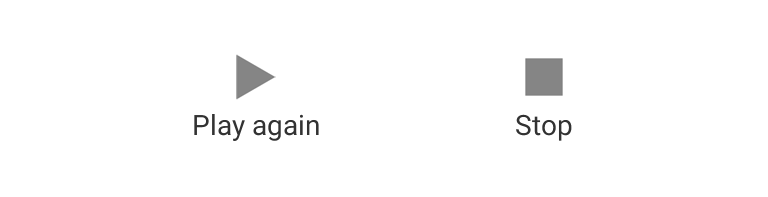
可以看到,两个按钮的位置与原来比有一点细微的偏差,因为第一个按钮由于字符串的变化而变宽了。之前没有考虑到按钮宽度不同的情况,他们之间的间距即使相等,也不会产生均匀分布的效果。但需要注意的是,按钮图片的宽度必须是相等的,否则无论如何都达不到均匀分布的视觉效果。
于是需求重新定义:每个按钮的X轴中心要正好在整个屏幕的N分之一处,N=按钮数量+1。
我们来研究一下用LinearLayout的weight能不能实现这个需求:
显然之前使占位View宽度相等的方法是不可行的,想要利用weight,那么就要找到宽度的一种比例上的关系,按钮之间的间距并不是固定的,固定的是他们中心的间距。但LinearLayout中所有View都是线性排列的,并没有像RelativeLayout中两个子View之间的关系来实现两个View的相对居中。
当然,有很多种复杂办法可以实现这个需求,比如用RelativeLayout在View绘制完成后,根据按钮的宽度和屏幕的宽度,用代码计算出margins值再设置给按钮;还可以自定义View计算出这个位置,这种方式应该是最正统的方式,但显得有些过于“小题大做”,并且定义一个有意义的自定义View并不是一件简单的事情。
还是回到LinearLayout,想实现需求必须要解决居中的问题,居中其实是所有View都有的功能,View的gravity属性能实现内容的居中,那么怎么利用这个属性呢?想要让按钮老实地待在屏幕的三分之一处,只能让这个点正好是某个View的二分之一处,那么其实这是一个数学问题。

假设按钮的图片宽度为w,屏幕宽度为W,间距长度L=(W-2w)/3,边缘的View宽度为L/2,而按钮实际宽度为L+w,于是两者的比例是(L/2):(L+w)。代入w=32dp,W=360dp,得到比例约等于5:13。于是代码如下:
<?xml version="1.0" encoding="utf-8"?>

<RelativeLayout

    xmlns:android="http://schemas.android.com/apk/res/android"

    android:layout_width="match_parent"

    android:layout_height="match_parent">

    <LinearLayout

        android:id="@+id/layout1"

        android:layout_width="match_parent"

        android:layout_height="60dp"

        android:layout_centerVertical="true">

        <View

            android:layout_width="0dp"

            android:layout_height="match_parent"

            android:background="#ffaa00"

            android:layout_weight="5"/>

        <TextView

            android:layout_width="0dp"

            android:layout_height="match_parent"

            android:drawableTop="@drawable/ic_action_start"

            android:gravity="center_horizontal"

            android:layout_weight="13"

            android:background="#00ff80"

            android:text="Play again"/>

        <TextView

            android:layout_width="0dp"

            android:layout_height="match_parent"

            android:drawableTop="@drawable/ic_action_stop"

            android:gravity="center_horizontal"

            android:layout_weight="13"

            android:background="#4490a0"

            android:text="Stop"/>

        <View

            android:layout_width="0dp"

            android:layout_height="match_parent"

            android:background="#ffaa00"

            android:layout_weight="5"/>

    </LinearLayout>

    <LinearLayout

        android:id="@+id/layout2"

        android:layout_width="match_parent"

        android:layout_height="wrap_content"

        android:layout_below="@id/layout1"

        android:layout_centerVertical="true">

        <View

            android:layout_width="0dp"

            android:layout_height="0dp"

            android:layout_weight="1"/>

        <TextView

            android:layout_width="wrap_content"

            android:layout_height="wrap_content"

            android:drawableTop="@drawable/ic_action_start"

            android:gravity="center_horizontal"

            android:text="Play"/>

        <View

            android:layout_width="0dp"

            android:layout_height="0dp"

            android:layout_weight="1"/>

        <TextView

            android:layout_width="wrap_content"

            android:layout_height="wrap_content"

            android:drawableTop="@drawable/ic_action_stop"

            android:gravity="center_horizontal"

            android:text="Stop"/>

        <View

            android:layout_width="0dp"

            android:layout_height="0dp"

            android:layout_weight="1"/>

    </LinearLayout>

</RelativeLayout>
Android Layout XML
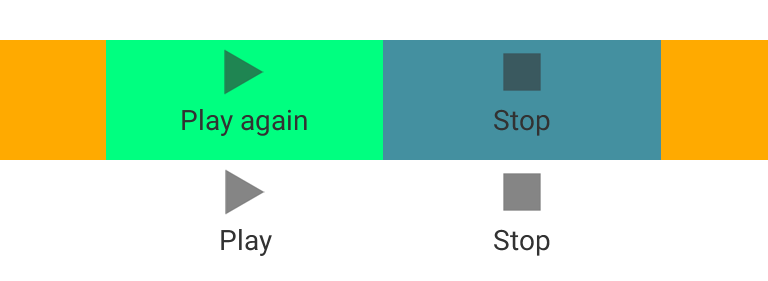
问题初步解决,可以忽悠老板了。问题本身并没有完美解决,因为安卓的碎片化,屏幕宽度并不一定是360dp,如果你以为是这样,会有各种奇葩的设备给你会心一击,这也是不能用写死margin的方法的原因。用了这个方法的代码真的能上线么,我们来考虑一下各种屏幕宽度的情况,将使W=[300, 400]代入公式,得到下面的表:

其中按比例L/2就是weight=5的实际宽度,按比例L+w就是weight=13的实际宽度,偏差是按钮和屏幕的间距与两个按钮之间间距的差,反应了三等分的精确程度,可以看到偏差在屏幕宽度为300dp时仅仅是3dp左右。
所以结论是,真的可以忽悠老板。
当然,至此并没有完美解决问题,但用了最少的代码和时间达到了次优的效果,这个间距又不是生死功能,所以到此为止就算开发成功了。
后来还发现一个好处,就是当一个按钮不可见,visibility设置为GONE的时候,正好另一个按钮可以居中显示。
Android代码故事第一回,平均间隔的按钮的更多相关文章
- 《代码的第一行——Android》封面诞生
<代码的第一行--Android>已经上市近一个月,现在的情况是相当不错的销售,也特别感谢众多朋友的支持. 其实一本好书,假设你想卖.除了给予外力所要求的内容.封面设计是至关重要的,这本书 ...
- Volley使用指南第一回(来自developer.android)
最近闲来想看看android网络方面的东西.google在2013年发布了一个叫做Volley的网络请求框架,我看了一下官网,居然在training里面就有教程.首先,英文的东西看着 还是挺不爽的,特 ...
- 想写个小说,关于C#的,名字就叫《原Csharp》吧 (第一回 买书未成炁自生 惶惶回屋遇老翁)
以前也有写过一些小说,但是总是写写停停的,因为忙于项目和其他事情,总是耽搁很久(真的是很久)才会继续动两笔,所以我想先在这里以随笔的方式写个关于C#异世界的小故事吧,更新随缘,也稍微能让自己轻松些. ...
- android代码片段二
1.Android拦截短信 一.AndroidManifest.xml <uses-permission android:name="android.permission.RECE ...
- Android精通教程-第一节Android入门简介
前言 大家好,给大家带来Android精通教程-第一节Android入门简介的概述,希望你们喜欢 每日一句 If life were predictable it would cease to be ...
- Android代码规范
Android代码规范——文章来源<IT蓝豹>http://itlanbao.com/preview.aspx#1,0 [-]一Import的次序二缩进Indentation总则示例代码规 ...
- 浅谈android代码保护技术_ 加固
浅谈android代码保护技术_加固 导语 我们知道Android中的反编译工作越来越让人操作熟练,我们辛苦的开发出一个apk,结果被人反编译了,那心情真心不舒服.虽然我们混淆,做到native层,但 ...
- Java&Android代码规范
项目中直接导入Square的代码风格文件.(不导入Google的原因是Square同时提供了Java和Android两套统一风格,Google只提供了一套) Square Code Styles Go ...
- Android studio开发-第一个应用
Android studio开发-第一个应用 上效果图 1.先创建布局文件 firstbutton.xml 代码 <?xml version="1.0" encoding=& ...
随机推荐
- Html5上传后有所见图片效果前端代码实现
<!DOCTYPE html> <html lang="en"> <head> <meta charset="UTF-8&quo ...
- Activity Intent Flags及Task相关属性
转自http://www.cnblogs.com/lwbqqyumidi/p/3775479.html 今天我们来讲一下Activity的task相关内容. 上次我们讲到Activity的四种启动模式 ...
- 【学】React的学习之旅6-组件的嵌套2
<input type=text placeholder='aaa'>, placeholder属性是定义文本框在没有输入值之前显示的一段灰色提示 ()=>{}箭头函数在ECMA6里 ...
- HDU 2795 Billboard(区间求最大值的位置update的操作在query里做了)
Billboard 通过这题,我知道了要活用线段树的思想,而不是拘泥于形式, 就比如这题 显然更新和查询放在一起很简单 但如果分开写 那么我觉得难度会大大增加 [题目链接]Billboard [题目类 ...
- 设计模式-GoF
资源: 下载GOF的书籍: http://download.csdn.net/download/quanbove/6534569 这里总结了模式,但讲的并不准确: http://www.runoob. ...
- win7(64位)php5.5-Apache2.4-mysql5.6环境安装
原文链接http://jingyan.baidu.com/article/9faa723152c5d6473d28cb47.html 工具/原料 php-5.5.10-Win32-VC11-x64.z ...
- web.py学习心得
1.注意判断数字时,如果是get传递的参数,一定要用int转换.不然出错. 2.$var 定义时,冒号后的内容不是python内容,需加上$符号.如$var naviId:$naviId. 3.各个模 ...
- Request.ServerVariables
APPL_MD_PATH-->APPL_PHYSICAL_PATH-->C:\Users\TomZhang\Desktop\GAP\后台修改\UMS\UMSSite\AUTH_TYPE-- ...
- CentOS7:搭建SVN + Apache 服务器
1. 安装httpd 安装httpd服务: $ sudo yum install httpd 检查httpd是否安装成功: $ httpd -version Server version: Apach ...
- 国内常用DNS地址介绍
1.谷歌全球通用DNS地址: 首选DNS地址:8.8.8.8 备选DNS地址:8.8.4.4 2.国内知名的114 DNS地址 首选DNS地址:114.114.114.114 备选DNS地址:114. ...