
004.Nginx日志配置及状态监控
一 Nginx请求简介
1.1 请求头部
  1 [root@nginx ~]# curl -v www.odocker.com

  2 * About to connect() to www.odocker.com port 80 (#0)	#关于本次连接信息

  3 *   Trying 113.31.119.149...

  4 * Connected to www.odocker.com (113.31.119.149) port 80 (#0)

  5 > GET / HTTP/1.1				#HTTP版本

  6 > User-Agent: curl/7.29.0			#客户端信息

  7 > Host: www.odocker.com				#请求的服务端主机

  8 > Accept: */*					#如上为请求

  9 >

 10 < HTTP/1.1 200 OK				#返回http版本

 11 < Server: nginx/1.16.1				#服务端Web类型

 12 < Date: Fri, 06 Mar 2020 13:09:40 GMT		#日期时间

 13 < Content-Type: text/html			#返回的类型

 14 < Content-Length: 13				#长度

 15 < Last-Modified: Thu, 05 Mar 2020 11:12:26 GMT	#日期时间

 16 < Connection: keep-alive			#长连接

 17 < ETag: "5e60de9a-d"				#Etag

 18 < Accept-Ranges: bytes				#大小单位

 19 <

 20 <h1>www</h1>					#具体内容

 21 * Connection #0 to host www.odocker.com left intact
二 日志配置
2.1 日志相关配置
2.2 access_log配置
- access_log path [format [buffer=size [flush=time]]];
- access_log path format gzip[=level] [buffer=size] [flush=time];
- access_log syslog:server=address[,parameter=value] [format];
- access_log off; #不记录日志
- gzip:压缩等级。
- buffer:设置内存缓存区大小。
- flush:保存在缓存区中的最长时间。
2.3 log_format配置
- log_format name string ……;
  1 ……

  2     log_format  main  '$remote_addr - $remote_user [$time_local] "$request" '

  3                       '$status $body_bytes_sent "$http_referer" '

  4                       '"$http_user_agent"';

  5 ……
  1 ……

  2     log_format  proxy  '$remote_addr - $remote_user [$time_local] "$request" '

  3                       '$status $body_bytes_sent "$http_referer" '

  4                       '"$http_user_agent" "$http_user_agent" ';

  5 ……
2.4 open_log_file_cache配置
- open_log_file_cache max=N [inactive=time] [min_uses=N] [valid=time];
- open_log_file_cache off;
2.5 log_not_found配置
2.6 log_subrequest配置
2.7 rewrite_log配置
2.8 error_log配置
三 状态监控
3.1 配置监控
  1 [root@nginx01 ~]# vi /etc/nginx/conf.d/status.conf

  2 server {

  3     server_name  status.linuxds.com;

  4

  5     error_page  404 403 500 502 503 504  /error.html;

  6     location = /error.html {

  7         root    /usr/share/nginx/html;

  8     }

  9

 10     location / {

 11         root    /usr/share/nginx/blog;

 12         index   index.html;

 13     }

 14     location /ok {

 15         alias   /usr/share/nginx/yes;

 16         index   index.html;

 17     }

 18     location /mystatus {

 19         stub_status on;

 20         access_log off;

 21     }

 22 }
  1 [root@nginx01 ~]# nginx -t -c /etc/nginx/nginx.conf

  2 [root@nginx01 ~]# nginx -s reload
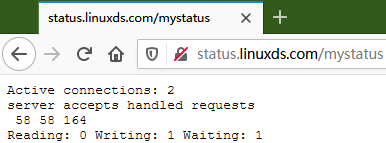
- Active connections:当前活跃的连接数。
- server:表示Nginx启动到现在共处理了90个连接。
- accepts:表示Nginx启动到现在共成功创建90次握手。
- handled requests:表示总共处理了19次请求。
- Reading:Nginx读取到客户端的 Header 信息数。
- Writing:Nginx返回给客户端的 Header 信息数。
- Waiting:Nginx开启keep-alive长连接情况下, 既没有读也没有写, 建立连接情况。
004.Nginx日志配置及状态监控的更多相关文章
- nginx日志配置
nginx日志配置 http://www.ttlsa.com/linux/the-nginx-log-configuration/ 日志对于统计排错来说非常有利的.本文总结了nginx日志相关的配置如 ...
- (转)nginx日志配置指令详解
这篇文章主要介绍了nginx日志配置指令详解,nginx有一个非常灵活的日志记录模式,每个级别的配置可以有各自独立的访问日志,需要的朋友可以参考下日志对于统计排错来说非常有利的.本文总结了nginx日 ...
- nginx日志配置指令详解
这篇文章主要介绍了nginx日志配置指令详解,nginx有一个非常灵活的日志记录模式,每个级别的配置可以有各自独立的访问日志,需要的朋友可以参考下日志对于统计排错来说非常有利的.本文总结了nginx日 ...
- Nginx https加密以及nginx日志配置与管理
Nginx https加密以及nginx日志配置与管理 使用Nginx的优点Nginx作为WEB服务器,Nginx处理静态文件.索引文件.自动索引的效率非常高.Nginx作为代理服务器,Nginx可以 ...
- nginx日志配置[转]
* * * sh /home/zyf/sh/cut_nginx_log.sh 这样就每天的0点1分把nginx日志重命名为日期格式,并重新生成今天的新日志文件。 日志对于统计排错来说非常有利的。本文 ...
- Nginx日志配置及日志切割
日志配置 日志对于统计排错来说非常有利的.本文总结了nginx日志相关的配置如access_log.log_format.open_log_file_cache.log_not_found.log_s ...
- 死磕nginx系列-nginx日志配置
nginx access日志配置 access_log日志配置 access_log用来定义日志级别,日志位置.语法如下: 日志级别: debug > info > notice > ...
- Nginx日志配置与切割
访问日志主要记录客户端访问Nginx的每一个请求,格式可以自定义.通过访问日志,你可以得到用户地域来源.跳转来源.使用终端.某个URL访问量等相关信息. Nginx中访问日志相关指令主要有两条,一条是 ...
- nginx别名配置,状态配置,include优化
一.nginx帮助参数 下面是关于/application/nginx/sbin/nginx 的参数帮助 [root@A conf]# /application/nginx/sbin/nginx -h ...
随机推荐
- Dubbo的使用及原理
Dubbo是什么? Dubbo是阿里巴巴SOA服务化治理方案的核心框架,每天为2,000+个服务提供3,000,000,000+次访问量支持,并被广泛应用于阿里巴巴集团的各成员站点. Dubbo[]是 ...
- android java层通过jni加载使用第三方的so库
1.例如我们自己编译一个so库,我们的其他模块要加载如何操作了 首先在c盘新建立一个文件夹sb,在sb下面新建立一个文件夹jni,如果你要使用ndk编译so库,必须需要有jni目录 2.在jni目录下 ...
- 入门大数据---Spark_RDD
一.RDD简介 RDD 全称为 Resilient Distributed Datasets,是 Spark 最基本的数据抽象,它是只读的.分区记录的集合,支持并行操作,可以由外部数据集或其他 RDD ...
- Docker搭建Rancher平台
sudo docker run -d --restart=unless-stopped -p 8080:8080 rancher/server service docker resatrt启动失败 ...
- linux查看当前目录下,各文件夹大小
du -lh --max-depth=1
- python unittest自动测试框架
编写函数或者类时进行测试,确保代码正常工作 python unittest 模块提供了代码测试工具.按照定义测试包括两部分:管理测试依赖库的代码(称为‘固件’)和测试本身. 单元测试用于核实函数的某 ...
- MySQL调优 优化需要考虑哪些方面
MySQL调优 优化需要考虑哪些方面 优化目标与方向定位 总体目标:使得响应时间更快,吞吐量更大. (throughout --- 吞吐量:单位时间内处理事务的数量) 如何找到需要优化的地方 使用 ...
- 用Serverless Kubernetes为.NET (Core)应用保驾护航
前言 容器化对现在(0202年)来说,已经不算是什么新东西了,老黄最近也在公司推动这一块的发展,有幸落地了几个项目,有.NET Core的,也有.NET Framework的. 容器化现在主流的就是d ...
- When Lambo with Howdoo
原文链接:https://howdoo.io/when-lambo/ 为了庆祝即将推出的革命性新社交媒体平台Howdoo以及我们令人惊喜的合作伙伴关系和社区,我们正在发起一项竞赛,以最终回答“When ...
- djangorestframework学习1-通过HyperlinkedModelSerializer,ModelViewSet,routers编写第一个接口
前提首先安装了django,安装方式:pip install django 1. djangorestftamework安装: pip install djangorestframework 2. 创 ...