
jQuery json遍历渲染到页面并且拼接html
jQuery 处理 json遍历在页面中显示,并且拼接html。
 1 <title>json多维数组遍历渲染</title>

 2

 3     <body>

 4         <div class="box">

 5

 6         </div>

 7     </body>

 8

 9         <script type="text/javascript" src="https://code.jquery.com/jquery-3.0.0.min.js"></script>

10         <script>

11             var manyArr = [{

12                 "id": 1,

13                 "onitem2vel": "一级目录1",

14                 "twoArr": [{

15                     "id": 1,

16                     "title": "二级目录1-1",

17                     "threeArr": [{

18                         "content": "三级目录1-1-1",

19                         "url": "http://www.baidu.com"

20                     }, {

21                         "content": "三级目录1-1-2",

22                         "url": "http://www.baidu.com"

23                     }, {

24                         "content": "三级目录1-1-3",

25                         "url": "http://www.baidu.com"

26                     }]

27                 }, {

28                     "id": 2,

29                     "title": "二级目录1-2",

30                     "threeArr": [{

31                         "content": "三级目录1-2-1",

32                         "url": "http://www.baidu.com"

33                     }, {

34                         "content": "三级目录1-2-2",

35                         "url": "http://www.baidu.com"

36                     }, {

37                         "content": "三级目录1-2-3",

38                         "url": "http://www.baidu.com"

39                     }]

40                 }]

41             }, {

42                 "id": 2,

43                 "onitem2vel": "一级目录2",

44                 "twoArr": [{

45                     "id": 1,

46                     "title": "二级目录2-1",

47                     "threeArr": [{

48                         "content": "三级目录2-1-1",

49                         "url": "http://www.baidu.com"

50                     }, {

51                         "content": "三级目录2-1-2",

52                         "url": "http://www.baidu.com"

53                     }, {

54                         "content": "三级目录2-1-3",

55                         "url": "http://www.baidu.com"

56                     }]

57                 }, {

58                     "id": 2,

59                     "title": "二级目录2-2",

60                     "threeArr": [{

61                         "content": "三级目录2-2-1",

62                         "url": "http://www.baidu.com"

63                     }, {

64                         "content": "三级目录2-2-2",

65                         "url": "http://www.baidu.com"

66                     }, {

67                         "content": "三级目录2-2-3",

68                         "url": "http://www.baidu.com"

69                     }]

70                 }]

71             }];

72

73             $(function() {

74                 var htmls = '';

75                 $.each(manyArr, function(i, item1) {

76                     htmls += '<div class="carea">' +

77                         '<h2>' + item1.onitem2vel + '</h2>' +

78                         '<ul class="carea-list">';

79

80                     $.each(item1.twoArr, function(j, item2) {

81                         htmls += '<li>' +

82                             '<a href="javascript:;">' + item2.title + '</a>' +

83                             '<ul class="carea-list-there">';

84

85                         $.each(item2.threeArr, function(k, item3) {

86                             htmls += '<li>' +

87                                 '<a href="' + item3.url + '">' + item3.content + '</a>' +

88                                 '</li>';

89                         })

90                         htmls += '</ul></li>';

91                     });

92                     htmls += '</ul></div>';

93                 });

94                 $(htmls).appendTo($(".box"));

95             });

96         </script>

97
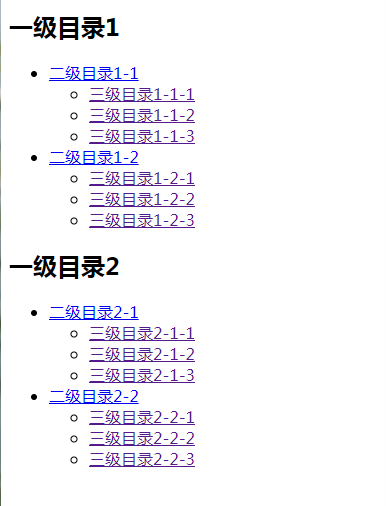
效果如下:
jQuery json遍历渲染到页面并且拼接html的更多相关文章
- jquery json遍历和动态绑定事件
<div id='tmpselectorList' style='border: 1px solid grey;max-height: 150px;position:absolute;text- ...
- json原理和jquey循环遍历获取所有页面元素
1.json原理: javascript object notation (javascript 对象表示法) 是一种轻量级的数据交换语言,由javascript衍生而出,适用于.NET java c ...
- jquery $.each遍历json数组方法
<!doctype html public "-//w3c//dtd xhtml 1.0 transitional//en" "http://www.w3.org/ ...
- JQuery + JSON作为前后台数据交换格式实践
JQuery + JSON作为前后台数据交换 JQuery提供良好的异步加载接口AJAX,可以局部更新页面数据, http://api.jquery.com/category/ajax/ JSON作为 ...
- ajax获取数据后怎么去渲染到页面?
$.ajax({ url:"apiAttachmentAction_uploadAttachment.action", type:"post", data:fo ...
- JQuery each遍历A标签获取href 和 里面指定的值
JQuery each遍历A标签获取href $('.scol_subject').each(function(){ var href = $(this).attr('href'); $(this). ...
- 基于 el-form 封装一个依赖 json 动态渲染的表单控件
nf-form 表单控件的功能 基于 el-form 封装了一个表单控件,包括表单的子控件. 既然要封装,那么就要完善一些,把能想到的功能都要实现出来,不想留遗憾. 毕竟UI库提供的功能都很强大了,不 ...
- (Spring4 json入门)Spring4+SpringMVC+页面数据发送与接收(json格式)
jar包(Maven仓库): Spring4 jar包(Maven仓库): 在测试过程中我查看了网上的一些教程,但是那些教程都是在Spring3环境下的,Spring3和Spring4解析json需要 ...
- struts2 + jquery + json 简单的前后台信息交互
ajax 是一种客户端与服务器端异步请求的交互技术.相比同步请求,大大提高了信息交互的速度和效率.是当下非常实用和流行的技术. 这里简单的说明 struts2 + jquery + json 下的 信 ...
随机推荐
- Centos7.3 离线环境下修改时间
运行以下命令 1.tzselect --命令确定时区 2.timedatectl set-timezone Asia/Shanghai --设置系统时区为上海 3.timedatectl set-n ...
- Java学习日报 9.29
package random;import java.util.*;import java.math.*;public class Com { public static void main(Stri ...
- std::thread线程详解(1)
目录 目录 简介 线程的使用 线程的创建 线程的方法和属性 std::jthread (C++20) stop_token (C++20) 总结 Ref 简介 本文主要介绍了标准库中的线程部分.线程是 ...
- mysql性能调优注意事项
1.最左原则 注意遇到> < like between失效 2.对于like 查询 遇到最左%索引无效 3.SQL性能优化目标:至少要达到range(对索引进行范围查找)级别,要求是 ...
- 入门oj 6451: The XOR Largest Pair之二
Description 今天小W用了1s不到的时候完成了这样一个题:在给定的N个整数 A_1,A_2,-,A_N中选出两个进行异或运算,得到的结果最大是多少?正当他志得意满时,L老师亮出了另一个题:给 ...
- (转) 增加 header 参数,spring boot + swagger2(springfox)
1 @Configuration 2 @EnableSwagger2 3 public class Swagger2 { 4 @Bean 5 public Docket createRestApi() ...
- 日常入坑1-Calendar类
1.当前时间是一号的时候,通过计算上一天的日期的时候,需要注意了 Calendar calendar = Calendar.getInstance();calendar.set(2019,10,1); ...
- linux hosts_access
linux hosts_access 概要 tcp连接的访问控制功能,通过libwrap提供,即编译到代码里的访问控制功能 可以通过ldd 命令查看程序是否链接了libwrap库 主要根据程序名称,以 ...
- Codeforces Round #695 (Div. 2)
比赛地址 A (水题) 题目链接 题目: 给出\(n\)个面板,每个面板初始时间相同,每过1s面板上数字会加1(数字在\(0\sim9\)循环播放),任意时刻选择一个面板\(x\)使他的时间停止,其他 ...
- Second_week_mofangzhen
第二周 奇数阶魔方阵 一.上节回顾 1.数组的基本操作 数组:若干个相同类型变量的集合. 声明:数据类型 数组名称[]; (在栈内存分配空间,存储的是数组的引用地址.数组首元素在堆内存 中的地址) 初 ...