
步进电机的Arduino库函数
This library allows you to control unipolar or bipolar stepper motors. To use it you will need a stepper motor, and the appropriate hardware to control it. For more on that, see Tom Igoe's notes on steppers.
函数
Stepper(steps, pin1, pin2) 步进电机定义
Stepper(steps, pin1, pin2, pin3, pin4) 步进电机定义
Description 解释
This function creates a new instance of the Stepper class that represents a particular stepper motor attached to your Arduino board. Use it at the top of your sketch, above setup() and loop(). The number of parameters depends on how you've wired your motor - either using two or four pins of the Arduino board.
Parameters 参数
steps: the number of steps in one revolution of your motor. If your motor gives the number of degrees per step, divide that number into 360 to get the number of steps (e.g. 360 / 3.6 gives 100 steps). (int) 一圈对应的步数
pin1, pin2: two pins that are attached to the motor (int)
pin3, pin4: optional the last two pins attached to the motor, if it's connected to four pins (int)
Returns A new instance of the Stepper motor class.
setSpeed(rpm) 速度设定
Description 解释
Sets the motor speed in rotations per minute (RPMs). This function doesn't make the motor turn, just sets the speed at which it will when you call step().
Parameters 参数
rpms: the speed at which the motor should turn in rotations per minute - a positive number (long)
Returns None 无返回值
step(steps) 步数执行
Description
Turns the motor a specific number of steps, at a speed determined by the most recent call to setSpeed(). This function is blocking; that is, it will wait until the motor has finished moving to pass control to the next line in your sketch. For example, if you set the speed to, say, 1 RPM and called step(100) on a 100-step motor, this function would take a full minute to run. For better control, keep the speed high and only go a few steps with each call to step().
Parameters
steps: the number of steps to turn the motor - positive to turn one direction, negative to turn the other (int)
Returns None
举例
例1 Stepper Motor Knob 用电位器控制步进电机步数
Control a highly accurate stepper motor using a potentiometer
Stepper motors, due to their unique design, can be controlled to a high degree of accuracy without any feedback mechanisms. The shaft of a stepper, mounted with a series of magnets, is controlled by a series of electromagnetic coils that are charged positively and negatively in a specific sequence, precisely moving it forward or backward in small "steps".
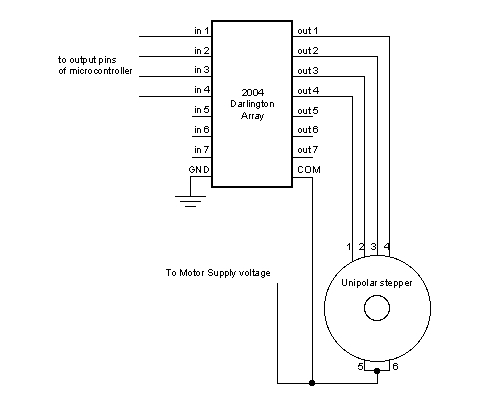
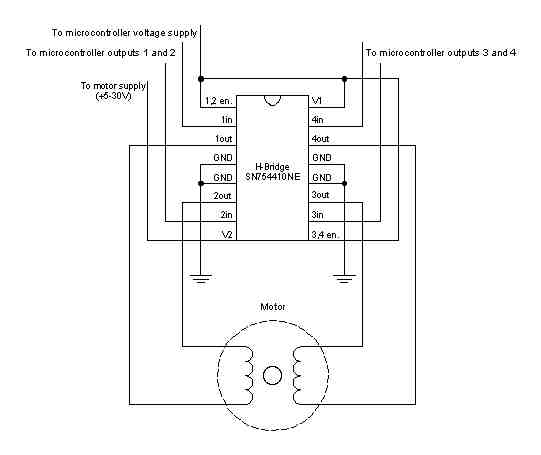
There are two types of steppers, Unipolars and Bipolars, and it is very important to know which type you are working with. For each of the motors, there is a different circuit. The example code will control both kinds of motors. See the unipolar and bipolar motor schematics for information on how to wire up your motor.
In this example, a potentiometer (or other sensor) on analog input 0 is used to control the movement of a stepper motor using the Arduino Stepper Library. The stepper is controlled by with digital pins 8, 9, 10, and 11 for either unipolar or bipolar motors.
The Arduino or Genuino board will connect to a U2004 Darlington Array if you're using a unipolar stepper or a SN754410NE H-Bridge if you have a bipolar motor.
For more information about the differences of the two types, please take a look at Tom Igoe's page on stepper motors.
Hardware Required 硬件
Arduino or Genuino Board
10k ohm potentiometer
stepper motor
U2004 Darlington Array (if using a unipolar stepper)
SN754410ne H-Bridge (if using a bipolar stepper)
power supply appropriate for your particular stepper
hook-up wires
breadboard
Circuits 电路
Below you'll find circuits for both unipolar and bipolar steppers. In either case, it is best to power your stepper motors from an external supply, as they draw too much to be powered directly from your Arduino board.
In both circuits, connect a 10k pot to power and ground, with it's wiper outputting to analog pin 0.
Note: Both circuits below are four wire configurations. Two wire configurations will not work with the code provided.
Unipolar Stepper Circuit and schematic:
Bipolar Stepper Circuit and schematic:
Code 程序
For both unipolar and bipolar steppers
 1 /*

 2 * MotorKnob

 3 ** A stepper motor follows the turns of a potentiometer (or other sensor) on analog input 0.

 4 ** http://www.arduino.cc/en/Reference/Stepper

 5 * This example code is in the public domain.

 6 */

 7

 8 #include <Stepper.h>

 9 #define STEPS 100     // change this to the number of steps on your motor

10   // create an instance of the stepper class, specifying

11   // the number of steps of the motor and the pins it's attached to

12 Stepper stepper(STEPS, 8, 9, 10, 11);

13 int previous = 0;    // the previous reading from the analog input

14

15 void setup()

16 {

17     stepper.setSpeed(30);   // set the speed of the motor to 30 RPMs

18 }

19

20 void loop()

21 {

22     int val = analogRead(0);   // get the sensor value

23   // move a number of steps equal to the change in the sensor reading

24     stepper.step(val - previous);   // remember the previous value of the sensor

25     previous = val;

26 }
例2 Stepper Speed Control 用电位器控制步进电机速度
Control the stepping speed with a potentiometer
硬件与电路部分,与上例同
Code 程序
For both unipolar and bipolar steppers
 1 /*

 2 Stepper Motor Control - speed control

 3 This program drives a unipolar or bipolar stepper motor.

 4 The motor is attached to digital pins 8 - 11 of the Arduino.

 5 A potentiometer is connected to analog input 0.

 6     The motor will rotate in a clockwise direction. The higher the potentiometer value,the faster the motor speed. Because setSpeed() sets the delay between steps,you may notice the motor is less responsive to changes in the sensor value at low speeds.

 7

 8 Created 30 Nov. 2009,Modified 28 Oct 2010,by Tom Igoe

 9 */

10

11 #include <Stepper.h>

12 const int stepsPerRevolution = 200;

13 // change this to fit the number of steps per revolution

14   // for your motor initialize the stepper library on pins 8 through 11:

15 Stepper myStepper(stepsPerRevolution, 8, 9, 10, 11);

16 int stepCount = 0;   // number of steps the motor has taken

17

18 void setup()

19 {

20     // nothing to do inside the setup

21 }

22

23 void loop()

24  {

25     int sensorReading = analogRead(A0); // read the sensor value:

26     int motorSpeed = map(sensorReading, 0, 1023, 0, 100);

27     // map it to a range from 0 to 100

28     if (motorSpeed > 0) // set the motor speed:

29     {

30         myStepper.setSpeed(motorSpeed);

31         myStepper.step(stepsPerRevolution / 100); // step 1/100 of a revolution:

32     }

33 }
例3 Stepper One Revolution 正转一圈反转一圈
Turn the shaft one revolution clockwise and one counterclockwise.
硬件与电路部分,与上例同
Code 程序
For both unipolar and bipolar steppers
 1 /*

 2 Stepper Motor Control - one revolution

 3 This program drives a unipolar or bipolar stepper motor.

 4 The motor is attached to digital pins 8 - 11 of the Arduino.

 5     The motor should revolve one revolution in one direction, then one revolution in the other direction.

 6

 7 Created 11 Mar. 2007,Modified 30 Nov. 2009,by Tom Igoe

 8 */

 9 #include <Stepper.h>

10 const int stepsPerRevolution = 200;

11 // change this to fit the number of steps per revolution

12  // for your motor initialize the stepper library on pins 8 through 11:

13 Stepper myStepper(stepsPerRevolution, 8, 9, 10, 11);

14

15 void setup()

16 {

17     myStepper.setSpeed(60);   // set the speed at 60 rpm:

18     Serial.begin(9600);   // initialize the serial port:

19 }

20

21 void loop()

22 {

23     Serial.println("clockwise");   // step one revolution in one direction:

24     myStepper.step(stepsPerRevolution);

25     delay(500);

26     Serial.println("counterclockwise");   // step one revolution in the other         direction:

27     myStepper.step(-stepsPerRevolution);

28     delay(500);

29 }
例4 One step at a time 一次只走一步
Turn the shaft step by step to check the proper wiring of the motor.
硬件与电路部分,与上例同
Code 程序
For both unipolar and bipolar steppers
 1 /*

 2 Stepper Motor Control - one step at a time

 3 This program drives a unipolar or bipolar stepper motor.

 4 The motor is attached to digital pins 8 - 11 of the Arduino.

 5     The motor will step one step at a time, very slowly. You can use this to test that you've got the four wires of your stepper wired to the correct pins. If wired correctly, all steps should be in the same direction.

 6     Use this also to count the number of steps per revolution of your motor,if you don't know it. Then plug that number into the one Revolution example to see if you got it right.

 7

 8 Created 30 Nov. 2009,by Tom Igoe

 9 */

10

11 #include <Stepper.h>

12 const int stepsPerRevolution = 200; // change this to fit the number of steps per revolution

13     // for your motor initialize the stepper library on pins 8 through 11:

14 Stepper myStepper(stepsPerRevolution, 8, 9, 10, 11);

15 int stepCount = 0; // number of steps the motor has taken

16

17 void setup()

18 {

19     Serial.begin(9600);   // initialize the serial port:

20 }

21

22 void loop()

23 {

24     myStepper.step(1);   // step one step:

25     Serial.print("steps:");

26     Serial.println(stepCount);

27     stepCount++;

28     delay(500);

29 }
步进电机的Arduino库函数的更多相关文章
- 总线SPI的Arduino库函数
来源参考:https://www.cnblogs.com/MyAutomation/p/9348480.html 总线SPI的Arduino库函数 SPI基本知识 SPI:高速同步串行口.是一种标准的 ...
- OneWire总线的Arduino库函数
OneWire总线基本点 One-wire总线是DALLAS公司研制开发的一种协议,采用单根信号线,既传输时钟,又传输数据而且数据传输是双向的.它具有节省I/O 口线资源.结构简单.成本低廉.便于总线 ...
- I2C总线的Arduino库函数
I2C总线的Arduino库函数 I2C即Inter-Integrated Circuit串行总线的缩写,是PHILIPS公司推出的芯片间串行传输总线.它以1根串行数据线(SDA)和1根串行时钟线(S ...
- Arduino库函数中文说明
#define 常量名 常量值 % 取模运算符 String abc / char abc[n] 定义字符串 pinMode(pin,mode); 用于引脚的初始化 mode包括 INPUT ...
- arduino库函数1
https://wenku.baidu.com/view/e657b1f0bcd126fff6050baf.html 的阅读笔记.现在到了 第四十页. setup应该是 在开始 执行一次. 然后 lo ...
- 伺服电机的Arduino库函数
servo.attach(pin) //连接伺服电机的信号线于控制板的引脚,9或10号引脚servo.attach(pin, min, max) servo: a variable of type ...
- Arduino小车学习与研究
信安系统设计基础实践模块 Arduino小车学习与研究 ================== 陈都(20135328) 余佳源(20135321) 莫凡(20135225) ---------- 索引 ...
- Arduino小车学习与研究博客
Arduino小车学习与研究博客 信安系统设计基础实践模块 Arduino小车学习与研究 ================== 陈都(20135328) 余佳源(20135321) 莫凡(201352 ...
- AVR开发 Arduino方法(一) 端口子系统
Arduino UNO R3使用的主处理器ATMega328P上有3个8位的输入/输出端口,它们分别是PB,PC和PD.Arduino IDE提供的Blink示例可以帮助我们了解端口的数字输出功能: ...
随机推荐
- java初探(1)之秒杀项目总结
在开始总结之前,先记录一个刚看到的博客,编程规约.该博客记录了一些java开发上的规范,可以在编码的时候引入这些规范. 无论流行框架一直怎么改变,web开发中的三层架构一直属于理论的基础存在. 表现层 ...
- 伪距定位算法(matlab版)
在各种伪距定位算法中,最小二乘法是一种比较简单而广泛的方法,该算法可以分为以下几步: 1.准备数据与设置初始值 这里准备数据,主要是对于各颗可见卫星,收集到它们在同一时刻的伪距测量值,计算测量值的各项 ...
- .net core3.1中实现简单的jwt认证
1.创建项目 使用visual studio创建一个名为JwtDemo的空项目,创建后如图 2.添加依赖项 在nuget包管理器中搜索 Microsoft.AspNetCore.Authenticat ...
- Qt绘图学习(1)
paintEvent()被调用的时机;1.当窗口第一次被show()的时候,Qt程序会自动产生一个绘图事件,调用绘图事件:2.重新调整窗口部件大小的时候,系统也会产生一个绘制事件.3.当窗口部件被其他 ...
- Redux异步解决方案之Redux-Thunk原理及源码解析
前段时间,我们写了一篇Redux源码分析的文章,也分析了跟React连接的库React-Redux的源码实现.但是在Redux的生态中还有一个很重要的部分没有涉及到,那就是Redux的异步解决方案.本 ...
- ElasticSearch7.6.1 安装及其head插件安装
本来打算写一篇ES和Solr的差别的,后来想想算了简单说说吧, 如果是对已存在数据建立完成索引的情况下,Solr更快 一但进行索引的操作的时候,Solr的IO是阻塞的 对于大数据量的实时检索,还是El ...
- centos开放指定端口
1.开启防火墙 systemctl start firewalld 2.开放指定端口 firewall-cmd --zone=public --add-port=1935/tcp ...
- leetcode刷题-71简化路径
题目 以 Unix 风格给出一个文件的绝对路径,你需要简化它.或者换句话说,将其转换为规范路径. 在 Unix 风格的文件系统中,一个点(.)表示当前目录本身:此外,两个点 (..) 表示将目录切换到 ...
- python模块之----subprocess
例子 >>> subprocess.getstatusoutput('pwd')(0, '/home/ronny')>>> subprocess.getoutput ...
- k8s架构分析(二)
master节点 k8s的集群由master和node组成,节点上运行着若干k8s服务. master节点之上运行着的后台服务有kube-apiserver .kube-scheduler.kube- ...