
JDBC入门学习
Introduction
What's JDBC
JDBC stands for Java Database Connectivity, which is a standard Java API for database-independent connectivity between the Java programming language and a wide range of databases.
JDBC library (includes APIs)的主要用途包括
Making a connection to a database. 连接数据库
Creating SQL or MySQL statements. 创建SQL或者MySQL语句
Executing SQL or MySQL queries in the database. 执行SQL或者MySQL查询
Viewing & Modifying the resulting records. 查看或者修改结果
JDBC架构
JDBC支持两层或者三层处理逻辑。但是一般,包括两层结构
JDBC API: This provides the application-to-JDBC Manager connection.
JDBC Driver API: This supports the JDBC Manager-to-Driver Connection.
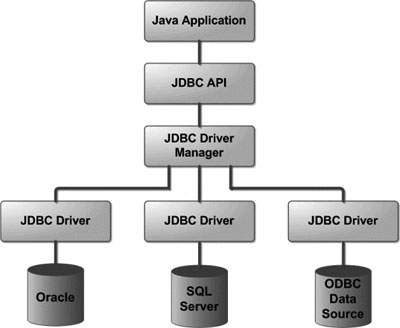
JDBC drivers实现了JDBC APIs定义的接口。
JDBC连接
连接JDBC通常有四个简单的步骤
Import JDBC Packages: Add import statements to your Java program to import required classes in your Java code.
Register JDBC Driver: This step causes the JVM to load the desired driver implementation into memory so it can fulfill your JDBC requests.
Database URL Formulation: This is to create a properly formatted address that points to the database to which you wish to connect.
Create Connection Object: Finally, code a call to the DriverManagerobject's getConnection( ) method to establish actual database connection.
注册JDBC driver
注册JDBC driver有两种方法:
Approach 1: Class.forName() 自动将driver相关class加载到内存
try {

   Class.forName("oracle.jdbc.driver.OracleDriver");

}

catch(ClassNotFoundException ex) {

   System.out.println("Error: unable to load driver class!");

   System.exit(1);

}
Approach 2: DriverManager.registerDriver() 如果使用的是 non-JDK compliant JVM
try {

   Driver myDriver = new oracle.jdbc.driver.OracleDriver();

   DriverManager.registerDriver( myDriver );

}

catch(ClassNotFoundException ex) {

   System.out.println("Error: unable to load driver class!");

   System.exit(1);

}
Database URL formulation
加载完driver之后,可以用DriverManager.getConnection()建立连接。
下面是常用数据库与connection URL的映射表
| RDBMS | JDBC driver name | URL format |
|---|---|---|
| MySQL | com.mysql.jdbc.Driver | jdbc:mysql://hostname/ databaseName |
| ORACLE | oracle.jdbc.driver.OracleDriver | jdbc:oracle:thin:@hostname:port Number:databaseName |
| DB2 | COM.ibm.db2.jdbc.net.DB2Driver | jdbc:db2:hostname:port Number/databaseName |
| Sybase | com.sybase.jdbc.SybDriver | jdbc:sybase:Tds:hostname: port Number/databaseName |
JDBC statement,PreparedStatement & CallableStatement
根据不同的需用,可以选择不同的statement接口。
| Interfaces | Recommended Use |
|---|---|
| Statement | Use for general-purpose access to your database. Useful when you are using static SQL statements at runtime. The Statement interface cannot accept parameters. |
| PreparedStatement | Use when you plan to use the SQL statements many times. The PreparedStatement interface accepts input parameters at runtime. |
| CallableStatement | Use when you want to access the database stored procedures. The CallableStatement interface can also accept runtime input parameters. |
Statement
创建statement
Statement stmt = null;

try {

   stmt = conn.createStatement( );

   . . .

}

catch (SQLException e) {

   . . .

}

finally {

   . . .

}
执行statement
创建完statement object之后,可以用来执行SQL语句
boolean execute (String SQL): Returns a boolean value of true if a ResultSet object can be retrieved; otherwise, it returns false. Use this method to execute SQL DDL statements or when you need to use truly dynamic SQL.
int executeUpdate (String SQL): Returns the number of rows affected by the execution of the SQL statement. Use this method to execute SQL statements for which you expect to get a number of rows affected - for example, an INSERT, UPDATE, or DELETE statement.
ResultSet executeQuery (String SQL): Returns a ResultSet object. Use this method when you expect to get a result set, as you would with a SELECT statement.
关闭statement
如果close connection节省数据库资源一样,close statement可以确保资源的合理回收。
Statement stmt = null;

try {

   stmt = conn.createStatement( );

   . . .

}

catch (SQLException e) {

   . . .

}

finally {

   stmt.close();

}
JDBC 批处理
批处理(batch processing)允许一次执行多条SQL语句。由于JDBC drivers并没有要求实现这个功能,因此使用前先用 DatabaseMetaData.supportsBatchUpdates() 检测目标数据库是否支持批处理。
Statement对象的批处理
Create a Statement object using either createStatement() methods.
Set auto-commit to false using setAutoCommit().
Add as many as SQL statements you like into batch using addBatch()method on created statement object.
Execute all the SQL statements using executeBatch() method on created statement object.
Finally, commit all the changes using commit() method.
// Create statement object

Statement stmt = conn.createStatement();

// Set auto-commit to false

conn.setAutoCommit(false);

// Create SQL statement

String SQL = "INSERT INTO Employees (id, first, last, age) " +

             "VALUES(200,'Zia', 'Ali', 30)";

// Add above SQL statement in the batch.

stmt.addBatch(SQL);

// Create one more SQL statement

String SQL = "INSERT INTO Employees (id, first, last, age) " +

             "VALUES(201,'Raj', 'Kumar', 35)";

// Add above SQL statement in the batch.

stmt.addBatch(SQL);

// Create one more SQL statement

String SQL = "UPDATE Employees SET age = 35 " +

             "WHERE id = 100";

// Add above SQL statement in the batch.

stmt.addBatch(SQL);

// Create an int[] to hold returned values

int[] count = stmt.executeBatch();

//Explicitly commit statements to apply changes

conn.commit();
PreparedStatement对象的批处理
// Create SQL statement

String SQL = "INSERT INTO Employees (id, first, last, age) " +

             "VALUES(?, ?, ?, ?)";

// Create PrepareStatement object

PreparedStatemen pstmt = conn.prepareStatement(SQL);

//Set auto-commit to false

conn.setAutoCommit(false);

// Set the variables

pstmt.setInt( 1, 400 );

pstmt.setString( 2, "Pappu" );

pstmt.setString( 3, "Singh" );

pstmt.setInt( 4, 33 );

// Add it to the batch

pstmt.addBatch();

// Set the variables

pstmt.setInt( 1, 401 );

pstmt.setString( 2, "Pawan" );

pstmt.setString( 3, "Singh" );

pstmt.setInt( 4, 31 );

// Add it to the batch

pstmt.addBatch();

//add more batches

.

.

.

.

//Create an int[] to hold returned values

int[] count = stmt.executeBatch();

//Explicitly commit statements to apply changes

conn.commit();
References
http://www.tutorialspoint.com/jdbc/jdbc-where-clause.htm
http://stackoverflow.com/questions/2839321/connect-java-to-a-mysql-database
JDBC入门学习的更多相关文章
- mysql的jdbc入门学习小结
转自:专注JavaWeb开发 http://www.javaweb1024.com/data/MySQL/2015/04/25/618.html 一.jdbc基本概念jdbc : Java Datab ...
- MyBatis入门学习教程-使用MyBatis对表执行CRUD操作
上一篇MyBatis学习总结(一)--MyBatis快速入门中我们讲了如何使用Mybatis查询users表中的数据,算是对MyBatis有一个初步的入门了,今天讲解一下如何使用MyBatis对use ...
- MyBatis入门学习(二)
在MyBatis入门学习(一)中我们完成了对MyBatis简要的介绍以及简单的入门小项目测试,主要完成对一个用户信息的查询.这一节我们主要来简要的介绍MyBatis框架的增删改查操作,加深对该框架的了 ...
- Jdbc入门
JDBC入门 l 导jar包:驱动! l 加载驱动类:Class.forName(“类名”); l 给出url.username.password,其中url背下来! l 使用DriverMa ...
- JDBC 接口学习
说明:文章所有内容皆选自实验楼教程[JDBC 入门教程],想要学习更多JDBC,可以点击教程进行学习~ JDBC 简介 JDBC 的全称是 Java Database Connectivity,叫做 ...
- day17(JDBC入门&jdbcUtils工具介绍)
day17 JDBC整体思维导图 JDBC入门 导jar包:驱动! 加载驱动类:Class.forName("类名"); 给出url.username.password,其中url ...
- Mybatis基础入门学习
Mybatis基础入门学习 mybatis架构分析 搭建测试mybatis架构 )下载并导入mybatis3.2.7.jar(架构),mysql-connector-java-5.1.7-bin.ja ...
- JDBC的学习 3-1
JDBC的学习 3-1 JDBC基本概念 快速入门 对JDBC中各个接口和类详解 JDBC : 概念 :Java DateBase Connectivity java数据库连接,Java语言操作数据库 ...
- vue入门学习(基础篇)
vue入门学习总结: vue的一个组件包括三部分:template.style.script. vue的数据在data中定义使用. 数据渲染指令:v-text.v-html.{{}}. 隐藏未编译的标 ...
随机推荐
- shell 脚本之判断语句 if 详解
使用 Linux 系统这么长时间,对 shell 脚本也算是比较熟悉.其实不管是搞开发,还是搞运维,shell 脚本都是必备的基本技能.这次抽时间好好总结一下 shell 方面的知识,综合的再学习一下 ...
- Ural 1209. 1, 10, 100, 1000... 一道有趣的题
1209. 1, 10, 100, 1000... Time limit: 1.0 secondMemory limit: 64 MB Let's consider an infinite seque ...
- kettle中参数和变量的区别
图一: 图二: 何时使用'?'何事使用${}应当根据情况: 在图二中使用的是${}因为此时没有"作为参数的字段",所以只能用el表达式直接获取其值,在图一中有"作为参数的 ...
- [No0000AE]在 Visual Studio 中调试 XAML 设计时异常
在 Visual Studio 中进行 WPF, UWP, Silverlight 开发时,经常会遇到 XAML 设计器由于遭遇异常而无法正常显示设计器视图的情况.很多时候由于最终生成的项目在运行时并 ...
- 【repost】浏览器内核、渲染引擎、js引擎
[1]定义 浏览器内核分成两部分渲染引擎和js引擎,由于js引擎越来越独立,内核就倾向于只指渲染引擎 渲染引擎是一种对HTML文档进行解析并将其显示在页面上的工具[2]常见引擎 渲染引擎: firef ...
- 【三石视频教程】当FineUIPro遇到ReportViewer
FineUIPro 下个版本(v2.8.0)即将支持 ReportViewer,为此三石特别制作了一期视频教程,供大家参考. 运行效果图: 视频下载:http://pan.baidu.com/s/ ...
- Doc
一:window: 属性(值或者子对象):opener:打开当前窗口的源窗口,如果当前窗口是首次启动浏览器打开的,则opener是null,可以利用这个属性来关闭源窗口. 方法(函数):事件(事先设置 ...
- Firefox默认英文修改中文
对于firefox,中文还是看着顺眼,为了自己的顺心.动起手来,自力更生,丰衣足食! 01.确定Linux的firefox版本 firefox -v 02.下载对应版本的中文语言包 http://ft ...
- CentOS中Mysql常用操作
安装mysqlyum -y install mysql-server 修改mysql配置vi /etc/my.cnf 这里会有很多需要注意的配置项,后面会有专门的笔记暂时修改一下编码(添加在密码下方) ...
- ajax处理缓冲问题
1.禁止页面缓存 header("Cache-Control:no-cache"); header("Pragma:no-cache"); header(&qu ...