
vue-element分页
<template>

  <card-layout :title="L('Users')" :actions="actions" @click="handleClick">

    <el-table :data="tableData4.slice((currentPage-1)*pagesize,currentPage*pagesize)" :default-sort="{prop: 'date', order: 'descending'}" style="width: 100%">

      <el-table-column fixed prop="id" label="编号" width="">

      </el-table-column>

      <el-table-column prop="name" label="姓名" width="">

      </el-table-column>

      <el-table-column prop="password" type="password" label="密码" width="">

      </el-table-column>

      <el-table-column prop="sexType" label="性别" width="" :formatter="sexTypes">

      </el-table-column>

      <el-table-column prop="phone" label="电话" width="">

      </el-table-column>

      <el-table-column prop="email" label="邮箱" width="">

      </el-table-column>

      <el-table-column prop="birthday" label="生日" width="">

      </el-table-column>

      <el-table-column prop="integral" label="等级" width="" :formatter="Getlevel">

      </el-table-column>

      <el-table-column fixed="right" label="操作" width="">

        <template slot-scope="scope">

          <el-button type="danger" @click.native.prevent="deleteRow(scope.row, tableData4)" size="small">

            移除

          </el-button>

         <el-button type="primary" @click="EditClick(scope.row)" size="small">

            {{Edit}}

          </el-button>

        </template>

      </el-table-column>

    </el-table>

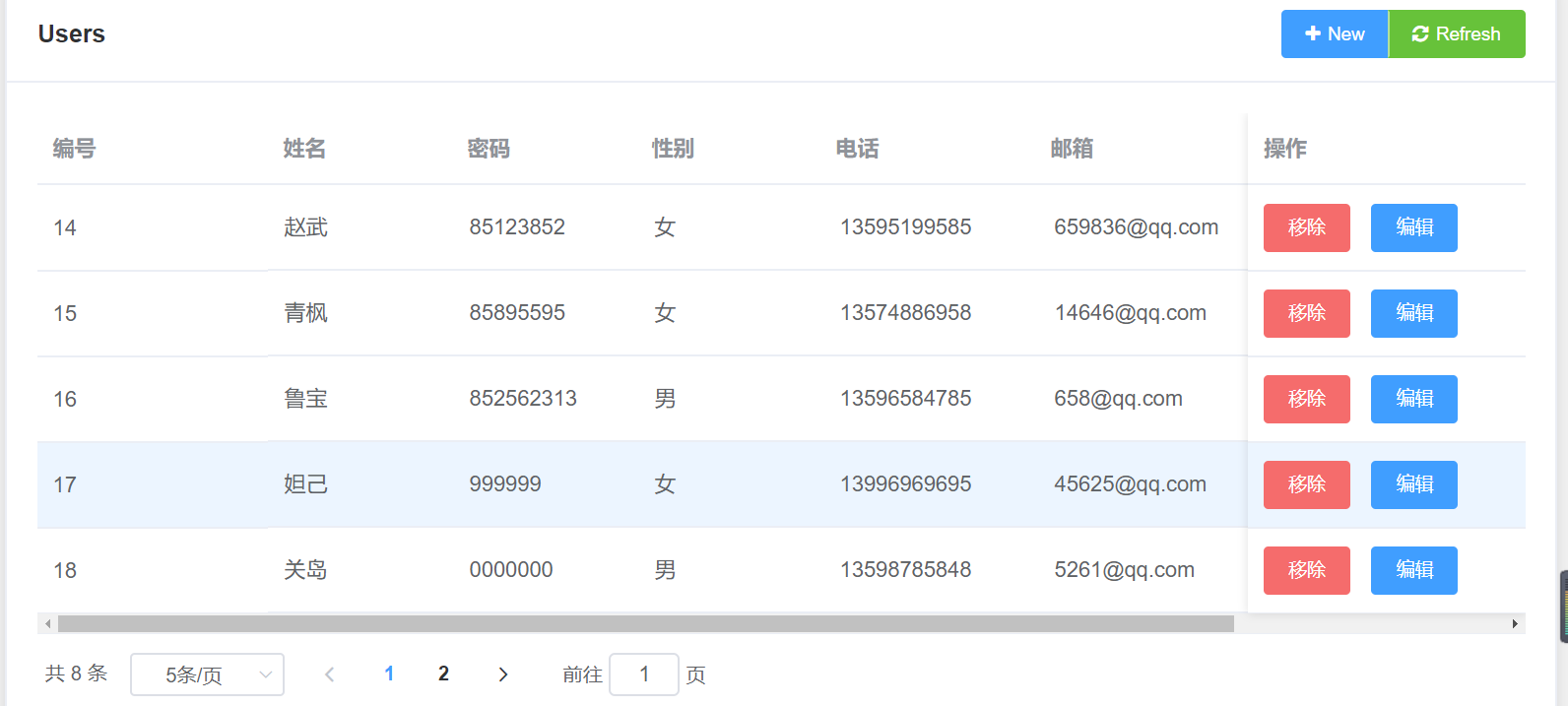
  <el-pagination @size-change="handleSizeChange" @current-change="handleCurrentChange" :current-page="currentPage" :page-sizes="[5, 10, 20, 40]" :page-size="pagesize" layout="total, sizes, prev, pager, next, jumper" :total="tableData4.length">

        </el-pagination>

   <update :show.sync="shows" @renovate="getuser" :datas="mydata" ></update>

   <UserEdit :show.sync="show" @renovate="getuser"></UserEdit>

  </card-layout>

</template>

<script>

import datatablepaging from "../.././components/basicElement/dataTable/dataTablePaging.vue";

import UserEdit from "./UserEdit-dialog.vue";

import update from './Update.vue'

export default {

  methods: {

    deleteRow(index, rows) {

      rows.splice(index, );

    }

  },

  data() {

    return {

      Edit:"编辑",

      pagesize: , //每页的数据条数

      currentPage: , //默认开始页面

      show: false,

      shows:false,

      mydata:{},

      SkipCount: ,

      MaxResultCount: ,

      actions: [

        [

          {

            id: "New",

            type: "primary",

            text: "New",

            icon: "fa fa-plus"

          },

          {

            id: "Refresh",

            type: "success",

            text: "Refresh",

            icon: "fa fa-refresh"

          }

        ]

      ],

      tableData4: []

    };

  },

  components: {

    UserEdit,

    datatablepaging,

    update

  },

  methods: {

    open() {

      this.show = true;

    },

    opens(){

      this.shows = true;

    },

    created: function() {

      this.total = this.tableData4.length;

    },

    current_change: function(currentPage) {

      this.currentPage = currentPage;

    },

    handleClick(id) {

      switch (id) {

        case "New":

          this.AddUser();

          break;

        case "Refresh":

          this.Refresh();

          break;

        default:

          break;

      }

    },

    AddUser() {

      this.open();

    },

    Refresh() {

      this.getuser();

    },

    getuser() {

      this.$http

        .get(

          "/api/services/app/Userinfro/GetUserinofor?MaxResultCount=" +

            this.MaxResultCount

        )

        .then(result => {

          this.tableData4 = result.data.result.items;

          //console.log(result.data.result.items);

        })

        .catch(err => {

          console.log(err);

        });

    },

    sexTypes(row, column) {

      if (row.sexType == ) {

        return "男";

      } else {

        return "女";

      }

    },

    Getlevel(row, column) {

      if (row.integral >=  && row.integral < ) {

        return "白银";

      }

      if (row.integral >=  && row.integral < ) {

        return "黄金";

      }

      if (row.integral >=  && row.integral < ) {

        return "铂金";

      }

      if (row.integral >= ) {

        return "钻石";

      }

    },

    deleteRow(row) {

      this.$confirm("此操作将永久删除该用户, 是否继续?", "提示", {

        confirmButtonText: "确定",

        cancelButtonText: "取消",

        type: "warning"

      }).then(() => {

        this.$http

          .delete("/api/services/app/Userinfro/DeleteUserByid?Id=" + row.id)

          .then(result => {

            this.$message({

              type: "success",

              message: "删除成功!"

            });

            this.getuser();

          })

          .catch(err => {

            console.log(err);

          });

      });

    },

    EditClick(data) {

      this.opens();

      //console.log(data)

      this.mydata=data;

    },

    handleSizeChange(size){

      this.pagesize=size;

    },

    handleCurrentChange(currentPage)

    {

      this.currentPage=currentPage;

    }

  },

  created() {

    this.getuser();

  }

};

</script>

<style>

 .el-pagination {

    padding-top: 12px;

}

</style>
vue-element分页的更多相关文章
- Vue element 分页
Vue单页面,有一个带分页的表格,表格内数据关联页码,套路如下: 代码如下: <div class="c-table-list auth-list m-bottom-20"& ...
- 循序渐进VUE+Element 前端应用开发(30)--- ABP后端和Vue+Element前端结合的分页排序处理
在很多列表展示数据的场合中,大多数都会需要一个排序的处理,以方便快速查找排序所需的数据,本篇随笔介绍如何结合ABP后端和Vue+Element前端结合的分页排序处理过程. 1.Vue+Element前 ...
- vue+element实现分页--之--前端分页
效果图: 访问的数据量小,一次返回所有数据,再次利用elementUI-Table 和el-pagination组件进行展示,关键点事数据的筛选 官网的完整案例 <div class=" ...
- vue + element ui 实现实现动态渲染表格
前言:之前需要做一个页面,能够通过表名动态渲染出不同的表格,这里记录一下.转载请注明出处:https://www.cnblogs.com/yuxiaole/p/9786326.html 网站地址:我的 ...
- Vue 实现分页+输入框关键字筛选
分页的实现(Vue+Element)+输入框关键字筛选 1.这里用的是Element 自带的分页组件 <template> <div class="sales-table& ...
- 新书上线:《Spring Boot+Spring Cloud+Vue+Element项目实战:手把手教你开发权限管理系统》,欢迎大家买回去垫椅子垫桌脚
新书上线 大家好,笔者的新书<Spring Boot+Spring Cloud+Vue+Element项目实战:手把手教你开发权限管理系统>已上线,此书内容充实.材质优良,乃家中必备垫桌脚 ...
- Vue+element ui table 导出到excel
需求: Vue+element UI table下的根据搜索条件导出当前所有数据 参考: https://blog.csdn.net/u010427666/article/details/792081 ...
- 循序渐进VUE+Element 前端应用开发(4)--- 获取后端数据及产品信息页面的处理
在前面随笔<循序渐进VUE+Element 前端应用开发(3)--- 动态菜单和路由的关联处理>中介绍了在Vue + Element整合框架中,实现了动态菜单和动态路由的处理,从而可以根据 ...
- 循序渐进VUE+Element 前端应用开发(5)--- 表格列表页面的查询,列表展示和字段转义处理
在我们一般开发的系统界面里面,列表页面是一个非常重要的综合展示界面,包括有条件查询.列表展示和分页处理,以及对每项列表内容可能进行的转义处理,本篇随笔介绍基于Vue +Element基础上实现表格列表 ...
- 循序渐进VUE+Element 前端应用开发(6)--- 常规Element 界面组件的使用
在我们开发BS页面的时候,往往需要了解常规界面组件的使用,小到最普通的单文本输入框.多文本框.下拉列表,以及按钮.图片展示.弹出对话框.表单处理.条码二维码等等,本篇随笔基于普通表格业务的展示录入的场 ...
随机推荐
- [Android] 基于 Linux 命令行构建 Android 应用(一):关于 Android 项目
关于 Android 项目 项目是保存源代码和资源文件的容器. 谷歌提供的 Android SDK 工具只能对具有固定目录结构的项目进行编译和打包.因此强烈建议使用 Eclipse + ADT 或者 ...
- js for in 获得遍历数组索引和对象属性
for in 遍历对象属性 获取的是对象的属性名 var person ={ name:"admin", age:"21", address:"sha ...
- C# 如何提取字符串中的数字
下面讲解如何在字符串当中抓取到数字 方法一.使用正则表达式 1.纯数字提取 string str = "提取123abc提取"; //我们抓取当前字符当中的123 string r ...
- linux命令学习(4):cd命令
Linux cd 命令可以说是Linux中最基本的命令语句,其他的命令语句要进行操作,都是建立在使用 cd 命令上的.所以,学习Linux 常用命令,首先就要学好 cd 命令的使用方法技巧. 1. 命 ...
- 正则表达式/(^\s*)|(\s*$)/g意思
包含以空格.回车符等字符开头 或者 空格.回车符等字符结尾 的字符串,可过滤出所有空格.回车符的字符
- ORM正向和反向查询
表结构 from django.db import models # Create your models here.class Publisher(models.Model): id = model ...
- PCL Save VTK File With Texture Coordinates 使用PCL库来保存带纹理坐标的VTK文件
我之前有一篇博客Convert PLY to VTK Using PCL 1.6.0 or PCL 1.8.0 使用PCL库将PLY格式转为VTK格式展示了如何将PLY格式文件转化为VTK格式的文件, ...
- juqery 点击谁获取他的值,赋给input标签
//html代码 <a href="javascript:;" class="confirm fahuo" data-fahuo-id="{$v ...
- SPRING的事务配置详解
spring事务配置的两种方式: 1.基于XML的事务配置.2.基于注解方式的事务配置. 前言:在我们详细介绍spring的两种声明式事务管理之前,我们需要先理解这些概念 1)spring的事务管理是 ...
- .NET Core开发日志——HttpContext
之前的文章记述了从ASP.NET Core Module到KestrelServer的请求处理过程.现在该聊聊如何生成ASP.NET中我们所熟悉的HttpContext. 当KestrelServer ...