
Vue 实现分页+输入框关键字筛选
分页的实现(Vue+Element)+输入框关键字筛选
<template>

<div class="sales-table">

<div class="order-list-header">订单列表</div>

<div class="back-box">

<div class="search-box"><input type="text" name="" id="" class="order-search-input" placeholder="关键词" v-model='search'></div>

</div>

<div class="table-box">

<div class="table-list" v-for="(cash, index) in orderList.slice((currentPage-1)*pagesize,currentPage*pagesize)" :key="cash.id">

<table id="tableSort" style="table-layout:fixed;">

<thead class="table-header">

<tr>

<th class="left-radius">序号</th>

<th>创建时间</th>

<th>订单ID</th>

<th>所属用户姓名</th>

<th>所属用户ID</th>

<th>所属用户手机</th>

<th>所属用户层级</th>

<th>订单金额</th>

<th>订单状态</th>

<th>审核状态</th>

<th>收件人</th>

<th>联系电话</th>

<th>收货地址</th>

<th>订单备注</th>

<th class="right-radius">操作</th>

</tr>

</thead>

<tbody class="table-lists">

<tr class="first-tr">

<td class="sequence">{{ index+1>9?index+1:"0"+(index+1) }}</td>

<td class="sequence">{{cash.createTime}}</td>

<td class="sequence">{{cash.orderId}}</td>

<td class="sequence">{{cash.cilentName}}</td>

<td class="sequence">{{cash.cilentId}}</td>

<td class="sequence">{{cash.cilentPhone}}</td>

<td class="sequence">{{cash.cilentGrade}}</td>

<td class="sequence money">¥{{cash.orderPrice}}</td>

<td class="sequence">{{cash.orderState}}</td>

<td class="sequence">{{cash.auditState}}</td>

<td class="sequence">{{cash.receiver}}</td>

<td class="sequence">{{cash.phone}}</td>

<td class="sequence">{{cash.address}}</td>

<td class="sequence">{{cash.orderRemark}}</td>

<td class="sequence"><a class="view-order">查看</a><a class="edit-order">编辑</a><a class="delete-order">删除</a></td>

</tr>

</tbody>

</table>

</div>

</div>

<-- 分页 -->

<div class="page">

<el-pagination

@size-change="handleSizeChange"

@current-change="handleCurrentChange"

:current-page="currentPage"

:page-sizes="[5, 10, 20, 40]"

:page-size="pagesize"

layout="total, sizes, prev, pager, next, jumper"

:total="Cashdata.length">

</el-pagination>

</div>

</div>

</template>
2.文中标红的字不再是循环数组,名字随意取,在后面搜索关键字部分也标红了。数据多分页效果会更加明显。
3.分页的CSS只是自己修改的部分,如有需要,请自行脑补。对了,补充一句,修改Eleement样式时,先在样式前加 /deep/.最外层类名{......}。
/deep/.el-pagination{

      margin-bottom: 30px;

      margin-top: 30px;

      float: right;

      font-size: 20px;

      color: #333333;

      margin-right: 55px;

      font-weight: normal;

    .el-select .el-input{

      width: 126px;

      height: 36px;

    }

    .el-select .el-input .el-input__inner{

      height: 100%;

      font-size: 20px;

      color: #333333;

    }

    .el-pagination__editor.el-input .el-input__inner{

        height: 36px;

    }

    .btn-prev,.btn-next{

      height: 36px;

    }

    .btn-prev{

      border-radius: 5px 0 0 5px;

    }

    .btn-next{

      border-radius: 0 5px 5px 0;

    }

    .el-pager li{

      line-height: 36px;

      height: 36px;

      font-size: 20px;

    }

    .el-pagination__total{

      color: #333333;

    }

     button,span:not([class*=suffix]){

      height: 36px;

      line-height: 36px;

      font-size: 20px;

      color: #333333;

    }

    .el-pagination__editor.el-input{

      font-size: 20px;

    }

  }
</style>
4.如有问题,欢迎指教。
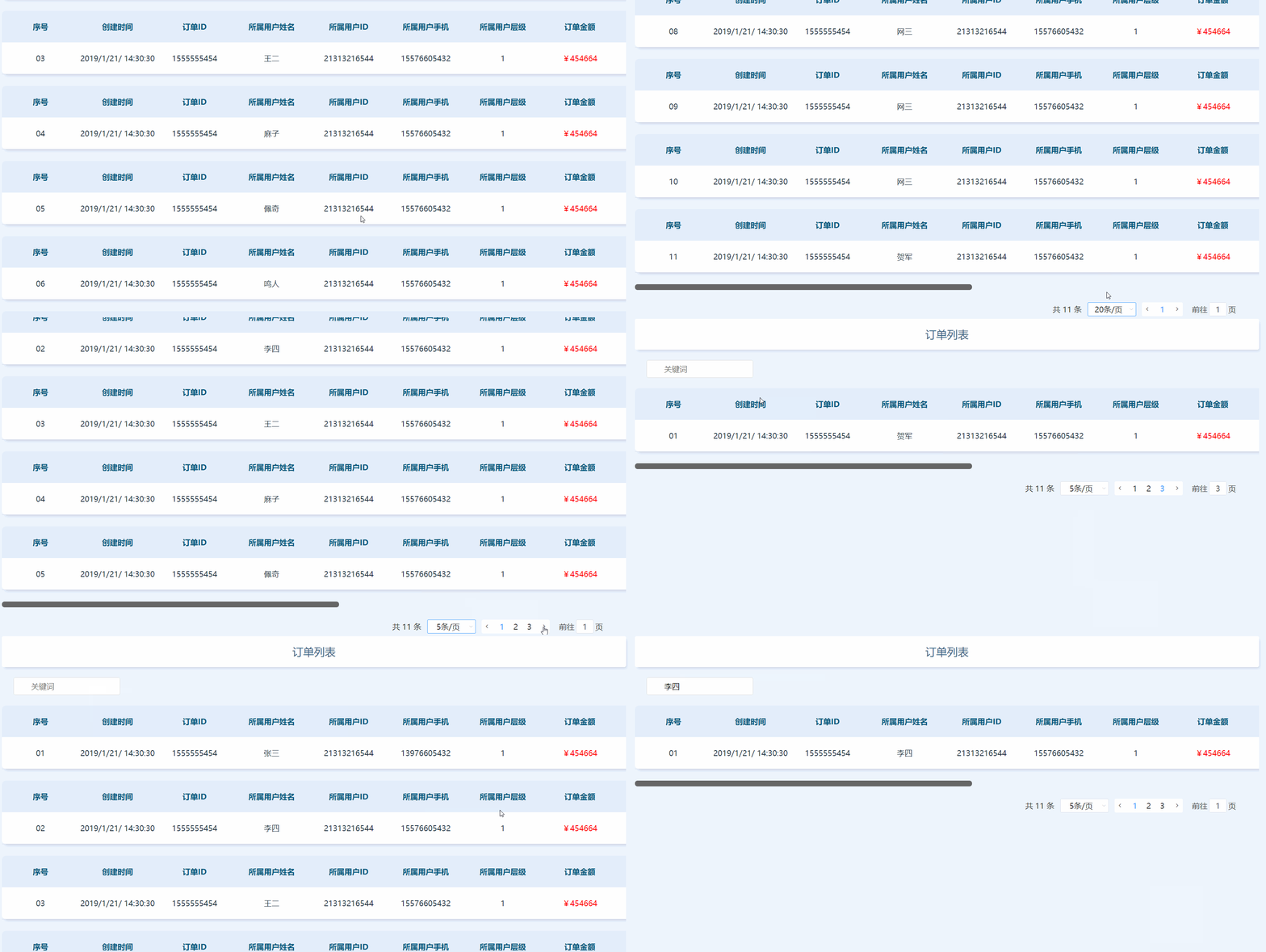
附上效果图一份:
Vue 实现分页+输入框关键字筛选的更多相关文章
- 基于Vue封装分页组件
使用Vue做双向绑定的时候,可能经常会用到分页功能 接下来我们来封装一个分页组件 先定义样式文件 pagination.css ul, li { margin: 0px; padding: 0px;} ...
- JS(vue iview)分页解决方案
JS(vue iview)分页解决方案 一.解决思路 使用分页组件 使用组件API使组件自动生成页面数量 调用组件on-change事件的返回值page 将交互获得的数组存在一个数组list中 通过p ...
- 【前端】vue.js实现输入框绑定
vue.js实现输入框绑定 实现效果如下: 实现代码及注释 <!DOCTYPE html> <html> <head> <title>vue.js数据动 ...
- 基于vue的分页插件
相信大家用过很多jquery的分页插件,那这次就用一用基于vue的分页插件. 这里的环境用的是springboot 首先要引入pagehelper的jar文件,版本是1.2.3,配置文件也需要配置一下 ...
- VUE实现限制输入框最多输入15个中文,或者30个英文
vue项目,输入框限制输入15个中文,或者30个英文 <input type="text" v-model="groupName" class=" ...
- vue的品牌添加与筛选的功能集合
<!DOCTYPE html> <html lang="en"> <head> <meta charset="UTF-8&quo ...
- vue+ springboot 分页(两种方式:sql分页 & PageHelper 分页)
方法一:sql分页 思路:使用数据库进行分页 前端使用element-ui的分页组件,往后台传第几页的起始行offest 以及每页多少行pageSize,后台根据起始行数和每页的行数可以算出该页的 ...
- 使用EditText+ListView并结合TextWatcher实现输入关键字筛选数据
想必大家应该遇到过这样的情况,当点击Spinner控件后弹出的列表内容超多,一个一个滑动着去寻找所要的项很麻烦,尤其是当自己知道想要选择的内容,这时候如果我们只需要输入某些关键字,就可以讲上百条数据筛 ...
- vue中input输入框的模糊查询实现
最近在使用vue写webapp在,一些感觉比较有意思的分享一下. 1:input输入框: <input class="s-search-text" placeholder=& ...
随机推荐
- HDU 5223 GCD
题意:给出一列数a,给出m个区间,再给出每个区间的最小公倍数 还原这列数 因为数组中的每个数至少都为1,而且一定是这个区间的最小公约数ans[i]的倍数,求出它与ans[i]的最小公倍数,如果大于1e ...
- SCO Openserver、SCO Unix、SCO UnixWare、Solaris几者到底是什么关系,有什么相同或不同?
Unix操作系统的历史漫长而曲折,它的第一个版本是1969年由Ken Thompson在AT&T贝尔实验室实现的,运行在一台DEC PDP-7计算机上.这个系统非常粗糙,与现代Unix相差很远 ...
- 俩层判断,判断button是否可以点击
描述如下: 当被保人数超过三个人并且input是必填项的时候button是disable为false的 代码如下: //起保日期 $('.pickerfour').on('tap', function ...
- Ubuntu命令行快捷启动Pycharm
我pycharm安装目录为/home/dell/pycharm-community-2018.1.2/bin.那么安装完成之后系统不会给pycharm添加系统路径,只有把终端切换到安装目录/home/ ...
- Windows 10 计划带来颜文字和Sandbox
在最新的 Window 10 测试版 Build 18305 中,Windows 10 增加了对颜文字(kaomoji)的支持. Kaomoji 是由日本符号序列组成的面脸部表情的名称.虽然有些人,比 ...
- Git学习笔记 1,GitHub常用命令1
廖雪峰Git教程 莫烦Git教程 莫烦Git视频教程 --------------- init > apt-get install git # 安装 > mkdir /home/yzn_g ...
- KM最大匹配 HDU 2255
KM算法详解+模板 - wenr - 博客园 http://www.cnblogs.com/wenruo/p/5264235.html #include<iostream> #inclu ...
- Memcache启动&存储原理&集群
一. windows下安装启动 首先将memcache的bin文件夹增加到Path环境变量中.方便后面使用命令: 然后运行 memcached –dinstall 命令安装memcache的服务: 然 ...
- Android ImageView设置图片原理(下)
本文来自http://blog.csdn.net/liuxian13183/ ,引用必须注明出处! 写完上一篇后,总认为介绍的知识点不多,仅仅是一种在UI线程解析载入图片.两种在子线程解析,在UI线程 ...
- Oracle TIMESTAMP的处理
public class Test { private static final SimpleDateFormat FORMAT = new SimpleDateFormat("yyyy-M ...