
NIO组件Channel
基本介绍
- NIO的通道类似于流, 但有些区别:
- 通道可以同时进行读写, 而流只能读或者只能写
- 通道可以实现异步读写数据
- 通道可以从缓冲区(Buffer)读数据, 也可以写数据到缓冲区
- BIO中的stream是单向的, 例如 FileInputStream 对象只能进行读取数据的操作, 而NIO中的通道(Channel)是双向的, 可以读操作, 也可以写操作。
- Channel在NIO中是一个接口: public interface Channel extends Closeable{}
- 常用的 Channel类有: FileChannel、DatagramChannel、ServerSocketChannel 和 SocketChannel。
- FileChannel 用于文件的数据读写, DatagramChannel 用于UDP的数据读写, ServerSocketChannel 和 SocketChannel 用于 TCP 的数据读写。
FileChannel类
FileChannel主要用于对本地文件进行IO操作, 常见方法有:
- public int read(ByteBuffer dst): 从通道读取数据并放到缓冲区中
- public int write(ByteBuffer src): 把缓冲区的数据写到通道中
- public long transferFrom(ReadableByteChannel src, long position, long count), 从目标通道中复制数据到当前通道
- public long transferTo(long position, long count, WritableByteChannel target), 把数据从当前通道复制给目标通道
一个简单demo
示意图
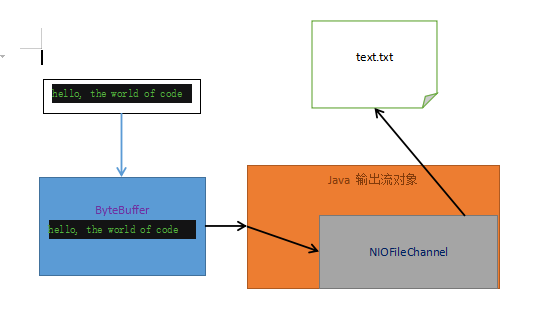
- 需要注意的是在将数据存入ByteBuffer再将数据写入到Channel中时需要对ByteBuffer进行flip转换改变模式。
写入案例代码
package com.ronnie.nio;

import java.io.FileOutputStream;

import java.io.IOException;

import java.nio.ByteBuffer;

import java.nio.channels.FileChannel;

public class NIOFileChannel01 {

    public static void main(String[] args) throws IOException {

        String str = "hello, the world of code";

        // 创建一个输出流 -> channel

        FileOutputStream fileOutputStream = new FileOutputStream("E:/fun/nio/doc/text.txt");

        // 通过 fileOutputStream获取对应的 FileChannel

        // 需要注意的是: 此fileChannel真实类型是 FileChannelImpl

        FileChannel fileChannel = fileOutputStream.getChannel();

        // 创建缓冲区 ByteBuffer

        ByteBuffer byteBuffer = ByteBuffer.allocate(1024);

        // 将 str 放入 byteBuffer

        byteBuffer.put(str.getBytes());

        // 对byteBuffer进行反转(flip)

        byteBuffer.flip();

        // 将byteBuffer 数据写入到channel

        fileChannel.write(byteBuffer);

        fileOutputStream.close();

    }

}
细节
fileOutputStream.getChannel()获取的 fileChannel 真实类型是 FileChannelImpl, 是FileChannel的实现类, FileChannel本身只是一个抽象类。
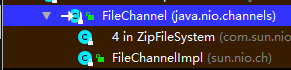
getChannel()方法:
    /**

     * Returns the unique {@link java.nio.channels.FileChannel \

     * FileChannel} object associated with this file output stream.

     * 返回与此文件输出流相关的唯一FileChannel对象

     *

     * <p> The initial {@link java.nio.channels.FileChannel#position()

     * position} of the returned channel will be equal to the

     * number of bytes written to the file so far unless this stream is

     * in append mode, in which case it will be equal to the size of the

     * file.

     * 返回的channel的初始位置与写入到此文件此文件的byte数一致(除非这个流式可

     * 添加模式, 该模式下channel的初始位置会与该文件的大小一致)

     * Writing bytes to this stream will increment the channel's position

     * accordingly.

     * 将字节码写入到该流会增加该channel的位置

     * Changing the channel's position, either explicitly or by

     * writing, will change this stream's file position.

     * 改变管道的位置, 无论是显示的修改还是通过写入修改, 都会改变此流的文件位置

     *

     * @return  the file channel associated with this file output stream

     *

     * @since 1.4

     * @spec JSR-51

     */

    public FileChannel getChannel() {

        // 同步锁锁了当前输出流对象

        synchronized (this) {

            // 如果管道为空

            if (channel == null) {

                // 就创建一个新的FileChannelImpl对象赋给channel

                channel = FileChannelImpl.open(fd, path, false, true, append, this);

            }

            return channel;

        }

    }
FileChannelImpl.open()方法:
    public static FileChannel open(FileDescriptor var0, String var1, boolean var2, boolean var3, boolean var4, Object var5) {

        return new FileChannelImpl(var0, var1, var2, var3, var4, var5);

    }
读取案例代码
package com.ronnie.nio;

import java.io.File;

import java.io.FileInputStream;

import java.io.IOException;

import java.nio.ByteBuffer;

import java.nio.channels.FileChannel;

public class NIOFileChannel02 {

    public static void main(String[] args) throws IOException {

        // 创建文件输入流

        File file = new File("E:/fun/nio/doc/text.txt");

        FileInputStream fileInputStream = new FileInputStream(file);

        // 通过fileInputStream 获取对应的fileChannel -> 实际类型 FileChannelImpl

        FileChannel fileChannel = fileInputStream.getChannel();

        // 创建缓冲区

        ByteBuffer byteBuffer = ByteBuffer.allocate((int) file.length());

        // 将通道的数据读入到buffer中

        fileChannel.read(byteBuffer);

        // 将字节数据转成String

        System.out.println(new String(byteBuffer.array()));

        fileInputStream.close();

    }

}- byteBuffer.array()返回的是底层的那个字节数组, 然后再将它转换成String类型。
一个Buffer完成文件读取案例
示意图

代码
package com.ronnie.nio;

import java.io.FileInputStream;

import java.io.FileOutputStream;

import java.io.IOException;

import java.nio.ByteBuffer;

import java.nio.channels.FileChannel;

public class NIOFileChannel03 {

    public static void main(String[] args) throws IOException {

        FileInputStream fileInputStream = new FileInputStream("1.txt");

        FileOutputStream fileOutputStream = new FileOutputStream("2.txt");

        FileChannel channel01 = fileInputStream.getChannel();

        FileChannel channel02 = fileOutputStream.getChannel();

        ByteBuffer byteBuffer = ByteBuffer.allocate(512);

        // 循环读取

        while (true){

            // 非常重要的操作, 复位(重置标志位)

            // 如果没写, 当position与limit相等时, read永远为0, 进入死循环

            byteBuffer.clear();

            int read = channel01.read(byteBuffer);

            if (read == -1){

                break;

            }

            // 将buffer 中的数据写入到 channel02

            byteBuffer.flip();

            channel02.write(byteBuffer);

        }

        // 关闭流

        fileInputStream.close();

        fileOutputStream.close();

    }

}
使用transferFrom()方法拷贝文件案例
package com.ronnie.nio;

import java.io.FileInputStream;

import java.io.FileOutputStream;

import java.io.IOException;

import java.nio.channels.FileChannel;

public class NIOFileChannel04 {

    public static void main(String[] args) throws IOException {

        // 创建线管的流

        FileInputStream fileInputStream = new FileInputStream("E:/fun/nio/doc/hadoop.jpg");

        FileOutputStream fileOutputStream = new FileOutputStream("E:/fun/nio/doc/hadoop2.jpg");

        // 获取各个流对应的fileChannel

        FileChannel sourceChannel = fileInputStream.getChannel();

        FileChannel destinationChannel = fileOutputStream.getChannel();

        // 使用transferFrom完成拷贝

        destinationChannel.transferFrom(sourceChannel, 0, sourceChannel.size());

        // 关闭相关通道和流

        sourceChannel.close();

        destinationChannel.close();

        fileInputStream.close();

        fileOutputStream.close();

    }

}
Buffer 和 Channel的注意事项和细节
ByteBuffer支持类型化的put和get, put放入的是什么数据类型, get就应该使用相应的数据类型来取出, 否则可能有 BufferUnderflowException 异常
package com.ronnie.nio;

import java.nio.ByteBuffer;

public class NIOByteBufferPutGet {

    public static void main(String[] args) {

        // 创建一个Buffer

        ByteBuffer buffer = ByteBuffer.allocate(64);

        // 类型化放入数据

        buffer.putInt(100);

        buffer.putLong(9);

        buffer.putChar('w');

        buffer.putShort((short) 4);

        // 取出

        buffer.flip();

        System.out.println();

        System.out.println(buffer.getInt());

        System.out.println(buffer.getLong());

        System.out.println(buffer.getChar());

        System.out.println(buffer.getShort());

        // 加个没的, 让它报错

        System.out.println(buffer.getLong());

    }

}
100

9

w

4

Exception in thread "main" java.nio.BufferUnderflowException

	at java.nio.Buffer.nextGetIndex(Buffer.java:506)

	at java.nio.HeapByteBuffer.getLong(HeapByteBuffer.java:412)

	at com.ronnie.nio.NIOByteBufferPutGet.main(NIOByteBufferPutGet.java:26)
可以将一个普通Buffer转成只读Buffer, 转换后不能再写入
package com.ronnie.nio;

import java.nio.ByteBuffer;

public class ReadOnlyBuffer {

    public static void main(String[] args) {

        // 创建一个buffer

        ByteBuffer buffer = ByteBuffer.allocate(64);

        for (int i = 0; i < 64; i++){

            buffer.put((byte) i);

        }

        // 读取

        buffer.flip();

        // 得到一个只读的Buffer

        ByteBuffer readOnlyBuffer = buffer.asReadOnlyBuffer();

        System.out.println(readOnlyBuffer.getClass());

        // 读取

        while (readOnlyBuffer.hasRemaining()){

            System.out.println(readOnlyBuffer.get());

        }

        // 会抛出ReadOnlyBufferException

        readOnlyBuffer.put((byte) 100);

    }

}
NIO还提供了 MappedByteBuffer, 可以让文件直接在内存(堆外的内存)中进行修改。
package com.ronnie.nio;

import java.io.IOException;

import java.io.RandomAccessFile;

import java.nio.MappedByteBuffer;

import java.nio.channels.FileChannel;

/**

 *  MappedByteBuffer 可让文件直接在堆外内存修改, 操作系统无需将数据拷贝到用户态内存中,

 *  即零拷贝, kafka底层就是依靠netty实现了零拷贝

 */

public class MappedByteBufferTest {

    public static void main(String[] args) throws IOException {

        RandomAccessFile randomAccessFile = new RandomAccessFile("1.txt", "rw");

        // 获取对应的通道

        FileChannel channel = randomAccessFile.getChannel();

        /**

         *  参数1: FileChannel.MapMode.READ_WRITE 使用的读写模式

         *  参数2: 0: 可以直接修改的起始位置

         *  参数3: 5: 是映射到内存的大小(不是索引位置), 即将 1.txt 的多少个字节映射到

         *  内存

         *  可以直接修改的范围就是0~5, 不到5

         */

        MappedByteBuffer mappedByteBuffer = channel.map(FileChannel.MapMode.READ_WRITE, 0, 5);

        mappedByteBuffer.put(0, (byte) 'S');

        mappedByteBuffer.put(3, (byte) '8');

        // mappedByteBuffer.put(5, (byte) 'G'); 会抛出数组越界异常

        randomAccessFile.close();

        System.out.println("修改成功");

    }

}
之前所说的读写操作都是通过一个Buffer完成的, NIO还支持通过多个Buffer(即Buffer数组) 完成读写操作, 即Scattering(分散) 和 Gathering(聚合)
案例代码:
package com.ronnie.nio;

import java.io.IOException;

import java.net.InetSocketAddress;

import java.nio.Buffer;

import java.nio.ByteBuffer;

import java.nio.channels.ServerSocketChannel;

import java.nio.channels.SocketChannel;

import java.util.Arrays;

/**

 *  Scattering: 将数据写入到buffer时, 可以采用buffer数组, 依次写入 [分散]

 *  Gathering: 从buffer读取数据时, 可以采用buffer数组, 依次读

 */

public class ScatteringAndGatheringTest {

    public static void main(String[] args) throws IOException {

        // 使用 ServerSocketChannel 和 SocketChannel 网络

        ServerSocketChannel serverSocketChannel = ServerSocketChannel.open();

        InetSocketAddress inetSocketAddress = new InetSocketAddress(7000);

        // 绑定端口到socket, 并启动

        serverSocketChannel.socket().bind(inetSocketAddress);

        // 创建Buffer数组

        ByteBuffer[] byteBuffers = new ByteBuffer[2];

        byteBuffers[0] = ByteBuffer.allocate(5);

        byteBuffers[1] = ByteBuffer.allocate(3);

        // 等待客户端连接(telnet)

        SocketChannel socketChannel = serverSocketChannel.accept();

        // 假定从客户端接收8个字节

        int messageLength = 8;

        // 循环的读取

        while (true){

            int byteRead = 0;

            while (byteRead < messageLength){

                long l = socketChannel.read(byteBuffers);

                // 累计读取的字节数

                byteRead += 1;

                System.out.println("byteRead = " + byteRead);

                // 使用流打印, 查看当前buffer的position和limit

                Arrays.stream(byteBuffers).map(buffer -> "position = " + buffer.position() + ", limit = " + buffer.limit()).forEach(System.out::println);

            }

            // 将所有的buffer进行反转(flip)

            Arrays.asList(byteBuffers).forEach(Buffer::flip);

            // 将数据读出显示到客户端

            long byteWrite = 0;

            while(byteWrite < messageLength){

                long l = socketChannel.write(byteBuffers);// 回写

                byteWrite += 1;

            }

            // 将所有的 buffer 进行 clear操作

            Arrays.asList(byteBuffers).forEach(Buffer::clear);

            System.out.println("byteRead := " + byteRead + " byteWrite = " + byteWrite + ", messageLength = " + messageLength);

        }

    }

}
windows的话打开win + R输入cmd, telnet 127.0.0.1 7000, 就就可以发送数据, 没有开启的请: 控制面板 -> 程序 -> 启用或关闭 Windows功能 -> 开启Telnet Client
NIO组件Channel的更多相关文章
- Java基础知识强化之IO流笔记73:NIO之 Channel
1. Java NIO的Channel(通道)类似 Stream(流),但又有些不同: 既可以从通道中读取数据,又可以写数据到通道.但流的读写通常是单向的. 通道可以异步地读写. 通道中的数据总是要先 ...
- NIO组件Selector调用实例
*对于nio的非阻塞I/O操作,使用Selector获取哪些I/O准备就绪,注册的SelectionKey集合记录关联的Channel这些信息.SelectionKey记录Channel对buffer ...
- NIO组件之channel
Java NIO指的是new IO ,相对OIO,也称non-blocking IO,对应四种基本IO类型中的IO多路复用,主要有有三大核心组件,Channel(管道),Buffer(缓冲区),sel ...
- NIO组件Selector详解
Selector(选择器)是Java NIO中能够检测一到多个NIO通道,并能够知晓通道是否为诸如读写事件做好准备的组件.这样,一个单独的线程可以管理多个channel,从而管理多个网络连接. 下面是 ...
- 《精通并发与Netty》学习笔记(10 - 详解NIO (一) Channel、Buffer )
一.Java NIO 概述 Java NIO 由以下几个核心部分组成:ChannelsBuffersSelectors虽然Java NIO 中除此之外还有很多类和组件,但在我看来,Channel,Bu ...
- JAVA基础知识之NIO——Buffer.Channel,Charset,Channel文件锁
NIO机制 NIO即NEW IO的意思,是JDK1.4提供的针对旧IO体系进行改进之后的IO,新增了许多新类,放在java.nio包下,并对java.io下许多类进行了修改,以便使用与nio. 在ja ...
- Java NIO教程 Channel
Channel是一个连接到数据源的通道.程序不能直接用Channel中的数据,必须让Channel与BtyeBuffer交互数据,才能使用Buffer中的数据. 我们用FileChannel作为引子, ...
- 《JAVA NIO》Channel
3.通道 Channle主要分为两类:File操作对应的FIleChannel和Stream操作对应的socket的3个channe. 1.这3个channel都是抽象类.其具体实现在SPI里面. 2 ...
- Java基础知识强化之IO流笔记76:NIO之 Channel(通道)之间的数据传输
1. 在Java NIO中,如果两个通道中有一个是FileChannel,那你可以直接将数据从一个channel(译者注:channel中文常译作通道)传输到另外一个channel. (1)trans ...
随机推荐
- C++查找指定路径下的特定类型的文件
转载:https://www.cnblogs.com/tinaluo/p/6824674.html 例子:找到C盘中所有后缀为exe的文件(不包括文件夹下的exe文件) #include<std ...
- TensorFlow基础二(Shape)
首先说明tf中tensor有两种shape,分别为static (inferred) shape和dynamic (true) shape,其中static shape用于构建图,由创建这个tenso ...
- android传递数据bundle封装传递map对象
android开发默认情况下,通过Bundle bundle=new Bundle();传递值是不能直接传递map对象的,解决办法: 第一步:封装自己的map,实现序列化即可 ? 1 2 3 4 5 ...
- 解题报告:luogu P5755 [NOI2000]单词查找树
题目链接:P5755 [NOI2000]单词查找树 曾几何时,NOI 也有这么水的题( 裸的\(Trie\),只用维护插入即可,记得\(+1\)就好了,真没用讲的. \(Code\): #includ ...
- 通过Java读取xml文件内容
读取XML中的内容就需要对XML进行解析,目前对XML进行解析的方法分为四种: 下面解析的方法是DOM4J,需要下载jar包dom4j:https://dom4j.github.io/ package ...
- Ubuntu 编译 LAMP
下载apache源码 http://httpd.apache.org/ 解压缩apache安装包,进入apache文件夹. 安装: apache2.2.9./configure --prefix=/u ...
- CSS - 定位(position),难点
元素的定位属性主要包括定位模式和边偏移两部分. 1. 边偏移 边偏移属性 描述 top 顶端偏移量,定义元素相对于其父元素上边线的距离 bottom 底部偏移量,定义元素相对于其父元素下边线的距离 l ...
- 2020-2-18 restful的学习
1-1 restful简介及资源的介绍 restful 是什么? 本质:一种软件架构风格 核心:面向资源 解决的问题: 1. 降低开发的复杂性 2. 提高系统的可伸缩性 设计概念和 ...
- Oracle 提取数据表信息
参考: https://www.progress.com/blogs/jdbc-tutorial-extracting-database-metadata-via-jdbc-driver http:/ ...
- js判断数组中是否包含某个元素
参考:http://www.runoob.com/jquery/misc-inarray.html js判断数组中是否包含某个元素 $.inArray( value, array [, fromInd ...