
jquery实现常用UI布局
tab
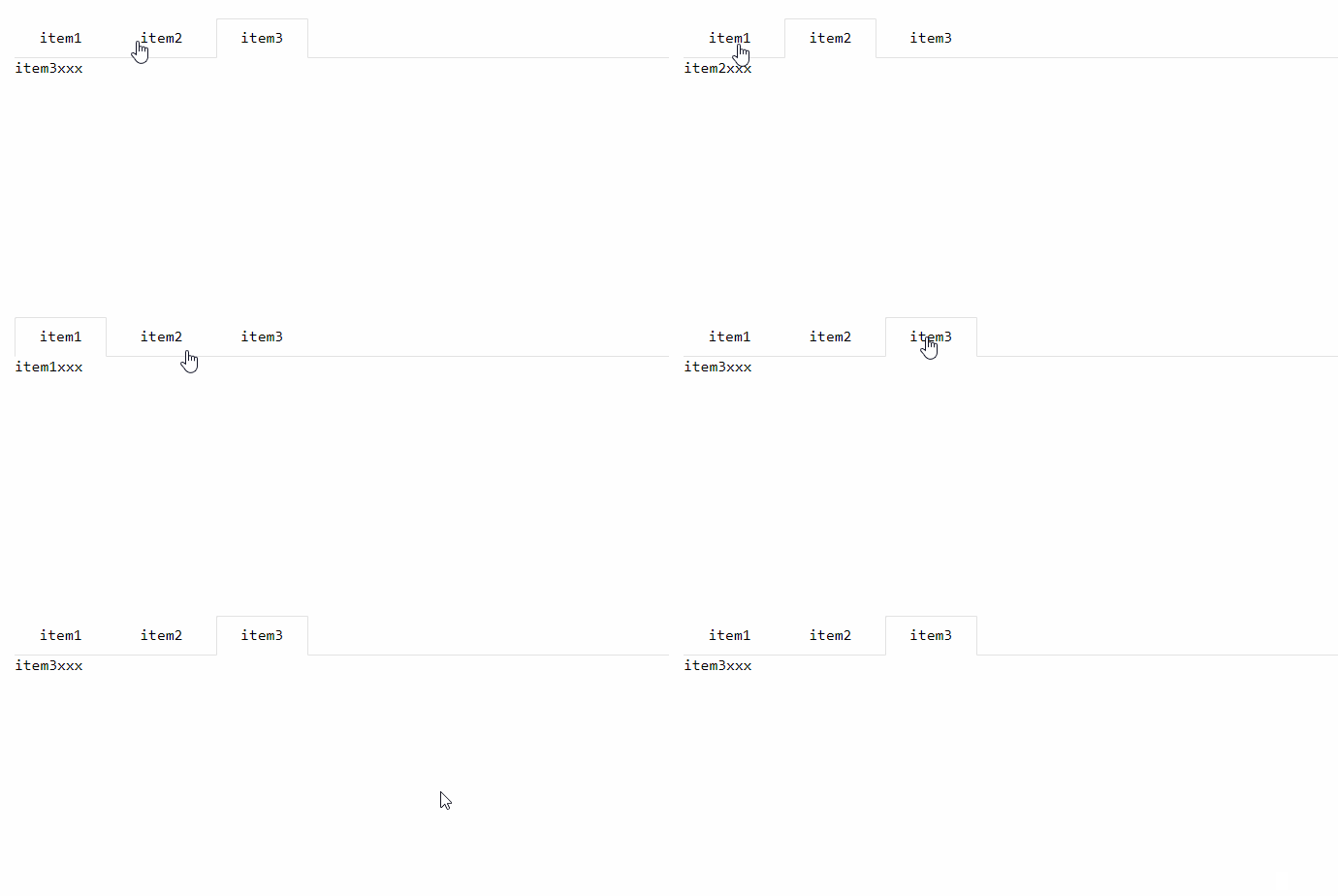
- html
<div class="tab">

    <ul class="tab-title">

        <li class="tab-this">item1</li>

        <li>item2</li>

        <li>item3</li>

    </ul>

    <div class="tab-content">

        <div class="tab-item show">item1xxx</div>

        <div class="tab-item">item2xxx</div>

        <div class="tab-item">item3xxx</div>

    </div>

</div>
- css
*{

    padding: 0; margin: 0; text-decoration: none; list-style: none;

    font-family: Consolas;

}

.tab{

    margin: 20px;

}

/*tab-title*/

.tab-title {

    height: 40px;

    position: relative;

    left: 0;

    white-space: nowrap;

    border-bottom-width: 1px;

    border-bottom-style: solid;

    border-color: #e2e2e2;

    transition: all .2s;

    -webkit-transition: all .2s;

}

.tab-title>li{

    display: inline-block;

    padding: 0 15px;

    text-align: center;

    cursor: pointer;

    line-height: 40px;

    min-width: 65px;

    position: relative;

}

.tab-title .tab-this:after {

    position: absolute;

    left: 0;

    top: 0;

    content: '';

    width: 100%;

    height: 41px;

    border-width: 1px;

    border-style: solid;

    border-color: #e2e2e2;

    border-bottom-color: #fff;

    border-radius: 2px 2px 0 0;

    box-sizing: border-box;

    pointer-events: none;

}

.tab-item{

    display: none;

}

.show{

    display: block !important;

}
- js
$('body').on('click','.tab-title>li:not(.tab-this)', function(){

     $(this).siblings().removeClass('tab-this');

     $(this).addClass('tab-this');

     var index = $(this).prevAll().length+1;

     $('.tab-content>div').removeClass('show');

     $('.tab-content>div:nth-child('+index+')').addClass('show');

 });
jquery实现常用UI布局的更多相关文章
- 常用UI布局
1.LinearLayout(线性布局):将布局所包含的控件在线性方向上依次排列. <1>android:orientation 指定了排列方向(垂直方向(vertical).水平方向(h ...
- 基于jquery开发的UI框架整理分析
根据调查得知,现在市场中的UI框架差不多40个左右,不知大家都习惯性的用哪个框架,现在市场中有几款UI框架稍微的成熟一些,也是大家比较喜欢的一种UI框架,那应该是jQuery,有部分UI框架都是根据j ...
- 常用前端布局,CSS技巧介绍
常用前端布局,CSS技巧介绍 对前端常用布局的整理总结,并对其性能优劣,兼容等情况进行介绍 css常用技巧之可变大小正方形的绘制 1:若通过设置width为百分比的方式,则高度不能通过百分比来控制. ...
- Android开发 UI布局
Android开发 UI布局一.线性布局LinearLayout 什么是线性布局? 其实呢,线性布局就是把所有的孩子摆在同一条线上 <?xml version="1.0" e ...
- Duilib源码分析(五)UI布局—Layout与各子控件
接下来,继续分析duilib之UI布局Layout,目前提供的布局有:VerticalLayout.HorizontalLayout.TileLayout.TabLayout.ChildLayout分 ...
- iOS-屏幕适配-UI布局
iOS 屏幕适配:autoResizing autoLayout和sizeClass 一.图片解说 -------------------------------------------------- ...
- AppleWatch___学习笔记(二)UI布局和UI控件
1.UI布局 直接开发,你会发现Apple Watch并不支持AutoLayout,WatchKit里有个类叫做WKInterfaceGroup,乍一看像是UIView,但是这货其实是用来布局的.从 ...
- DIV+CSS常用网页布局技巧!
以下是我整理的DIV+CSS常用网页布局技巧,仅供学习与参考! 第一种布局:左边固定宽度,右边自适应宽度 HTML Markup <div id="left">Left ...
- iOS开发~UI布局(三)深入理解autolayout
一.概要 通过对iOS8界面布局的学习和总结,发现autolayout才是主角,autolayout是iOS6引入的新特性,当时还粗浅的学习了下,可是没有真正应用到项目中.随着iOS设备尺寸逐渐碎片化 ...
随机推荐
- Centos7 mariadb (mysql)主从复制实现
一.mysql基本命令 .启动mysql systemctl start mariadb .linux客户端连接自己 mysql -uroot -p -h 127.0.0.1 .远程链接mysql服务 ...
- uniGUI之uniColorButton(21)
uniColorButton相当于VCL的ColorDialog1 若Palette 为空,则为系统自带颜色.
- 302重定向之后,session中存储的值没了
302重定向之后,session中存储的值没了
- 吴裕雄 Bootstrap 前端框架开发——Bootstrap 按钮:表示成功的动作
<!DOCTYPE html> <html> <head> <meta charset="utf-8"> <title> ...
- Linux中用systemctl命令管理服务
systemctl start foo.service 启动服务systemctl restart foo.service 重启服务systemctl stop foo.service 停止服务sys ...
- RabbitMq学习笔记——RabbitMQ C的使用
1.需要用到的参数: 主机名:hostname.端口号:port.交换器:exchange.路由key:routingkey .绑定路由:bindingkey.用户名:user.密码:psw,默认用户 ...
- threading 多线程
# coding:utf- import time from threading import Thread def foo(x):#这里可以带参数def foo(x) print "foo ...
- spring mvc ,spring boot 整合swagger
https://blog.csdn.net/qq_35992900/article/details/81274436
- 103、Java中String类之compareTo()方法
01.代码如下: package TIANPAN; /** * 此处为文档注释 * * @author 田攀 微信382477247 */ public class TestDemo { public ...
- Spark调优(二) 数据本地化
Application任务执行流程: 在Spark Application提交后,Driver会根据action算子划分成一个个的job,然后对每一 个job划分成一个个的stage,stage内部 ...