
Centos7.5 firewalld防火墙配置
CentOS 7.0默认使用的是firewall作为防火墙
1、查看firewall服务状态
systemctl status firewalld

2、查看firewall的状态
firewall-cmd --state

3、开启、重启、关闭、firewalld.service服务
#查看linux哪些程序正在使用互联网
firewall-cmd --permanent --list-services ssh dhcpv6-client
# 开启
service firewalld start
# 重启
service firewalld restart

# 关闭
service firewalld stop
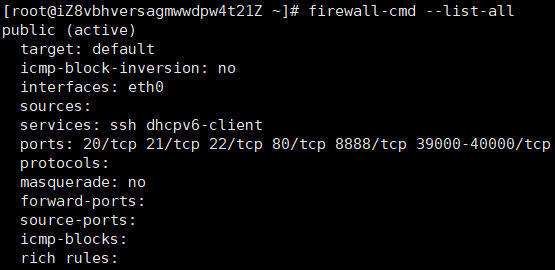
4、查看防火墙规则
firewall-cmd --list-all
停止firewall
systemctl stop firewalld.service
禁止firewall开机启动
systemctl disable firewalld.service
5、查询、开放、关闭端口
# 查询端口是否开放
firewall-cmd --query-port=8080/tcp

# 开放80端口
firewall-cmd --permanent --add-port=80/tcp
firewall-cmd --permanent --add-port=8080-8085/tcp

# 移除端口
firewall-cmd --permanent --remove-port=8080/tcp
查看防火墙的开放的端口
firewall-cmd --permanent --list-ports
#重启防火墙(修改配置后要重启防火墙)
firewall-cmd --reload
# 参数解释
1、firwall-cmd:是Linux提供的操作firewall的一个工具;
2、--permanent:表示设置为持久;
3、--add-port:标识添加的端口;
常用命令配置白名单,限制指定ip只能访问服务器指定的端口和去掉开通的端口
#配置规则

firewall-cmd --permanent --add-rich-rule="rule family="ipv4" source address="指定的ip地址" port protocol="tcp" prot="指定的端口" accept"

#配置所有端口都可以访问

firewall-cmd --permanent --zone=public --add-port=8080/tcp

#批量配置规则

firewall-cmd --permanent --add-rich-rule="rule family="ipv4" source address="指定的ip地址段(192.168.1.0/24)" port protocol="tcp" prot="指定的端口" accept"

#reload配置生效

firewall-cmd --reload

#关闭端口

firewall-cmd --zone=public --remove-port=80/tcp --permanent

#批量添加区间端口

firewall-cmd --zone=public --add-port=4400-4600/udp --permanent

#查看防火墙排除端口

firewall-cmd --permanent --list-port

#查看所有开放的端口

iptables -L -n
Centos7.5 firewalld防火墙配置的更多相关文章
- CentOS7使用firewalld防火墙配置端口
安装启用firewalld防火墙 CentOS7默认的防火墙是firewalld 如果没有firewalld防火墙,可以执行yum install firewalld 命令进行安装 firewalld ...
- Centos7下Firewalld防火墙配置命令
前 言 服务端口日常被拦截,记录一下常用的命令便于查询 Firewalld服务管理 查看防火墙状态 1 systemctl status firewalld 开机启用/禁用防火墙 1 s ...
- CentOS7下Firewall防火墙配置用法详解
官方文档地址: https://access.redhat.com/documentation/en-US/Red_Hat_Enterprise_Linux/7/html/Security_Guide ...
- centos7 开启端口防火墙配置(如开启3306或者80端口)
转载自https://blog.csdn.net/codepen/article/details/52738906 https://www.cnblogs.com/hantianwei/p/57362 ...
- CentOS7使用firewalld防火墙
firewalld的基本使用 启动: systemctl start firewalld 关闭: systemctl stop firewalld 查看状态: systemctl status fir ...
- centos7之firewalld防火墙的配置与使用
firewalld是centos7开始提供的管理防火墙工具,提供了一个动态管理的防火墙,当然低层仍然调用的是 netfilter . 一.区域(zone)firewalld将网卡对应到不同的区域(zo ...
- Centos7 iptables firewalld防火墙与selinux配置
一.iptables防火墙 1.基本操作 # 查看防火墙状态 service iptables status # 停止防火墙 service iptables stop # 启动防火墙 service ...
- CentOS7 firewalld防火墙配置
[root@ecs ~]# firewall-cmd --version //查看版本0.3.9 [root@ecs ~]# firewall-cmd --state //查 ...
- 02.Linux-CentOS系统Firewalld防火墙配置
1.firewalld的基本使用 启动: systemctl start firewalld关闭: systemctl stop firewalld查看状态: systemctl status fir ...
随机推荐
- 如何写好一个完整的Essay写作论证
主体段是我们留学生在Essay写作中陈述观点和论述观点的核心段落,那么一个完整的论证应该包含哪些要素呢?我觉得有这么几项:主旨句.解释.例证.小结(非必需) 这些其实也是我们在说服他人接受我们的观点时 ...
- Android群英传知识点回顾——第四章:ListView常用优化技巧
4.1 ListView常用优化技巧 4.1.1 使用ViewHolder模式提高效率 4.1.2 设置项目间分割线 4.1.3 隐藏ListView的滚动条 4.1.4 取消ListView的Ite ...
- 每天一点点之laravel框架开发 - passport授权报invalid_credentials
{"error":"invalid_credentials","message":"The user credentials we ...
- delphi 串口的打开与关闭
Delphi 打开串口与关闭串口 procedure TForm1.btn1Click(Sender: TObject); begin cm1.CommName:=cbb1.Text; cm1.Bau ...
- 18 12 30 新建一个 django project
1. 新建一个 django project 1 2 django-admin.py startproject project_name 特别是在 windows 上,如果报错,尝试用 django- ...
- BZOJ 4084 [Sdoi2015]双旋转字符串
题解:hash 至今不会unsigned long long 的输出 把B扔进map 找A[mid+1][lenA]在A[1][mid]中的位置 把A[1][mid]贴两遍(套路) 枚举A[mid+1 ...
- NBU For Windows 更新后无法启动Java Console
系统环境:Win Server 2016 备份软件:NBU 8.1 Case :Windows系统默认自动安装系统补丁,重启过程中自动进行了Update,打上了最新的补丁后,NBU Java Co ...
- 吴裕雄--天生自然MySQL学习笔记:MySQL ALTER命令
需要修改数据表名或者修改数据表字段时,就需要使用到MySQL ALTER命令. root@host# mysql -u root -p password; Enter password:******* ...
- Linux 常用命令全拼
pwd: print work directory 打印当前目录 显示出当前工作目录的绝对路径 ps: process status(进程状态,类似于windows的任务管理器) 常用参数:-auxf ...
- python 爬虫 多线程 多进程
一.程序.进程和线程的理解 程序:就相当于一个应用(app),例如电脑上打开的一个程序. 进程:程序运行资源(内存资源)分配的最小单位,一个程序可以有多个进程. 线程:cpu最小的调度单位,必须依赖 ...