
JSF 2 multiple select listbox example
In JSF, <h:selectManyListbox /> tag is used to render a multiple select listbox – HTML select element with “multiple” and “size” attribute.
//JSF...

<h:selectManyListbox value="#{user.favFood1}">

   	<f:selectItem itemValue="Fry Checken" itemLabel="Food1 - Fry Checken" />

   	<f:selectItem itemValue="Tomyam Soup" itemLabel="Food1 - Tomyam Soup" />

   	<f:selectItem itemValue="Mixed Rice" itemLabel="Food1 - Mixed Rice" />

</h:selectManyListbox>
//HTML output...

<select name="j_idt6:j_idt8" multiple="multiple" size="3">

	<option value="Fry Checken">Food1 - Fry Checken</option>

	<option value="Tomyam Soup">Food1 - Tomyam Soup</option>

	<option value="Mixed Rice">Food1 - Mixed Rice</option>

</select>
h:selectManyListbox example
A JSF 2.0 example to show the use of “h:selectManyListbox” tag to render multiple select listbox, and populate the data in 3 different ways :
- Hardcoded value in “
f:selectItem” tag. - Generate values with a
Mapand put it into “f:selectItems” tag. - Generate values with an
Objectarray and put it into “f:selectItems” tag, then represent the value with “var” attribute.
1. Backing Bean
A backing bean to hold and generate data for the multiple select listbox values. The property to hold the multi-selected listbox value, must be a type of Collection or Array; Otherwise it will hits the following error message
WARNING: Target model Type is no a Collection or Array

javax.faces.FacesException: Target model Type is no a Collection or Array
package com.mkyong;

import java.io.Serializable;

import java.util.Arrays;

import java.util.LinkedHashMap;

import java.util.Map;

import javax.faces.bean.ManagedBean;

import javax.faces.bean.SessionScoped;

@ManagedBean(name="user")

@SessionScoped

public class UserBean implements Serializable{

	public String[] favFood1;

	public String[] favFood2;

	public String[] favFood3;

	//getter and setter methods...

	public String getFavFood1InString() {

		return Arrays.toString(favFood1);

	}

	public String getFavFood2InString() {

		return Arrays.toString(favFood2);

	}

	public String getFavFood3InString() {

		return Arrays.toString(favFood3);

	}

	//Generated by Map

	private static Map<String,Object> food2Value;

	static{

		food2Value = new LinkedHashMap<String,Object>();

		food2Value.put("Food2 - Fry Checken", "Fry Checken"); //label, value

		food2Value.put("Food2 - Tomyam Soup", "Tomyam Soup");

		food2Value.put("Food2 - Mixed Rice", "Mixed Rice");

	}

	public Map<String,Object> getFavFood2Value() {

		return food2Value;

	}

	//Generated by Object array

	public static class Food{

		public String foodLabel;

		public String foodValue;

		public Food(String foodLabel, String foodValue){

			this.foodLabel = foodLabel;

			this.foodValue = foodValue;

		}

		public String getFoodLabel(){

			return foodLabel;

		}

		public String getFoodValue(){

			return foodValue;

		}

	}

	public Food[] food3List;

	public Food[] getFavFood3Value() {

		food3List = new Food[3];

		food3List[0] = new Food("Food3 - Fry Checken", "Fry Checken");

		food3List[1] = new Food("Food3 - Tomyam Soup", "Tomyam Soup");

		food3List[2] = new Food("Food3 - Mixed Rice", "Mixed Rice");

		return food3List;

	}

}
2. JSF Page
A JSF page to demonstrate the use “h:selectManyListbox” tag.
<?xml version="1.0" encoding="UTF-8"?>

<!DOCTYPE html PUBLIC "-//W3C//DTD XHTML 1.0 Transitional//EN"

"http://www.w3.org/TR/xhtml1/DTD/xhtml1-transitional.dtd">

<html xmlns="http://www.w3.org/1999/xhtml"

      xmlns:h="http://java.sun.com/jsf/html"

      xmlns:f="http://java.sun.com/jsf/core"

      >

    <h:body>

    	<h1>JSF 2 multi-select listbox example</h1>

    	<h:form>

	    1. Hard-coded with "f:selectItem" :

   		<h:selectManyListbox value="#{user.favFood1}">

   			<f:selectItem itemValue="Fry Checken" itemLabel="Food1 - Fry Checken" />

   			<f:selectItem itemValue="Tomyam Soup" itemLabel="Food1 - Tomyam Soup" />

   			<f:selectItem itemValue="Mixed Rice" itemLabel="Food1 - Mixed Rice" />

   		</h:selectManyListbox>

		<br /><br />

	    2. Generated by Map :

   		<h:selectManyListbox value="#{user.favFood2}">

   			<f:selectItems value="#{user.favFood2Value}" />

   		</h:selectManyListbox>

	    <br /><br />

	    3. Generated by Object array and iterate with var :

   		<h:selectManyListbox value="#{user.favFood3}">

   			<f:selectItems value="#{user.favFood3Value}" var="f"

   			itemLabel="#{f.foodLabel}" itemValue="#{f.foodValue}" />

   		</h:selectManyListbox>

	    <br /><br />

    	    <h:commandButton value="Submit" action="result" />

	    <h:commandButton value="Reset" type="reset" />

    	</h:form>

    </h:body>

</html>
result.xhtml…
<?xml version="1.0" encoding="UTF-8"?>

<!DOCTYPE html PUBLIC "-//W3C//DTD XHTML 1.0 Transitional//EN"

"http://www.w3.org/TR/xhtml1/DTD/xhtml1-transitional.dtd">

<html xmlns="http://www.w3.org/1999/xhtml"

      xmlns:h="http://java.sun.com/jsf/html"

      >

    <h:body>

    	<h1>JSF 2 multi-select listbox example</h1>

    	<h2>result.xhtml</h2>

    	<ol>

    		<li>user.favFood1 : #{user.favFood1InString}</li>

    		<li>user.favFood2 : #{user.favFood2InString}</li>

    		<li>user.favFood3 : #{user.favFood3InString}</li>

    	</ol>

    </h:body>

</html>
3. Demo

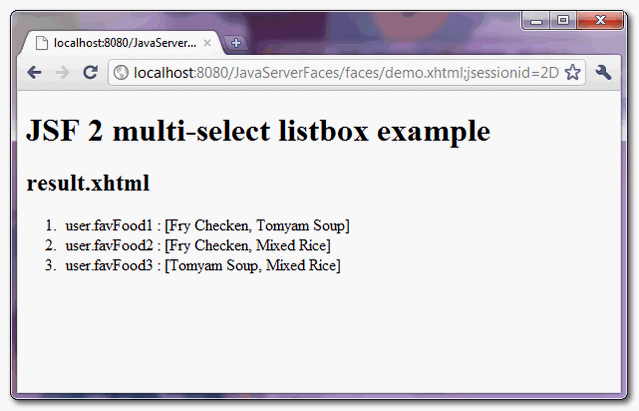
When “submit” button is clicked, link to “result.xhtml” page and display the submitted multi-selected listbox values.
How to pre-select multiple listbox values ?
The value of “f:selectItems” tag is selected if it matched to the “value” of “h:selectManyListbox” tag. In above example, if you set favFood1 property to “Fry Checken” and “Tomyam Soup” :
@ManagedBean(name="user")

@SessionScoped

public class UserBean{

	public String[] favFood1 = {"Fry Checken", "Tomyam Soup"};

	//...
The “favFood1″ listbox values, “Fry Checken” and “Tomyam Soup” are selected by default.
JSF 2 multiple select listbox example的更多相关文章
- JSF 2 multiple select dropdown box example
In JSF, <h:selectManyMenu /> tag is used to render a multiple select dropdown box – HTML selec ...
- 目录窗口多选Multiple Select in Catalog Window or arccatalog
目录窗口多选Multiple Select in Catalog Window or arccatalog 商务合作,科技咨询,版权转让:向日葵,135-4855__4328,xiexiaokui#q ...
- html multiple select option 分组
普通html方式展示<select name="viewType" style="width: 100%;height: 300px;" multiple ...
- JSF 2 listbox example
In JSF, <h:selectOneListbox /> tag is used to render a single select listbox – HTML select ele ...
- ListBox控件例子
<%@ Page Language="C#" AutoEventWireup="true" CodeBehind="ListBox.aspx.c ...
- Web页面中两个listbox的option的转移
Html: <div><span>所选时间:</span><select id="xuanyongTimelb" style=" ...
- 前端插件之Bootstrap Dual Listbox使用
工欲善其事,必先利其器 对于很多非专业前端开发来说写页面是非常痛苦的,借助框架或插件往往能够达到事半功倍的效果,本系列文章会介绍我在运维系统开发过程中用到的那些顺手的前端插件,如果你是想写XX管理系统 ...
- select框宽度与高度设置(实用版)
在IE中只能使用 font-size: 限制 select 的高度. 同时使用 width:200px 限制宽度 size="20" 表示最多显示20个选项,超过20的需要 ...
- js select级联,上面分类,下面是内容
js select级联,上面分类,下面是内容. js级联效果如下: 分类: 请选择 水果 蔬菜 其他 内容: // html和js代码如下: <html> <hea ...
随机推荐
- Android权限安全(10)应用与设备绑定
有些时候开发者想要把应用与设备绑定 如: 计费应用下载,防导出运行. app内部注册付费等等. 常用的绑定方案:
- Android app Splash页的替代方案
一般的App想要显示公司的log什么的,都会在启动的第一个页面显示,就是SplashActivity. 目前在看到一个替代SplashActivity的方案. 使用SplashActivity的时候, ...
- 函数lock_rec_get_first
/*********************************************************************//** Gets the first explicit l ...
- JavaScript 面试题,给大家补补基础,加加油,埋埋坑!
以下是我根据个人爱好收集网罗的一些个觉得还可以的面试题,觉得很有意思,给小伙伴们分享一下! ======后续还会继续追加试题.................... 第一道题: 下面弹出a的结果是多少 ...
- hdu 4607 Park Visit(树上最长链)
求树上最长链:两遍搜索. 第一次从树上任意点开始,最远点必然是某一条最长链上的端点u. 第二次从u开始,最远点即该最长链的另一端点. 先在最长链上走,不足再去走支链. 把询问数m错打成n,狠狠wa了一 ...
- [反汇编练习] 160个CrackMe之004
[反汇编练习] 160个CrackMe之004. 本系列文章的目的是从一个没有任何经验的新手的角度(其实就是我自己),一步步尝试将160个CrackMe全部破解,如果可以,通过任何方式写出一个类似于注 ...
- jQuery 制作的Tab标签切换选项卡
基于jQuery实现的一个选项卡效果,重点体现在HTML里没有内联事件处理程序,而是定义在js文件里,做到行为与结构的分离.在实际应用过程中,只要保证选项卡模块结构代码的完整性,就可以任意添加N个同类 ...
- jdbc:oracle:thin:@192.168.3.98:1521:orcl(详解)
整理自互联网 一. jdbc:oracle:thin:@192.168.3.98:1521:orcljdbc:表示采用jdbc方式连接数据库oracle:表示连接的是oracle数据库thin:表示连 ...
- HDU 5430 Reflect
题意:问在一个圆形的镜面里,从任意一点发出一个光源,经n次反射回到起点的情况数是多少. 解法:直接贴题解吧…… 求1至N+1中与N+1互质的个数,即欧拉函数. 代码: #include<stdi ...
- 《Python核心编程》 第三章 Python基础 - 练习
创建文件: # -*- coding: gbk -*- #! /auto/ERP/python_core/chapter ''' Created on 2014年5月21日 @author: user ...