
C# Winform 小技巧(Datagridview某一列按状态显示不同图片)
步骤:
一、导入状态图片到项目中:
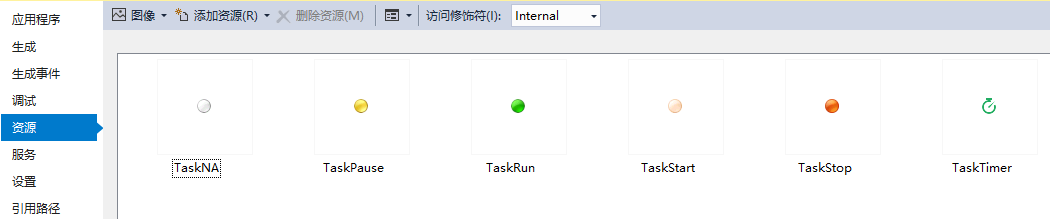
二、在窗体中声明一个图片数组,并在窗体的OnLoad事件中加入图片资源:
/// <summary>
/// 存储状态图片序列,避免同一状态对图片重复读取引发闪烁。
/// </summary>
private Image[] StatusImgs;
private void FrmSer_Main_Load(object sender, EventArgs e)
{
StatusImgs = new Image[] { Resources.TaskNA, Resources.TaskPause, Resources.TaskRun, Resources.TaskStart, Resources.TaskStop, Resources.TaskTimer };
}
三、处理Datgridview的格式化事件:
        private void DgvTaskList_CellFormatting(object sender, DataGridViewCellFormattingEventArgs e)

        {

            if (DgvTaskList.Rows[e.RowIndex].IsNewRow) return;

            if (e.ColumnIndex != 0) return;

            string stas =OPString.NZ2Str(DgvTaskList.Rows[e.RowIndex].Cells["RunStatus"].Value);

            if (string.IsNullOrEmpty(stas)) stas = "Timer";

            try

            {

                DataGridViewImageCell tmpCell = (DataGridViewImageCell)DgvTaskList.Rows[e.RowIndex].Cells["StatusImg"];

                switch (stas)

                {

                    case "NA":

                        tmpCell.Value = StatusImgs[0];

                        tmpCell.ToolTipText = "闲置";

                        break;

                    case "Pause":

                        tmpCell.Value = StatusImgs[1];

                        tmpCell.ToolTipText = "暂停";

                        break;

                    case "Run":

                        tmpCell.Value = StatusImgs[2];

                        tmpCell.ToolTipText = "运行中";

                        break;

                    case "Start":

                        tmpCell.Value = StatusImgs[3];

                        tmpCell.ToolTipText = "解析中";

                        break;

                    case "Stop":

                        tmpCell.Value = StatusImgs[4];

                        tmpCell.ToolTipText = "任务终止";

                        break;

                    case "Timer":

                        tmpCell.Value = StatusImgs[5];

                        tmpCell.ToolTipText = "循检中";

                        break;

                    default:

                        tmpCell.ToolTipText = "循检中";

                        break;

                }

            }

            catch (Exception)

            {

            }

        }
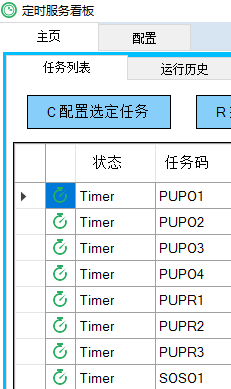
这样,你就能得到一个没有闪烁的状态图片列了。
C# Winform 小技巧(Datagridview某一列按状态显示不同图片)的更多相关文章
- winform datatable 或datagridview中添加列
DataGridViewCheckBoxColumn dg = new DataGridViewCheckBoxColumn(); dg.HeaderText = "选择"; dg ...
- chrome 小技巧:保持元素的hover状态
审查元素,选中需要hover的标签 点击"Styles"菜单中的":hov",弹出 Force element state 选中相应的 :hover :acti ...
- css的一些小技巧。修改input样式
在第一次正式写项目的时候,遇到了几个布局的小技巧.记录一下. 我们常常会遇到图片和文字对齐的一种样式.比如 这样的样式,我们写的时候有时候会出现不对齐的情况.我们有俩种方法 一种就是flex的布局,还 ...
- sql里的多行多列转一行多列小技巧
---恢复内容开始--- [ 今天下午接受了一个紧急小任务,是将一组比赛记录统计出来,将象棋游戏玩家的两条记录在一行里面显示,进数据库看之后是首先想到的是行转列,但是一开始就觉得不对,后来写到一半确实 ...
- WinForm 清空界面控件值的小技巧
原文:WinForm 清空界面控件值的小技巧 在WinForm里面有时候需要清空自己输入内容或是选择的选项,以便重新操作流程,那么一般你是怎么清空界面各个控件值的呢?如果窗体里面控件,尤其是TextB ...
- Winform 中DataGridView的checkbox列,当修改checkbox状态时实时获得其状态值
不知道大家有没有这样的经验,当点击或者取消datagridview的checkbox列时,比较难获得其状态是选中还是未选中,进而不好进行其它操作,下面就列出它的解决办法: 主要用到了DataGridV ...
- winform之权限判断小技巧
每个页面都要判断用户是否登陆并且判断用户是否拥有相应的权限,,以至于每个页面都要判断Session["user"]是否为空,后期不好维护 小技巧: 因为每个页面都继承与Page类, ...
- C# WinForm DataGridView 给标题列增加序号及格式化某个字段
DataGridView 给标题列增加序号 private void dataGridView1_DataBindingComplete(object sender, DataGridViewBind ...
- C# WinForm开发系列 - DataGridView
1.DataGridView实现课程表 testcontrol.rar 2.DataGridView二维表头及单元格合并 DataGridView单元格合并和二维表头.rar myMultiColHe ...
随机推荐
- Installing Eclipse Plug-ins from an Update Site with a self-signed certificate
If you try and connect to a p2 repository on a server with a self-signed cert, you will more than li ...
- java普通类如何调用Spring的Service层?
首先在Service层上面添加 @Service("myService") 然后,在main方法中调用,String[]中为配置文件,如下所示: ApplicationContex ...
- 16.3Sum Closest (Two-Pointers)
Given an array S of n integers, find three integers in S such that the sum is closest to a given num ...
- OGNL特殊符号的使用
---------------------siwuxie095 # 的使用 1.使用 # 获取 context 中的数据 「值栈分为 root 和 context 两部分」 2.如:向 Request ...
- Qt Font
Font and How to use TTF字体基本知识及其在QT中的应用 Qt为程序添加外部字体 在使用qt 添加第三方字体的时候,在程序开始的时候,使用·QFontDatabse·的静态函数加载 ...
- php从数组中取出一段 之 array_slice
array array_slice ( array $array , int $offset [, int $length [, bool $preserve_keys ]] ) array_slic ...
- Windows c++程序的基本结构
Windows c++程序的基本结构 1.一个完整的Windows应用程序通常由五种类型的文件组成 C语言源程序文件 头文件 模块定义文件 资源描述文件 项目文件 2.Windows应用程序构成基本框 ...
- 字符编码codecs模块(读写文件)
python对多国语言的处理是支持的很好的,它可以处理现在任意编码的字符,这里深入的研究一下python对多种不同语言的处理.有一点需要清楚的是,当python要做编码转换的时候,会借助于内部的编码, ...
- [Java]通过java获取计算机名
通过java获取计算机名 String hostname = "Unknown"; try { InetAddress addr; addr = InetAddress.getLo ...
- [SoapUI]怎样获取隐藏元素的文本内容Get text of hidden element
隐藏元素无法通过gettext()获取其文本内容,须用javascript来获取 String actualDataPointName = (String) ((JavascriptExecutor) ...