
华为交换机VRRP配置实例收集(转)
示例图:
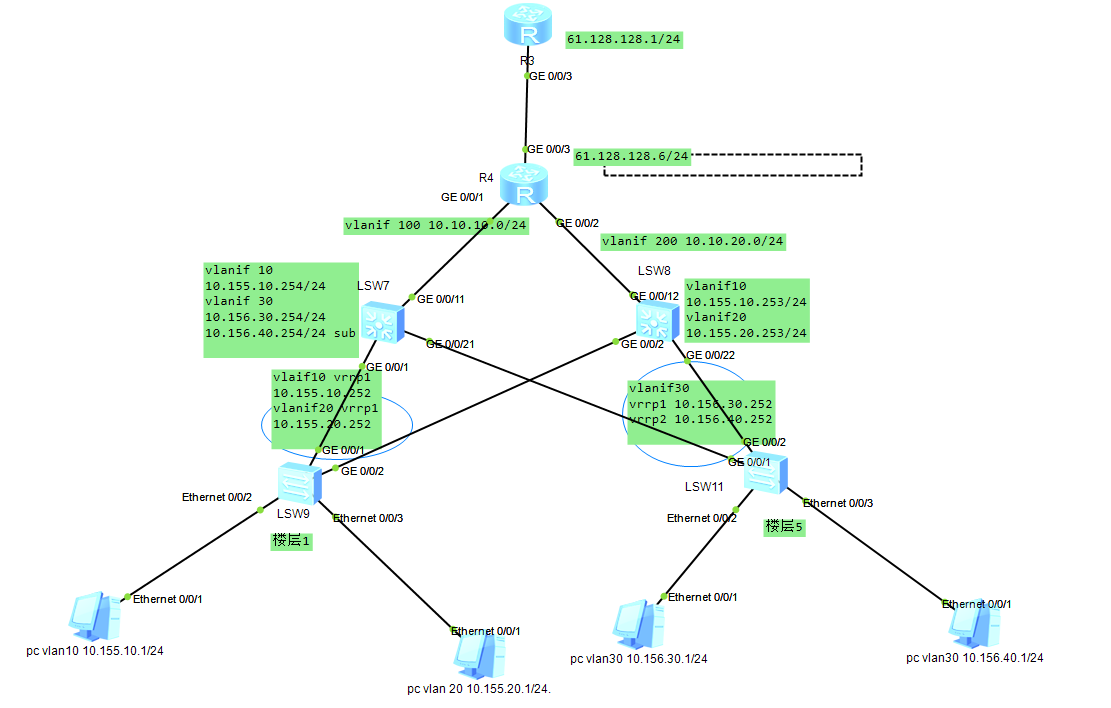
其实说白了就是做线路冗余,达到热备切换。
组网需求:
楼层1和楼层2分别通过两条线路做冗余接入交换机(本示例只考虑vrrp,暂不考虑其他方面)。当其中一段链路故障时,能通过另外一条链路传输。
配置信息:
<lsw9>dis cu

#

sysname lsw9

#

vlan batch 10 20

#

stp mode stp

#

interface Ethernet0/0/2

 port link-type access

 port default vlan 10

#

interface Ethernet0/0/3

 port link-type access

 port default vlan 20

#

interface GigabitEthernet0/0/1

 port link-type trunk

 port trunk allow-pass vlan 10 20

#

interface GigabitEthernet0/0/2

 port link-type trunk

 port trunk allow-pass vlan 10 20

 stp instance 0 cost 200000000

#

return

<lsw9>
--------------------------
<lsw11>dis cu

#

sysname lsw11

#

vlan batch 30

#

stp mode stp

#

interface Ethernet0/0/2

 port link-type access

 port default vlan 30

#

interface Ethernet0/0/3

 port link-type access

 port default vlan 30

#

interface GigabitEthernet0/0/1

 port link-type trunk

 port trunk allow-pass vlan 30

 stp instance 0 cost 200000000

#

interface GigabitEthernet0/0/2

 port link-type trunk

 port trunk allow-pass vlan 30

#

return

<lsw11>
-------------------------
<lsw7>dis cu

#

sysname lsw7

#

vlan batch 10 20 30 100

#

stp mode stp

#

interface Vlanif1

#

interface Vlanif10

 description to 1 L

 ip address 10.155.10.254 255.255.255.0

 vrrp vrid 1 virtual-ip 10.155.10.252

 vrrp vrid 1 priority 120

 vrrp vrid 1 preempt-mode timer delay 20

#

interface Vlanif20

 ip address 10.155.20.254 255.255.255.0

 vrrp vrid 1 virtual-ip 10.155.20.252

 vrrp vrid 1 priority 120

 vrrp vrid 1 preempt-mode timer delay 20

#

interface Vlanif30

 description to 5 L

 ip address 10.156.40.254 255.255.255.0

 ip address 10.156.30.254 255.255.255.0 sub

 vrrp vrid 1 virtual-ip 10.156.30.252

 vrrp vrid 2 virtual-ip 10.156.40.252

 vrrp vrid 2 priority 120

 vrrp vrid 2 preempt-mode timer delay 20

#

interface Vlanif100

 ip address 10.10.10.1 255.255.255.0

#

interface MEth0/0/1

#

interface GigabitEthernet0/0/1

 port link-type access

 port default vlan 100

#

interface GigabitEthernet0/0/11

 port link-type trunk

 port trunk pvid vlan 100

 port trunk allow-pass vlan 2 to 4094

#

interface GigabitEthernet0/0/21

 port link-type trunk

 port trunk allow-pass vlan 30

#

ospf 1

 area 0.0.0.0

  network 10.10.10.0 0.0.0.255

  network 10.155.0.0 0.0.255.255

  network 10.156.0.0 0.0.255.255

#

return
--------------------------------------
<lsw8>dis cu

#

sysname lsw8

#

vlan batch 10 20 30 200

#

stp mode stp

#

interface Vlanif1

#

interface Vlanif10

 description to 1 L

 ip address 10.155.10.253 255.255.255.0

 vrrp vrid 1 virtual-ip 10.155.10.252

#

interface Vlanif20

 description to 1 L

 ip address 10.155.20.253 255.255.255.0

 vrrp vrid 1 virtual-ip 10.155.20.252

#

interface Vlanif30

 description to 5 L

 ip address 10.156.30.253 255.255.255.0

 ip address 10.156.40.253 255.255.255.0 sub

 vrrp vrid 1 virtual-ip 10.156.30.252

 vrrp vrid 1 priority 120

 vrrp vrid 1 preempt-mode timer delay 20

 vrrp vrid 2 virtual-ip 10.156.40.252

#

interface Vlanif200

 ip address 10.10.20.1 255.255.255.0

#

interface MEth0/0/1

#

interface GigabitEthernet0/0/1

#

interface GigabitEthernet0/0/2

 port link-type trunk

 port trunk allow-pass vlan 10 20

#

interface GigabitEthernet0/0/12

 port hybrid pvid vlan 200

 port hybrid tagged vlan 1 to 4094

#

interface GigabitEthernet0/0/22

 port link-type trunk

 port trunk allow-pass vlan 30

#

ospf 1

 area 0.0.0.0

  network 10.155.0.0 0.0.255.255

  network 10.156.0.0 0.0.255.255

  network 10.10.20.0 0.0.0.255

#

return

<lsw8>
-----------------
<R4>dis cu

#

sysname R4

#

stp instance 0 root primary

stp enable

#

interface GigabitEthernet0/0/1

 ip address 10.10.10.254 255.255.255.0

 stp enable

#

interface GigabitEthernet0/0/2

 ip address 10.10.20.254 255.255.255.0

 stp enable

#

interface GigabitEthernet0/0/3

 ip address 61.128.128.6 255.255.255.0

#

return

<R4>
参考:
http://www.023wg.com/kkxpz/85.html(以上内容转自此篇文章)
华为交换机VRRP配置实例收集(转)的更多相关文章
- 华为交换机MSTP+VRRP配置实例说明文档
华为交换机MSTP+VRRP配置实例说明文档 拓扑图 IP地址规划表 设备名称 设备接口 对端设备 对端接口 VLAN VLAN /接口地址 备注 SW0 GE0/0/23 SW2 GE0/0/23 ...
- 华为交换机sflow配置
华为交换机sflow功能配置 1.配置交换机的sflow流发送 [系统视图]sflow agen ip x.x.x.x 设置sflow输出源 [系统视图]sflow ...
- 华为交换机-SNMP配置
1.1 SNMP基础配置 <switch>system-view 进入交换机的配置模式 [switch]snmp-agent 使能snmp服务 [switch]snmp-agent ...
- 华为交换机VRRP 综合配置示例
组网需求: 楼层1和楼层2分别通过两条线路做冗余接入交换机(本示例只考虑vrrp,暂不考虑其他方面).当其中一段链路故障时,能通过另外一条链路传输. 配置信息: <lsw9>dis cu ...
- 华为交换机netstream配置
1.配置交换机的流发送 [系统视图]ip netstream timeout active 100 流活跃时间 [系统视图]ip netstream timeout inactive ...
- 华为交换机telnet配置
1.在路由器上和交换机相连的借口上配置一个IP地址:比如192.168.1.1 24 2.在交换机上配置如下:<switch>system-view[switch]vlan 10[swit ...
- 华为交换机如何配置SSH远程登录,一分钟秒学会
从事网络运维工作的小伙伴们都知道,在交换机正式上线时,必须完成配置SSH远程登录,这样做目的是为了日后,维护方便,不需要每次登录设备都要跑到机房,这样既不现实,又费事. 远程登录方式 目前网络设备中主 ...
- 华为交换机SSH配置
设备:S5700 一.在本地设备服务端生成秘钥对 [Huawei]rsa local-key-pair create 二.配置VTY [Huawei]user-interface vty 0 4进入虚 ...
- MSTP+ VRRP 交换机的 配置过程
配置思路采用以下思路配置: 1.在处于环形网络中的交换设备上配置MSTP基本功能,包括:a.配置MST域并创建多实例,配置VLAN2映射到MSTI1,VLAN3映射到MSTI2,实现流量的负载分担. ...
随机推荐
- MongoDB 之 数据类型 最无聊! But 最有用! MongoDB - 3
MongoDB的新篇章开始啦 - 数据类型 https://www.cnblogs.com/xuzhaocai/p/8048177.html 一.MongoDB 之 丰富多彩的数据类型世界 首先我们要 ...
- 解决MySQL新增用户无法登陆问题
1. 新增用户 grant all on *.* to '库名'@'%' identified by '库名'; 2. 刷新授权表 flush privileges; 3. 删除空用户 use mys ...
- nagios报警延迟的解决--flapping state
这个问题是在测试中发现的.因为要在服务器上布置nagios用来监控oracle,可是发现手动shutdown数据库后能够很快报警,但是再startup后就不是很及时,有时会延迟很久.经过研究发现了这个 ...
- Casperjs循环执行(重复执行不退出)
var casper = require('casper').create({ // pageSettings: { // loadImages: true, // loadPlugins: fals ...
- php ++测试
2014年4月27日 12:17:47 结论暂时没有组织语言去表述,但是看看测试结果大家都会明白的 $x = 1; $y = empty($x) ? 3 : $x++; var_dump($x,$y) ...
- mybatis generator 双击创建失败
https://coding.imooc.com/learn/questiondetail/20460.html 用的下面这个方法
- Deep learnin简介
从今天开始,准备入DL的大坑,希望自己能坚持下来. 网上有不少介绍: 深度学习的历 史:http://www.goldencui.org/2014/12/02/%E7%AE%8 ...
- SqlServer中查看索引的使用情况
--查看数据库索引的使用情况 select db_name(database_id) as N'TOPK_TO_DEV', --库名 object_name(a.object_id) as N'Top ...
- SendMessage原理初探
今天跟踪一下SendMessage的实现. 用向导先创建一个Windows application. 向导生成了一个简单的窗口,如下. 在File菜单添加SendMessage,顺便添加一个PostM ...
- .NetCore中使用ExceptionLess记录Polly中的操作异常日志
结合上一篇文章我写了一个demo测试下 重试2次 _polly.PollyRetry<Exception>(()=>_demoQuery.GetTestAOPAsync(), ); ...