
华为交换机VRRP配置实例收集(转)
示例图:
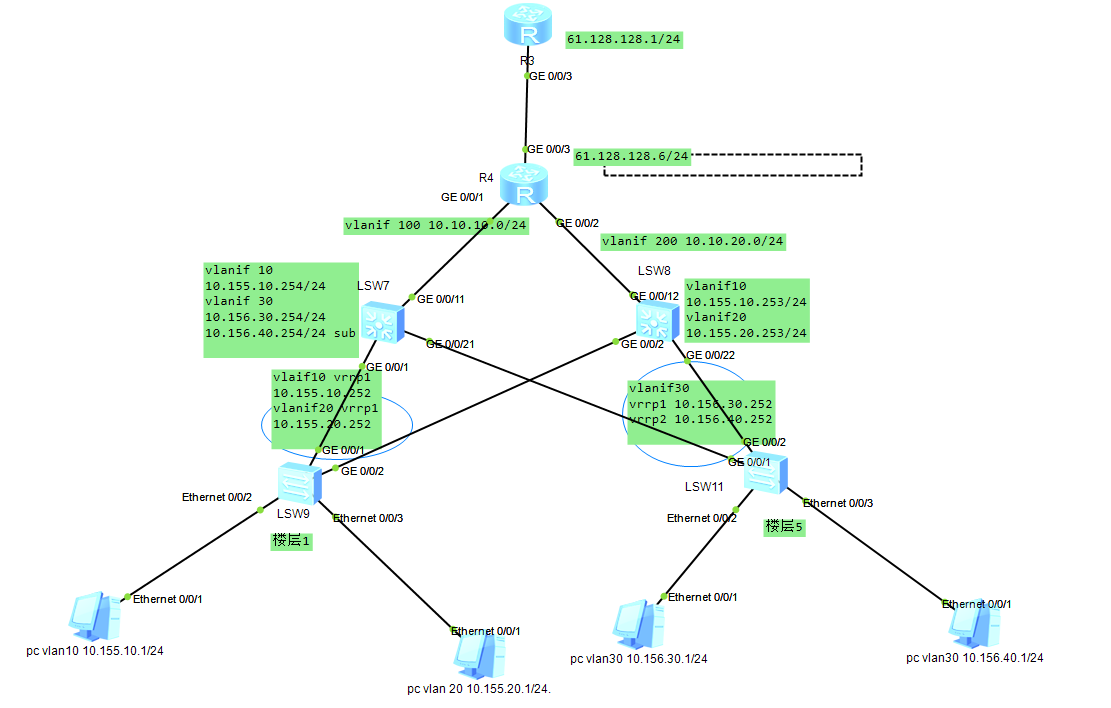
其实说白了就是做线路冗余,达到热备切换。
组网需求:
楼层1和楼层2分别通过两条线路做冗余接入交换机(本示例只考虑vrrp,暂不考虑其他方面)。当其中一段链路故障时,能通过另外一条链路传输。
配置信息:
<lsw9>dis cu

#

sysname lsw9

#

vlan batch 10 20

#

stp mode stp

#

interface Ethernet0/0/2

 port link-type access

 port default vlan 10

#

interface Ethernet0/0/3

 port link-type access

 port default vlan 20

#

interface GigabitEthernet0/0/1

 port link-type trunk

 port trunk allow-pass vlan 10 20

#

interface GigabitEthernet0/0/2

 port link-type trunk

 port trunk allow-pass vlan 10 20

 stp instance 0 cost 200000000

#

return

<lsw9>
--------------------------
<lsw11>dis cu

#

sysname lsw11

#

vlan batch 30

#

stp mode stp

#

interface Ethernet0/0/2

 port link-type access

 port default vlan 30

#

interface Ethernet0/0/3

 port link-type access

 port default vlan 30

#

interface GigabitEthernet0/0/1

 port link-type trunk

 port trunk allow-pass vlan 30

 stp instance 0 cost 200000000

#

interface GigabitEthernet0/0/2

 port link-type trunk

 port trunk allow-pass vlan 30

#

return

<lsw11>
-------------------------
<lsw7>dis cu

#

sysname lsw7

#

vlan batch 10 20 30 100

#

stp mode stp

#

interface Vlanif1

#

interface Vlanif10

 description to 1 L

 ip address 10.155.10.254 255.255.255.0

 vrrp vrid 1 virtual-ip 10.155.10.252

 vrrp vrid 1 priority 120

 vrrp vrid 1 preempt-mode timer delay 20

#

interface Vlanif20

 ip address 10.155.20.254 255.255.255.0

 vrrp vrid 1 virtual-ip 10.155.20.252

 vrrp vrid 1 priority 120

 vrrp vrid 1 preempt-mode timer delay 20

#

interface Vlanif30

 description to 5 L

 ip address 10.156.40.254 255.255.255.0

 ip address 10.156.30.254 255.255.255.0 sub

 vrrp vrid 1 virtual-ip 10.156.30.252

 vrrp vrid 2 virtual-ip 10.156.40.252

 vrrp vrid 2 priority 120

 vrrp vrid 2 preempt-mode timer delay 20

#

interface Vlanif100

 ip address 10.10.10.1 255.255.255.0

#

interface MEth0/0/1

#

interface GigabitEthernet0/0/1

 port link-type access

 port default vlan 100

#

interface GigabitEthernet0/0/11

 port link-type trunk

 port trunk pvid vlan 100

 port trunk allow-pass vlan 2 to 4094

#

interface GigabitEthernet0/0/21

 port link-type trunk

 port trunk allow-pass vlan 30

#

ospf 1

 area 0.0.0.0

  network 10.10.10.0 0.0.0.255

  network 10.155.0.0 0.0.255.255

  network 10.156.0.0 0.0.255.255

#

return
--------------------------------------
<lsw8>dis cu

#

sysname lsw8

#

vlan batch 10 20 30 200

#

stp mode stp

#

interface Vlanif1

#

interface Vlanif10

 description to 1 L

 ip address 10.155.10.253 255.255.255.0

 vrrp vrid 1 virtual-ip 10.155.10.252

#

interface Vlanif20

 description to 1 L

 ip address 10.155.20.253 255.255.255.0

 vrrp vrid 1 virtual-ip 10.155.20.252

#

interface Vlanif30

 description to 5 L

 ip address 10.156.30.253 255.255.255.0

 ip address 10.156.40.253 255.255.255.0 sub

 vrrp vrid 1 virtual-ip 10.156.30.252

 vrrp vrid 1 priority 120

 vrrp vrid 1 preempt-mode timer delay 20

 vrrp vrid 2 virtual-ip 10.156.40.252

#

interface Vlanif200

 ip address 10.10.20.1 255.255.255.0

#

interface MEth0/0/1

#

interface GigabitEthernet0/0/1

#

interface GigabitEthernet0/0/2

 port link-type trunk

 port trunk allow-pass vlan 10 20

#

interface GigabitEthernet0/0/12

 port hybrid pvid vlan 200

 port hybrid tagged vlan 1 to 4094

#

interface GigabitEthernet0/0/22

 port link-type trunk

 port trunk allow-pass vlan 30

#

ospf 1

 area 0.0.0.0

  network 10.155.0.0 0.0.255.255

  network 10.156.0.0 0.0.255.255

  network 10.10.20.0 0.0.0.255

#

return

<lsw8>
-----------------
<R4>dis cu

#

sysname R4

#

stp instance 0 root primary

stp enable

#

interface GigabitEthernet0/0/1

 ip address 10.10.10.254 255.255.255.0

 stp enable

#

interface GigabitEthernet0/0/2

 ip address 10.10.20.254 255.255.255.0

 stp enable

#

interface GigabitEthernet0/0/3

 ip address 61.128.128.6 255.255.255.0

#

return

<R4>
参考:
http://www.023wg.com/kkxpz/85.html(以上内容转自此篇文章)
华为交换机VRRP配置实例收集(转)的更多相关文章
- 华为交换机MSTP+VRRP配置实例说明文档
华为交换机MSTP+VRRP配置实例说明文档 拓扑图 IP地址规划表 设备名称 设备接口 对端设备 对端接口 VLAN VLAN /接口地址 备注 SW0 GE0/0/23 SW2 GE0/0/23 ...
- 华为交换机sflow配置
华为交换机sflow功能配置 1.配置交换机的sflow流发送 [系统视图]sflow agen ip x.x.x.x 设置sflow输出源 [系统视图]sflow ...
- 华为交换机-SNMP配置
1.1 SNMP基础配置 <switch>system-view 进入交换机的配置模式 [switch]snmp-agent 使能snmp服务 [switch]snmp-agent ...
- 华为交换机VRRP 综合配置示例
组网需求: 楼层1和楼层2分别通过两条线路做冗余接入交换机(本示例只考虑vrrp,暂不考虑其他方面).当其中一段链路故障时,能通过另外一条链路传输. 配置信息: <lsw9>dis cu ...
- 华为交换机netstream配置
1.配置交换机的流发送 [系统视图]ip netstream timeout active 100 流活跃时间 [系统视图]ip netstream timeout inactive ...
- 华为交换机telnet配置
1.在路由器上和交换机相连的借口上配置一个IP地址:比如192.168.1.1 24 2.在交换机上配置如下:<switch>system-view[switch]vlan 10[swit ...
- 华为交换机如何配置SSH远程登录,一分钟秒学会
从事网络运维工作的小伙伴们都知道,在交换机正式上线时,必须完成配置SSH远程登录,这样做目的是为了日后,维护方便,不需要每次登录设备都要跑到机房,这样既不现实,又费事. 远程登录方式 目前网络设备中主 ...
- 华为交换机SSH配置
设备:S5700 一.在本地设备服务端生成秘钥对 [Huawei]rsa local-key-pair create 二.配置VTY [Huawei]user-interface vty 0 4进入虚 ...
- MSTP+ VRRP 交换机的 配置过程
配置思路采用以下思路配置: 1.在处于环形网络中的交换设备上配置MSTP基本功能,包括:a.配置MST域并创建多实例,配置VLAN2映射到MSTI1,VLAN3映射到MSTI2,实现流量的负载分担. ...
随机推荐
- HDU 3371 Connect the Cities 最小生成树(和关于sort和qsort的一些小发现)
解题报告:有n个点,然后有m条可以添加的边,然后有一个k输入,表示一开始已经有k个集合的点,每个集合的点表示现在已经是连通的了. 还是用并查集加克鲁斯卡尔.只是在输入已经连通的集合的时候,通过并查集将 ...
- Linux驱动技术(五) _设备阻塞/非阻塞读写【转】
转自:http://www.cnblogs.com/xiaojiang1025/p/6377925.html 等待队列是内核中实现进程调度的一个十分重要的数据结构,其任务是维护一个链表,链表中每一个节 ...
- elasticsearch安装kibana插件
1.下载 2.解压将解压后的文件放到D:\DevTools\kibana-4.6.0-windows-x86路径下 3.修改配置文件D:\DevTools\kibana-4.6.0-windows-x ...
- java 编译与运行
javac 编译 .java文件 javac file.java //将file.java 编译为 file.classjavac -d folder file.java //将file.java ...
- java 完全解耦
只要有一个方法操作的是类而非接口,那么你就只能使用这个类及其子类,如果你想要将这个方法应用于不在此继承结构中的某个类,那么你就会触霉头,接口可以在很大程度上放宽这种限制,因此,我们可以编写可服用性更好 ...
- Visual C++中最常用的类与API函数
这篇文章能让初学者快速了解visual C++ MFC中常见的核心的类与函数,虽然全部看下来有点枯燥,但对初学者快速了解MFC的框架结构很有好处. 常用类 CArchive类:用于二进制保存档案 CB ...
- vuex 的使用
用于多组件共享状态,如果不打算开发大型单页应用,使用 Vuex 可能是繁琐冗余的.确实是如此——如果应用够简单,您最好不要使用 Vuex.可使用简单Bus总线的方式来管理共享的数据详见(http:// ...
- 【转】卖萌的大牛你桑不起啊 ——记CVPR2011一篇极品文章
来源:http://blog.renren.com/share/228707015/7197269922 作者 : 庞宇 CVPR2011正在如火如荼的进行中,在网上能看到的部分文章中,我终于找到一篇 ...
- 在win7_64bit + ubuntu-12.04-desktop-amd64+VMware-workstation-full-10.0.1-1379776平台上安装ns-allinone-2.35
step1. ns-allinone-2.35的下载地址:http://www.isi.edu/nsnam/ns/ns-build.html#allinone step2. 在虚拟机中打开term ...
- hdu 2923 map+Floyd 拉破车
有向图 具体方向看箭头 从起点到指定城市拉破车,一个城市可能有多个破车,一次只能拉一辆破车 也就是到了指定地点后要回到起点 假如有100辆破车 但是只有一个城市有 就得在起点与这个城市间往返100次所 ...