
在centos7上安装elasticSearch
因为elasticsearch是用java编写的,所以需要先安装JDK;
jdk1.8的安装:安装指导
elasticsearch的下载和安装
一、下载elasticSearch
1、下载地址: http://www.elastic.co/cn/downloads (本篇下载 elasticsearch 5.6.6)

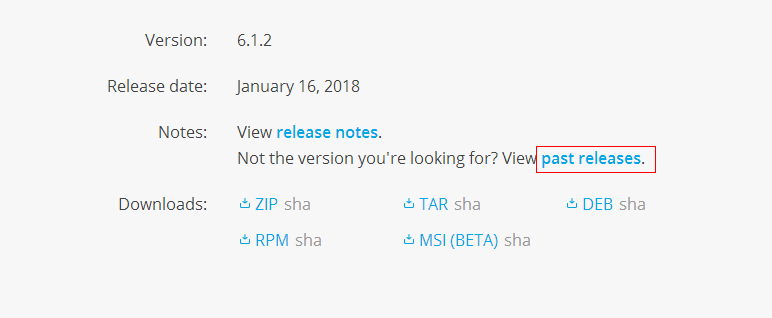
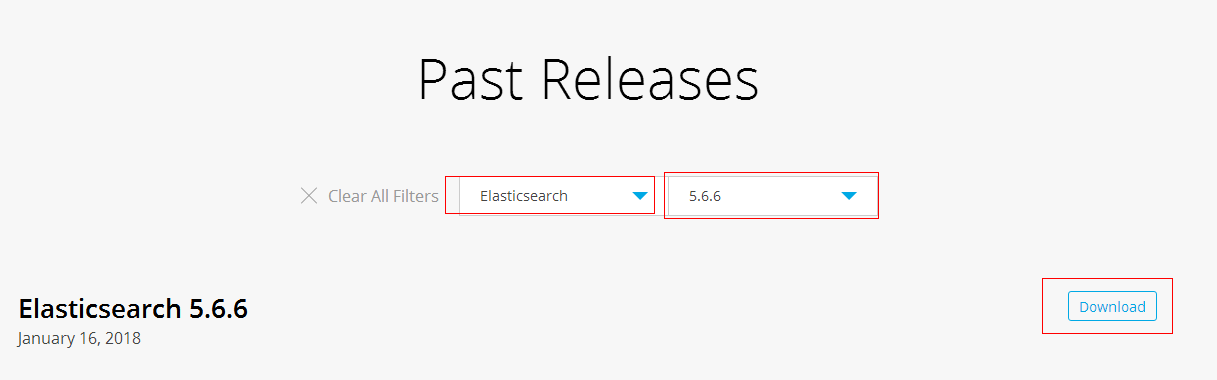
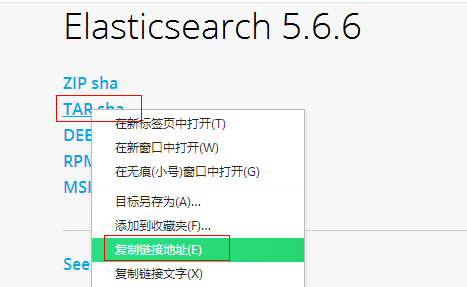
2、使用 wget 命令下载
wget https://artifacts.elastic.co/downloads/elasticsearch/elasticsearch-5.6.6.tar.gz
二、安装elasticsearch
1、解压elasticsearch到 /usr/local 目录下
tar -zxvf elasticsearch-5.6..tar.gz -C /usr/local/
2、进入到解压的elasticsearch包目录下:cd /usr/local/elasticsearch-5.6.6/
3、启动 ./bin/elasticsearch -d #参数 -d 指的是后台运行

4、使用 curl http://localhost:9200/ 查看是否运行,如果返回如下信息则标示运行正常:
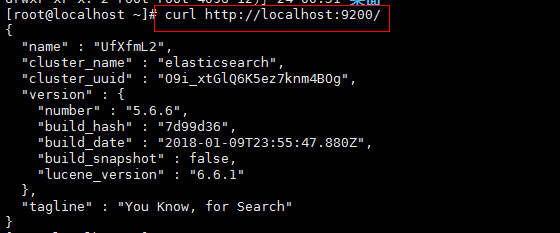
5、elasticsearch默认restful-api的端口是9200 不支持Ip地址,只能在本机用http://localhost:9200来访问。如果需要改变,需要修改配置文件。
默认情况下 Elasticsearch 的 RESTful 服务只有本机才能访问,也就是说无法从主机访问虚拟机中的服务。
可以修改 /etc/elasticsearch/config/elasticsearch.yml 文件,将注释的 network.host 和 http.port 放开,并配置正确的IP;
cd /usr/local/elasticsearch-5.6.

vim config/elasticsearch.yml
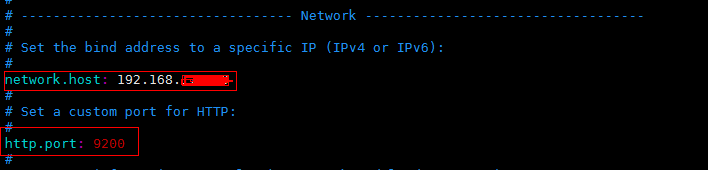
6、先将Elasticsearch 关闭,然后启动;
关闭方法:输入命令: ps -ef | grep elasticsearch ,找到进程,然后kill掉就行了;
启动方法:输入命令:su elastic , 然后输入 ./bin/elasticserach -d
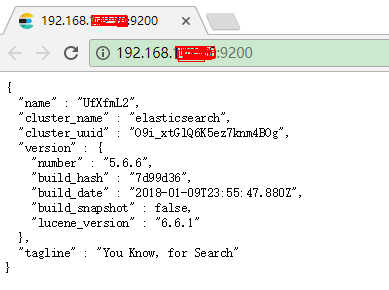
7、在谷歌浏览器中打开:http://{server_IP}:9200/
三、问题
1、问题一:启动elasticsearch报错如下:Java HotSpot(TM) 64-Bit Server VM warning: INFO: os::commit_memory(0x0000000085330000, 2060255232, 0) failed; error='Cannot allocate memory' (errno=12)

解决方法:
由于elasticsearch5.0默认分配jvm空间大小为2g,修改jvm空间分配: vim config/jvm.options
-Xms2g

-Xmx2g
修改为
-Xms512m

-Xmx512m
2、问题二:启动elasticsearch报错如下:org.elasticsearch.bootstrap.StartupException: java.lang.RuntimeException: can not run elasticsearch as root
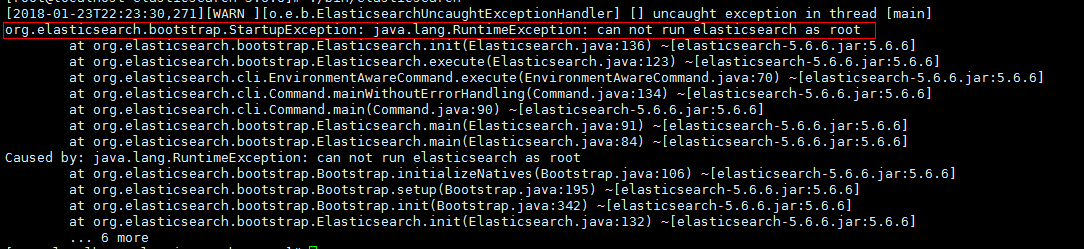
解决方法:
原因是elasticsearch默认是不支持用root用户来启动的,需要添加专门的用户。
cd /usr/local

useradd elastic

chown -R elastic:elastic elasticsearch-5.6./

su elastic

./elasticsearch-5.6./bin/elasticsearch -d
3、问题三:启动报错如下
ERROR: [3] bootstrap checks failed
[1]: max file descriptors [4096] for elasticsearch process is too low, increase to at least [65536]
[2]: max number of threads [1775] for user [elastic] is too low, increase to at least [2048]
[3]: max virtual memory areas vm.max_map_count [65530] is too low, increase to at least [262144]
解决方法:
(1)[1]: max file descriptors [4096] for elasticsearch process is too low, increase to at least [65536]
[2]: max number of threads [1775] for user [elastic] is too low, increase to at least [2048]
先切换到root账户下面,使用 vi /etc/security/limits.conf ,增加如下内容
elastic soft nofile

elastic hard nofile

elastic soft nproc

elastic hard nproc
(2)[3]: max virtual memory areas vm.max_map_count [65530] is too low, increase to at least [262144]
使用 vim /etc/sysctl.conf ,增加如下的内容
vm.max_map_count=
输入:sysctl -p ,如下所示

(3)重新启动elasticsearch,
su elastic

cd /usr/local/elasticsearch-5.6.

./bin/elasticsearch -d
在centos7上安装elasticSearch的更多相关文章
- 在centos7上安装Jenkins
在centos7上安装Jenkins 安装 添加yum repos,然后安装 sudo wget -O /etc/yum.repos.d/jenkins.repo http://pkg.jenkins ...
- 在Windows上安装Elasticsearch 5.0
在windows上安装Elasticsearch Elasticsearch可以使用.zip软件包安装在Windows上. elasticsearch-service.bat命令,它将设置Elasti ...
- 在 CentOS7 上安装 zookeeper-3.4.9 服务
在 CentOS7 上安装 zookeeper-3.4.9 服务 1.创建 /usr/local/services/zookeeper 文件夹: mkdir -p /usr/local/service ...
- 在 CentOS7 上安装 MongoDB
在 CentOS7 上安装 MongoDB 1 通过 SecureCRT 连接至 CentOS7 服务器: 2 进入到 /usr/local/ 目录: cd /usr/local 3 在当前目录下创建 ...
- 在 CentOS7 上安装 MySQL5.7
在 CentOS7 上安装 MySQL5.7 1 通过 SecureCRT 连接到阿里云 CentOS7 服务器: 2 进入到目录 /usr/local/ 中: cd /usr/local/ 3 创建 ...
- 在 CentOS7 上安装 Tomcat9
在 CentOS7 上安装 Tomcat9 1 通过 SecureCRT 连接到阿里云 CentOS7 服务器: 2 进入到目录 /usr/local/ 中: cd /usr/local/ 3 创建目 ...
- 在CentOS7上安装JDK1.8
在CentOS7上安装JDK1.8 1 通过 SecureCRT 连接到阿里云 CentOS7 服务器: 2 进入到目录 /usr/local/ 中: cd /usr/local/ 3 创建目录 to ...
- 在Centos7上安装漏洞扫描软件Nessus
本文摘要:简单叙述了在Centos7上安装Nessus扫描器的过程 Nessus 是目前全世界最多人使用的系统漏洞扫描与分析软件,Nessus的用户界面是基于Web界面来访问Nessus漏洞扫描器 ...
- 如何在centos7上安装源码包
在我们使用linux的过程中,有很多程序是通过红帽官网给的系统中安装的,但是一般来说,系统更新的速度比较慢,如果这个时候我们又想用最新版的该怎么办呢?总不能一直等系统升级吧╮(╯﹏╰)╭所以,我们可以 ...
随机推荐
- unity 2048Game
将游戏分为四个脚本,将数据和界面分开,这是开发模式常用的类似于mvc模式,但由于我们只用一个二位数组就可以保存数据,所以讲m省略 GameControllor 控制游戏数据的脚本, using Uni ...
- MVC模式浅谈
MVC模式浅谈 一.MVC模式概述 模型-视图-控制器(MVC模式)是一种非常经典的软件架构模式,在UI框架和UI设计思路中扮演着非常重要的角色.从设计模式的角度来看,MVC模式是 一种复合模式,它将 ...
- hdu1573-X问题-(扩展欧几里得定理+中国剩余定理)
X问题 Time Limit: 1000/1000 MS (Java/Others) Memory Limit: 32768/32768 K (Java/Others)Total Submiss ...
- springboot-day01-引入如何读取配置文件以及helloWorld
前言:该文章是紧接上一篇文章http://www.cnblogs.com/newAndHui/p/8058527.html 3.3. 实战 3.3.1.读取外部的资源配置文件 通过@PropertyS ...
- 1.2、CDH 搭建Hadoop在安装之前(CDH基于包的安装所需的权限)
CDH基于包的安装所需的权限 以下部分描述了使用Cloudera Manager进行基于软件包的CDH安装的用户权限要求.这些要求是安装和管理包和服务的标准UNIX系统要求. 所需特权 sudo由Cl ...
- 执行SDK的aapt报错./aapt: /lib64/libc.so.6: version `GLIBC_2.14' not found (required by ./aapt)
问题| 执行SDK下的aapt报错./aapt: /lib64/libc.so.6: version `GLIBC_2.14' not found (required by ./aapt) ../ ...
- Redis数据结构的多种用法
分布式锁(string) setnx key value,当key不存在时,将 key 的值设为 value ,返回1.若给定的 key 已经存在,则setnx不做任何动作,返回0. 当setnx返回 ...
- cloudera cdh5.13.0 vmware 快速安装
1. 从官网上载VMWARE VM快速安装包 https://www.cloudera.com/downloads/quickstart_vms/5-12.html 2. 下载后的安装包,解压之后得到 ...
- Numpy函数库基础
利用Numpy函数库构造4*4随机数组,然后将数组转化为矩阵,然后矩阵与其逆矩阵相乘,计算机处理的误差 from numpy import * random.rand(4,4) print(rando ...
- 【转】 UI自动化测试的关注点
我发现了,大家极度关心自动化测试,尤其是UI自动化测试,虽然现在作为专项测试,离开这些越来越远了,但总能遥想以前,我总能想起自己做nokia的WindowsLive的ui自动化,做web的自动化测试, ...