
php版本CKEditor 4和CKFinder安装及配置
下载并解压CKEditor 4和CKFinder
CKEditor 4下载地址:https://ckeditor.com/cke4/builder,选择自定义的版本,记得加上中文语言包
CKFinder下载地址:https://download.cksource.com/CKFinder/CKFinder%20for%20PHP/3.4.4/ckfinder_php_3.4.4.zip
查看CKEditor的示例文件,http://127.0.0.1/ckeditor/samples/
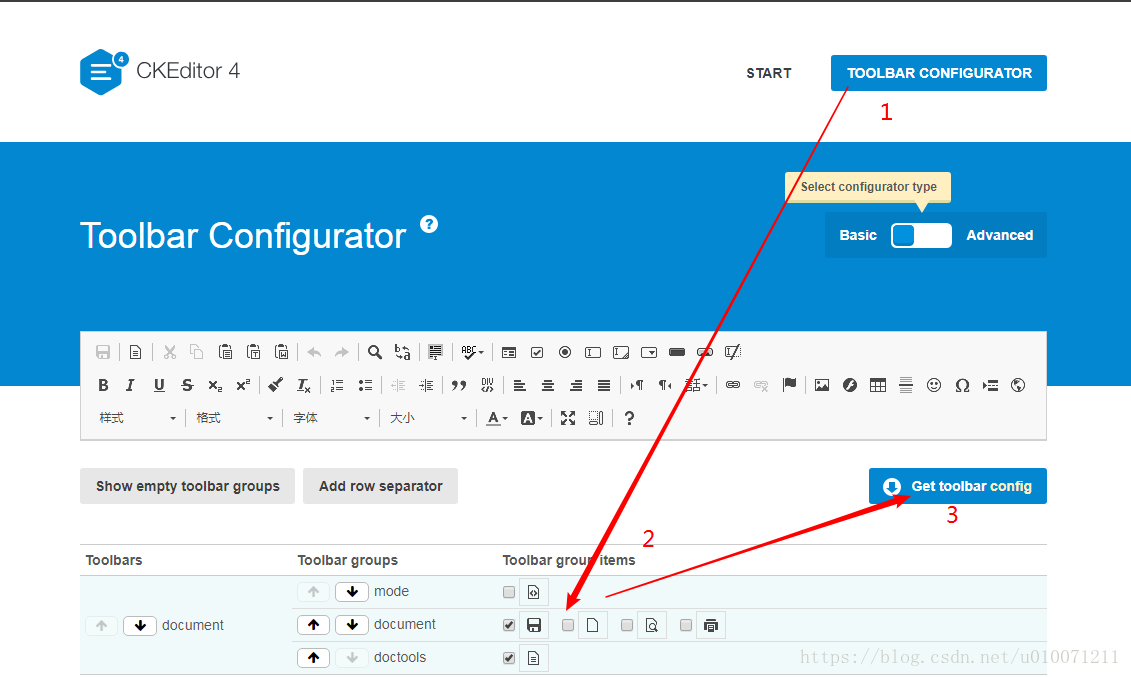
根据你的需求选择自定义工具栏,选好之后点击Get toolbar config,把这个配置代码复制,备用
在CKEditor 4同级目录新建index.html,和myconfig.js
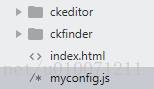
index.html的源代码为:
<!DOCTYPE html>

<html>

<head>

	<meta charset="utf-8">

	<title>CKEditor Sample</title>

	<!-- 加载ckeditor.js -->

	<script src="./ckeditor/ckeditor.js"></script>

</head>

<body id="main">

	<textarea name="editor1" id="editor1" cols="30" rows="10">

		这是一个CKEditor测试

	</textarea>

<script>

	// 这样就可以使用啦

	CKEDITOR.replace('editor1',{

		//toolbar : 'Basic',            //方式1,在此直接写配置

		//uiColor : '#9ab8f5'

		customConfig : '../myconfig.js'  //方式2,加载配置js,相对于ckeditor.js的路径

	});

</script>

</body>

</html>
myconfig.js的源代码为:
//特别注意,每次修改都要ctrl+f5 清除缓存后查看

CKEDITOR.editorConfig = function( config ) {

    config.language =  "zh-cn" ;  //语言,对应ckeditor下的lang文件夹

	config.uiColor = '#9ab8f5';   //编辑器颜色

	config.width = '900';         //编辑器宽

	config.height = '500';        //编辑器高

	//自定义工具栏,刚才从示例哪里复制的代码

	config.toolbarGroups = [

		'/',

		{ name: 'document', groups: [ 'mode', 'document', 'doctools' ] },

		{ name: 'clipboard', groups: [ 'clipboard', 'undo' ] },

		{ name: 'editing', groups: [ 'find', 'selection', 'spellchecker', 'editing' ] },

		{ name: 'forms', groups: [ 'forms' ] },

		{ name: 'basicstyles', groups: [ 'basicstyles', 'cleanup' ] },

		{ name: 'paragraph', groups: [ 'list', 'indent', 'blocks', 'align', 'bidi', 'paragraph' ] },

		{ name: 'links', groups: [ 'links' ] },

		{ name: 'insert', groups: [ 'insert' ] },

		{ name: 'styles', groups: [ 'styles' ] },

		{ name: 'colors', groups: [ 'colors' ] },

		{ name: 'tools', groups: [ 'tools' ] },

		{ name: 'others', groups: [ 'others' ] },

		{ name: 'about', groups: [ 'about' ] }

	];

	config.removeButtons = 'NewPage,Save,Preview,Cut,Copy,Paste,PasteText,PasteFromWord,Find,Replace,SelectAll,Scayt,HiddenField,Form,Radio,TextField,Textarea,Select,Button,ImageButton,Outdent,Indent,Subscript,Superscript,Strike,Blockquote,CreateDiv,BidiLtr,BidiRtl,Language,Anchor,Table,HorizontalRule,Smiley,SpecialChar,PageBreak,Iframe,ShowBlocks,About,Source';

	//ckfinder的相关配置项

	config.filebrowserBrowseUrl =  './ckfinder/ckfinder.html' ;

    config.filebrowserImageBrowseUrl =  './ckfinder/ckfinder.html?type=Images' ;

    config.filebrowserFlashBrowseUrl =  './ckfinder/ckfinder.html?type=Flash' ;

    config.filebrowserUploadUrl =  './ckfinder/core/connector/php/connector.php?command=QuickUpload&type=Files' ;

    config.filebrowserImageUploadUrl =  './ckfinder/core/connector/php/connector.php?command=QuickUpload&type=Images' ;

    config.filebrowserFlashUploadUrl =  './ckfinder/core/connector/php/connector.php?command=QuickUpload&type=Flash' ;

    config.filebrowserWindowWidth = '600';     //文件浏览宽

    config.filebrowserWindowHeight = '300';     //文件浏览宽

};
网上搜索有同学总结了最全的配置项,详见:https://blog.csdn.net/com185272358/article/details/24814109
图片上传,点击浏览服务器,会出下面的提示
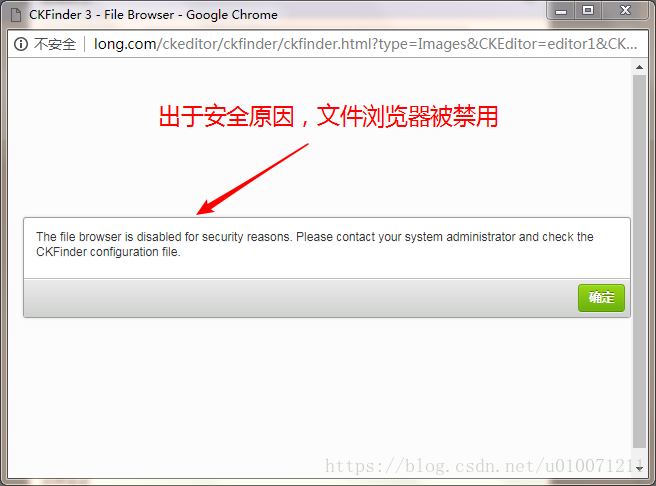
修改ckfinder文件夹下config.php,将29行的return false;改为return ture;

ckfinder即可正常使用,上传图片的默认保存位置为根目录下的ckfinder->userfiles->images。
php版本CKEditor 4和CKFinder安装及配置的更多相关文章
- mongodb4版本,windows下的安装与配置(史上步骤最全最详细+图解)
安装的是4.2.1版本,安装途中出现过很多错误,找遍各种博客基本没能解决 1.mongodb安装的官方地址: https://www.mongodb.com/download-center/commu ...
- win10 免安装版本的MySQL的下载安装和配置
一.概述 网上找了好多,发现好多不是linux系统的就是与现在新版本有出入,自己做小项目亲手实践了一下,供大家借鉴. MySQL版本:mysql-5.7.17 下载方法: 1.MySQL官方网址htt ...
- win10免安装版本的MySQL的下载安装和配置
下载mysql-xxx.zip(免安装版) 解压到自己想要的目录下(我的是D:\mysql\),打开mysql-5.7.21-winx64文件夹,新建my.ini文件,输入: [mysql] # 设置 ...
- PostgreSQL 9.6.2版本在centOS下的安装和配置
1.如果有用yum安装过旧版,卸载掉: yum remove postgresql* 2.更新一下yum: sudo yum update 3.去 官网 找到 适合你系统 的资源的下载地址,然后使用w ...
- hdfs-over-ftp安装与配置
hdfs-over-ftp是一个开源,简单易用的实现了对HDFS系统的下载和上传功能的小工具.可以作为管理工具来使用,快捷方便. 1 安装jdk(1.6以上版本)并配置环境变量分别执行java -ve ...
- Synergy使用(安装及配置)
最近在看一篇文章,找到了一款符合我需求的软件:Synergy. Synergy可以在多台电脑上进行鼠标与键盘及剪贴板(只能共享文本)的共享.不用每台电脑都插上这些外设了... 共享文件可以参看微软出品 ...
- mysql nonInstall 版本的安装与配置
最近用到mysql,发现如果想使用最新版本64 bit mysql 需要独特的配置和使用方式 结合最近的研究总结一下安装过程. 首先下载:http://dev.mysql.com/downloads/ ...
- Centos 6.5 SNMP客户端安装及配置版本net-snmp-5.7.3
Centos 6.5 SNMP客户端安装及配置SNMP版本:net-snmp-5.7.3.tar.gz1.下载软件cd /usr/local/srcyum -y install gccwget htt ...
- windows版本的phantomjs-2.1.1-windows安装
windows版本的phantomjs-2.1.1-windows安装 1.下载 链接:http://pan.baidu.com/s/1dEUl6dN 密码:oij8 2.安装 下载好之后解压放到某个 ...
随机推荐
- 安装【Jenkins】
前言 jenkins的一款持续集成工具, 它可以做的事情很多,其中一个主要的功能就是简化部署流程 回想一下我们的发布流程: 1.本地把项目打包 ...
- Java基础-零拷贝技术应用案例
Java基础-零拷贝技术应用案例 作者:尹正杰 版权声明:原创作品,谢绝转载!否则将追究法律责任. 零拷贝技术在Hadoop生态圈中很多组件得到应用,典型的比如kafka组件,它就很成功的应用了零拷贝 ...
- MySQL存储引擎对比
MySQL存储引擎对比 作者:尹正杰 版权声明:原创作品,谢绝转载!否则将追究法律责任. 一.MySQL的存储引擎 大家应该知道MySQL的存储引擎应该是表级别的概念,因为我们无法再创建databas ...
- vue ssr服务端渲染
SSR:Server Side Rendering(服务端渲染) 目的是为了解决单页面应用的 SEO 的问题,对于一般网站影响不大,但是对于论坛类,内容类网站来说是致命的,搜索引擎无法抓取页面相关内容 ...
- 浅谈 js 下 with 对性能的影响
这几天多次看到有博主们在写 with 的文章,这货确实非常方便,但是却是个性能杀手,所以一直都是上不得台面的.那么他究竟会让效率低下到什么程度呢?先来看下 with 是如何的便捷吧.. // 正常调用 ...
- html之div始终停留在屏幕中间部分
需求: 使得某一个div始终停留在屏幕中间 实现: <!DOCTYPE html PUBLIC "-//W3C//DTD XHTML 1.0 Transitional//EN" ...
- 环形缓冲区-模仿linux kfifo【转】
转自:https://blog.csdn.net/vertor11/article/details/53741681 struct kfifo{ uint8_t *buffer; uint32_t i ...
- ORACLE数据库数据文件转移方法(不同于move方法)
1) 手动拷贝要转移的数据数据文件'd:\OracleData\GWTABLE42.DBF'到新的位置'E:\OracleData\GWTABLE42.DBF'. 2) 把数据文件所属的表空间Offl ...
- NET调用Com组件事例
http://blog.csdn.net/shizhiyingnj/article/details/1507948 在程序设计中,往往通过键盘的某个按键来完成相关操作! 下面就来说明如何实现: 1.引 ...
- 你会使用super()吗?你确定你了解它吗?
我们经常在类的继承当中使用super(), 来调用父类中的方法.例如下面: class A: def func(self): print('OldBoy') class B(A): def func( ...