
openerp学习笔记 对象间关系【多对一(一对一)、一对多(主细结构)、多对多关系、自关联关系(树状结构)】
1.多对一(一对一)关系:采购单与供应商之间的关系
'partner_id':fields.many2one('res.partner', 'Supplier', required=True, states={'confirmed':[('readonly',True)], 'approved':[('readonly',True)],'done':[('readonly',True)]},
change_default=True, track_visibility='always'),
典型的录入界面: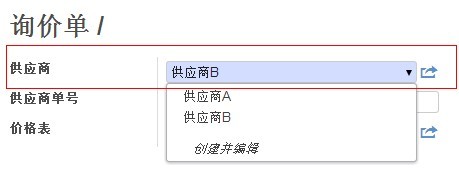
2.一对多(主细结构)关系:采购单主表与采购单明细表之间的关系
'order_line': fields.one2many('purchase.order.line', 'order_id', 'Order Lines', states={'approved':[('readonly',True)],'done':[('readonly',True)]}),
典型的录入界面:
对应的XML定义:
                        <page string="Purchase Order">

                            <field name="order_line">

                                <tree string="Purchase Order Lines" editable="bottom">

                                    <field name="product_id" on_change="onchange_product_id(parent.pricelist_id,product_id,0,product_uom,parent.partner_id, parent.date_order,parent.fiscal_position,date_planned,name,price_unit,context)"/>

                                    <field name="name"/>

                                    <field name="date_planned"/>

                                    <field name="company_id" groups="base.group_multi_company" widget="selection"/>

                                    <field name="account_analytic_id" groups="purchase.group_analytic_accounting" domain="[('type','not in',('view','template'))]"/>

                                    <field name="product_qty" on_change="onchange_product_id(parent.pricelist_id,product_id,product_qty,product_uom,parent.partner_id,parent.date_order,parent.fiscal_position,date_planned,name,price_unit,context)"/>

                                    <field name="product_uom" groups="product.group_uom" on_change="onchange_product_uom(parent.pricelist_id,product_id,product_qty,product_uom,parent.partner_id, parent.date_order,parent.fiscal_position,date_planned,name,price_unit,context)"/>

                                    <field name="price_unit"/>

                                    <field name="taxes_id" widget="many2many_tags" domain="[('parent_id','=',False),('type_tax_use','!=','sale')]"/>

                                    <field name="price_subtotal"/>

                                </tree>

                            </field>

                            <group class="oe_subtotal_footer oe_right">

                                <field name="amount_untaxed" widget="monetary" options="{'currency_field': 'currency_id'}"/>

                                <field name="amount_tax" widget="monetary" options="{'currency_field': 'currency_id'}"/>

                                <div class="oe_subtotal_footer_separator oe_inline">

                                    <label for="amount_total"/>

                                    <button name="button_dummy"

                                        states="draft" string="(update)" type="object" class="oe_edit_only oe_link"/>

                                </div>

                                <field name="amount_total" nolabel="1" class="oe_subtotal_footer_separator" widget="monetary" options="{'currency_field': 'currency_id'}"/>

                            </group>

                            <div class="oe_clear"/>

                            <field name="notes" class="oe_inline" placeholder="Terms and conditions..."/>

                        </page>
反过来,采购单明细与采购单主表之间为多对一关系
'order_id': fields.many2one('purchase.order', 'Order Reference', select=True, required=True, ondelete='cascade'),
其中 ondelete='cascade' 表示开启级联删除,即删除采购单主表时自动删除采购单明细表。
3.多对多关系:客户与客户类型之间的关系,自动生成关联表 res_partner_res_partner_category_rel
'category_id': fields.many2many('res.partner.category', id1='partner_id', id2='category_id', string='Tags'),
典型的录入界面1:
对应的XML定义:
<field name="category_id" widget="many2many_tags" placeholder="Tags..."/>
典型的录入界面2: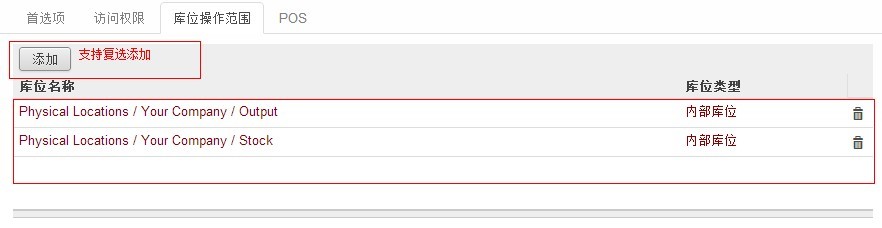
对应的XML定义:
<page string="库位操作范围">
<field name="location_ids" nolabel="1" />
</page>
4.自关联关系:OpenERP客户与联系人之间的关系,res.partner 与 res.partner 自关联产生 many2one 关系(parent_id)和 one2many 关系(child_ids)
class res_partner(osv.osv, format_address):
_description = 'Partner'
_name = "res.partner"
# indirection to avoid passing a copy of the overridable
method when declaring the function field
_commercial_partner_id = lambda self, *args, **kwargs:
self._commercial_partner_compute(*args, **kwargs)
_order = "name"
_columns =
{
'name': fields.char('Name',
size=128, required=True,
select=True),
'date':
fields.date('Date', select=1),
'title': fields.many2one('res.partner.title',
'Title'),
'parent_id':
fields.many2one('res.partner', 'Related
Company'),
'child_ids':
fields.one2many('res.partner', 'parent_id', 'Contacts',
domain=[('active','=',True)]), # force "active_test" domain to bypass _search()
override
'ref':
fields.char('Reference', size=64,
select=1),
'lang':
fields.selection(_lang_get,
'Language',
help="If the selected language is loaded in the system, all documents related to
this contact will be printed in this language. If not, it will be
English."),
'tz':
fields.selection(_tz_get, 'Timezone',
size=64,
help="The partner's timezone, used to output proper date and time values inside
printed reports.
"
"It is important to set a value for this field. You should use the same timezone
"
"that is otherwise used to pick and render date and time values: your computer's
timezone."),
'tz_offset':
fields.function(_get_tz_offset, type='char', size=5, string='Timezone offset',
invisible=True),
'user_id':
fields.many2one('res.users', 'Salesperson', help='The internal user that is in
charge of communicating with this contact if
any.'),
'vat': fields.char('TIN',
size=32, help="Tax Identification Number. Check the box if this contact is
subjected to taxes. Used by the some of the legal
statements."),
'bank_ids':
fields.one2many('res.partner.bank', 'partner_id',
'Banks'),
'website':
fields.char('Website', size=64, help="Website of Partner or
Company"),
'comment':
fields.text('Notes'),
'category_id': fields.many2many('res.partner.category', id1='partner_id',
id2='category_id',
string='Tags'),
'credit_limit': fields.float(string='Credit
Limit'),
'ean13':
fields.char('EAN13', size=13),
'active':
fields.boolean('Active'),
'customer': fields.boolean('Customer', help="Check this box if this contact is a
customer."),
'supplier':
fields.boolean('Supplier', help="Check this box if this contact is a supplier.
If it's not checked, purchase people will not see it when encoding a purchase
order."),
'employee':
fields.boolean('Employee', help="Check this box if this contact is an
Employee."),
'function':
fields.char('Job Position',
size=128),
'type':
fields.selection([('default', 'Default'), ('invoice',
'Invoice'),
('delivery', 'Shipping'), ('contact',
'Contact'),
('other', 'Other')], 'Address
Type',
help="Used to select automatically the right address according to the context in
sales and purchases documents."),
'street': fields.char('Street',
size=128),
'street2':
fields.char('Street2', size=128),
'zip': fields.char('Zip', change_default=True,
size=24),
'city':
fields.char('City', size=128),
'state_id': fields.many2one("res.country.state",
'State'),
'country_id':
fields.many2one('res.country',
'Country'),
'country':
fields.related('country_id', type='many2one', relation='res.country',
string='Country',
deprecated="This field will be removed as of OpenERP 7.1, use country_id
instead"),
'email':
fields.char('Email', size=240),
'phone': fields.char('Phone',
size=64),
'fax':
fields.char('Fax', size=64),
'mobile': fields.char('Mobile',
size=64),
'birthdate':
fields.char('Birthdate', size=64),
'is_company': fields.boolean('Is a Company', help="Check if the contact is a
company, otherwise it is a
person"),
'use_parent_address':
fields.boolean('Use Company Address', help="Select this if you want to set
company's address information for this
contact"),
# image: all image
fields are base64 encoded and
PIL-supported
'image':
fields.binary("Image",
help="This field holds the image used as avatar for this contact, limited to
1024x1024px"),
'image_medium':
fields.function(_get_image,
fnct_inv=_set_image,
string="Medium-sized image", type="binary",
multi="_get_image",
store={
'res.partner': (lambda self, cr, uid, ids, c={}: ids, ['image'],
10),
},
help="Medium-sized image of this contact. It is automatically
"\
"resized as a 128x128px image, with aspect ratio preserved.
"\
"Use this field in form views or some kanban
views."),
'image_small':
fields.function(_get_image,
fnct_inv=_set_image,
string="Small-sized image", type="binary",
multi="_get_image",
store={
'res.partner': (lambda self, cr, uid, ids, c={}: ids, ['image'],
10),
},
help="Small-sized image of this contact. It is automatically
"\
"resized as a 64x64px image, with aspect ratio preserved.
"\
"Use this field anywhere a small image is
required."),
'has_image':
fields.function(_has_image,
type="boolean"),
'company_id':
fields.many2one('res.company', 'Company',
select=1),
'color':
fields.integer('Color Index'),
'user_ids': fields.one2many('res.users', 'partner_id',
'Users'),
'contact_address':
fields.function(_address_display, type='char', string='Complete
Address'),
# technical field used for
managing commercial fields
'commercial_partner_id': fields.function(_commercial_partner_id,
type='many2one', relation='res.partner', string='Commercial
Entity'),
'create_uid':
fields.many2one('res.users', u"创建用户", invisible=False, readonly=True),
#需要在记录中读取该字段或者在视图、打印中显示该字段时,对象中必须包含
}
5.自关联关系(树状结构,无限级):产品类别与父级类别之间的关系,product.category 与 product.category 自关联产生 many2one 关系(parent_id)和 one2many 关系(child_id)
class product_category(osv.osv):
def name_get(self, cr, uid, ids,
context=None):
if
isinstance(ids, (list, tuple)) and not
len(ids):
return []
if isinstance(ids,
(long,
int)):
ids
= [ids]
reads = self.read(cr, uid,
ids, ['name','parent_id'],
context=context)
res =
[]
for record in
reads:
name =
record['name']
if
record['parent_id']:
name = record['parent_id'][1]+' /
'+name
res.append((record['id'], name))
return res
def _name_get_fnc(self, cr, uid, ids,
prop, unknow_none, context=None):
res = self.name_get(cr, uid, ids,
context=context)
return
dict(res)
_name = "product.category"
_description = "Product Category"
_columns =
{
'name': fields.char('Name',
size=64, required=True, translate=True,
select=True),
'complete_name': fields.function(_name_get_fnc, type="char",
string='Name'),
'parent_id':
fields.many2one('product.category','Parent Category', select=True,
ondelete='cascade'),
'child_id':
fields.one2many('product.category', 'parent_id', string='Child
Categories'),
'sequence':
fields.integer('Sequence', select=True, help="Gives the sequence order when
displaying a list of product
categories."),
'type':
fields.selection([('view','View'), ('normal','Normal')], 'Category Type',
help="A category of the view type is a virtual category that can be used as the
parent of another category to create a hierarchical structure."),
'parent_left':
fields.integer('Left Parent', select=1),
'parent_right': fields.integer('Right Parent',
select=1),
}
_defaults =
{
'type' : lambda *a :
'normal',
}
_parent_name = "parent_id"
_parent_store = True
_parent_order = 'sequence,
name'
_order = 'parent_left'
def _check_recursion(self, cr, uid, ids,
context=None):
level =
100
while
len(ids):
cr.execute('select distinct parent_id from product_category where id IN
%s',(tuple(ids),))
ids = filter(None, map(lambda x:x[0],
cr.fetchall()))
if not
level:
return
False
level -= 1
return True
_constraints =
[
(_check_recursion, 'Error ! You
cannot create recursive categories.',
['parent_id'])
]
def
child_get(self, cr, uid, ids):
return [ids]
product_category()
openerp学习笔记 对象间关系【多对一(一对一)、一对多(主细结构)、多对多关系、自关联关系(树状结构)】的更多相关文章
- openerp学习笔记 对象继承,对象初始化数据
1.对象继承 _inherit = "product.product" 继承产品对象,给产品对象添加字段或方法,不需要设置 _name._table 等属性 注意: ...
- openerp学习笔记 对象调用(创建、修改),用于后台代码创建和更新对象
#服务卡创建,自动更新服务卡为开卡状态 def create(self, cr, uid, values, context=None): values['state'] = '1' ...
- 树状结构Java模型、层级关系Java模型、上下级关系Java模型与html页面展示
树状结构Java模型.层级关系Java模型.上下级关系Java模型与html页面展示 一.业务原型:公司的组织结构.传销关系网 二.数据库模型 很简单,创建 id 与 pid 关系即可.(pid:pa ...
- ucos实时操作系统学习笔记——任务间通信(消息)
ucos另一种任务间通信的机制是消息(mbox),个人感觉是它是queue中只有一个信息的特殊情况,从代码中可以很清楚的看到,因为之前有关于queue的学习笔记,所以一并讲一下mbox.为什么有了qu ...
- python基础学习笔记——类空间问题以及类之间的关系
一. 类的空间问题 1.1 何处可以添加对象属性 class A: def __init__(self,name): self.name = name def func(self,sex): self ...
- openerp学习笔记 数据合法性约束(对象约束+数据库约束)
#检测同一时间段内是否存在相同的请假单,False 是存在,不允许创建 def _check_date(self, cr, uid, ids): for rec in self.b ...
- openerp学习笔记 视图更新时删除已存在的菜单或其他对象
删除菜单示例: <delete id="base.menu_module_updates" model="ir.ui.menu"/><dele ...
- openerp学习笔记 模块结构分析
以OpenERP7.0中的 hr_expense 模块为例: 如图中代码所示: __init__.py :和普通 Python 模块中的__init__.py 作用相同,主要用于引用模块根目录下的.p ...
- ucos实时操作系统学习笔记——任务间通信(信号量)
ucos实时操作系统的任务间通信有好多种,本人主要学习了sem, mutex, queue, messagebox这四种.系统内核代码中,这几种任务间通信机制的实现机制相似,接下来记录一下本人对核心代 ...
随机推荐
- Linux Crontab 任务管理工具命令以及示例
Crontab 是 Linux 平台下的一款用于循环执行例行任务的工具,Linux 系统由 cron (crond) 这个系统服务来控制任务 , Linux系统本来就有很多的计划任务需要启动 , 所以 ...
- Nginx根据用户请求的不同参数返回不同的json值
用户请求url:http://localhost:8000/getconfig?v=1.03.01,根据参数v=1.03.01或者其他的值返回不同的json值.如果用户请求不带该参数,则返回默认的js ...
- [java]基于UDP的Socket通信Demo
java课编程作业:在老师给的demo的基础上实现客户端发送数据到服务器端,服务器端接受客户端后进行数据广播. 整体功能类似于聊天室,代码部分不是太难,但是在本机测试的时候出现这样的问题: 服务端通过 ...
- 1:C#的三种异步的详细介绍及实现
一.介绍异步的前世今生: 异步编程模型 (APM,Asynchronous Programming Model) 模式(也称 IAsyncResult 模式),在此模式中异步操作需要 Begin 和 ...
- VS2013启动越来越慢
Q.VS2013 原来启动只要大概 一两秒的时间,现在启动最少也得十秒以上.而且打开项目也变得很慢了!求解决方案. A.清理一下缓存就好了. VS2010清理缓存:第一:启用vs2010命令行工具:在 ...
- MFC学习(一)
参考: VS项目属性的一些配置项的总结(important) 1. 项目配置 项目属性定制 常规(General) -> 平台工具集(Platform Toolset):vs2012中默认为&q ...
- MongoDB复制集与Raft协议异同点分析
此文已由作者温正湖授权网易云社区发布. 欢迎访问网易云社区,了解更多网易技术产品运营经验. 一.日志复制流程: a.raft leader节点在接收client请求后,先将请求写到日志中,再将日志通过 ...
- Java学习--多态
1. 多态 多态:同一个对象(实物),在不同时刻体现出来的不同状态 多态的前提: A:要有继承关系 B:要有方法重写 C:要有父类引用指向子类对象 父类 f = new 子类() 多态中的成员访问特点 ...
- 安装ubuntu server时候的多网卡问题
安装的时候看到多个网卡,eth0,eth1,到系统中后只看见eth0 1.输入 ifconfig -a,这个时候如果能够看到多网卡,则在/etc/network/.interfaces中配置一下网卡就 ...
- Linux进程间通信——使用System V 消息队列
消息队列 消息队列提供了一种从一个进程向另一个进程发送一个数据块的方法. 每个数据块都被认为含有一个类型,接收进程可以独立地接收含有不同类型的数据结构.我们可以通过发送消息来避免命名管道的同步和阻塞问 ...