
Openssl ecparam命令
一、简介
椭圆曲线密钥参数生成及操作
二、语法
openssl ecparam [-inform DER|PEM] [-outform DER|PEM] [-in filename] [-out filename] [-noout] [-text] [-C] [-check] [-name arg] [-list_curve] [-conv_form arg] [-param_enc arg] [-no_seed] [-rand file(s)] [-genkey] [-engine id]
选项
-inform arg       input format - default PEM (DER or PEM)

 -outform arg      output format - default PEM

 -in  arg          input file  - default stdin

 -out arg          output file - default stdout

 -noout            do not print the ec parameter

 -text             print the ec parameters in text form

 -check            validate the ec parameters

 -C                print a 'C' function creating the parameters

 -name arg         use the ec parameters with 'short name' name

 -list_curves      prints a list of all currently available curve 'short names'

 -conv_form arg    specifies the point conversion form

                   possible values: compressed

                                    uncompressed (default)

                                    hybrid

 -param_enc arg    specifies the way the ec parameters are encoded

                   in the asn1 der encoding

                   possible values: named_curve (default)

                                    explicit

 -no_seed          if 'explicit' parameters are choosen do not use the seed

 -genkey           generate ec key

 -rand file        files to use for random number input

 -engine e         use engine e, possibly a hardware device
三、实例
1、创建EC参数和私钥文件
openssl ecparam -out ec_param.pem -name prime256v1 -param_enc explicit -genkey
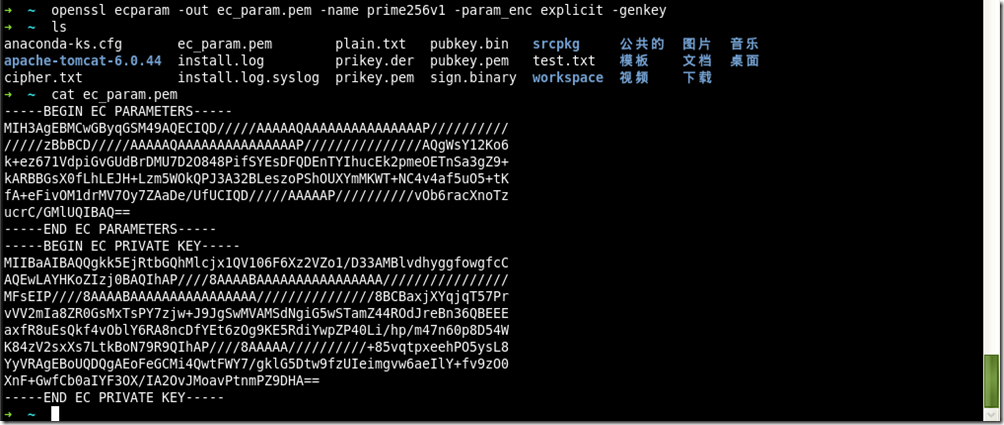
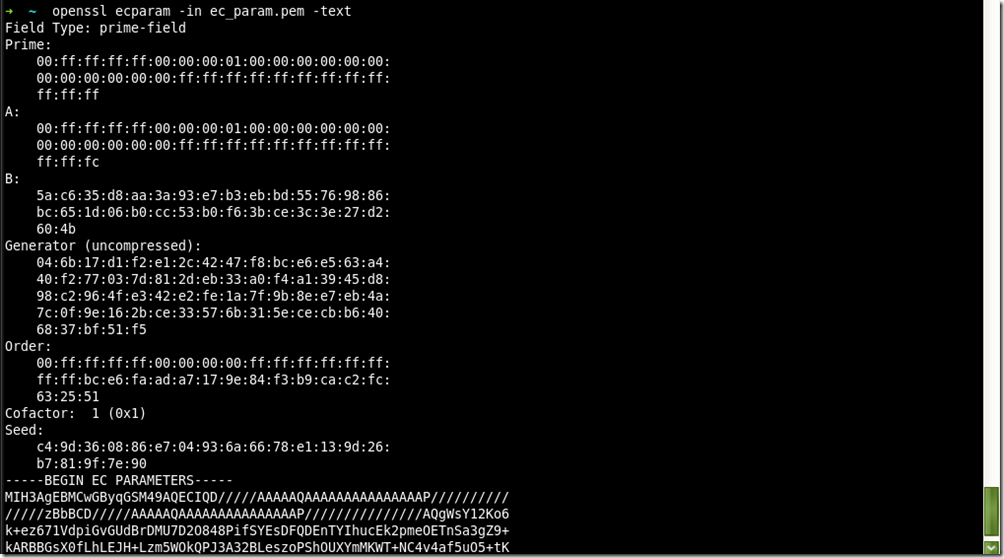
2、查看EC私钥
openssl ecparam -in ec_param.pem -text
3、验证EC参数
openssl ecparam -in ec_param.pem -check

4、签发ECC证书
openssl ecparam -out EccCA.key -name prime256v1 -genkey

openssl req -config openssl.cnf -key EccCA.key -new -out EccCA.req

openssl x509 -req -in EccCA.req -signkey EccCA.key -out EccCA.pem

openssl ecparam -out EccSite.key -name prime256v1 -genkey

openssl req -config openssl.cnf -key EccSite.key -new -out EccSite.req

openssl x509 -req -in EccSite.req -CA EccCA.pem -CAkey EccCA.key -out EccSite.pem -CAcreateserial
Openssl ecparam命令的更多相关文章
- Openssl s_server命令
一.简介 s_server是openssl提供的一个SSL服务程序.使用此程序前,需要生成各种证书.本命令可以用来测试ssl客户端,比如各种浏览器的https协议支持 二.语法 openssl s_s ...
- openssl常用命令行汇总
openssl常用命令行汇总 随机数 openssl rand -out rand.dat -base64 32 摘要 直接做摘要 openssl dgst -sha1 -out dgst.dat p ...
- Openssl ec命令
一.简介 椭圆曲线密钥处理工具 二.语法 openssl ec [-inform PEM|DER] [-outform PEM|DER] [-in filename] [-out filename] ...
- (转)openssl 命令: openssl req 命令详解
openssl req命令主要的功能有,生成证书请求文件, 查看验证证书请求文件,还有就是生成自签名证书.本文就主要记录一下open ...
- Openssl asn1parse命令
一.简介 asn1parse命令是一种用来诊断ASN.1结构的工具,也能用于从ASN1.1数据中提取数据 二.语法 openssl asn1parse [-inform PEM|DER] [-in f ...
- Openssl pkcs7命令
一.简介 pkcs7命令用于处理DER或者PEM格式的pkcs#7文件. 二.语法 openssl pkcs7 [-inform PEM|DER] [-outform PEM|DER] [-in ...
- Openssl crl2pkcs7命令
一.简介 crl2pkcs命令用来根据CRL或证书来生成pkcs#7消息. 二.语法 openssl crl2pkcs7 [-inform PEM|DER ] [-outform PEM|DER ...
- Openssl verify命令
一.简介 verify命令对证书的有效性进行验证,verify 指令会沿着证书链一直向上验证,直到一个自签名的CA 二.语法 openssl verify [-CApath directory] [- ...
- Openssl rsa命令
一.简介 Rsa命令用于处理RSA密钥.格式转换和打印信息 二.语法 openssl rsa [-inform PEM|NET|DER] [-outform PEM|NET|DER] [-in fil ...
随机推荐
- kbuild-(directory)
-INDEX - this file: info on the kernel build process kbuild.txt - developer information on kbuild kc ...
- EF6:编写你自己的code first 数据迁移操作(睡前来一篇,翻译的)
原英文版由EF团队成员 Rowan Miller 在2013年发表,此处只作翻译备忘. 数据迁移提供了一套强类型API,用于执行通用的操作,比如CreateIndex("dbo.Blogs& ...
- 历届试题 小数第n位(小技巧)
问题描述 我们知道,整数做除法时,有时得到有限小数,有时得到无限循环小数. 如果我们把有限小数的末尾加上无限多个0,它们就有了统一的形式. 本题的任务是:在上面的约定下,求整数除法小数点后的第n位开始 ...
- xshell连接kali
连接出现错误,连接不上去,看到一篇文章可以使用,https://blog.csdn.net/yemaxq/article/details/78171241
- 以太坊客户端Geth命令用法
命令用法 geth [选项] 命令 [命令选项] [参数…] 命令: account 管理账户attach 启动交互式JavaScript环境(连接到节点)bug 上报bug Issuesconsol ...
- offset()和position()
网上百度都有的说明是 offset():获取匹配元素在当前视口的相对偏移. position():获取匹配元素相对父元素的偏移. 如果单纯写这两句话,这个博客毫无意义 这里我写下他俩的使用情况,希望对 ...
- jredis 客户端 使用
redis学习及实践3---Jedis.JedisPool.Jedis分布式实例介绍 Java中使用Jedis操作Redis Redis客户端:Jedis
- 竖屏拍照,但是sd卡中却是横屏解决方法
protected void onActivityResult(int requestCode, int resultCode, Intent data) { switch (resultCode) ...
- 【洛谷】P1754 球迷购票问题(基础dp)
题目背景 盛况空前的足球赛即将举行.球赛门票售票处排起了球迷购票长龙. 按售票处规定,每位购票者限购一张门票,且每张票售价为50元.在排成长龙的球迷中有N个人手持面值50元的钱币,另有N个人手持面值1 ...
- oracle用户解锁
创建一个概要文件 create profile frank_profile limit SESSIONS_PER_USER 5 IDLE_TIME 2 FAILED_LOGIN_ ...