
springboot用于web开发
1.使用SpringBoot;
1)创建SpringBoot应用,选中我们需要的模块;
2)SpringBoot已经默认将这些场景配置好了,只需要在配置文件中指定少量配置就可以运行起来
3)自己编写业务代码;
自动配置原理?
xxxxAutoConfiguration:帮我们给容器中自动配置组件;
xxxxProperties:配置类来封装配置文件的内容;
2.SpringBoot对静态资源的映射规则
2.1"/**" 访问当前项目的任何资源,都去(静态资源的文件夹)找映射
"classpath:/META‐INF/resources/",

"classpath:/resources/",

"classpath:/static/",

"classpath:/public/"

"/":当前项目的根路径

(classpath指的是java或者resources目录下)
2.2欢迎页; 静态资源文件夹下的所有index.html页面;被"/**"映射
localhost:8080/ 找index页面
2.3所有的 **/favicon.ico 都是在静态资源文件下找
3.模板引擎
JSP、Velocity、Freemarker、Thymeleaf
SpringBoot推荐的Thymeleaf;
语法更简单,功能更强大;
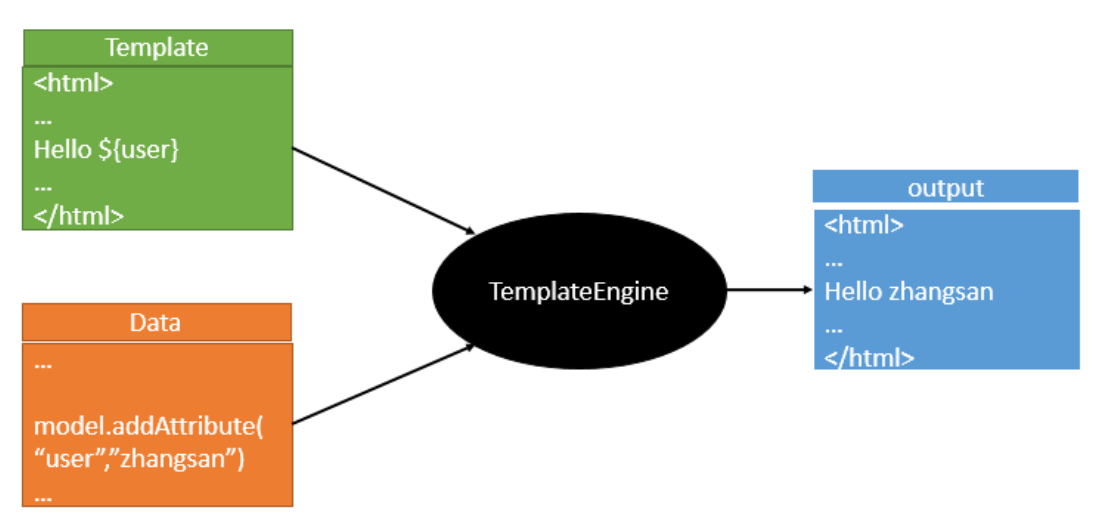
3.1pom文件中引入thymeleaf:
<!--切换thymeleaf版本-->

<properties>

    <thymeleaf.version>3.0.9.RELEASE</thymeleaf.version>

    <!‐‐ 布局功能的支持程序 thymeleaf3主程序 layout2以上版本 ‐‐>

    <!‐‐ thymeleaf2 layout1‐‐>

    <thymeleaf‐layout‐dialect.version>2.2.2</thymeleaf‐layout‐dialect.version>

</properties>

<dependency>

    <groupId>org.springframework.boot</groupId>

    <artifactId>spring‐boot‐starter‐thymeleaf</artifactId

</dependency>
3.2Thymeleaf使用
(只要我们把HTML页面放在classpath:/templates/,thymeleaf就能自动渲染)
@ConfigurationProperties(prefix = "spring.thymeleaf")

public class ThymeleafProperties {

    private static final Charset DEFAULT_ENCODING = Charset.forName("UTF‐8");

    private static final MimeType DEFAULT_CONTENT_TYPE = MimeType.valueOf("text/html");

    public static final String DEFAULT_PREFIX = "classpath:/templates/";

    public static final String DEFAULT_SUFFIX = ".html";

}
3.3举例
package com.zy.controller;

import org.springframework.stereotype.Controller;

import org.springframework.web.bind.annotation.RequestMapping;

import org.springframework.web.bind.annotation.ResponseBody;

import java.util.Map;

@Controller

public class Hello {

    // 1.测试hello world

    @RequestMapping("/hello")

    @ResponseBody

    public String hello(){

        return "hello";

    }

    // 2.测试thymeleaf

    @RequestMapping("/success")

    public String success(Map<String, String> map) {

        map.put("one","good");

        return "success";

    }

}
<!DOCTYPE html>
<!--导入thymeleaf的名称空间-->

<html lang="en" xmlns="http://www.thymeleaf.org">

<head>

    <meta charset="UTF-8">

    <title>Title</title>

</head>

<body>

    <a href="www.baidu.com">百度一下</a>

    <!-- thymeleaf动态取值 -->

    <div th:text="${one}"></div>

</body>

</html>
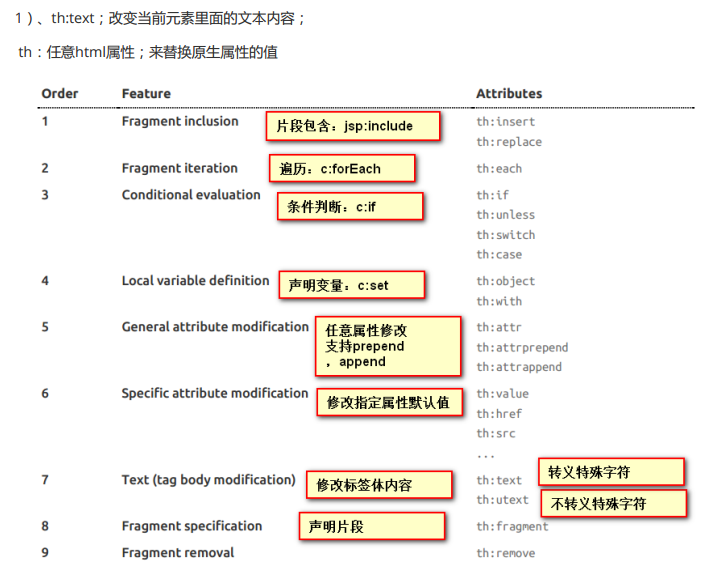
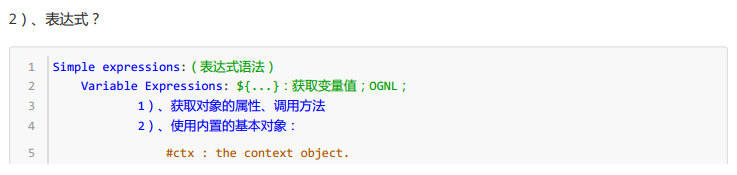
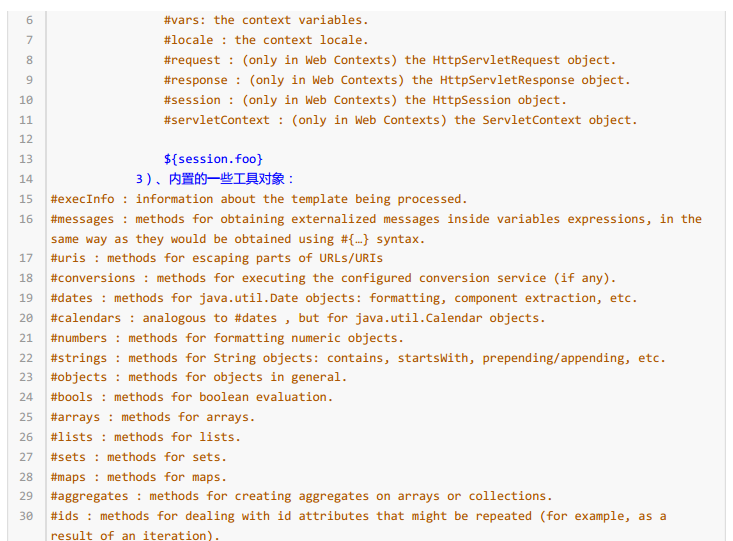
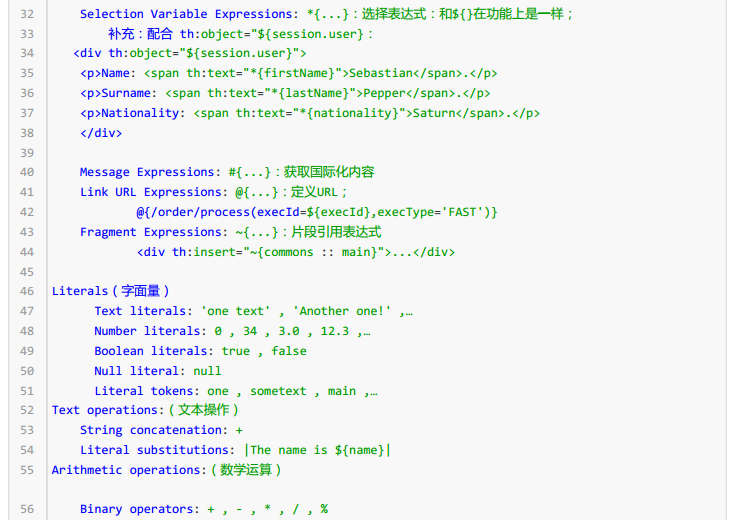
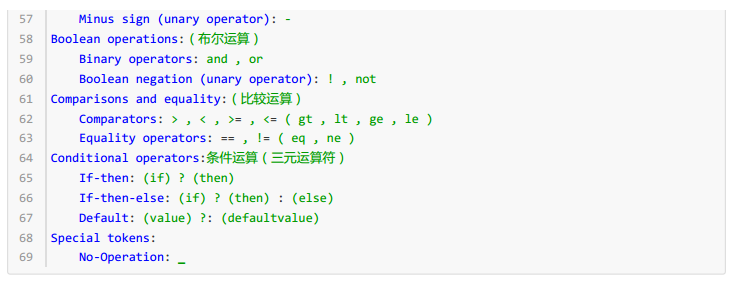
4.thymeleaf语法规则
5.扩展SpringMVC
编写一个配置类(@Configuration),是WebMvcConfigurerAdapter类型;不能标注@EnableWebMvc;
既保留了所有的自动配置,也能用我们扩展的配置;
//使用WebMvcConfigurerAdapter可以来扩展SpringMVC的功能

@Configuration

public class MyMvcConfig extends WebMvcConfigurerAdapter {

    @Override

    public void addViewControllers(ViewControllerRegistry registry) {

        // super.addViewControllers(registry);

        //浏览器发送 /atguigu 请求来到 success

        registry.addViewController("/atguigu").setViewName("success");

    }

}
原理:
1)、WebMvcAutoConfiguration是SpringMVC的自动配置类
2)、在做其他自动配置时会导入;@Import(EnableWebMvcConfiguration.class)
3)、容器中所有的WebMvcConfigurer都会一起起作用;
4)、我们的配置类也会被调用;
效果:SpringMVC的自动配置和我们的扩展配置都会起作用;
6.全面接管SpringMVC;
SpringBoot对SpringMVC的自动配置不需要了,所有都是我们自己配置;所有的SpringMVC的自动配置都失效了
我们需要在配置类中添加@EnableWebMvc即可;
//不使用springboot对springMVC的自动配置

@EnableWebMvc

@Configuration

public class MyMvcConfig extends WebMvcConfigurerAdapter {

    @Override

    public void addViewControllers(ViewControllerRegistry registry) {

        // super.addViewControllers(registry);

        //浏览器发送 /atguigu 请求来到 success

        registry.addViewController("/atguigu").setViewName("success");

    }

}
7.如何修改SpringBoot的默认配置
模式:
1)、SpringBoot在自动配置很多组件的时候,先看容器中有没有用户自己配置的(@Bean、@Component)如
果有就用用户配置的,如果没有,才自动配置;如果有些组件可以有多个(ViewResolver)将用户配置的和自己默
认的组合起来;
2)、在SpringBoot中会有非常多的xxxConfigurer帮助我们进行扩展配置
3)、在SpringBoot中会有很多的xxxCustomizer帮助我们进行定制配置
8.配置嵌入式Servlet容器
SpringBoot默认使用Tomcat作为嵌入式的Servlet容器
8.1修改配置文件application.yaml
server:

  tomcat:

    uri-encoding: utf-8

  port: 8081
8.2编写一个EmbeddedServletContainerCustomizer:嵌入式的Servlet容器的定制器;来修改Servlet容器的配置
@Bean //一定要将这个定制器加入到容器中

public EmbeddedServletContainerCustomizer embeddedServletContainerCustomizer(){

    return new EmbeddedServletContainerCustomizer() {

        //定制嵌入式的Servlet容器相关的规则

        @Override

        public void customize(ConfigurableEmbeddedServletContainer container) {

            container.setPort(8083);

        }

    };

}
9.springboot中注册Servlet三大组件【Servlet、Filter、Listener】
package com.atguigu.springboot.servlet;

/**
* 定义servlet
*
*/

import javax.servlet.ServletException;

import javax.servlet.http.HttpServlet;

import javax.servlet.http.HttpServletRequest;

import javax.servlet.http.HttpServletResponse;

import java.io.IOException;

public class MyServlet extends HttpServlet {

    //处理get请求

    @Override

    protected void doGet(HttpServletRequest req, HttpServletResponse resp) throws ServletException, IOException {

        doPost(req,resp);

    }

    @Override

    protected void doPost(HttpServletRequest req, HttpServletResponse resp) throws ServletException, IOException {

        resp.getWriter().write("Hello MyServlet");

    }

}
package com.atguigu.springboot.filter;

/**
* 定义filter
*
*/

import javax.servlet.*;

import java.io.IOException;

public class MyFilter implements Filter {

    @Override

    public void init(FilterConfig filterConfig) throws ServletException {

    }

    @Override

    public void doFilter(ServletRequest request, ServletResponse response, FilterChain chain) throws IOException, ServletException {

        System.out.println("MyFilter process...");

        chain.doFilter(request,response);

    }

    @Override

    public void destroy() {

    }

}
package com.atguigu.springboot.listener;

/**
* 定义listener
*
*/

import javax.servlet.ServletContextEvent;

import javax.servlet.ServletContextListener;

public class MyListener implements ServletContextListener {

    @Override

    public void contextInitialized(ServletContextEvent sce) {

        System.out.println("contextInitialized...web应用启动");

    }

    @Override

    public void contextDestroyed(ServletContextEvent sce) {

        System.out.println("contextDestroyed...当前web项目销毁");

    }

}
package com.atguigu.springboot.config;

/**
* 注册servlet,filter,listener
*
*/

import com.atguigu.springboot.filter.MyFilter;

import com.atguigu.springboot.listener.MyListener;

import com.atguigu.springboot.servlet.MyServlet;

import org.springframework.boot.context.embedded.ConfigurableEmbeddedServletContainer;

import org.springframework.boot.context.embedded.EmbeddedServletContainerCustomizer;

import org.springframework.boot.web.servlet.FilterRegistrationBean;

import org.springframework.boot.web.servlet.ServletListenerRegistrationBean;

import org.springframework.boot.web.servlet.ServletRegistrationBean;

import org.springframework.context.annotation.Bean;

import org.springframework.context.annotation.Configuration;

import java.util.Arrays;

@Configuration

public class MyServerConfig {

    //注册三大组件

    @Bean

    public ServletRegistrationBean myServlet(){

        ServletRegistrationBean registrationBean = new ServletRegistrationBean(new MyServlet(),"/myServlet");

        registrationBean.setLoadOnStartup(1);

        return registrationBean;

    }

    @Bean

    public FilterRegistrationBean myFilter(){

        FilterRegistrationBean registrationBean = new FilterRegistrationBean();

        registrationBean.setFilter(new MyFilter());

        registrationBean.setUrlPatterns(Arrays.asList("/hello","/myServlet"));

        return registrationBean;

    }

    @Bean

    public ServletListenerRegistrationBean myListener(){

        ServletListenerRegistrationBean<MyListener> registrationBean = new ServletListenerRegistrationBean<>(new MyListener());

        return registrationBean;

    }

    //配置嵌入式的Servlet容器

    @Bean

    public EmbeddedServletContainerCustomizer embeddedServletContainerCustomizer(){

        return new EmbeddedServletContainerCustomizer() {

            //定制嵌入式的Servlet容器相关的规则

            @Override

            public void customize(ConfigurableEmbeddedServletContainer container) {

                container.setPort(8083);

            }

        };

    }

}
10.springboot中引入其他web容器,jetty,或者undertow
10.1默认使用tomcat容器的pom配置
<dependency>

    <groupId>org.springframework.boot</groupId>

    <artifactId>spring‐boot‐starter‐web</artifactId>

    <!--引入web模块默认就是使用嵌入式的Tomcat作为Servlet容器-->

</dependency>
10.2使用jetty容器的pom配置(用于需要长时间连接的场景,如聊天)
<!‐‐ 引入web模块 ‐‐>

<dependency>

    <groupId>org.springframework.boot</groupId>

    <artifactId>spring‐boot‐starter‐web</artifactId>

    <exclusions>

        <exclusion>

            <artifactId>spring‐boot‐starter‐tomcat</artifactId>

            <groupId>org.springframework.boot</groupId>

        </exclusion>

    </exclusions>

</dependency>

<!‐‐引入jetty容器‐‐>

<dependency>

    <artifactId>spring‐boot‐starter‐jetty</artifactId>

    <groupId>org.springframework.boot</groupId>

</dependency>
10.3使用Undertow容器的pom配置
<!‐‐ 引入web模块 ‐‐>

<dependency>

    <groupId>org.springframework.boot</groupId>

    <artifactId>spring‐boot‐starter‐web</artifactId>

    <exclusions>

        <exclusion>

            <artifactId>spring‐boot‐starter‐tomcat</artifactId>

            <groupId>org.springframework.boot</groupId>

        </exclusion>

    </exclusions>

</dependency>

<!‐‐引入Undertow容器‐‐>

<dependency>

    <artifactId>spring‐boot‐starter‐undertow</artifactId>

    <groupId>org.springframework.boot</groupId>

</dependency>
springboot用于web开发的更多相关文章
- 10个用于Web开发的最好 Python 框架
Python 是一门动态.面向对象语言.其最初就是作为一门面向对象语言设计的,并且在后期又加入了一些更高级的特性.除了语言本身的设计目的之外,Python标准 库也是值得大家称赞的,Python甚至还 ...
- SpringBoot学习(七)-->SpringBoot在web开发中的配置
SpringBoot在web开发中的配置 Web开发的自动配置类:在Maven Dependencies-->spring-boot-1.5.2.RELEASE.jar-->org.spr ...
- SpringBoot:Web开发
西部开源-秦疆老师:基于SpringBoot 2.1.6 的博客教程 , 基于atguigu 1.5.x 视频优化 秦老师交流Q群号: 664386224 未授权禁止转载!编辑不易 , 转发请注明出处 ...
- SpringBoot之WEB开发-专题二
SpringBoot之WEB开发-专题二 三.Web开发 3.1.静态资源访问 在我们开发Web应用的时候,需要引用大量的js.css.图片等静态资源. 默认配置 Spring Boot默认提供静态资 ...
- springboot java web开发工程师效率
基础好工具 idea iterm2 和 oh-my-zsh git 热加载 java web项目每次重启时间成本太大. 编程有一个过程很重要, 就是试验, 在一次次试验中探索, 积累素材优化调整程序模 ...
- SpringBoot(四) Web开发 --- Thymeleaf、JSP
Spring Boot提供了spring-boot-starter-web为Web开发予以支持,spring-boot-starter-web为我们提供了嵌入的Tomcat以及Spring MVC的依 ...
- SpringBoot(四) -- SpringBoot与Web开发
一.发开前准备 1.创建一个SpringBoot应用,引入我们需要的模块 2.SpringBoot已经默认将这些场景配置好了,只需要在配置文件中指定少量配置,就能运行起来 3.编写业务代码 二.静态资 ...
- SpringBoot与Web开发
web开发1).创建SpringBoot应用,选中我们需要的模块:2).SpringBoot已经默认将这些场景已经配置好了,只需要在配置文件中指定少量配置就可以运行起来3).自己编写业务代码: 自动配 ...
- SpringBoot日记——Web开发篇
准备开始实战啦!~~~~ 我们先来看,SpringBoot的web是如何做web开发的呢?通常的步骤如下: 1.创建springboot应用,指定模块: 2.配置部分参数配置: 3.编写业务代码: 为 ...
随机推荐
- Ubuntu secuerCRT连接失败,The remote system refused the connection.
新安装的ubuntu系统,securtCRT连接失败,出现下面结果,这是因为ubuntu没有安装工具. The remote system refused the connection. 解决办法: ...
- xdebug : Debug session was finished without being paused
一.当调试模式出现说路径不匹配的时候,需要检查当前请求的URL和设置断点的是否在同样的位置 Debug session was finished without being paused It may ...
- 使用GDI+保存带Alpha通道的图像
带Alpha通道的图像(ARBG)在通过GDIPlus::Bitmap::FromHBITMAP等转为GDI+位图,再存储时,透明区域会变成纯黑(也有可能是纯白?). 网上找了两段保持透明的实现代 ...
- python多标签分类模版
from sklearn.multioutput import MultiOutputClassifier from sklearn.ensemble import RandomForestClass ...
- 制作mysql数据快照
在建立主从关系时,如果主上有旧数据,需要将旧数据拷贝到每一个从上.下面介绍几种不同的拷贝方式. 方法一:使用mysqldump工具创建一个你想要复制的所有数据库的一个dump.这是推荐使用的方法,特别 ...
- [转]关闭 Chrome 浏览器的启动时提示 - 请停用以开发者模式运行的扩展程序
最新版本 69.0.3497.92 (x64) 解决办法: https://www.cnblogs.com/liuxianan/p/disable-chrome-extension-warning.h ...
- 初学者手册-Sublime Text常用快捷键
Alt + F3 :找出当前文档中所有被划选的词语,若文档很大的话,可能会导致Sublime Text崩溃. Ctrl + kkk :删除当前行光标至行尾的所有内容. End: 光标跳至行尾. Hom ...
- STL sort
STL的sort()算法,数据量大时采用Quick Sort,分段递归排序,一旦分段后的数据量小于某个门槛,为避免Quick Sort的递归调用带来过大的额外负荷,就改用Insertion Sort. ...
- PHP中的traits简单理解
Traits可以理解为一组能被不同的类都能调用到的方法集合,但Traits不是类!不能被实例化.先来例子看下语法: ? 1 2 3 4 5 6 7 8 9 10 11 12 13 14 15 16 1 ...
- sql sever数据库常用的执行语句
--使用master数据库use master --创建数据库文件create database 数据库名字 on( name=, --逻辑名称 filename= .ndf, --数据文件物理路径名 ...