
POI读写大数据量EXCEL
另一篇文章http://www.cnblogs.com/tootwo2/p/8120053.html里面有xml的一些解释。
大数据量的excel一般都是.xlsx格式的,网上使用POI读写的例子比较多,但是很少提到读写非常大数据量的excel的例子,POI官网上提到XSSF有三种读写excel,POI地址:http://poi.apache.org/spreadsheet/index.html。官网的图片:
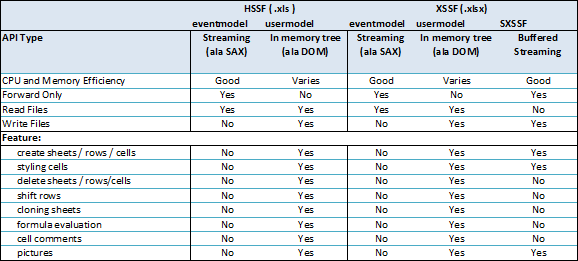
可以看到有三种模式:
1、eventmodel方式,基于事件驱动,SAX的方式解析excel(.xlsx是基于OOXML的),CPU和内存消耗非常低,但是只能读不能写
2、usermodel,就是我们一般使用的方式,这种方式可以读可以写,但是CPU和内存消耗非常大
3、SXSSF,POI3.8以后开始支持,这种方式只能写excel
下面介绍下使用方式(官网地址:http://poi.apache.org/spreadsheet/how-to.html):
第一种方式:
pom文件需要添加依赖:
<dependency>

    <groupId>org.apache.poi</groupId>

    <artifactId>poi-ooxml</artifactId>

    <version>3.15</version>

</dependency>

<dependency>

    <groupId>xerces</groupId>

    <artifactId>xerces</artifactId>

    <version>2.4.0</version>

</dependency>
java官网示例代码:
package excel;

import java.io.InputStream;

import java.util.Iterator;

import org.apache.poi.xssf.eventusermodel.XSSFReader;

import org.apache.poi.xssf.model.SharedStringsTable;

import org.apache.poi.xssf.usermodel.XSSFRichTextString;

import org.apache.poi.openxml4j.opc.OPCPackage;

import org.xml.sax.Attributes;

import org.xml.sax.ContentHandler;

import org.xml.sax.InputSource;

import org.xml.sax.SAXException;

import org.xml.sax.XMLReader;

import org.xml.sax.helpers.DefaultHandler;

import org.xml.sax.helpers.XMLReaderFactory;

public class ExampleEventUserModel {

    public void processOneSheet(String filename) throws Exception {

        OPCPackage pkg = OPCPackage.open(filename);

        XSSFReader r = new XSSFReader( pkg );

        SharedStringsTable sst = r.getSharedStringsTable();

        XMLReader parser = fetchSheetParser(sst);

        // To look up the Sheet Name / Sheet Order / rID,

        //  you need to process the core Workbook stream.

        // Normally it's of the form rId# or rSheet#

        InputStream sheet2 = r.getSheet("rId2");

        InputSource sheetSource = new InputSource(sheet2);

        parser.parse(sheetSource);

        sheet2.close();

    }

    public void processAllSheets(String filename) throws Exception {

        OPCPackage pkg = OPCPackage.open(filename);

        XSSFReader r = new XSSFReader( pkg );

        SharedStringsTable sst = r.getSharedStringsTable();

        XMLReader parser = fetchSheetParser(sst);

        Iterator<InputStream> sheets = r.getSheetsData();

        while(sheets.hasNext()) {

            System.out.println("Processing new sheet:\n");

            InputStream sheet = sheets.next();

            InputSource sheetSource = new InputSource(sheet);

            parser.parse(sheetSource);

            sheet.close();

            System.out.println("");

        }

    }

    public XMLReader fetchSheetParser(SharedStringsTable sst) throws SAXException {

        XMLReader parser =

            XMLReaderFactory.createXMLReader(

                    "com.sun.org.apache.xerces.internal.parsers.SAXParser"

            );

        ContentHandler handler = new SheetHandler(sst);

        parser.setContentHandler(handler);

        return parser;

    }

    /**

     * See org.xml.sax.helpers.DefaultHandler javadocs

     */

    private static class SheetHandler extends DefaultHandler {

        private SharedStringsTable sst;

        private String lastContents;

        private boolean nextIsString;

        private SheetHandler(SharedStringsTable sst) {

            this.sst = sst;

        }

        public void startElement(String uri, String localName, String name,

                Attributes attributes) throws SAXException {

            // c => cell

            if(name.equals("c")) {

                // Print the cell reference

                System.out.print(attributes.getValue("r") + " - ");

                // Figure out if the value is an index in the SST

                String cellType = attributes.getValue("t");

                if(cellType != null && cellType.equals("s")) {

                    nextIsString = true;

                } else {

                    nextIsString = false;

                }

            }

            // Clear contents cache

            lastContents = "";

        }

        public void endElement(String uri, String localName, String name)

                throws SAXException {

            // Process the last contents as required.

            // Do now, as characters() may be called more than once

            if(nextIsString) {

                int idx = Integer.parseInt(lastContents);

                lastContents = new XSSFRichTextString(sst.getEntryAt(idx)).toString();

                nextIsString = false;

            }

            // v => contents of a cell

            // Output after we've seen the string contents

            if(name.equals("v")) {

                System.out.println(lastContents);

            }

        }

        public void characters(char[] ch, int start, int length)

                throws SAXException {

            lastContents += new String(ch, start, length);

        }

    }

    public static void main(String[] args) throws Exception {

        ExampleEventUserModel example = new ExampleEventUserModel();

        System.out.println("11");

        example.processOneSheet(args[0]);

        example.processAllSheets(args[0]);

    }

}
运行的时候使用本地的文件地址替代main函数里面的参数就可以运行(亲测可以)。
第三种方式:
其核心是减少存储在内存当中的数据,达到一定行数就存储到硬盘的临时文件中。
pom文件需要增加依赖:
<dependency>

    <groupId>xerces</groupId>

    <artifactId>xercesImpl</artifactId>

    <version>2.11.0</version>

</dependency>
java代码如下:
package excel;

//import junit.framework.Assert;

import java.io.FileOutputStream;

import org.apache.poi.ss.usermodel.Cell;

import org.apache.poi.ss.usermodel.Row;

import org.apache.poi.ss.usermodel.Sheet;

import org.apache.poi.ss.usermodel.Workbook;

import org.apache.poi.ss.util.CellReference;

import org.apache.poi.xssf.streaming.SXSSFWorkbook;

public class SXSSFDemo {

    public static void main(String[] args) throws Throwable {

        SXSSFWorkbook wb = new SXSSFWorkbook(100); // 在内存当中保持 100 行 , 超过的数据放到硬盘中

        Sheet sh = wb.createSheet();

        for(int rownum = 0; rownum < 10000; rownum++){

            Row row = sh.createRow(rownum);

            for(int cellnum = 0; cellnum < 10; cellnum++){

                Cell cell = row.createCell(cellnum);

                String address = new CellReference(cell).formatAsString();

                cell.setCellValue(address);

            }

        }

        FileOutputStream out = new FileOutputStream("/Users/tootwo2/Documents/sxssf.xlsx");

        wb.write(out);

        out.close();

        // dispose of temporary files backing this workbook on disk

        wb.dispose();

    }

}
POI读写大数据量EXCEL的更多相关文章
- POI读写大数据量excel,解决超过几万行而导致内存溢出的问题
1. Excel2003与Excel2007 两个版本的最大行数和列数不同,2003版最大行数是65536行,最大列数是256列,2007版及以后的版本最大行数是1048576行,最大列数是16384 ...
- POI 读写大数据量 EXCEL
参考:https://www.cnblogs.com/tootwo2/p/6683143.html
- [转]POI大数据量Excel解决方案
全文转载自:jinshuaiwang的博客 目前处理Excel的开源javaAPI主要有两种,一是Jxl(Java Excel API),Jxl只支持Excel2003以下的版本.另外一种是Apach ...
- POI3.8解决导出大数据量excel文件时内存溢出的问题
POI3.8的SXSSF包是XSSF的一个扩展版本,支持流处理,在生成大数据量的电子表格且堆空间有限时使用.SXSSF通过限制内存中可访问的记录行数来实现其低内存利用,当达到限定值时,新一行数据的加入 ...
- 由“大数据量Excel入库高效方式”瞥见“并联系统”之优势
使用场景: 当你有一个Excel文件,需要把其中的数据高速录入到数据库中,文件中包含10万条以上数据. 设计方案: 我们将整个过程分成三个阶段,A(装载Excel文件). ...
- C#读取大数据量Excel
var worksheet = workbook.Worksheets["工作表1"]; var maxN = worksheet.Range["A1"].En ...
- python3 修改大数据量excel内容
最好使用python3 64位 对excel的修改操作: from openpyxl import load_workbook import time #打开一个excel表格.xlsx wb = l ...
- POI实现大数据EXCLE导入导出,解决内存溢出问题
使用POI能够导出大数据保证内存不溢出的一个重要原因是SXSSFWorkbook生成的EXCEL为2007版本,修改EXCEL2007文件后缀为ZIP打开可以看到,每一个Sheet都是一个xml文件, ...
- poi 操作Excel 以及大数据量导出
maven 依赖 (版本必须一致,否则使用SXSSFworkbook 时程序会报错) <dependency> <groupId>org.apache.poi</grou ...
随机推荐
- android的NDK和java进行本地socket通信
关于Android应用与Framework的socket通信,相信关心这个问题的朋友们已经看过<android使用socket使底层和framework通信>这篇文章,美中不足的是作者只贴 ...
- centos7 配置PPTP、L2TP、IPSec服务
首先,推荐跑下面的脚本: https://github.com/BoizZ/PPTP-L2TP-IPSec-VPN-auto-installation-script-for-CentOS-7 这个脚本 ...
- AutoFac文档9(转载)
目录 开始 Registering components 控制范围和生命周期 用模块结构化Autofac xml配置 与.net集成 深入理解Autofac 指导 关于 词汇表 关系类型 Autofa ...
- windows 2003 群集
http://www.tudou.com/programs/view/-UZoSIuUvXs/
- 自己工作之余做的OSX小软件
ShareSDK是为iOS.Android.WindowsPhone提供社会功能的一个组件,开发者只需10分钟即可集成到自己的APP中,它不仅支持分享给QQ好友.微信好友.微信朋友圈.新浪微博.腾迅微 ...
- 简洁经常使用权限系统的设计与实现(一):构造权限菜单树的N(N>=4)种方法
权限系统.Web开发常见标准子系统之中的一个.结合自己的一些思考和实践,从本篇開始权限系统的设计与实现之路. 近期,重构了项目的权限菜单构造过程,向前端返回json格式的权限树. 这一篇.仅仅是大致介 ...
- atitit.产品console 日志的aticonsole 方案处理总结
atitit.产品console 日志的aticonsole 方案处理总结 1. 主要原理流程 1 2. 调用代码 1 3. 内部主要实现 1 3.1. 放入消息 1 3.2. 读取消息 2 默认可以 ...
- Unity3D学习(十):使用VideoPlayer在UI上播放视频
前言 每一款游戏往往启动的第一次都会播放CG动画之类的,Unity本身对于移动平台也提供了一个接口. Handheld.PlayFullScreenMovie("path") 过场 ...
- NSString (NSStringPathExtensions)
转自:http://linwwwei.iteye.com/blog/1407520 + (NSString *)pathWithComponents(NSArray *)components 根据co ...
- flume+kafka
这里演示在单机fulume环境下,kafka作为source ,chanel , sink时三种情况 下面的测试都是基于下面的基本的配置文件进行修改的 a1.sources = r1 a1.sinks ...