
Strophe.js连接XMPP服务器Openfire、Tigase实现Web私聊、群聊(MUC)
XMPP(Extensible Messaging and Presence Protocol)是一种网络即时通讯协议,它基于XML,具有很强的扩展性,被广泛使用在即时通讯软件、网络游戏聊天、Web聊天及Web消息推送、移动设备的消息推送等场景,例如Google的GTalk、《英雄联盟LOL》游戏聊天模块。
由于在Web浏览器上的JavaScript不能直接处理TCP协议,所以XMPP服务器通常会提供BOSH(Bidirectional-streams Over Synchronous HTTP)接口,通过HTTP长轮训(long-polling)可以实现Web浏览器即时聊天。Strophe.js是一个通过BOSH连接Web浏览器和XMPP服务器的工具库。
XMPP协议简介:
XMPP服务器和客户端之间,是通过XML节(XML Stanza)来进行通讯。其中有三种非常重要的XML Stanza类型:<message>、<presence>、<iq>。
<message>:
聊天消息的发送和接收就是通过message节来实现。例如xxg1@host发送一条信息"你好"给xxg2@host,xxg1@host客户端会将下面的这段XML发送到XMPP服务器,服务器再推送给xxg2@host客户端。其中<message>的from属性是发送者,to属性是接收者,<body>子元素的内容就是聊天信息。
<message from="xxg1@host" to="xxg2@host" type="chat">

    <body>你好</body>

</message>
<presence>:
可用于表明用户的状态,例如用户状态改变成“Do not disturb”(“请勿打扰”),会向服务器发送:
<presence from="xxg@host">

    <status>Do not disturb</status>

    <priority>0</priority>

    <show>dnd</show>

</presence>
<iq>:
iq即Info/Query,采用“请求-响应”机制,类似于HTTP的机制。下面的例子是客户端通过<iq>请求获取联系人,XMPP服务器将结果返回:
客户端请求获取联系人:
<iq from='xxg@host' id='bv1bs71f' type='get'>

    <query xmlns='jabber:iq:roster'/>

</iq>
服务器结果返回:
<iq to='xxg@host' id='bv1bs71f' type='result'>

    <query xmlns='jabber:iq:roster'>

        <item jid='xxg2@host'/>

        <item jid='xxg3@host'/>

    </query>

</iq>
搭建XMPP服务器:
在实现Web浏览器聊天之前,首先要搭建一个XMPP服务器。例如Openfire、Tigase、Ejabberd是常用的XMPP服务器。其中Openfire、Tigase是基于Java实现,Ejabberd是Erlang实现。虽然实现的语言不同,但是都遵循XMPP协议,所以使用其中任意一个XMPP服务器即可。
下面以Openfire和Tigase为例。
Openfire可以自动化搭建很方便,本文不再介绍。Tigase的搭建可以参考我的另一篇博文:Linux搭建XMPP服务器Tigase(Spark客户端测试)。
XMPP服务器通常会实现BOSH扩展,下面是Openfire和Tigase的BOSH默认URL:
Openfire:http://host:7070/http-bind
Tigase:http://host:5280
在使用Strophe.js的时候,需要使用对应的HTTP地址才能连接上XMPP服务器。
如果使用Opnefire,还需要在管理后台配置一下:

Strophe.js:
下载:http://strophe.im/strophejs/
实现Web私聊:
私聊比较简单,聊天信息是通过上面介绍的<message>来进行传递交换。例如接收到一条别人发来的聊天信息,即接收一个<message>元素,发送给别人一条聊天信息,即发送一个<message>元素。
HTML:
<!DOCTYPE html>

<html>

<head>

    <script src='http://cdn.bootcss.com/jquery/1.9.1/jquery.min.js'></script>

    <script src='http://cdn.bootcss.com/strophe.js/1.1.3/strophe.min.js'></script>

    <script src='test.js'></script>

</head>

<body>

    JID:<input type="text" id="input-jid">

    <br>

    密码:<input type="password" id="input-pwd">

    <br>

    <button id="btn-login">登录</button>

    <div id="msg" style="height: 400px; width: 400px; overflow: scroll;"></div>

    联系人JID:

    <input type="text" id="input-contacts">

    <br>

    消息:

    <br>

    <textarea id="input-msg" cols="30" rows="4"></textarea>

    <br>

    <button id="btn-send">发送</button>

</body>

</html>
JavaScript(test.js):
// XMPP服务器BOSH地址

var BOSH_SERVICE = 'http://host:5280';

// XMPP连接

var connection = null;

// 当前状态是否连接

var connected = false;

// 当前登录的JID

var jid = "";

// 连接状态改变的事件

function onConnect(status) {

    console.log(status)

    if (status == Strophe.Status.CONNFAIL) {

        alert("连接失败!");

    } else if (status == Strophe.Status.AUTHFAIL) {

        alert("登录失败!");

    } else if (status == Strophe.Status.DISCONNECTED) {

        alert("连接断开!");

        connected = false;

    } else if (status == Strophe.Status.CONNECTED) {

        alert("连接成功,可以开始聊天了!");

        connected = true;

        // 当接收到<message>节,调用onMessage回调函数

        connection.addHandler(onMessage, null, 'message', null, null, null);

        // 首先要发送一个<presence>给服务器(initial presence)

        connection.send($pres().tree());

    }

}

// 接收到<message>

function onMessage(msg) {

    // 解析出<message>的from、type属性,以及body子元素

    var from = msg.getAttribute('from');

    var type = msg.getAttribute('type');

    var elems = msg.getElementsByTagName('body');

    if (type == "chat" && elems.length > 0) {

        var body = elems[0];

        $("#msg").append(from + ":<br>" + Strophe.getText(body) + "<br>")

    }

    return true;

}

$(document).ready(function() {

    // 通过BOSH连接XMPP服务器

    $('#btn-login').click(function() {

        if(!connected) {

            connection = new Strophe.Connection(BOSH_SERVICE);

            connection.connect($("#input-jid").val(), $("#input-pwd").val(), onConnect);

            jid = $("#input-jid").val();

        }

    });

    // 发送消息

    $("#btn-send").click(function() {

        if(connected) {

            if($("#input-contacts").val() == '') {

                alert("请输入联系人!");

                return;

            }

            // 创建一个<message>元素并发送

            var msg = $msg({

                to: $("#input-contacts").val(),

                from: jid,

                type: 'chat'

            }).c("body", null, $("#input-msg").val());

            connection.send(msg.tree());

            $("#msg").append(jid + ":<br>" + $("#input-msg").val() + "<br>");

            $("#input-msg").val('');

        } else {

            alert("请先登录!");

        }

    });

});
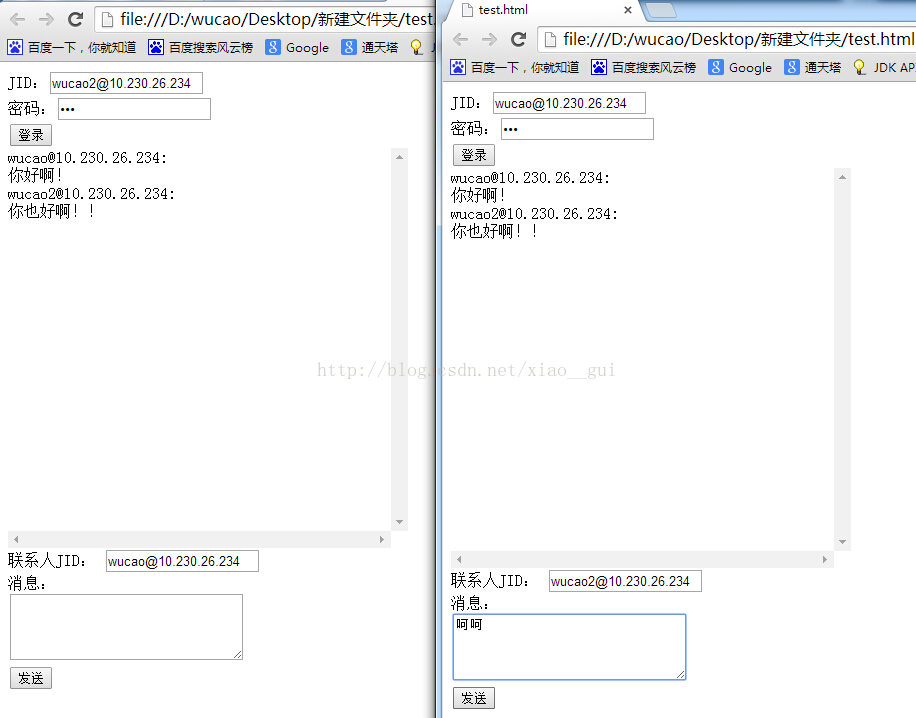
修改JavaScript代码中的BOSH_SERVICE,用浏览器打开HTML文件,登录后即可聊天:
实现Web群聊:
XMPP群聊通过XMPP协议的MUC(Multi-User Chat)扩展实现。
Openfire默认支持MUC,但是Tigase服务器默认不支持MUC,需要在init.properties文件中加入以下粗体部分的配置项:
config-type=--gen-config-def
--admins=admin@host
--virt-hosts = host
--debug=server
--user-db=mysql
--user-db-uri = jdbc:mysql://localhost:3306/tigasedb?user=root&password=xxx
--comp-name-1 = muc
--comp-class-1 = tigase.muc.MUCComponent
--external = muc.devel.tigase.org:muc-pass:connect:5270:devel.tigase.org:accept
创建房间:
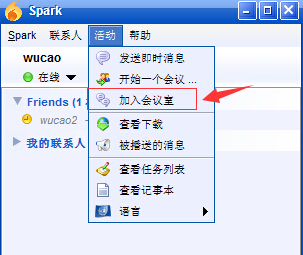
创建房间实际上可以写在代码中,但是本文为了方便,就使用XMPP客户端Spark或者其他工具来创建。
首先使用Spark任意登录一个用户,下图是Spark创建房间的步骤:

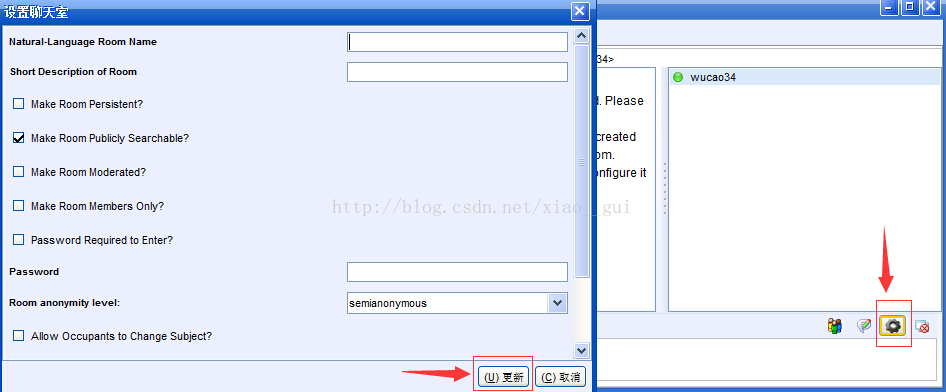
如果使用的是Tigase,默认创建的房间是加锁的,别的用户无法进入,需要对房间解锁。Spark进入房间后,点击下面的设置按钮,然后不用更改任何设置,直接更新即可解锁房间(虽然没有修改任何配置,但是更新时会发送一个<iq>给服务器,这个<iq>解锁了房间,参考http://xmpp.org/extensions/xep-0045.html#createroom-instant):
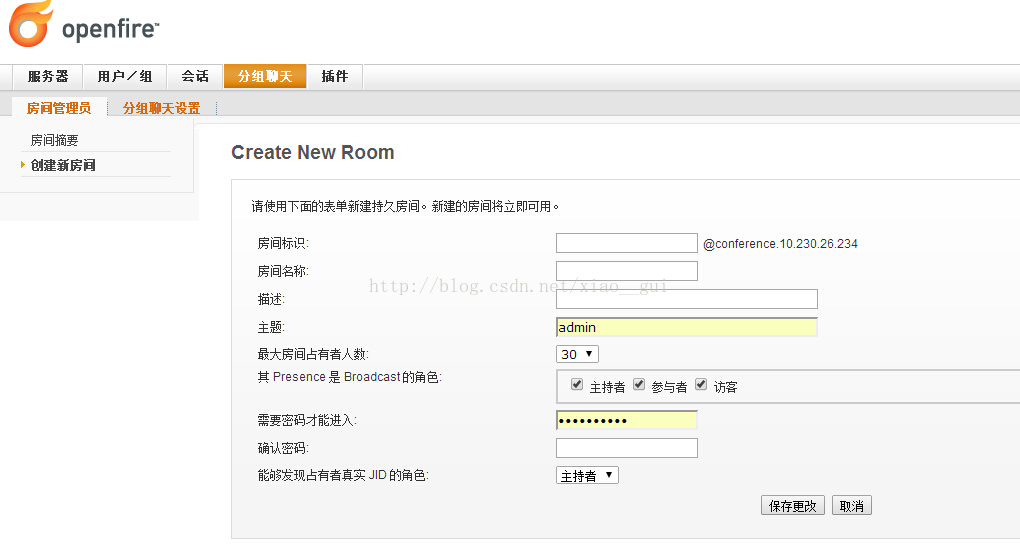
另外,如果使用Openfire可以直接使用管理后台来创建:
加入房间:
房间创建好了之后,就有有对应的房间JID:

加入房间可以通过发送一个<presence>来实现(实际上如果房间不存在下面的这条<presence>也会创建房间,但是创建的房间默认加锁,还需要发送一条<iq>解锁,所以本文就直接用Spark创建房间):
<presence from='xxg@host' to='xxgroom@muc.host/xxg'>

    <x xmlns='http://jabber.org/protocol/muc'/>

</presence>
属性to='xxgroom@muc.host/xxg'中,xxgroom@muc.host表示房间JID,xxg表示在房间的昵称。
聊天:
和私聊一样,群聊也是通过<message>来实现,不同的是<message>的type属性,私聊是"chat",而群聊是"groupchat",另外,to属性即为房间JID,这样一条聊天消息就会发送给房间中的所有人。
<message from='xxg@host' to='myroom@muc.host' type='groupchat'>

  <body>大家好!</body>

</message>
实现:
HTML:
<!DOCTYPE html>

<html>

<head>

    <script src='http://cdn.bootcss.com/jquery/1.9.1/jquery.min.js'></script>

    <script src='http://cdn.bootcss.com/strophe.js/1.1.3/strophe.min.js'></script>

    <script src='test2.js'></script>

</head>

<body>

    JID:<input type="text" id="input-jid">

    <br>

    密码:<input type="password" id="input-pwd">

    <br>

    <button id="btn-login">登录</button>

    <div id="msg" style="height: 400px; width: 400px; overflow: scroll;"></div>

    <br>

    消息:

    <br>

    <textarea id="input-msg" cols="30" rows="4"></textarea>

    <br>

    <button id="btn-send">发送</button>

</body>

</html>
JavaScript(test2.js):
// XMPP服务器BOSH地址

var BOSH_SERVICE = 'http://host:5280';

// 房间JID

var ROOM_JID = 'xxgroom@muc.host';

// XMPP连接

var connection = null;

// 当前状态是否连接

var connected = false;

// 当前登录的JID

var jid = "";

// 连接状态改变的事件

function onConnect(status) {

    if (status == Strophe.Status.CONNFAIL) {

        alert("连接失败!");

    } else if (status == Strophe.Status.AUTHFAIL) {

        alert("登录失败!");

    } else if (status == Strophe.Status.DISCONNECTED) {

        alert("连接断开!");

        connected = false;

    } else if (status == Strophe.Status.CONNECTED) {

        alert("连接成功,可以开始聊天了!");

        connected = true;

        // 当接收到<message>节,调用onMessage回调函数

        connection.addHandler(onMessage, null, 'message', null, null, null);

        // 首先要发送一个<presence>给服务器(initial presence)

        connection.send($pres().tree());

        // 发送<presence>元素,加入房间

        connection.send($pres({

            from: jid,

            to: ROOM_JID + "/" + jid.substring(0,jid.indexOf("@"))

        }).c('x',{xmlns: 'http://jabber.org/protocol/muc'}).tree());

    }

}

// 接收到<message>

function onMessage(msg) {

    console.log(msg);

    // 解析出<message>的from、type属性,以及body子元素

    var from = msg.getAttribute('from');

    var type = msg.getAttribute('type');

    var elems = msg.getElementsByTagName('body');

    if (type == "groupchat" && elems.length > 0) {

        var body = elems[0];

        $("#msg").append(from.substring(from.indexOf('/') + 1) + ":<br>" + Strophe.getText(body) + "<br>")

    }

    return true;

}

$(document).ready(function() {

    // 通过BOSH连接XMPP服务器

    $('#btn-login').click(function() {

        if(!connected) {

            connection = new Strophe.Connection(BOSH_SERVICE);

            connection.connect($("#input-jid").val(), $("#input-pwd").val(), onConnect);

            jid = $("#input-jid").val();

        }

    });

    // 发送消息

    $("#btn-send").click(function() {

        if(connected) {

            // 创建一个<message>元素并发送

            var msg = $msg({

                to: ROOM_JID,

                from: jid,

                type: 'groupchat'

            }).c("body", null, $("#input-msg").val());

            connection.send(msg.tree());

            $("#input-msg").val('');

        } else {

            alert("请先登录!");

        }

    });

});
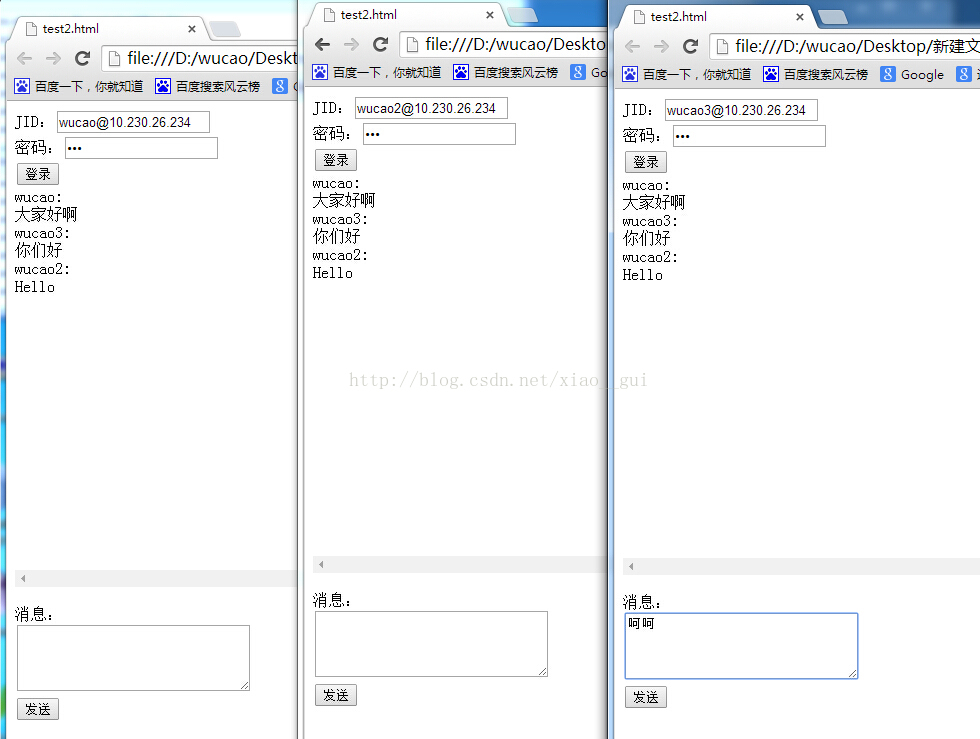
创建好房间,修改JavaScript代码中的BOSH_SERVICE和ROOM_JID,用浏览器打开HTML文件,登录后即可群聊:
另外,Strophe.js还有一个专门的MUC插件,有兴趣的同学可以自己研究下:https://github.com/strophe/strophejs-plugins/tree/master/muc。
Strophe.js连接XMPP服务器Openfire、Tigase实现Web私聊、群聊(MUC)的更多相关文章
- XMPP 服务器 Openfire 的 Emoji 支持问题(进行部分修改)
当前最新版3.9.3已经可以支持Emoji ----------------------------------------------------------------------------- ...
- strophe.js 插件 XMPP openfire
参考资料:http://strophe.im/strophejs/ https://github.com/strophe/strophejs-plugins http://amazeui.org/ 最 ...
- Android XMPP服务器, BOSH(Http-Binding)和WEB客户端搭建
目标: 搭建一个XMPP服务器, 实现在web page上用javascript与自己XMPP服务器通信, 匿名登录并与任何一个XMPP(Jabber)帐户通信. (Gtalk目前尚有问题) XMPP ...
- Android studio使用smack连接xmpp服务器收发消息
我使用的是ejabberd16.09的Linux版本,安装教程网上有很多,我在这里只介绍一下Android端连接.登录和收发消息的方法.文章最后附上了我写的一个demo,欢迎大家参考. ejabber ...
- 客户端技术的一点思考(数据存储用SQLite, XMPP通讯用Gloox, Web交互用LibCurl, 数据打包用Protocol Buffer, socket通讯用boost asio)
今天看到CSDN上这么一篇< 彻底放弃没落的MFC,对新人的忠告!>, 作为一个一直在Windows上搞客户端开发的C++程序员,几年前也有过类似的隐忧(参见 落伍的感觉), 现在却有一些 ...
- Android XMPP 例子(Openfire+asmack+spark) 出现登陆连接错误
Android XMPP 例子(Openfire+asmack+spark) 运行出来没问题,但是登陆的时候出现如下错误: 出现错误: 09-17 15:24:16.388: E/AndroidRun ...
- 常用的XMPP服务器
1. Openfire (Wildfire) 3.x 底层通讯采用的mina框架,minak框架其实性能一般,netty早已经超越它,虽然最初都是Doug Lea写的.3.4版本之后支持集群,单台服务 ...
- 技术笔记:XMPP之openfire+spark+smack
在即时通信这个领域目前只找到一个XMPP协议,在其协议基础上还是有许多成熟的产品,而且是开源的.所以还是想在这个领域多多了解一下. XMPP协议:具体的概念我就不写了,毕竟这东西网上到处是.简单的说就 ...
- XMPP 和 OpenFire
XMPP XMPP(可扩展消息处理现场协议)是基于可扩展标记语言(XML)的协议,它用于即时消息(IM)以及在线现场探测.是一种数据传输协议. XMPP的前身是Jabber,一个开源形式组织产生的网络 ...
随机推荐
- .Net下的 ORM框架介紹
在.NET平台下,关于数据持久层框架非常多,本文主要对如下几种做简要的介绍并推荐一些学习的资源: 1.NHibernate 2.NBear 3.Castle ActiveRecord 4.iBATIS ...
- ABP框架详解(六)Aspects
这种AOP式的设计非常类似于Asp.net MVC和WebApi中过滤器(Filter)机制,感觉没有太多可讲述的,只能谈谈设计思路. 框架中AspectAttribute特性用于设置到需要被拦截的T ...
- (转载)JAVA敏捷开发环境搭建
整个软件项目分为四个环境 开发本地环境.开发环境.测试环境.IDC环境.和传统C++开发不一样的模式是多了第一个开发本地环境.这是为什么呢,因为目前大部分开发人员还是比较熟悉windows下开发.对于 ...
- linux Makefile编写的整理
最近将Makefile的编写进行了整理和提炼了一下,大致分为五个步骤: 编译总共为五个部分 1.设置编译环境 set compile environment 2.获取要编译的源文件,以及把源文件转换为 ...
- svn忽略eclipse自动生成的文件
工程目录下右键,选择“TortoiseSVN”——“Settings”菜单 选择“General”,在“Global ignore pattern”输入框的最前面添加 .settings .class ...
- System.DateTimeOffset 中新增的Unix 时间戳方法
// System.DateTimeOffset [__DynamicallyInvokable] public static DateTimeOffset FromUnixTimeMilliseco ...
- .net与mono的那些事
米格尔·德伊卡萨在.NET的文档于2000年10月发布时就马上对.NET产生了兴趣.在查看字节码解释器后,他发现对于元数据(metadata)没有相应的说明文档.2001年2月,德伊卡萨在.NET邮件 ...
- 基于ABP的应用执行Update-Database出现异常的解决办法
今天在QQ群中看到有网友在更新数据库执行Update-Database时出现下面的错误: 为了能让搜索引擎搜索到,特意加上该错误的文字说明: 在与 SQL Server 建立连接时出现与网络相关的或特 ...
- objective-c(框架)
框架指objective-c的foundation库,下面的例子中给出几个常见用的类及其方法. 数值对象 NSNumber *intNum; NSNumber *longNum; NSNumber * ...
- 每周一书-2016年8月15日到21日(bootstrap基础教程)获奖读者公布
本次赠书 由微信昵称为“………….”的网友以10个赞获得. 请这位网友,订阅号回复你的联系方式,明天给你邮递这本书.谢谢!同时感谢<把时间当朋友>的获奖者“永梅”为<bootsrap ...