
SpringBoot整合JavaFx(十三)
SpringBoot整合JavaFx(十三)
在Java中,基本上万物可springboot… 整合了spring全家桶,你可以很方便整合它的生态框架。
JavaFx也能整合springboot,下面我就演示javafx+springboot操作数据库吧,学习了下面的方式,针对其他main工程也适用。
整合过程主要分三步:
1、引入springboot依赖
2、配置
3、加载fxml时注入bean
特别注意第三点,使用javafx提供的控制器工厂能轻松注入。开发模式类似MVC,只不过视图变成了fxml。
一、配置
用IDEA初始化一个springboot项目,,Maven依赖如下
   <?xml version="1.0" encoding="UTF-8"?>

<project xmlns="http://maven.apache.org/POM/4.0.0" xmlns:xsi="http://www.w3.org/2001/XMLSchema-instance"

         xsi:schemaLocation="http://maven.apache.org/POM/4.0.0 https://maven.apache.org/xsd/maven-4.0.0.xsd">

    <modelVersion>4.0.0</modelVersion>

    <groupId>top.lingkang</groupId>

    <artifactId>springboot-javafx-demo</artifactId>

    <version>0.0.1-SNAPSHOT</version>

    <name>springboot-javafx-demo</name>

    <description>Demo project for Spring Boot</description>

    <properties>

        <java.version>1.8</java.version>

        <project.build.sourceEncoding>UTF-8</project.build.sourceEncoding>

        <project.reporting.outputEncoding>UTF-8</project.reporting.outputEncoding>

        <spring-boot.version>2.3.7.RELEASE</spring-boot.version>

    </properties>

    <dependencies>

        <dependency>

            <groupId>org.springframework.boot</groupId>

            <artifactId>spring-boot-starter-data-jdbc</artifactId>

        </dependency>

        <dependency>

            <groupId>org.springframework.boot</groupId>

            <artifactId>spring-boot-devtools</artifactId>

            <scope>runtime</scope>

            <optional>true</optional>

        </dependency>

        <dependency>

            <groupId>mysql</groupId>

            <artifactId>mysql-connector-java</artifactId>

            <scope>runtime</scope>

        </dependency>

        <dependency>

            <groupId>org.projectlombok</groupId>

            <artifactId>lombok</artifactId>

            <optional>true</optional>

        </dependency>

        <dependency>

            <groupId>org.springframework.boot</groupId>

            <artifactId>spring-boot-starter-test</artifactId>

            <scope>test</scope>

            <exclusions>

                <exclusion>

                    <groupId>org.junit.vintage</groupId>

                    <artifactId>junit-vintage-engine</artifactId>

                </exclusion>

            </exclusions>

        </dependency>

    </dependencies>

    <dependencyManagement>

        <dependencies>

            <dependency>

                <groupId>org.springframework.boot</groupId>

                <artifactId>spring-boot-dependencies</artifactId>

                <version>${spring-boot.version}</version>

                <type>pom</type>

                <scope>import</scope>

            </dependency>

        </dependencies>

    </dependencyManagement>

    <build>

        <plugins>

            <plugin>

                <groupId>org.apache.maven.plugins</groupId>

                <artifactId>maven-compiler-plugin</artifactId>

                <version>3.8.1</version>

                <configuration>

                    <source>1.8</source>

                    <target>1.8</target>

                    <encoding>UTF-8</encoding>

                </configuration>

            </plugin>

            <plugin>

                <groupId>org.springframework.boot</groupId>

                <artifactId>spring-boot-maven-plugin</artifactId>

                <version>2.3.7.RELEASE</version>

                <configuration>

                    <mainClass>top.lingkang.springbootjavafxdemo.SpringbootJavafxDemoApplication</mainClass>

                </configuration>

                <executions>

                    <execution>

                        <id>repackage</id>

                        <goals>

                            <goal>repackage</goal>

                        </goals>

                    </execution>

                </executions>

            </plugin>

        </plugins>

    </build>

</project>
配置application.properties
spring.main.web-application-type=none

spring.main.allow-bean-definition-overriding=true

# 应用名称

spring.application.name=springboot-javafx-demo

# 数据库驱动:

spring.datasource.driver-class-name=com.mysql.cj.jdbc.Driver

# 数据源名称

spring.datasource.name=defaultDataSource

# 数据库连接地址

spring.datasource.url=jdbc:mysql://localhost:3306/test?serverTimezone=UTC

# 数据库用户名&密码:

spring.datasource.username=root

spring.datasource.password=123456
二、编写启动类
import javafx.application.Application;

import javafx.fxml.FXMLLoader;

import javafx.scene.Scene;

import javafx.scene.layout.VBox;

import javafx.stage.Stage;

import javafx.util.Callback;

import org.springframework.boot.SpringApplication;

import org.springframework.boot.autoconfigure.SpringBootApplication;

import org.springframework.context.ConfigurableApplicationContext;

import java.net.URL;

@SpringBootApplication

public class SpringbootJavafxDemoApplication extends Application {

	// 任何地方都可以通过这个applicationContext获取springboot的上下文

    public static ConfigurableApplicationContext applicationContext;

    private static String[] args;

    @Override

    public void start(Stage primaryStage) throws Exception {

        URL resource = getClass().getResource("/fxml/login.fxml");

        if (resource == null) {

            throw new Exception();

        }

        // 加载 fxml 下面的逻辑可以单独封装

        FXMLLoader loader = new FXMLLoader(resource);

        loader.setControllerFactory(new Callback<Class<?>, Object>() {

            @Override

            public Object call(Class<?> param) {

                // 控制器工厂提供bean注入,此处的缺点是不能根据bean名字注入,只能通过class类型注入bean

                // 解决方案:

                // 1、SpringbootJavafxDemoApplication.applicationContext.getBean("Bean Name", Bean.class);

                // 2、@Autowired private ApplicationContext applicationContext;

                // Object bean_name = applicationContext.getBean("bean Name", Bean.class);

                return applicationContext.getBean(param);

            }

        });

        // 加载

        VBox root = loader.load();

        primaryStage.setScene(new Scene(root));

        primaryStage.show();

    }

    public static void main(String[] args) {

        SpringbootJavafxDemoApplication.args = args;

        launch(args);

    }

    @Override

    public void init() throws Exception {

        // 启动springboot

        applicationContext = SpringApplication.run(SpringbootJavafxDemoApplication.class, args);

    }

    @Override

    public void stop() throws Exception {

        // 关闭springboot

        applicationContext.stop();

    }

}
/fxml/login.fxml内容如下:
<?xml version="1.0" encoding="UTF-8"?>

<?import javafx.scene.control.*?>

<?import javafx.scene.layout.AnchorPane?>

<?import javafx.scene.layout.VBox?>

<?import javafx.scene.text.Font?>

<VBox maxHeight="-Infinity" maxWidth="-Infinity" minHeight="-Infinity" minWidth="-Infinity" prefHeight="330.0"

      fx:controller="top.oneit.jdownload.controller.LoginController"

      prefWidth="430.0" xmlns="http://javafx.com/javafx/11" xmlns:fx="http://javafx.com/fxml/1">

    <AnchorPane prefHeight="330.0" prefWidth="430.0" style="-fx-background-color: white;">

        <children>

            <Label layoutX="99.0" layoutY="183.0" text="账 号:">

                <font>

                    <Font size="14.0"/>

                </font>

            </Label>

            <Label layoutX="99.0" layoutY="217.0" text="密 码:">

                <font>

                    <Font size="14.0"/>

                </font>

            </Label>

            <Button fx:id="loginButton" layoutX="97.0" layoutY="270.0" mnemonicParsing="false" prefHeight="35.0" prefWidth="236.0"

                    style="-fx-background-color: #1EC6FC;" text="登  录" textAlignment="CENTER" textFill="WHITE">

                <font>

                    <Font size="14.0"/>

                </font>

            </Button>

            <CheckBox layoutX="98.0" layoutY="243.0" mnemonicParsing="false" text="自动登录" textFill="#a6a6a6"/>

            <CheckBox layoutX="188.0" layoutY="243.0" mnemonicParsing="false" text="记住密码" textFill="#a6a6a6"/>

            <Label layoutX="277.0" layoutY="242.0" text="找回密码" textFill="#a6a6a6">

                <font>

                    <Font size="14.0"/>

                </font>

            </Label>

            <TextField layoutX="146.0" layoutY="183.0" prefHeight="23.0" prefWidth="182.0"/>

            <PasswordField layoutX="146.0" layoutY="216.0" prefHeight="23.0" prefWidth="182.0"/>

        </children>

    </AnchorPane>

</VBox>
编写一个controller触发按钮事件
import javafx.event.ActionEvent;

import javafx.event.EventHandler;

import javafx.fxml.FXML;

import javafx.fxml.Initializable;

import javafx.scene.control.Button;

import org.springframework.beans.factory.annotation.Autowired;

import org.springframework.jdbc.core.JdbcTemplate;

import org.springframework.stereotype.Controller;

import java.net.URL;

import java.util.List;

import java.util.ResourceBundle;

/**

 * @author lingkang

 * @date 2021/11/9

 */

@Controller

public class LoginController implements Initializable {

    @FXML

    private Button loginButton;

    @Autowired

    private JdbcTemplate jdbcTemplate;

    @Override

    public void initialize(URL url, ResourceBundle resourceBundle) {

        loginButton.setOnAction(new EventHandler<ActionEvent>() {

            @Override

            public void handle(ActionEvent actionEvent) {

                List res = jdbcTemplate.queryForList("select * from t_user");

                if (!res.isEmpty()) {

                    System.out.println(res.toString());

                }

                System.out.println("你点击了我!");

            }

        });

    }

}
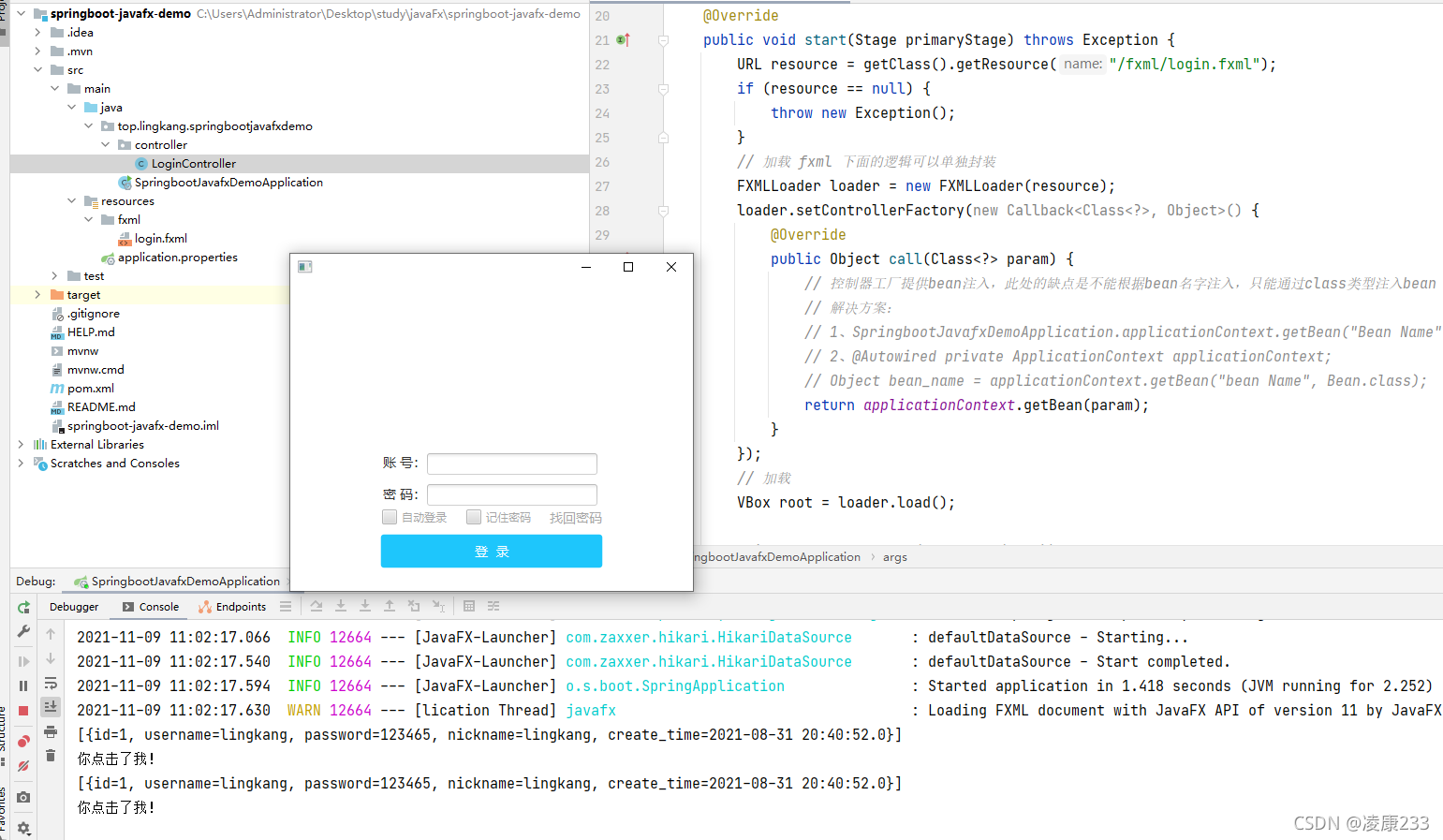
三、效果
四、一键三连
创作不易,你觉得对你有帮助请给我点个赞!一健三连…谢谢啦!
SpringBoot整合JavaFx(十三)的更多相关文章
- springboot整合javafx
原文(原码)参考地址: https://github.com/roskenet/springboot-javafx-support https://github.com/spartajet/javaf ...
- 很详细的SpringBoot整合UEditor教程
很详细的SpringBoot整合UEditor教程 2017年04月10日 20:27:21 小宝2333 阅读数:21529 版权声明:本文为博主原创文章,未经博主允许不得转载. https: ...
- SpringBoot整合SpringBatch
一.引入依赖 pom.xml <?xml version="1.0" encoding="UTF-8"?> <project xmlns=&q ...
- spring-boot整合mybatis(1)
sprig-boot是一个微服务架构,加快了spring工程快速开发,以及简便了配置.接下来开始spring-boot与mybatis的整合. 1.创建一个maven工程命名为spring-boot- ...
- SpringBoot整合Mybatis之项目结构、数据源
已经有好些日子没有总结了,不是变懒了,而是我一直在奋力学习springboot的路上,现在也算是完成了第一阶段的学习,今天给各位总结总结. 之前在网上找过不少关于springboot的教程,都是一些比 ...
- springboot整合mq接收消息队列
继上篇springboot整合mq发送消息队列 本篇主要在上篇基础上进行activiemq消息队列的接收springboot整合mq发送消息队列 第一步:新建marven项目,配置pom文件 < ...
- springboot整合mybaits注解开发
springboot整合mybaits注解开发时,返回json或者map对象时,如果一个字段的value为空,需要更改springboot的配置文件 mybatis: configuration: c ...
- SpringBoot整合Redis、ApachSolr和SpringSession
SpringBoot整合Redis.ApachSolr和SpringSession 一.简介 SpringBoot自从问世以来,以其方便的配置受到了广大开发者的青睐.它提供了各种starter简化很多 ...
- SpringBoot整合ElasticSearch实现多版本的兼容
前言 在上一篇学习SpringBoot中,整合了Mybatis.Druid和PageHelper并实现了多数据源的操作.本篇主要是介绍和使用目前最火的搜索引擎ElastiSearch,并和Spring ...
- SpringBoot整合Kafka和Storm
前言 本篇文章主要介绍的是SpringBoot整合kafka和storm以及在这过程遇到的一些问题和解决方案. kafka和storm的相关知识 如果你对kafka和storm熟悉的话,这一段可以直接 ...
随机推荐
- 基于react18+vite4+arco.design搭建极简版后台管理模板
趁着国庆前夕整了一个vite4结合react18搭建后台管理模板,搭配上字节团队react组件库ArcoDesign,整体操作功能非常丝滑.目前功能支持多种模板布局.暗黑/亮色模式.国际化.权限验证. ...
- 聊聊JDK19特性之虚拟线程
1.前言 在读<深入理解JVM虚拟机>这本书前两章的时候整理了JDK从1.0到最新版本发展史,其中记录了JDK这么多年来演进过程中的一些趣闻及引人注目的一些特性,在调研JDK19新增特性的 ...
- 如何基于three.js(webgl)引擎架构,研发一套通过配置就能自动生成的3D机房系统
序: 这几年观察下来,大部分做物联网三维可视化解决方案的企业或个人, 基本都绕不开3D机房.包括前面也讲过这样的案例<使用webgl(three.js)创建自动化抽象化3D机房,3D机房模块详细 ...
- LLM探索:为ChatGLM2的gRPC后端增加连续对话功能
前言 之前我做 AIHub 的时候通过 gRPC 的方式接入了 ChatGLM 等开源大模型,对于大模型这块我搞了个 StarAI 框架,相当于简化版的 langchain ,可以比较方便的把各种大模 ...
- 入门篇-其之六-Java运算符(中)
祝所有程序员,1024节日快乐!!! 一.自增/自减运算符 假设有一个变量intValue的值为10,如果想让这个值加1,有哪些方式? 首先,我们可以使用最原始的方式: int intValue = ...
- 钉钉OA自定义审批流的创建和使用
前言 大家好!我是sum墨,一个一线的底层码农,平时喜欢研究和思考一些技术相关的问题并整理成文,限于本人水平,如果文章和代码有表述不当之处,还请不吝赐教. 钉钉作为一款办公软件,审批功能是它的核心功能 ...
- 【日常收支账本】【Day02】通过PyCharm集成QtDesigner和PyUIC快速创建界面
一.集成QtDesigner和PyUIC PyCharm集成QtDesigner和PyUIC教程 二.在QtDesigner中画出窗体 1. 主界面 编辑账本: 新增.修改或删除记录 可视化账本:通过 ...
- 《最新出炉》系列初窥篇-Python+Playwright自动化测试-26-处理单选和多选按钮-下篇
1.简介 今天这一篇宏哥主要是讲解一下,如何使用Playwright来遍历单选和多选按钮.大致两部分内容:一部分是宏哥在本地弄的一个小demo,另一部分,宏哥是利用JQueryUI网站里的单选和多选按 ...
- LeetCode-Java:88合并两个有序数组
题目: 给你两个按 非递减顺序 排列的整数数组 nums1 和 nums2,另有两个整数 m 和 n ,分别表示 nums1 和 nums2 中的元素数目. 请你 合并 nums2 到 nums1 中 ...
- 全屏API及vue3 hook封装
最近在一个大屏项目遇到一个需求:用户可以通过一个按钮,触发页面部分模块全屏.通过以下API可以实现: Element.requestFullscreen()方法用于发出异步请求使元素进入全屏模式. 且 ...