
Menu学习
本文由博主(YinaPan)原创,转载请注明出处:http://www.cnblogs.com/YinaPan/p/Unity_Menu.html
using UnityEditor;

using UnityEngine;

public class Menu : MonoBehaviour {

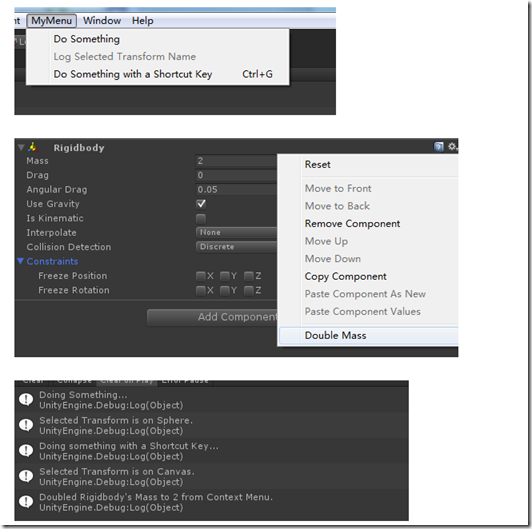
    // Add a menu item named "Do Something" to MyMenu in the menu bar.

    [MenuItem ("MyMenu/Do Something")]

    static void DoSomething () {

        Debug.Log ("Doing Something...");

    }

    // Validated menu item.

    // Add a menu item named "Log Selected Transform Name" to MyMenu in the menu bar.

    // We use a second function to validate the menu item

    // so it will only be enabled if we have a transform selected.

    [MenuItem ("MyMenu/Log Selected Transform Name")]

    static void LogSelectedTransformName ()

    {

        Debug.Log ("Selected Transform is on " + Selection.activeTransform.gameObject.name + ".");

    }

    // Validate the menu item defined by the function above.

    // The menu item will be disabled if this function returns false.

    [MenuItem ("MyMenu/Log Selected Transform Name", true)]

    static bool ValidateLogSelectedTransformName () {

        // Return false if no transform is selected.

        return Selection.activeTransform != null;

    }

    // Add a menu item named "Do Something with a Shortcut Key" to MyMenu in the menu bar

    // and give it a shortcut (ctrl-g on Windows, cmd-g on OS X).

    [MenuItem ("MyMenu/Do Something with a Shortcut Key %g")]

    static void DoSomethingWithAShortcutKey () {

        Debug.Log ("Doing something with a Shortcut Key...");

    }

    // Add a menu item called "Double Mass" to a Rigidbody's context menu.

    [MenuItem ("CONTEXT/Rigidbody/Double Mass")]

    static void DoubleMass (MenuCommand command) {

        Rigidbody body = (Rigidbody)command.context;

        body.mass = body.mass * ;

        Debug.Log ("Doubled Rigidbody's Mass to " + body.mass + " from Context Menu.");

    }

    // Add a menu item to create custom GameObjects.

    // Priority 1 ensures it is grouped with the other menu items of the same kind

    // and propagated to the hierarchy dropdown and hierarch context menus.

    [MenuItem("GameObject/MyCategory/Custom Game Object", false, )]

    static void CreateCustomGameObject(MenuCommand menuCommand) {

        // Create a custom game object

        GameObject go = new GameObject("Custom Game Object");

        // Ensure it gets reparented if this was a context click (otherwise does nothing)

        GameObjectUtility.SetParentAndAlign(go, menuCommand.context as GameObject);

        // Register the creation in the undo system

        Undo.RegisterCreatedObjectUndo(go, "Create " + go.name);

        Selection.activeObject = go;

    }

}
Menu学习的更多相关文章
- 【转】 Pro Android学习笔记(三三):Menu(4):Alternative菜单
目录(?)[-] 什么是Alternative menu替代菜单 小例子说明 Alternative menu代码 关于Category和规范代码写法 关于flags 多个匹配的itemId等参数 什 ...
- 值得 Web 开发人员学习的20个 jQuery 实例教程
这篇文章挑选了20个优秀的 jQuery 实例教程,这些 jQuery 教程将帮助你把你的网站提升到一个更高的水平.其中,既有网站中常用功能的的解决方案,也有极具吸引力的亮点功能的实现方法,相信通过对 ...
- Android -- Options Menu,Context Menu,Popup Menu
Options Menu 创建选项菜单的步骤: 1. ...
- [转载-仅为个人学习所用]Stack Menu
http://code4app.com/ios/51fa7d7e6803fa2710000006 我有个很牛的同学朋友同事舍友···他技术牛人,写的博客都是原创,粉丝无数,说实话我真的挺妒嫉的,试过为 ...
- Editor Scripting学习笔记之Menu Item
主要用到: MenuItem属性 MenuCommand参数 可能用到: EditorApplication类 Selection类 GameObjectUtility类 FileUtil类 Undo ...
- Android学习笔记——Menu(三)
知识点 今天继续昨天没有讲完的Menu的学习,主要是Popup Menu的学习. Popup Menu(弹出式菜单) 弹出式菜单是一种固定在View上的菜单模型.主要用于以下三种情况: 为特定的内容提 ...
- Android学习笔记——Menu(二)
知识点: 这次将继续上一篇文章没有讲完的Menu的学习,上下文菜单(Context menu)和弹出菜单(Popup menu). 上下文菜单 上下文菜单提供对UI界面上的特定项或上下文框架的操作,就 ...
- 【转】 Pro Android学习笔记(三四):Menu(5):动态菜单
目录(?)[-] OptionsMenu的创建方式 如何再次创建OptionsMenu 每次访问都重新填充菜单项 OptionsMenu的创建方式 OptionMenu在第一次访问该菜单时调用,只调用 ...
- 【转】 Pro Android学习笔记(三五):Menu(6):XML方式 & PopUp菜单
目录(?)[-] 利用XML创建菜单 XML的有关属性 onClick事件 Pop-up菜单 利用XML创建菜单 在代码中对每个菜单项进行设置,繁琐且修改不灵活,不能适配多国语言的要求,可以利用资源进 ...
随机推荐
- MATLAB文件操作及读txt文件
转自:http://blog.csdn.net/vblittleboy/article/details/8049748 文件操作是一种重要的输入输出方式,即从数据文件读取数据或将结果写入数据文件.MA ...
- 自己动手做 UEStudio/UltraEdit 的语法高亮文件 (*.uew)
自己一直比较习惯用 UEStudio 来编写 C/C++ 文件,因为 Visual Studio 2010 实在太大了,我的 T400 都跑的费劲,所以一般我只用它来编译和调试.但是可惜的是 UESt ...
- C51 延时程序
一.相关换算 1.1s=10^3ms(毫秒)=10^6μs(微秒)=10^9ns(纳秒)=10^12ps(皮秒)=10^15fs(飞秒)=10^18as(阿秒)=10^21zm(仄秒)=10^24ym ...
- Signing key has not been configured
Signing key has not been configured.https://dev.openwrt.org/changeset/38284 Add package signing key ...
- 【转】Android 带checkbox的listView 实现多选,全选,反选 -- 不错
原文网址:http://blog.csdn.net/onlyonecoder/article/details/8687811 Demo地址(0分资源):http://download.csdn.net ...
- USB Loader使用心得之游戏名称、简介、背景音乐
我在<WAD独立安装版USB Loader的下载和安装>(链接:http://www.cnblogs.com/duxiuxing/p/4255124.html)开头提到:“任何版本的USB ...
- 最受欢迎linux命令
1. 以 root 帐户执行上一条命令 sudo !! 2. 利用 Python 搭建一个简单的 Web 服务器,可通过 http://$HOSTNAME:8000访问 python -m ...
- Spark计算模型-RDD介绍
在Spark集群背后,有一个非常重要的分布式数据架构,即弹性分布式数据集(Resilient Distributed DataSet,RDD),它是逻辑集中的实体,在集群中的多台集群上进行数据分区.通 ...
- M - Jamie's Contact Groups - poj 2289(二分图多重匹配)
题意:某个人通讯录有很多人,现在他想把这个人分组,给的数据是可以把这个人分在那些组里面,现在他想知道分组后,人最多的那个组至少有多少人. 分析:因为没有给组限制有多少人,可以使用二分求出来最小的那个, ...
- WKWebview点击图片查看大图
大家都知道,WKWebview是没有查看大图的属性或者方法的,所以只能通过js与之交互来实现这一功能,原理:通过js获取页面的图片,把它存放到数组,给图片添加点击事件,通过index显示大图就行了 其 ...