
简单几步让网站支持https,windows iis配置方式
1.https证书的分类
SSL证书没有所谓的"品质"和"等级"之分,只有三种不同的类型。
SSL证书需要向国际公认的证书证书认证机构(简称CA,Certificate Authority)申请。
CA机构颁发的证书有3种类型:
域名型SSL证书(DV SSL):信任等级普通,只需验证网站的真实性便可颁发证书保护网站;
企业型SSL证书(OV SSL):信任等级强,须要验证企业的身份,审核严格,安全性更高;
增强型SSL证书(EV SSL):信任等级最高,一般用于银行证券等金融机构,审核严格,安全性最高,同时可以激活绿色网址栏。
我们只要使用DV证书就可以了,一般来说我们申请到的免费ssl证书都是dv证书。
2.申请免费的证书
2.1 自签名惹的祸
Ca证书必须要可信任的机构颁发才可以信任,自签名证书就是自己给自己签名,没有通过第三方CA机构颁发。浏览器默认添加了一些可信任的CA机构,都是通过国际Web Trust认证的。
如果你的CA证书不是这些浏览器里默认添加的可信任的CA机构签发的话,那么就会出现像12306这样的笑话。

2.2申请免费的DV证书
Let's Encrypt是国外一个公共的免费SSL项目,由 Linux 基金会托管,由Mozilla、思科、Akamai、IdenTrust和EFF等组织发起,靠谱!
申请免费的证书可以参考这篇文章,工具和步骤都非常的完整,这里就不累述了
http://www.cnblogs.com/teamblog/p/6219204.html
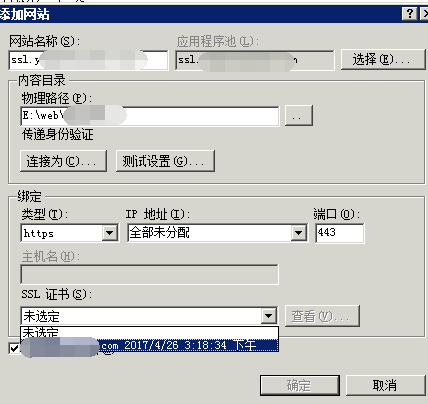
最后申请完之后iis的配置就是新建一个网站,其他都不用配置,就可以了,老的网站不要删除,如果要强制https访问的话可以再搜索其他的文章,这里不再展开
3.https网站安全验证
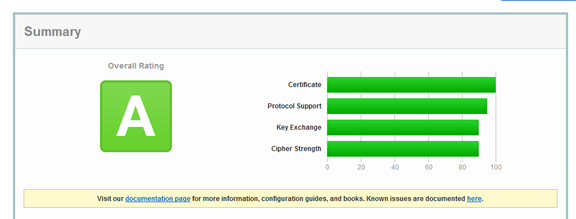
https已经可以访问了,但是https就一定是安全的吗,我们可以通过下面这个网站进一步检查你的网站的安全性,主要是从https的安全性去测试
https://www.ssllabs.com/ssltest/analyze.html
可能一开始测试是个F,像我一开始测试就是个F,这是因为操作系统的默认设置里有很多不安全的设置,需要我们手动来配置修改。

可以仔细看下面的说明,没有开启TLS1.2 ,RC4已经过时了,Forward Secrecy支持的不好等等。
4.为了A+不断修改
这里大段的删除线是我一下午的心血,哪怕最后发现了powerShell脚本可以一次性完成上面所有的工作,你可以不看,但请尊重我的劳动
4.1 关闭SLL2和SSL3
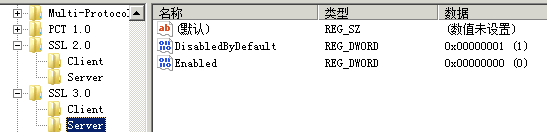
找到HKEY_LOCAL_MACHINE\SYSTEM\CurrentControlSet\Control\SecurityProviders\SCHANNEL\Protocols右键->新建->项->新建SSL 2.0,SSL 3.0
SSL 2.0和SSL 3.0 中间是有空格的!!!
在SSL 2.0 和 SSL 3.0上分别右键->新建->项->新建Server, Client
在新建的Server和Client中都新建如下的项(DWORD 32位值),
DisabledByDefault 值1
Enabled 值0
总共8个
 、
、


4.2 开启TLS1.0 1.1 1.2
还是在刚才的目录下面,新建3个TLS 1.0 ,TLS 1.1,TLS 1.2
然后分别在下面建立Client,Server
然后跟一样在每个里面建立下面的项(DWORD 32位值)
DisabledByDefault 值 0
Enabled 值1
图都一样,就不重复截图了
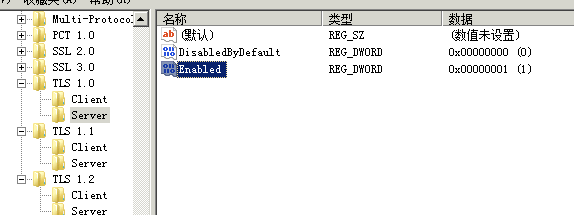
完成上面的步骤后重启服务器就可以看到效果了
4.3 关闭RC4
这里的步骤更复杂,但和上面大同小异 ,无非就是在注册表里创建项,设置键值。
但是做到这里,我发现最后一步的powerShell脚本把所有的事都做了。所以后面的步骤我们都省略吧!!!!!!!!
4.5 修改ssl配置设置
别的我就说,在这个ssl配置的时候我尝试了很多种Cipher Suites的配置方式,包括参考别人A+的网站上报告里的配置,一个一个复制出来,每次都要重启服务器,重新测试,花了好多时间,最后终于评价成为A-,剩下一个Forward Secrecy的问题,结果搜索到一份powershell的脚本,问题是一步一步处理的,没毛病,但最后找到一个脚本一次性解决了前面所有的问题,所以分享出来给大家,减少大家走弯路的时间
4.6 最后配置 Forward Secrecy
4.7 一键配置的powershell脚本
Powershell脚本原文:
https://www.hass.de/content/setup-your-iis-ssl-perfect-forward-secrecy-and-tls-12
使用方法是,开始-》运行-》输入powershell,打开类似cmd窗口的命令行工具,然后直接复制脚本进去执行就ok了。
# Copyright 2016, Alexander Hass

# http://www.hass.de/content/setup-your-iis-ssl-perfect-forward-secrecy-and-tls-12

#

# Version 1.7

# - Windows Version compare failed. Get-CimInstance requires Windows 2012 or later.

# Version 1.6

# - OS version detection for cipher suites order.

# Version 1.5

# - Enabled ECDH and more secure hash functions and reorderd cipher list.

# - Added Client setting for all ciphers.

# Version 1.4

# - RC4 has been disabled.

# Version 1.3

# - MD5 has been disabled.

# Version 1.2

# - Re-factored code style and output

# Version 1.1

# - SSLv3 has been disabled. (Poodle attack protection)

Write-Host 'Configuring IIS with SSL/TLS Deployment Best Practices...'

Write-Host '--------------------------------------------------------------------------------'

# Disable Multi-Protocol Unified Hello

New-Item 'HKLM:\SYSTEM\CurrentControlSet\Control\SecurityProviders\SCHANNEL\Protocols\Multi-Protocol Unified Hello\Server' -Force | Out-Null

New-ItemProperty -path 'HKLM:\SYSTEM\CurrentControlSet\Control\SecurityProviders\SCHANNEL\Protocols\Multi-Protocol Unified Hello\Server' -name Enabled -value 0 -PropertyType 'DWord' -Force | Out-Null

New-ItemProperty -path 'HKLM:\SYSTEM\CurrentControlSet\Control\SecurityProviders\SCHANNEL\Protocols\Multi-Protocol Unified Hello\Server' -name 'DisabledByDefault' -value 1 -PropertyType 'DWord' -Force | Out-Null

New-Item 'HKLM:\SYSTEM\CurrentControlSet\Control\SecurityProviders\SCHANNEL\Protocols\Multi-Protocol Unified Hello\Client' -Force | Out-Null

New-ItemProperty -path 'HKLM:\SYSTEM\CurrentControlSet\Control\SecurityProviders\SCHANNEL\Protocols\Multi-Protocol Unified Hello\Client' -name Enabled -value 0 -PropertyType 'DWord' -Force | Out-Null

New-ItemProperty -path 'HKLM:\SYSTEM\CurrentControlSet\Control\SecurityProviders\SCHANNEL\Protocols\Multi-Protocol Unified Hello\Client' -name 'DisabledByDefault' -value 1 -PropertyType 'DWord' -Force | Out-Null

Write-Host 'Multi-Protocol Unified Hello has been disabled.'

# Disable PCT 1.0

New-Item 'HKLM:\SYSTEM\CurrentControlSet\Control\SecurityProviders\SCHANNEL\Protocols\PCT 1.0\Server' -Force | Out-Null

New-ItemProperty -path 'HKLM:\SYSTEM\CurrentControlSet\Control\SecurityProviders\SCHANNEL\Protocols\PCT 1.0\Server' -name Enabled -value 0 -PropertyType 'DWord' -Force | Out-Null

New-ItemProperty -path 'HKLM:\SYSTEM\CurrentControlSet\Control\SecurityProviders\SCHANNEL\Protocols\PCT 1.0\Server' -name 'DisabledByDefault' -value 1 -PropertyType 'DWord' -Force | Out-Null

New-Item 'HKLM:\SYSTEM\CurrentControlSet\Control\SecurityProviders\SCHANNEL\Protocols\PCT 1.0\Client' -Force | Out-Null

New-ItemProperty -path 'HKLM:\SYSTEM\CurrentControlSet\Control\SecurityProviders\SCHANNEL\Protocols\PCT 1.0\Client' -name Enabled -value 0 -PropertyType 'DWord' -Force | Out-Null

New-ItemProperty -path 'HKLM:\SYSTEM\CurrentControlSet\Control\SecurityProviders\SCHANNEL\Protocols\PCT 1.0\Client' -name 'DisabledByDefault' -value 1 -PropertyType 'DWord' -Force | Out-Null

Write-Host 'PCT 1.0 has been disabled.'

# Disable SSL 2.0 (PCI Compliance)

New-Item 'HKLM:\SYSTEM\CurrentControlSet\Control\SecurityProviders\SCHANNEL\Protocols\SSL 2.0\Server' -Force | Out-Null

New-ItemProperty -path 'HKLM:\SYSTEM\CurrentControlSet\Control\SecurityProviders\SCHANNEL\Protocols\SSL 2.0\Server' -name Enabled -value 0 -PropertyType 'DWord' -Force | Out-Null

New-ItemProperty -path 'HKLM:\SYSTEM\CurrentControlSet\Control\SecurityProviders\SCHANNEL\Protocols\SSL 2.0\Server' -name 'DisabledByDefault' -value 1 -PropertyType 'DWord' -Force | Out-Null

New-Item 'HKLM:\SYSTEM\CurrentControlSet\Control\SecurityProviders\SCHANNEL\Protocols\SSL 2.0\Client' -Force | Out-Null

New-ItemProperty -path 'HKLM:\SYSTEM\CurrentControlSet\Control\SecurityProviders\SCHANNEL\Protocols\SSL 2.0\Client' -name Enabled -value 0 -PropertyType 'DWord' -Force | Out-Null

New-ItemProperty -path 'HKLM:\SYSTEM\CurrentControlSet\Control\SecurityProviders\SCHANNEL\Protocols\SSL 2.0\Client' -name 'DisabledByDefault' -value 1 -PropertyType 'DWord' -Force | Out-Null

Write-Host 'SSL 2.0 has been disabled.'

# NOTE: If you disable SSL 3.0 the you may lock out some people still using

# Windows XP with IE6/7. Without SSL 3.0 enabled, there is no protocol available

# for these people to fall back. Safer shopping certifications may require that

# you disable SSLv3.

#

# Disable SSL 3.0 (PCI Compliance) and enable "Poodle" protection

New-Item 'HKLM:\SYSTEM\CurrentControlSet\Control\SecurityProviders\SCHANNEL\Protocols\SSL 3.0\Server' -Force | Out-Null

New-ItemProperty -path 'HKLM:\SYSTEM\CurrentControlSet\Control\SecurityProviders\SCHANNEL\Protocols\SSL 3.0\Server' -name Enabled -value 0 -PropertyType 'DWord' -Force | Out-Null

New-ItemProperty -path 'HKLM:\SYSTEM\CurrentControlSet\Control\SecurityProviders\SCHANNEL\Protocols\SSL 3.0\Server' -name 'DisabledByDefault' -value 1 -PropertyType 'DWord' -Force | Out-Null

New-Item 'HKLM:\SYSTEM\CurrentControlSet\Control\SecurityProviders\SCHANNEL\Protocols\SSL 3.0\Client' -Force | Out-Null

New-ItemProperty -path 'HKLM:\SYSTEM\CurrentControlSet\Control\SecurityProviders\SCHANNEL\Protocols\SSL 3.0\Client' -name Enabled -value 0 -PropertyType 'DWord' -Force | Out-Null

New-ItemProperty -path 'HKLM:\SYSTEM\CurrentControlSet\Control\SecurityProviders\SCHANNEL\Protocols\SSL 3.0\Client' -name 'DisabledByDefault' -value 1 -PropertyType 'DWord' -Force | Out-Null

Write-Host 'SSL 3.0 has been disabled.'

# Add and Enable TLS 1.0 for client and server SCHANNEL communications

New-Item 'HKLM:\SYSTEM\CurrentControlSet\Control\SecurityProviders\SCHANNEL\Protocols\TLS 1.0\Server' -Force | Out-Null

New-ItemProperty -path 'HKLM:\SYSTEM\CurrentControlSet\Control\SecurityProviders\SCHANNEL\Protocols\TLS 1.0\Server' -name 'Enabled' -value '0xffffffff' -PropertyType 'DWord' -Force | Out-Null

New-ItemProperty -path 'HKLM:\SYSTEM\CurrentControlSet\Control\SecurityProviders\SCHANNEL\Protocols\TLS 1.0\Server' -name 'DisabledByDefault' -value 0 -PropertyType 'DWord' -Force | Out-Null

New-Item 'HKLM:\SYSTEM\CurrentControlSet\Control\SecurityProviders\SCHANNEL\Protocols\TLS 1.0\Client' -Force | Out-Null

New-ItemProperty -path 'HKLM:\SYSTEM\CurrentControlSet\Control\SecurityProviders\SCHANNEL\Protocols\TLS 1.0\Client' -name 'Enabled' -value '0xffffffff' -PropertyType 'DWord' -Force | Out-Null

New-ItemProperty -path 'HKLM:\SYSTEM\CurrentControlSet\Control\SecurityProviders\SCHANNEL\Protocols\TLS 1.0\Client' -name 'DisabledByDefault' -value 0 -PropertyType 'DWord' -Force | Out-Null

Write-Host 'TLS 1.0 has been enabled.'

# Add and Enable TLS 1.1 for client and server SCHANNEL communications

New-Item 'HKLM:\SYSTEM\CurrentControlSet\Control\SecurityProviders\SCHANNEL\Protocols\TLS 1.1\Server' -Force | Out-Null

New-ItemProperty -path 'HKLM:\SYSTEM\CurrentControlSet\Control\SecurityProviders\SCHANNEL\Protocols\TLS 1.1\Server' -name 'Enabled' -value '0xffffffff' -PropertyType 'DWord' -Force | Out-Null

New-ItemProperty -path 'HKLM:\SYSTEM\CurrentControlSet\Control\SecurityProviders\SCHANNEL\Protocols\TLS 1.1\Server' -name 'DisabledByDefault' -value 0 -PropertyType 'DWord' -Force | Out-Null

New-Item 'HKLM:\SYSTEM\CurrentControlSet\Control\SecurityProviders\SCHANNEL\Protocols\TLS 1.1\Client' -Force | Out-Null

New-ItemProperty -path 'HKLM:\SYSTEM\CurrentControlSet\Control\SecurityProviders\SCHANNEL\Protocols\TLS 1.1\Client' -name 'Enabled' -value '0xffffffff' -PropertyType 'DWord' -Force | Out-Null

New-ItemProperty -path 'HKLM:\SYSTEM\CurrentControlSet\Control\SecurityProviders\SCHANNEL\Protocols\TLS 1.1\Client' -name 'DisabledByDefault' -value 0 -PropertyType 'DWord' -Force | Out-Null

Write-Host 'TLS 1.1 has been enabled.'

# Add and Enable TLS 1.2 for client and server SCHANNEL communications

New-Item 'HKLM:\SYSTEM\CurrentControlSet\Control\SecurityProviders\SCHANNEL\Protocols\TLS 1.2\Server' -Force | Out-Null

New-ItemProperty -path 'HKLM:\SYSTEM\CurrentControlSet\Control\SecurityProviders\SCHANNEL\Protocols\TLS 1.2\Server' -name 'Enabled' -value '0xffffffff' -PropertyType 'DWord' -Force | Out-Null

New-ItemProperty -path 'HKLM:\SYSTEM\CurrentControlSet\Control\SecurityProviders\SCHANNEL\Protocols\TLS 1.2\Server' -name 'DisabledByDefault' -value 0 -PropertyType 'DWord' -Force | Out-Null

New-Item 'HKLM:\SYSTEM\CurrentControlSet\Control\SecurityProviders\SCHANNEL\Protocols\TLS 1.2\Client' -Force | Out-Null

New-ItemProperty -path 'HKLM:\SYSTEM\CurrentControlSet\Control\SecurityProviders\SCHANNEL\Protocols\TLS 1.2\Client' -name 'Enabled' -value '0xffffffff' -PropertyType 'DWord' -Force | Out-Null

New-ItemProperty -path 'HKLM:\SYSTEM\CurrentControlSet\Control\SecurityProviders\SCHANNEL\Protocols\TLS 1.2\Client' -name 'DisabledByDefault' -value 0 -PropertyType 'DWord' -Force | Out-Null

Write-Host 'TLS 1.2 has been enabled.'

# Re-create the ciphers key.

New-Item 'HKLM:SYSTEM\CurrentControlSet\Control\SecurityProviders\SCHANNEL\Ciphers' -Force | Out-Null

# Disable insecure/weak ciphers.

$insecureCiphers = @(

  'DES 56/56',

  'NULL',

  'RC2 128/128',

  'RC2 40/128',

  'RC2 56/128',

  'RC4 40/128',

  'RC4 56/128',

  'RC4 64/128',

  'RC4 128/128'

)

Foreach ($insecureCipher in $insecureCiphers) {

  $key = (Get-Item HKLM:\).OpenSubKey('SYSTEM\CurrentControlSet\Control\SecurityProviders\SCHANNEL\Ciphers', $true).CreateSubKey($insecureCipher)

  $key.SetValue('Enabled', 0, 'DWord')

  $key.close()

  Write-Host "Weak cipher $insecureCipher has been disabled."

}

# Enable new secure ciphers.

# - RC4: It is recommended to disable RC4, but you may lock out WinXP/IE8 if you enforce this. This is a requirement for FIPS 140-2.

# - 3DES: It is recommended to disable these in near future. This is the last cipher supported by Windows XP.

# - Windows Vista and before 'Triple DES 168' was named 'Triple DES 168/168' per https://support.microsoft.com/en-us/kb/245030

$secureCiphers = @(

  'AES 128/128',

  'AES 256/256',

  'Triple DES 168'

)

Foreach ($secureCipher in $secureCiphers) {

  $key = (Get-Item HKLM:\).OpenSubKey('SYSTEM\CurrentControlSet\Control\SecurityProviders\SCHANNEL\Ciphers', $true).CreateSubKey($secureCipher)

  New-ItemProperty -path "HKLM:\SYSTEM\CurrentControlSet\Control\SecurityProviders\SCHANNEL\Ciphers\$secureCipher" -name 'Enabled' -value '0xffffffff' -PropertyType 'DWord' -Force | Out-Null

  $key.close()

  Write-Host "Strong cipher $secureCipher has been enabled."

}

# Set hashes configuration.

New-Item 'HKLM:SYSTEM\CurrentControlSet\Control\SecurityProviders\SCHANNEL\Hashes' -Force | Out-Null

New-Item 'HKLM:\SYSTEM\CurrentControlSet\Control\SecurityProviders\SCHANNEL\Hashes\MD5' -Force | Out-Null

New-ItemProperty -path 'HKLM:\SYSTEM\CurrentControlSet\Control\SecurityProviders\SCHANNEL\Hashes\MD5' -name Enabled -value 0 -PropertyType 'DWord' -Force | Out-Null

$secureHashes = @(

  'SHA',

  'SHA256',

  'SHA384',

  'SHA512'

)

Foreach ($secureHash in $secureHashes) {

  $key = (Get-Item HKLM:\).OpenSubKey('SYSTEM\CurrentControlSet\Control\SecurityProviders\SCHANNEL\Hashes', $true).CreateSubKey($secureHash)

  New-ItemProperty -path "HKLM:\SYSTEM\CurrentControlSet\Control\SecurityProviders\SCHANNEL\Hashes\$secureHash" -name 'Enabled' -value '0xffffffff' -PropertyType 'DWord' -Force | Out-Null

  $key.close()

  Write-Host "Hash $secureHash has been enabled."

}

# Set KeyExchangeAlgorithms configuration.

New-Item 'HKLM:SYSTEM\CurrentControlSet\Control\SecurityProviders\SCHANNEL\KeyExchangeAlgorithms' -Force | Out-Null

$secureKeyExchangeAlgorithms = @(

  'Diffie-Hellman',

  'ECDH',

  'PKCS'

)

Foreach ($secureKeyExchangeAlgorithm in $secureKeyExchangeAlgorithms) {

  $key = (Get-Item HKLM:\).OpenSubKey('SYSTEM\CurrentControlSet\Control\SecurityProviders\SCHANNEL\KeyExchangeAlgorithms', $true).CreateSubKey($secureKeyExchangeAlgorithm)

  New-ItemProperty -path "HKLM:\SYSTEM\CurrentControlSet\Control\SecurityProviders\SCHANNEL\KeyExchangeAlgorithms\$secureKeyExchangeAlgorithm" -name 'Enabled' -value '0xffffffff' -PropertyType 'DWord' -Force | Out-Null

  $key.close()

  Write-Host "KeyExchangeAlgorithm $secureKeyExchangeAlgorithm has been enabled."

}

# Set cipher suites order as secure as possible (Enables Perfect Forward Secrecy).

$os = Get-WmiObject -class Win32_OperatingSystem

if ([System.Version]$os.Version -lt [System.Version]'10.0') {

  Write-Host 'Use cipher suites order for Windows 2008R2/2012/2012R2.'

  $cipherSuitesOrder = @(

    'TLS_ECDHE_RSA_WITH_AES_256_CBC_SHA384_P521',

    'TLS_ECDHE_RSA_WITH_AES_256_CBC_SHA384_P384',

    'TLS_ECDHE_RSA_WITH_AES_256_CBC_SHA384_P256',

    'TLS_ECDHE_RSA_WITH_AES_128_CBC_SHA256_P521',

    'TLS_ECDHE_RSA_WITH_AES_128_CBC_SHA256_P384',

    'TLS_ECDHE_RSA_WITH_AES_128_CBC_SHA256_P256',

    'TLS_ECDHE_RSA_WITH_AES_256_CBC_SHA_P521',

    'TLS_ECDHE_RSA_WITH_AES_256_CBC_SHA_P384',

    'TLS_ECDHE_RSA_WITH_AES_256_CBC_SHA_P256',

    'TLS_ECDHE_RSA_WITH_AES_128_CBC_SHA_P521',

    'TLS_ECDHE_RSA_WITH_AES_128_CBC_SHA_P384',

    'TLS_ECDHE_RSA_WITH_AES_128_CBC_SHA_P256',

    'TLS_ECDHE_ECDSA_WITH_AES_256_GCM_SHA384_P521',

    'TLS_ECDHE_ECDSA_WITH_AES_256_GCM_SHA384_P384',

    'TLS_ECDHE_ECDSA_WITH_AES_128_GCM_SHA256_P521',

    'TLS_ECDHE_ECDSA_WITH_AES_128_GCM_SHA256_P384',

    'TLS_ECDHE_ECDSA_WITH_AES_128_GCM_SHA256_P256',

    'TLS_ECDHE_ECDSA_WITH_AES_256_CBC_SHA384_P521',

    'TLS_ECDHE_ECDSA_WITH_AES_256_CBC_SHA384_P384',

    'TLS_ECDHE_ECDSA_WITH_AES_128_CBC_SHA256_P521',

    'TLS_ECDHE_ECDSA_WITH_AES_128_CBC_SHA256_P384',

    'TLS_ECDHE_ECDSA_WITH_AES_128_CBC_SHA256_P256',

    'TLS_ECDHE_ECDSA_WITH_AES_256_CBC_SHA_P521',

    'TLS_ECDHE_ECDSA_WITH_AES_256_CBC_SHA_P384',

    'TLS_ECDHE_ECDSA_WITH_AES_256_CBC_SHA_P256',

    'TLS_ECDHE_ECDSA_WITH_AES_128_CBC_SHA_P521',

    'TLS_ECDHE_ECDSA_WITH_AES_128_CBC_SHA_P384',

    'TLS_ECDHE_ECDSA_WITH_AES_128_CBC_SHA_P256',

    'TLS_RSA_WITH_AES_256_GCM_SHA384',

    'TLS_RSA_WITH_AES_128_GCM_SHA256',

    'TLS_RSA_WITH_AES_256_CBC_SHA256',

    'TLS_RSA_WITH_AES_128_CBC_SHA256',

    'TLS_RSA_WITH_AES_256_CBC_SHA',

    'TLS_RSA_WITH_AES_128_CBC_SHA',

    'TLS_RSA_WITH_3DES_EDE_CBC_SHA'

  )

}

else {

  Write-Host 'Use cipher suites order for Windows 10/2016 and later.'

  $cipherSuitesOrder = @(

    'TLS_ECDHE_RSA_WITH_AES_256_GCM_SHA384',

    'TLS_ECDHE_RSA_WITH_AES_128_GCM_SHA256',

    'TLS_ECDHE_RSA_WITH_AES_256_CBC_SHA384',

    'TLS_ECDHE_RSA_WITH_AES_128_CBC_SHA256',

    'TLS_ECDHE_RSA_WITH_AES_256_CBC_SHA',

    'TLS_ECDHE_RSA_WITH_AES_128_CBC_SHA',

    'TLS_ECDHE_ECDSA_WITH_AES_256_GCM_SHA384',

    'TLS_ECDHE_ECDSA_WITH_AES_128_GCM_SHA256',

    'TLS_ECDHE_ECDSA_WITH_AES_256_CBC_SHA384',

    'TLS_ECDHE_ECDSA_WITH_AES_128_CBC_SHA256',

    'TLS_ECDHE_ECDSA_WITH_AES_256_CBC_SHA',

    'TLS_ECDHE_ECDSA_WITH_AES_128_CBC_SHA',

    'TLS_RSA_WITH_AES_256_GCM_SHA384',

    'TLS_RSA_WITH_AES_128_GCM_SHA256',

    'TLS_RSA_WITH_AES_256_CBC_SHA256',

    'TLS_RSA_WITH_AES_128_CBC_SHA256',

    'TLS_RSA_WITH_AES_256_CBC_SHA',

    'TLS_RSA_WITH_AES_128_CBC_SHA',

    'TLS_RSA_WITH_3DES_EDE_CBC_SHA'

  )

}

$cipherSuitesAsString = [string]::join(',', $cipherSuitesOrder)

# One user reported this key does not exists on Windows 2012R2. Cannot repro myself on a brand new Windows 2012R2 core machine. Adding this just to be save.

New-Item 'HKLM:\SOFTWARE\Policies\Microsoft\Cryptography\Configuration\SSL\00010002' -ErrorAction SilentlyContinue

New-ItemProperty -path 'HKLM:\SOFTWARE\Policies\Microsoft\Cryptography\Configuration\SSL\00010002' -name 'Functions' -value $cipherSuitesAsString -PropertyType 'String' -Force | Out-Null

Write-Host '--------------------------------------------------------------------------------'

Write-Host 'NOTE: After the system has been rebooted you can verify your server'

Write-Host '      configuration at https://www.ssllabs.com/ssltest/'

Write-Host "--------------------------------------------------------------------------------`n"

Write-Host -ForegroundColor Red 'A computer restart is required to apply settings. Restart computer now?'

Restart-Computer -Force -Confirm
4.8 最后成功评价到A
至于A+还应该怎么做,我也不知道该怎么做下去了,一下午的劳动最后一个脚本就全部搞定了,为了防止大家再走弯路分享给大家,希望大家都能评价到A+。
简单几步让网站支持https,windows iis配置方式的更多相关文章
- 简单几步让网站支持https,windows iis下https配置方式
1.https证书的分类 SSL证书没有所谓的"品质"和"等级"之分,只有三种不同的类型.SSL证书需要向国际公认的证书证书认证机构(简称CA,Certific ...
- 如何让你的网站支持https
如何让你的网站支持https 当今世界的主流网站基本都是使用https对外界提供服务,甚至有某些公司建议完全使用https, 那么https是什么呢?请参考如下的图解,https是在我们通常说的tcp ...
- 简单“三步”让你的网站支持https!
关于Let's Encrypt Let's Encrypt作为一个公共且免费SSL的项目逐渐被广大用户传播和使用,是由Mozilla.Cisco.Akamai.IdenTrust.EFF等组织人员发起 ...
- web开发必看:你的网站支持https吗?
如果有一项技术可以让网站的访问速度更快.更安全.并且seo权重提升(百度除外),而且程序员不需要改代码就可以全站使用,最重要的是,不需要额外花钱,那有这么好的事情吗? HTTP通信协议是全球万维网ww ...
- charles支持https抓包配置
自从公司站点全部启用https后,使用charles就不能像以前那样愉快的抓包啦!不过没关系,这里教你怎么配置charles,使其支持https抓包.之前有一篇介绍charles的使用,参考这篇:ht ...
- 30分钟让网站支持HTTPS
对于一个良好和安全的网络——并且也为了更快的性能,新的API网络例如Service Workers,更佳的搜索排名,还有——在你的网站上使用HTTPS是关键.这里我会指导大家如何轻松搞定. 我不是安全 ...
- 使用免费SSL证书让网站支持HTTPS访问
参考掘金的文章,掘金的文章最详细. https://juejin.im/post/5a31cbf76fb9a0450b6664ee 先检查是否存在 EPEL 源: # 进入目录检查是否存在 EPEL ...
- 在阿里云购买SSL证书,让网站支持HTTPS
SSL简介 引自:https://baike.baidu.com/item/ssl/320778?fr=aladdin SSL SSL(Secure Sockets Layer 安全套接层),及其继任 ...
- handbook/CentOS/使用免费SSL证书让网站支持HTTPS访问.md
随机推荐
- 你的外接键盘的小键盘在Num Lock键亮着的,但是数字按了不能用,解决办法在这里
1.可能是Num Lock键卡住了导致的,你多按几次numlock键试试. 如果上面的不行,你就再试试下面的这个: 2.系统下开启了启用鼠标键导致的,解决的方法如下: (1).打开"控制面板 ...
- 菜鸟聊JavaScript中this
菜鸟聊this this在JavaScript中是一个比较头疼的问题,我现在以一枚菜鸟的观点结合代码简单的谈下JavaScript中的this指向问题. 1.例子1 function a() { va ...
- TIME_WAIT问题总结
最近用http_load做压测,跑出来一大串"Cannot assign requested address "的错误,查了一下,是TIME_WAIT过多导致的.因为短时 ...
- Jdom读取XML文件
学习Spring时,我们经常看到很多xml配置文件,Spring通过在配置文件中的配置,使用IOC(控制反转),从而实现代码的灵活性,本篇我就为大家介绍一种解析xml方式--Jdom 首先我们到Jdo ...
- CCS内存数据转成图片
在嵌入式DSP图像处理开发过程中,经常需要将DSP内存中的图像数据保存下来,作为数据集.CCS5.4或者CCS3.3都只支持保存内存原始数据而不支持将内存数据直接存储为一张图片,为了能将CCS保存的. ...
- Linux云自动化运维第三课
Linux云自动化运维第三课 一.正则表达式 1.匹配符 * ###匹配0到任意字符 ? ###匹配单个字符 [[:alpha:]] ###匹配单个字母 [[:lower:]] ###匹配单个小写字母 ...
- 【树莓派】制作树莓派最小镜像:img裁剪瘦身
制作树莓派镜像,可以参考这篇文章:http://blog.csdn.net/talkxin/article/details/50456282 摘录部分要点内容如下(如果作者不允许转载,请联系即删除): ...
- iOS 上传文件
NSString *boundry = @"boundry";//分节符 NSMutableURLRequest *mutableRequest = [NSMutableURLRe ...
- Shell中一键添加作者,版权信息
第一步:编辑/etc/vimrc文件 [root@proxy ~]# cp /etc/vimrc /etc/vimrc.ori [root@proxy ~]# vim /etc/vimrc 第二步:直 ...
- ASP.NET Core:CMD命令行+记事本 创建Console程序和Web Application
今天看了Scott关于ASP.NET Core的介绍视频,发现用命令行一步一步新建项目.添加Package.Restore.Build.Run 执行的实现方式,更让容易让我们了解.NET Core的运 ...