
Entity Framework : The model backing the '' context has changed since the database was created
1.采用code first 做项目时,数据库已经生成,后期修改数据库表结构。再次运行时出现一下问题:
Entity Framework : The model backing the '' context has changed since the database was create
解决方法:
1.打开当前项目中的:程序包管理器控制台
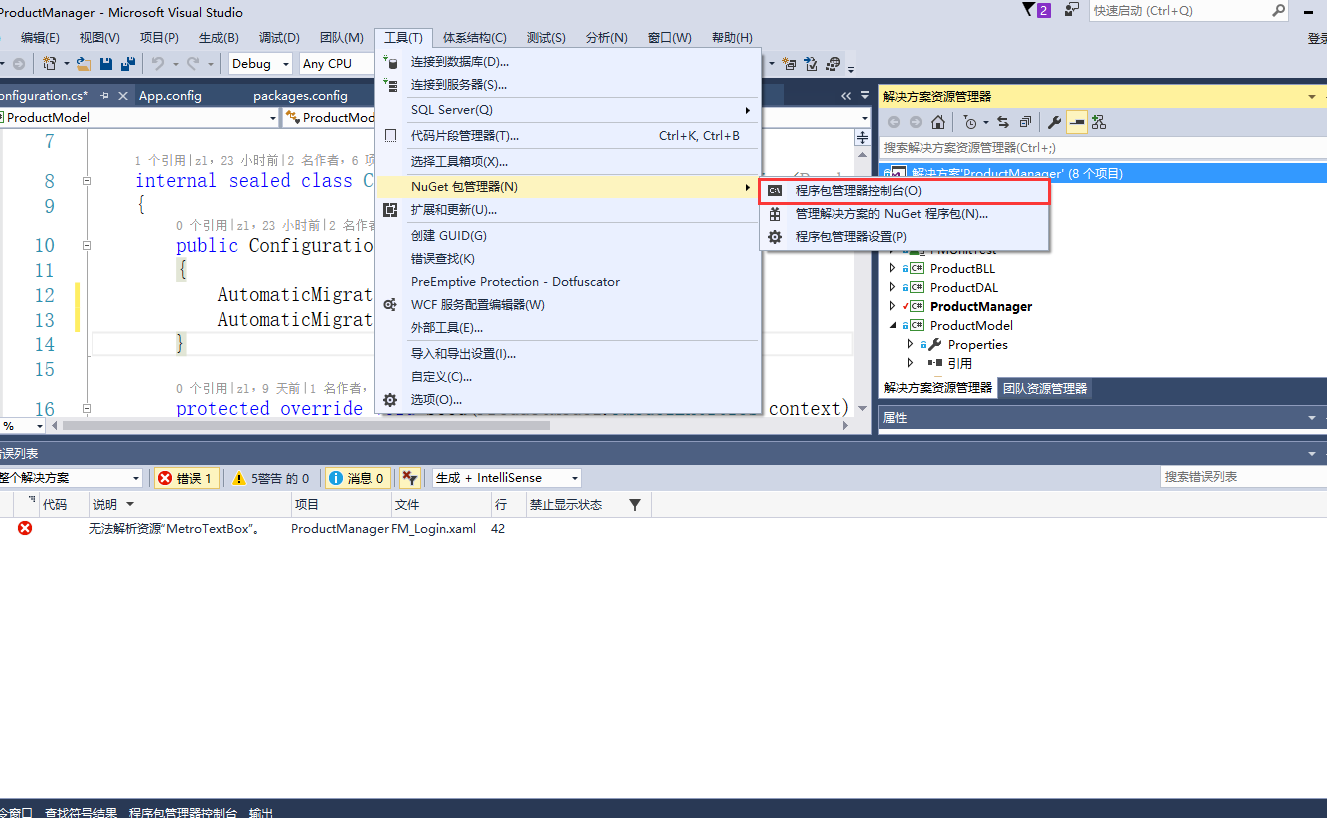
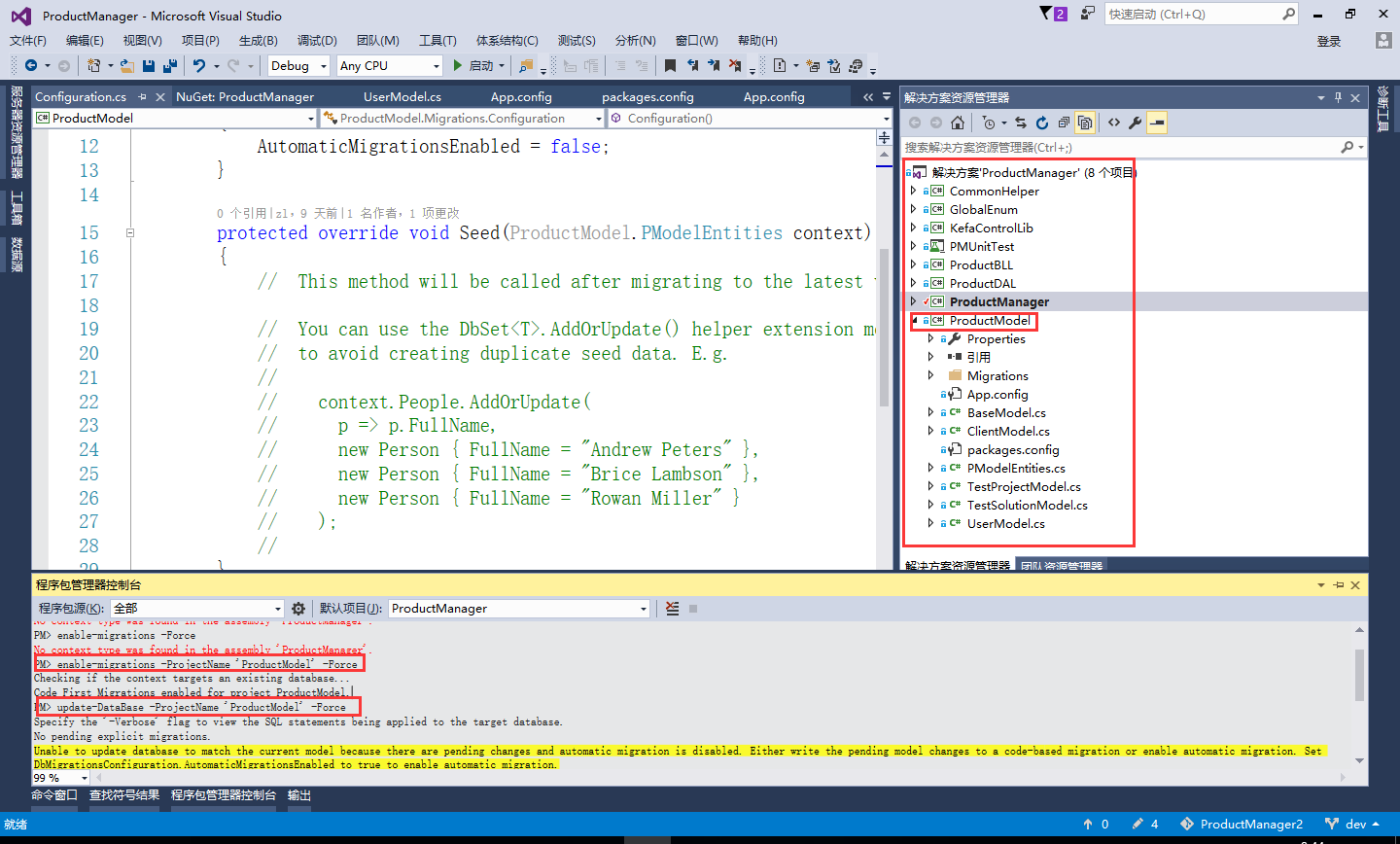
2.输入:enable-migrations -ProjectName 'ProductModel' -Force
解释:’ProductModel‘,ef框架model层所在程序集名称
看到执行结果:
Checking if the context targets an existing database...
Code First Migrations enabled for project ProductModel.
输入:update-DataBase -ProjectName 'ProductModel' -Force
看到执行结果:
Specify the '-Verbose' flag to view the SQL statements being applied to the target database.
No pending explicit migrations.
Unable to update database to match the current model because there are pending changes and automatic migration is disabled. Either write the pending model changes to a code-based migration or enable automatic migration. Set DbMigrationsConfiguration.AutomaticMigrationsEnabled to true to enable automatic migration.
You can use the Add-Migration command to write the pending model changes to a code-based migration.
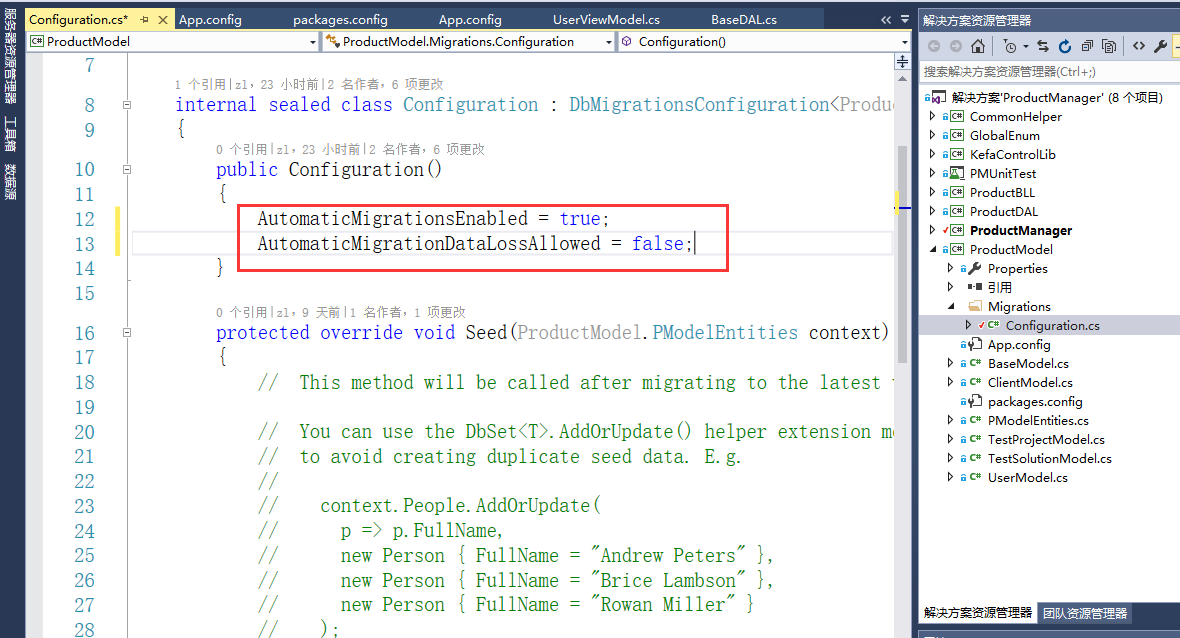
3.打开 ’ProductModel‘,找到Migrations-Configuration
public Configuration()
{
AutomaticMigrationsEnabled = true; (原来为false,改为true)
AutomaticMigrationDataLossAllowed = false; (是否丢数据)
}
下面时操作时的照片:
Entity Framework : The model backing the '' context has changed since the database was created的更多相关文章
- EF框架CodeFirst the model backing the 'PModelEntities' context has changed since the database was created. Consider using Code First Migrations to update the database
1.采用code first 做项目时,数据库已经生成,后期修改数据库表结构.再次运行时出现一下问题: Entity Framework : The model backing the 'Produc ...
- The model backing the <Database> context has changed since the database was created.
Just found out the answer and thought of updating here. Just need to do the following. public class ...
- [转]Creating an Entity Framework Data Model for an ASP.NET MVC Application (1 of 10)
本文转自:http://www.asp.net/mvc/overview/older-versions/getting-started-with-ef-5-using-mvc-4/creating-a ...
- How to: Use the Entity Framework Data Model Located in an External Assembly 如何:使用位于外部程序集中的EF数据模型
If you have a non-XAF application, and want to develop an XAF application that utilizes the same dat ...
- 第三篇:Entity Framework CodeFirst & Model 映射 续篇 EntityFramework Power Tools 工具使用
上一篇 第二篇:Entity Framework CodeFirst & Model 映射 主要介绍以Fluent API来实作EntityFramework CodeFirst,得到了大家一 ...
- 第二篇:Entity Framework CodeFirst & Model 映射
前一篇 第一篇:Entity Framework 简介 我有讲到,ORM 最关键的 Mapping,也提到了最早实现Mapping的技术,就是 特性 + 反射,那Entity Framework 实现 ...
- How to: Supply Initial Data for the Entity Framework Data Model 如何:为EF数据模型提供初始数据
After you have introduced a data model, you may need to have the application populate the database w ...
- 【Entity Framework】Model First Approach
EF中的model first 所谓mf, 就是使用vs提供的edm designer去设计model,然后将设计好的model使用vs在指定的数据库中生成数据库即可. 当你的项目既没有数据库也没有c ...
- Entity Framework之Model First开发方式
一.Model First开发方式 在项目一开始,就没用数据库时,可以借助EF设计模型,然后根据模型同步完成数据库中表的创建,这就是Model First开发方式.总结一点就是,现有模型再有表. 二. ...
随机推荐
- c++ 命名空间 以及 作用域 函数参数 面向对象实验报告
面向对象的分析与设计 实验报告一 一.变量的储存类别 auto static register extern auto变量 函数中的局部变量,如不专门声明为static存储类别,都是动态地分配存 ...
- Android服务端的设计
1.创建自己的MyServletContextListener.java: package yybwb; import java.net.ServerSocket; import javax.serv ...
- Spring Data JPA 复杂/多条件组合查询
1: 编写DAO类或接口 dao类/接口 需继承 public interface JpaSpecificationExecutor<T> 接口: 如果需要分页,还可继承 public ...
- Java--回调接口
回调接口: 我们都知道,一个线程在运行中,遇到一个耗时操作(方法)时,会开启另外一个线程,即所谓 -- 异步 .java中 回调接口 也必然应用与异步加载. 所谓 回调接口 ,也就是线程运行中 遇到一 ...
- Django学习(四)---Admin配置
1)Admin: admin是django自带的功能强大的自动化数据管理界面 被授权的用户可以直接在Admin中管理数据库(增.删.改.查) Django提供了许多针对Admin的定制功能 2)配置A ...
- GET请求和POST请求的区别
request获取请求参数 最为常见的客户端传递参数方式有两种: 浏览器地址栏直接输入:一定是GET请求: 超链接:一定是GET请求: 表单:可以是GET,也可以是POST,这取决与<form& ...
- 【TensorFlow入门完全指南】模型篇·逻辑斯蒂回归模型
import库,加载mnist数据集. 设置学习率,迭代次数,batch并行计算数量,以及log显示. 这里设置了占位符,输入是batch * 784的矩阵,由于是并行计算,所以None实际上代表并行 ...
- 流畅python学习笔记:第十一章:抽象基类
__getitem__实现可迭代对象.要将一个对象变成一个可迭代的对象,通常都要实现__iter__.但是如果没有__iter__的话,实现了__getitem__也可以实现迭代.我们还是用第一章扑克 ...
- HTML中重要的知识点,表单
今天跟大家分享一下有关HTML中比较重要的一个知识点-表单: <form></form>表单 这是一个双标签,form表单有两个必须要有的属性,①action就是指表单传递到的 ...
- 初学安卓开发随笔之 Menu、toast 用法、活动的四种启动模式 以及 一个方便的Base活动类使用方法
Toast toast 是安卓系统的一种非常棒的提醒方式 首先定义一个弹出Toast的触发点,比如可以是按钮之类 其中 Toast.LENGTH_SHORT是指显示时长 还有一个内置变量为Toast. ...