
Qt5.9 WebEngine 概述
Qt WebEngine模块提供了一个web浏览器, 在不使用本地浏览器的情况下, 它可以很容易地把Web内容嵌入到Qt应用程序中.
Qt WebEngine为渲染HTML, XHTML和SVG文档, 使用CSS和JavaScript, 提供了C++类和QML类型
Qt WebEngine架构
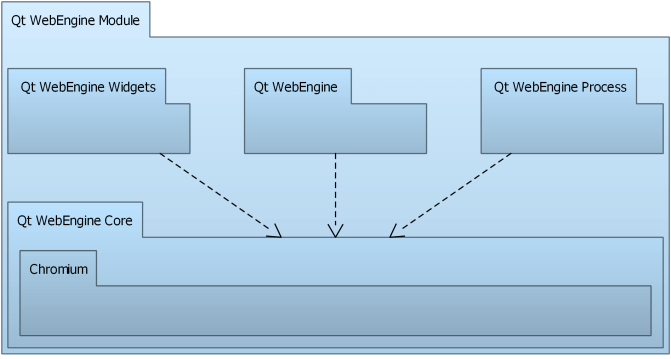
Qt WebEngine的功能分成下列模块:
- Qt WebEngine Widgets 模块: 用于创建基于Widget的web应用.
- Qt WebEngine 模块: 用于创建基于Qt Quick的web应用.
- Qt WebEngine Core 模块: 与Chromium交互
页面(Page)渲染和JavaScript执行从GUI进行分离到了Qt WebEngine进程. 它是一个独立的应用库.
Qt WebEngine Widgets 模块
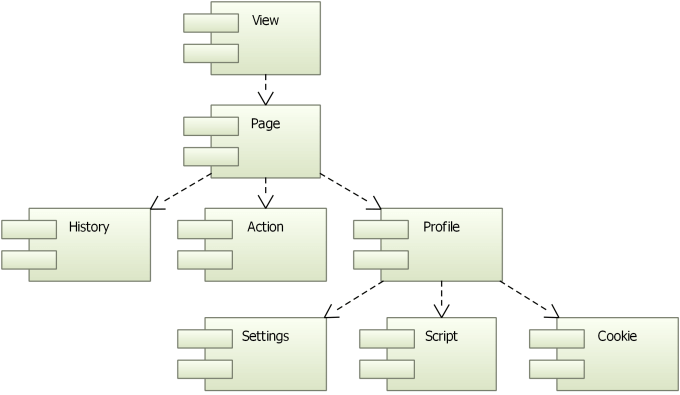
一个web engine view 是Qt WebEngine模块的主要Widget. 它可以在各种各样的应用中加载网页内容. 在视图(view)里, 一个web engine page有一个主frame, 它响应网页内容, 浏览链接历史以及操作(actions). view 和 page 非常相似, 它们提供一组公共函数.
所有pages都属于web engine profile(配置), 它包含共享设置, 脚本和cookies. Profiles可以使用页面分离. 一个典型应用是专用浏览模式的专用配置文件,其中没有永久保存的信息.
备注: Qt WebEngine Widgets 模块使用 Qt Quick场景图来构成视图中的网页元素。这意味这UI进程需要OpenGL ES 2.0或OpenGL 2.0来进行渲染.
A web engine view is the main widget component of the Qt WebEngine module. It can be used in various applications to load web content. Within a view, a web engine page holds a main frame that is responsible for web content, the history of navigated links, and actions. The view and page are quite similar, as they provide a set of common functions.
All pages belong to a web engine profile that contains shared settings, scripts, and cookies. Profiles can be used to isolate pages from each other. A typical use case is a dedicated profile for a private browsing mode, where no information is permanently saved.
Note: The Qt WebEngine Widgets module uses the Qt Quick scene graph to compose the elements of a web page into one view. This means that the UI process requires OpenGL ES 2.0 or OpenGL 2.0 for its rendering.
Qt WebEngine Core Module
Qt WebEngine core基于Chromium项目.
备注: Qt WebEngine基于Chromium, 但是没有包含或使用任何Chrome浏览器的其它服务和插件. 你可以在Chromium项目源代码库查看Chromium和Chrome的区别.
Qt5.9.1中的 Qt WebEngine基于Chromium 56.0.2924.122, 以及额外的安全更新.
The Qt WebEngine core is based on the Chromium Project. Chromium provides its own network and painting engines and is developed tightly together with its dependent modules.
Note: Qt WebEngine is based on Chromium, but does not contain or use any services or add-ons that might be part of the Chrome browser that is built and delivered by Google. You can find more detailed information about the differences between Chromium and Chrome in this overview that is part of the documentation in the Chromium Project upstream source tree.
This version of Qt WebEngine is based on Chromium version 56.0.2924.122, with additional security fixes from newer versions.
Qt WebEngine Process
The Qt WebEngine Process is a separate executable that is used to render web pages and execute JavaScript. This mitigates security issues and isolates crashes caused by specific content.
基于Widget的应用 Embedding Web Content into Widget Based Applications
使用QWebEngineView来显示网页非常简单, 示例如下:
Use the QWebEngineView class to display web pages in the simplest way. Because it is a widget, you can embed QWebEngineView into your forms and use its convenience functions to download and display web sites.
  QWebEngineView *view = new QWebEngineView(parent);

  view->load(QUrl("http://www.qt.io/"));

  view->show();
一个QWebEngineView 实例有一个QWebEnginePage. QWebEnginePage有一个QWebEngineHistory(页面的浏览历史)和一些用于操作页面的QAction对象. 此外, QWebEnginePage可以在页面的主框架内运行JavaScript代码以及为特定事件使用自定义处理器(比如显示自定义授权对话框).
An instance of QWebEngineView has one QWebEnginePage. QWebEnginePage can have a QWebEngineHistory that provides access to the page's navigation history and several QAction objects that apply actions on the web page. In addition, a QWebEnginePage has the ability to run JavaScript code in the context of the page's main frame and to enable customization of handlers for specific events like showing custom authentication dialogs.
每一个QWebEnginePage都属于一个QWebEngineProfile, QWebEngineProfile有一个页面设置的QWebEngineSettings, 一个在页面上运行脚本的QWebEngineScriptCollection, 一个访问HTTP cookies的QWebEngineCookieStore . QWebEnginePage 可以直接指定脚本集合.
Each QWebEnginePage belongs to a QWebEngineProfile that can have a QWebEngineSettings for specifying page settings, a QWebEngineScriptCollection for running scripts on the page, and a QWebEngineCookieStore for accessing the HTTP cookies of Chromium. A QWebEnginePage can also directly point to a script collection.
对于基于widget的应用, web engine会自动初始化, 除非把它放在插件中. 在这种情况下, 它必须在应用程序主文件中用QtWebEngine::initialize初始化, 示例代码如下:
For a widget based application, the web engine is automatically initialized, unless it is placed in a plugin. In that case, it must be initialized in the application main source file by using QtWebEngine::initialize, as illustrated by the following code snippet:
  int main(int argc, char **argv)

  {

      QApplication app(argc, argv);

      QtWebEngine::initialize();

      QMainWindow window;

      window.show();

      return app.exec();

  }
Embedding Web Content into Qt Quick Applications
The WebEngineView QML type allows Qt Quick applications to render regions of dynamic web content. A WebEngineView type may share the screen with other QML types or encompass the full screen as specified within the Qt Quick application.
To make sure that OpenGL context can be shared between the GUI and render processes, the web engine must be initialized by using QtWebEngine::initialize in the application main source file, as illustrated by the following code snippet:
  int main(int argc, char *argv[])

  {

      QCoreApplication::setAttribute(Qt::AA_EnableHighDpiScaling);

      QGuiApplication app(argc, argv);

      QtWebEngine::initialize();

      QQmlApplicationEngine engine;

      engine.load(QUrl(QStringLiteral("qrc:/main.qml")));

      return app.exec();

  }
应用程序可以使用URL和HTML字符串加载页面到WebEngineView, 并使用事务历史进行导航. 在默认情况下, 不同页面的链接会加载到相同的WebEngineView对象, 但是web sites可能会请求打开新的tab, window和dialog.
An application can load pages into the WebEngineView, using either an URL or HTML string, and navigate within session history. By default, links to different pages load within the same WebEngineView object, but web sites may request them to be opened as a new tab, window, or dialog.
The following sample QML application loads a web page using the url property:
  import QtQuick 2.0

  import QtQuick.Window 2.0

  import QtWebEngine 1.0

  Window {

      width:

      height:

      visible: true

      WebEngineView {

          anchors.fill: parent

          url: "http://www.qt.io"

      }

  }
Script Injection
Qt WebEngine不允许直接操作页面DOM. 然而,DOM可以通过注入脚本来检查和调整。
Qt WebEngine does not allow direct access to the document object model (DOM) of a page. However, the DOM can be inspected and adapted by injecting scripts.
在文档ready(一般是页面加载完成)时, 页面Dom构建完成, . 因此, 在文档创建时立刻执行脚本对DOM操作并不适合, 只有在DOM准备好之后再执行脚本.
The DOM of a page is constructed when the document is ready, typically when the page is completely loaded. Therefore, executing scripts as soon as a document is created is not suitable for DOM operations, where one has to wait until the DOM is ready.
另外, 注入脚本与页面上运行的其它脚本共享同一个世界, 这意味着可能引起代码冲突. 为避免它, QWebEngineScript和WebEngineScript QML类型提供了Chromium API 的 Content Script Extensions实现.
In addition, an injected script shares the same world as the other scripts executed on the page, which might lead to conflicts. To avoid this, the QWebEngineScript class and the WebEngineScript QML type provide implementations of the Chromium API for Content Script Extensions. They specify the script to run, the injection point, and the world where the script is run. This enables accessing the DOM to manipulate it within a world.
The following Greasemonkey attributes are supported since Qt 5.8: @exclude, @include, @name, @match, and @run-at.
Managing Certificates
Qt WebEngine uses its own network stack, and therefore QSslConfiguration is not used to open SSL connections. Instead, Qt WebEngine uses the root CA certificates from the operating system to validate the peer's certificate.
The WebEngineCertificateError::error and QWebEngineCertificateError::Error enumerations provide information about the types of certificate errors that might occur. The errors can be handled by using the WebEngineView::certificateError QML method or by reimplementing the QWebEnginePage::certificateError function.
Proxy Support
Qt WebEngine uses the proxy settings from Qt Network, and forwards them to Chromium's networking stack. If QNetworkProxy::applicationProxy is set, it will also be used for Qt WebEngine. If QNetworkProxyFactory::usesSystemConfiguration() is enabled, the proxy settings are automatically retrieved from the system. Settings from an installed QNetworkProxyFactory will be ignored, though.
Not all properties of QNetworkProxy are supported by Qt WebEngine. That is, QNetworkProxy::type(), QNetworkProxy::hostName() and QNetworkProxy::port() are taken into account. All other proxy settings such as QNetworkProxy::rawHeader(), QNetworkProxy::user(), or QNetworkProxy::password() are ignored.
If a proxy requires authentication, QWebEnginePage::proxyAuthenticationRequired is emitted. For Qt Quick, a dialog is shown.
高分辨率支持 High DPI Support
To support High DPI devices, it is recommended that the application attribute Qt::AA_EnableHighDpiScaling is set to enable automatic scaling based on the pixel density of the monitor. In Qt WebEngine applications, the scaling affects the default zooming factor and scrollbar size.
For example:
  int main(int argc, char *argv[])

  {

    QCoreApplication::setAttribute(Qt::AA_EnableHighDpiScaling);

    QApplication app(argc, argv);

    // ...

  }
Qt WebEngine bundles images for normal and high-dpi resolutions into qtwebengine_resources_100p.pak and qtwebengine_resources_200p.pak files. Depending on the target resolutions, one or both of these files need to be deployed.
For more information, see High DPI Displays.
Using WebEngine Core
Qt WebEngine Core provides an API shared by Qt WebEngine and Qt WebEngine Widgets for handling URL requests issued for the networking stack of Chromium and for accessing its HTTP cookies.
Implementing the QWebEngineUrlRequestInterceptor interface and installing the interceptor on a profile enables intercepting, blocking, and modifying URL requests (QWebEngineUrlRequestInfo) before they reach the networking stack of Chromium.
A QWebEngineUrlSchemeHandler can be registered for a profile to add support for custom URL schemes. Requests for the scheme are then issued to QWebEngineUrlSchemeHandler::requestStarted() as QWebEngineUrlRequestJob objects.
The QWebEngineCookieStore class provides functions for accessing HTTP cookies of Chromium. The functions can be used to synchronize cookies with QNetworkAccessManager, as well as to set, delete, and intercept cookies during navigation.
Platform Notes
Qt WebEngine currently supports only Windows, Linux, and macOS. Due to Chromium build requirements it also often requires a newer compiler than the rest of Qt. See Qt WebEngine Platform Notes for further details.
Related Modules
Qt WebEngine supersedes the Qt WebKit module, which is based on the WebKit project, but has not been actively synchronized with the upstream WebKit code since Qt 5.2 and has been deprecated in Qt 5.5. For tips on how to change a Qt WebKit widgets application to use Qt WebEngine widgets, see Porting from Qt WebKit to Qt WebEngine.
The Qt WebView module allows to use a native web browser on platforms where one is available.
The Qt WebChannel module can be used to create a bi-directional communication channel between QObject objects on the C++ side and JavaScript on the QML side.
参考:
http://doc.qt.io/qt-5/qtwebengine-overview.html
Qt5.9 WebEngine 概述的更多相关文章
- qt5.6 webengine兼容xp的编译方法
http://www.qtcn.org/bbs/read-htm-tid-62470.html http://stackoverflow.com/questions/31678657/qtwebeng ...
- PyQt+Html+Js
先做记录,后面有时间在仔细研究 https://www.cnblogs.com/jiangjh5/p/7209315.html?utm_source=itdadao&utm_medium=re ...
- PyQt5.9 Html与本地代码交互实例
在PyQt5.9中, 应用QWebEngineView和QWebChannel技术, 可以进行HTML与本地代码进行交互. 要点: 创建交互对象, 基于QObject, 定义信息槽 创建QWebCha ...
- Qt5的插件机制(1)--Qt 框架中的插件载入机制概述
概述 Qt的源代码中通过 Q<pluginType>Factory.Q<pluginType>Plugin 和 Q<pluginType> 这三个类实现了Qt的插件 ...
- linux 下Qt WebEngine 程序打包简单记录
本次记录仅作参考. 程序说明: 程序是一个编解码器控制管理的工具,使用到的库有:Qt的WebEngine.OpenGL模块.poco库.libmicrohttpd.libcurl.libvlc.同时程 ...
- msvc2013编译qt5.6源码
1.回顾 说起到qt的编译,真是领人痛心啊,不仅编译选项繁多,而且编译时间比较久,总是能使想编译qt源码的人望而却步,呵呵...我就是其中一个,不知道从什么时候开始就想着把qt的源码编译一下,也尝试过 ...
- 翻译qmake文档(一) qmake指南和概述
翻译qmake文档 目录 英文文档连接: http://qt-project.org/doc/qt-5/qmake-manual.html http://qt-project.org/doc/qt-5 ...
- 相遇Qt5
使用Qt5.x版本中的不同方面来开发应用程序,着重于新的Qt Quick的技术,提供了编写C++后端的必要内容,并扩展了Qt Quick. 本章提供了关于Qt5高层次的概述.它对开发者有效的展 ...
- Qt WebEngine版本要求
WebEngine是Qt5.4之后加入的新特性,用Qt WebEngine取代之前的Qt Webkit http://wiki.qt.io/QtWebEngine windows版本 windows版 ...
随机推荐
- AI 的会议总结(by南大周志华)
原文链接:http://blog.csdn.net/akipeng/article/details/6533897 这个列的更详细:http://www.cvchina.info/2010/08/31 ...
- Matlab数组创建
只用C语言,不用Matlab这种魔咒还是要打破的.Matlab是科学计算的常用工具,既然以前没用过,现在开始学吧...... 1. 向量的创建 1)直接输入: 行向量:a=[1,2,3,4,5] ...
- Higher-Order Functions and Lambdas
https://kotlinlang.org/docs/reference/lambdas.html
- sql server 查询时间 格式化输出
use test select * from vote insert into vote (contents) values(GETDATE()) insert into vote (contents ...
- 修改默认的gitlab clone地址,要不每次都得自己修改
这个是无法clone的,得换成gitlab的ip地址 下面进行修改 sudo vim /opt/gitlab/embedded/service/gitlab-rails/config/ ...
- 莫烦大大keras的Mnist手写识别(5)----自编码
一.步骤: 导入包和读取数据 数据预处理 编码层和解码层的建立 + 构建模型 编译模型 训练模型 测试模型[只用编码层来画图] 二.代码: 1.导入包和读取数据 #导入相关的包 import nump ...
- Codeforces Round #548 (Div. 2) B. Chocolates
You went to the store, selling
- JDK环境变量设置(linux)
1.下载jdk1.8版本软件包 2.解压 tar -zxvf jdk1.8.tar.gz mv jdk1.8 /usr/local/ 3.添加环境变量 vim /etc/profile 在文件底部加入 ...
- 【Codeforces 996B】World Cup
[链接] 我是链接,点我呀:) [题意] [题解] 你可以找出来a[i]里面的最小值mi,显然是这个数字最可能先变成0,但还不确定. 然后用mi/n得到你最少需要走多少圈才能让那个mi变成" ...
- 第三次组队赛 (DFS&BFS)
网站:CSUST 8月1日 先总结下,不得不说死的很惨,又是第三就不说了,一共7道题,AC了5道,但是有一个组三个人是做的个人赛,有两人AK了.......Orz,然后深搜还是大问题,宽搜倒是不急了. ...