
Spring Boot (2) Restful风格接口
Rest接口
动态页面jsp早已过时,现在流行的是vuejs、angularjs、react等前端框架 调用 rest接口(json格式),如果是单台服务器,用动态还是静态页面可能没什么大区别,如果服务器用到了集群,负载均衡,CDN等技术,用动态页面还是静态页面差别非常大。
传统rest用法
用spring mvc可以很容易的实现json格式的rest接口,这是比较传统的用法,在spring boot中已经自动配置了jackson。
@Controller

public class HelloController {

    @Autowired

    String hello;

    @RequestMapping(value = "/hello",method = RequestMethod.POST)

    @ResponseBody

    public String hello(User user){

        return "hello world";

    }

}
新的rest用法
在比较新的spring版本中,出了几个新的注解,简化了上面的用法,如下
/**

 * RestController 等价于 @Controller 和 @ResponseBody

 */

@RestController

public class HelloController {

    @PostMapping("/postUserAPI")

    public User postUserAPI(@RequestBody User user){ //@RequestBody json格式参数->自动转换为user

        return user;

    }

}
ajax调用Rest
<html>

<head>

    <title>Title</title>

    <script  src="http://libs.baidu.com/jquery/1.7.2/jquery.min.js"></script>

    <script>

        $(function(){

            var data = {

                userId:1,

                userName:'david'

            };

            $.ajax({

                url:'/dev/postUserAPI',

                type:"post",

                data:JSON.stringify(data),

                contentType:'application/json;charset=UTF-8',

                dataType:"json",

                success:function(data){

                    console.log(data)

                }

            });

        });

    </script>

</head>

<body>

index

</body>

</html>
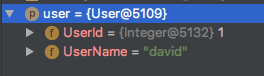
spring boot 默认使用jackson 处理json,如果我们想要使用fast的json解析框架的话
1.我们需要在pom.xml中引入相应的依赖
        <!--fastjson数据配置-->

        <dependency>

            <groupId>com.alibaba</groupId>

            <artifactId>fastjson</artifactId>

            <version>1.2.29</version>

        </dependency>
2.需要在SpringBootApplication启动类中配置一下,配置有两种方式:
1.继承WebMVCConfigurerAdapter并重写方法configureMessageConverters 添加我们自定义的json解析框架。
package com.spring.boot;

import com.alibaba.fastjson.serializer.SerializerFeature;

import com.alibaba.fastjson.support.config.FastJsonConfig;

import com.alibaba.fastjson.support.spring.FastJsonHttpMessageConverter;

import org.springframework.boot.SpringApplication;

import org.springframework.boot.autoconfigure.SpringBootApplication;

import org.springframework.http.converter.HttpMessageConverter;

import org.springframework.web.servlet.config.annotation.WebMvcConfigurerAdapter;

import java.util.List;

@SpringBootApplication

public class BootApplication extends WebMvcConfigurerAdapter {

    @Override

    public void configureMessageConverters(List<HttpMessageConverter<?>> converters) {

        super.configureMessageConverters(converters);

        //1.定义一个convert转换消息对象

        FastJsonHttpMessageConverter fastConverter=new FastJsonHttpMessageConverter();

        //2.添加fastjson的配置信息,比如:是否要格式化返回json数据

        FastJsonConfig fastJsonConfig=new FastJsonConfig();

        fastJsonConfig.setSerializerFeatures(SerializerFeature.PrettyFormat);

        fastConverter.setFastJsonConfig(fastJsonConfig);

        converters.add(fastConverter);

    }

    public static void main(String[] args) {

        SpringApplication.run(BootApplication.class, args);

    }

}
2.使用@Bean注入第三方的json解析器。
package com.david;

import com.alibaba.fastjson.serializer.SerializerFeature;

import com.alibaba.fastjson.support.config.FastJsonConfig;

import com.alibaba.fastjson.support.spring.FastJsonHttpMessageConverter;

import org.springframework.boot.SpringApplication;

import org.springframework.boot.autoconfigure.SpringBootApplication;

import org.springframework.boot.autoconfigure.web.HttpMessageConverters;

import org.springframework.context.annotation.Bean;

import org.springframework.http.converter.HttpMessageConverter;

import org.springframework.web.servlet.config.annotation.WebMvcConfigurerAdapter;

import java.util.List;

@SpringBootApplication

public class DemoApplication{

    @Bean//使用@Bean注入fastJsonHttpMessageConvert

    public HttpMessageConverters fastJsonHttpMessageConverters(){

        //1.需要定义一个Convert转换消息的对象

        FastJsonHttpMessageConverter fastConverter=new FastJsonHttpMessageConverter();

        //2.添加fastjson的配置信息,比如是否要格式化返回的json数据

        FastJsonConfig fastJsonConfig=new FastJsonConfig();

        fastJsonConfig.setSerializerFeatures(SerializerFeature.PrettyFormat);

        //3.在convert中添加配置信息

        fastConverter.setFastJsonConfig(fastJsonConfig);

        HttpMessageConverter<?> converter=fastConverter;

        return new HttpMessageConverters(converter);

    }

    public static void main(String[] args) {

        SpringApplication.run(DemoApplication.class,args);

    }

}
fastjson常用方法:
        //bean转换json

        //将对象转换成格式化的json

        JSON.toJSONString(obj, true);

        //将对象转换成非格式化的json

        JSON.toJSONString(obj, false);

        //obj设计对象

        //对于复杂类型的转换,对于重复的引用在转成json串后在json串中出现引用的字符,比如 $ref":"$[0].books[1]

        Student stu = new Student();

        Set books = new HashSet();

        Book book = new Book();

        books.add(book);

        stu.setBooks(books);

        List list = new ArrayList();

        for (int i = 0; i < 5; i++)

            list.add(stu);

        String json = JSON.toJSONString(list, true);

        //json转换bean

        String json = "{\"id\":\"2\",\"name\":\"Json技术\"}";

        Book book = JSON.parseObject(json, Book.class);

        //json转换复杂的bean,比如List,Map

        String json = "[{\"id\":\"1\",\"name\":\"Json技术\"},{\"id\":\"2\",\"name\":\"java技术\"}]";

        //将json转换成List

        List list = JSON.parseObject(json, new TypeReference<ARRAYLIST>() {

        });

        //将json转换成Set

        Set set = JSON.parseObject(json, new TypeReference<HASHSET>() {

        });

        //通过json对象直接操作json

        //从json串中获取属性

        String propertyName = 'id';

        String propertyValue = "";

        String json = "{\"id\":\"1\",\"name\":\"Json技术\"}";

        JSONObject obj = JSON.parseObject(json);

        propertyValue = obj.get(propertyName));

        //除去json中的某个属性

        String propertyName = 'id';

        String propertyValue = "";

        String json = "{\"id\":\"1\",\"name\":\"Json技术\"}";

        JSONObject obj = JSON.parseObject(json);

        Set set = obj.keySet();

        propertyValue = set.remove(propertyName);

        json = obj.toString();

        //向json中添加属性

        String propertyName = 'desc';

        Object propertyValue = "json的玩意儿";

        String json = "{\"id\":\"1\",\"name\":\"Json技术\"}";

        JSONObject obj = JSON.parseObject(json);

        obj.put(propertyName, JSON.toJSONString(propertyValue));

        json = obj.toString();

        //修改json中的属性

        String propertyName = 'name';

        Object propertyValue = "json的玩意儿";

        String json = "{\"id\":\"1\",\"name\":\"Json技术\"}";

        JSONObject obj = JSON.parseObject(json);

        Set set = obj.keySet();

        if (set.contains(propertyName))

            obj.put(propertyName, JSON.toJSONString(propertyValue));

        json = obj.toString();

        //判断json中是否有属性

        String propertyName = 'name';

        boolean isContain = false;

        String json = "{\"id\":\"1\",\"name\":\"Json技术\"}";

        JSONObject obj = JSON.parseObject(json);

        Set set = obj.keySet();

        isContain = set.contains(propertyName);

        //json中日期格式的处理

        Object obj = new Date();

        String json = JSON.toJSONStringWithDateFormat(obj, "yyyy-MM-dd HH:mm:ss.SSS");

        //使用JSON.toJSONStringWithDateFormat,该方法可以使用设置的日期格式对日期进行转换
jackson常用方法:
        //bean转换json

        //将类转换成Json,obj是普通的对象,不是List,Map的对象

        String json = JSONObject.fromObject(obj).toString();

        //将List,Map转换成Json

        String json = JSONArray.fromObject(list).toString();

        String json = JSONArray.fromObject(map).toString();

        //json转换bean

        String json = "{\"id\":\"1\",\"name\":\"Json技术\"}";

        JSONObject jsonObj = JSONObject.fromObject(json);

        Book book = (Book)JSONObject.toBean(jsonObj,Book.class);

        //json转换List,对于复杂类型的转换会出现问题

        String json = "[{\"id\":\"1\",\"name\":\"Json技术\"},{\"id\":\"2\",\"name\":\"Java技术\"}]";

        JSONArray jsonArray = JSONArray.fromObject(json);

        JSONObject jsonObject;

        T bean;

        int size = jsonArray.size();

        List list = new ArrayList(size);

        for (int i = 0; i < size; i++) {

            jsonObject = jsonArray.getJSONObject(i);

            bean = (T) JSONObject.toBean(jsonObject, beanClass);

            list.add(bean);

        }

        //json转换Map

        String jsonString = "{\"id\":\"1\",\"name\":\"Json技术\"}";

        JSONObject jsonObject = JSONObject.fromObject(jsonString);

        Iterator keyIter = jsonObject.keys();

        String key;

        Object value;

        Map valueMap = new HashMap();

        while (keyIter.hasNext()) {

            key = (String) keyIter.next();

            value = jsonObject.get(key).toString();

            valueMap.put(key, value);

        }

        //json对于日期的操作比较复杂,需要使用JsonConfig,比Gson和FastJson要麻烦多了

        //创建转换的接口实现类,转换成指定格式的日期

        class DateJsonValueProcessor implements JsonValueProcessor{

            public static final String DEFAULT_DATE_PATTERN = "yyyy-MM-dd HH:mm:ss.SSS";

            private DateFormat dateFormat;

            public DateJsonValueProcessor(String datePattern) {

                try {

                    dateFormat = new SimpleDateFormat(datePattern);

                } catch (Exception ex) {

                    dateFormat = new SimpleDateFormat(DEFAULT_DATE_PATTERN);

                }

            }

            public Object processArrayValue(Object value, JsonConfig jsonConfig) {

                return process(value);

            }

            public Object processObjectValue(String key, Object value,

                                             JsonConfig jsonConfig) {

                return process(value);

            }

            private Object process(Object value) {

                return dateFormat.format[1];

                Map<STRING,DATE> birthDays = new HashMap<STRING,DATE>();

                birthDays.put("WolfKing",new Date());

                JSONObject jsonObject = JSONObject.fromObject(birthDays, jsonConfig);

                String json = jsonObject.toString();

                System.out.println(json);

            }

        }

        //JsonObject 对于json的操作和处理

        //从json串中获取属性

        String jsonString = "{\"id\":\"1\",\"name\":\"Json技术\"}";

        Object key = "name";

        Object value = null;

        JSONObject jsonObject = JSONObject.fromObject(jsonString);

        value = jsonObject.get(key);

        jsonString = jsonObject.toString();

        //除去json中的某个属性

        String jsonString = "{\"id\":\"1\",\"name\":\"Json技术\"}";

        Object key = "name";

        Object value = null;

        JSONObject jsonObject = JSONObject.fromObject(jsonString);

        value = jsonObject.remove(key);

        jsonString = jsonObject.toString();

        //向json中添加和修改属性,有则修改,无则添加

        String jsonString = "{\"id\":\"1\",\"name\":\"Json技术\"}";

        Object key = "desc";

        Object value = "json的好东西";

        JSONObject jsonObject = JSONObject.fromObject(jsonString);

        jsonObject.put(key,value);

        jsonString = jsonObject.toString();

        //判断json中是否有属性

        String jsonString = "{\"id\":\"1\",\"name\":\"Json技术\"}";

        boolean containFlag = false;

        Object key = "desc";

        JSONObject jsonObject = JSONObject.fromObject(jsonString);

        containFlag = jsonObject.containsKey(key);
Spring Boot (2) Restful风格接口的更多相关文章
- 使用Spring boot开发RestFul 风格项目PUT/DELETE方法不起作用
在使用Spring boot 开发restful 风格的项目,put.delete方法不起作用,解决办法. 实体类Student @Data public class Student { privat ...
- Spring Boot构建 RESTful 风格应用
Spring Boot构建 RESTful 风格应用 1.Spring Boot构建 RESTful 风格应用 1.1 实战 1.1.1 创建工程 1.1.2 构建实体类 1.1.4 查询定制 1.1 ...
- Spring Boot2 系列教程(三十一)Spring Boot 构建 RESTful 风格应用
RESTful ,到现在相信已经没人不知道这个东西了吧!关于 RESTful 的概念,我这里就不做过多介绍了,传统的 Struts 对 RESTful 支持不够友好 ,但是 SpringMVC 对于 ...
- spring boot(3)-Rest风格接口
Rest接口 虽然现在还有很多人在用jsp,但是其实这种动态页面早已过时,现在前端流行的是静态HTML+ rest接口(json格式).当然,如果是单台服务器,用动态还是静态页面可能没什么很大区别,但 ...
- Spring Boot 之restful风格
步骤一:restful风格是什么? 我们知道在做web开发的过程中,method常用的值是get和post.可事实上,method值还可以是put和delete等等其他值. 既然method值如此丰富 ...
- SpringBoot2.0基础案例(01):环境搭建和RestFul风格接口
一.SpringBoot 框架的特点 1.SpringBoot2.0 特点 1)SpringBoot继承了Spring优秀的基因,上手难度小 2)简化配置,提供各种默认配置来简化项目配置 3)内嵌式容 ...
- 使用SpringBoot编写Restful风格接口
一.简介 Restful是一种对url进行规范的编码风格,通常一个网址对应一个资源,访问形式类似http://xxx.com/xx/{id}/{id}. 举个栗子,当我们在某购物网站上买手机时会 ...
- Spring Boot开发RESTful接⼝服务及单元测试
Spring Boot开发RESTful接⼝服务及单元测试 常用注解解释说明: @Controller :修饰class,⽤来创建处理http请求的对象 @RestController :Spring ...
- Spring Boot - Building RESTful Web Services
Spring Boot Building RESTful Web Services https://www.tutorialspoint.com/spring_boot/spring_boot_bui ...
随机推荐
- 面试bb
1.面试者进行自我介绍 2.学校/学历/大学生活及课程的心得总结(人品,性格评估) 3.技能介绍(是否对应聘工作有帮助,评估学习能力):编程/操作系统/测试工具/测试方法/脚本 4.离职原因/项目经验 ...
- CODEVS 3500
题目描述 输入3个数a,b,c,求a^b mod c=?输入描述 三个数a,b,c输出描述 一个数,即a^b mod c 的答案.样例输入5 10 9样例输出 4 基 ...
- Haybale Guessing
Haybale Guessing Time Limit: 1000MS Memory Limit: 65536K Description The cows, who always ha ...
- 最小生成树prime算法模板
#include<stdio.h> #include<string.h> using namespace std; int map[505][505]; int v, e; i ...
- R语言为数据框添加列名或行名
1.添加列名 wts=c(1,1,1) names(wts)=c("setosa","versicolor","virginica") 2. ...
- P1331 海战 洛谷
题目描述 在峰会期间,武装部队得处于高度戒备.警察将监视每一条大街,军队将保卫建筑物,领空将布满了F-2003飞机.此外,巡洋船只和舰队将被派去保护海岸线.不幸的是因为种种原因,国防海军部仅有很少的几 ...
- cogs 29. 公路建设
29. 公路建设 ★ 输入文件:road.in 输出文件:road.out 简单对比时间限制:1 s 内存限制:128 MB [问题描述] A 国是一个新兴的国家,有 N 个城市,分别 ...
- N天学习一个Linux命令之top
用途 查看机器负载以及进程资源占用情况,linux系统性能分析工具 用法 top -hv | -abcHimMsS -d delay -n iterations -p pid [, pid ...] ...
- Unity3d-反编译C#和提取资源
使用MonoDevelop查看代码 1.解压缩一个Ipa文件,找到如下目录 2.拖拽一个Assembly-CSharp.dll文件到MonoDevelop工具栏,即可查看C#代码 其他C#反编译工具: ...
- DSP、Media、AdExchanger之间的关系及交互流程
广告商,如以下的樱花日语,淘宝卖家.其须要推广自己的产品. Zampdsp(晶赞) 是DSP平台.其与非常多广告商合作,广告商在平台上公布广告创意,并托付平台代为投放. tanx.com 是adExc ...