
WPF遍历当前容器中某种控件的方法
版权声明:本文为博主原创文章,未经博主允许不得转载。 https://blog.csdn.net/m0_37591671/article/details/79528845
WPF遍历当前容器中某种控件的方法
1.目的:
在设计界面的时候遇到了这样一个问题:一个窗口中有六个按钮,我希望点击某一个按钮的时候,该按钮能够高亮显示,即:更换该按钮的背景图片,点击第二个的时候,第二个高亮显示,其他按钮还是显示为普通按钮颜色,如图:
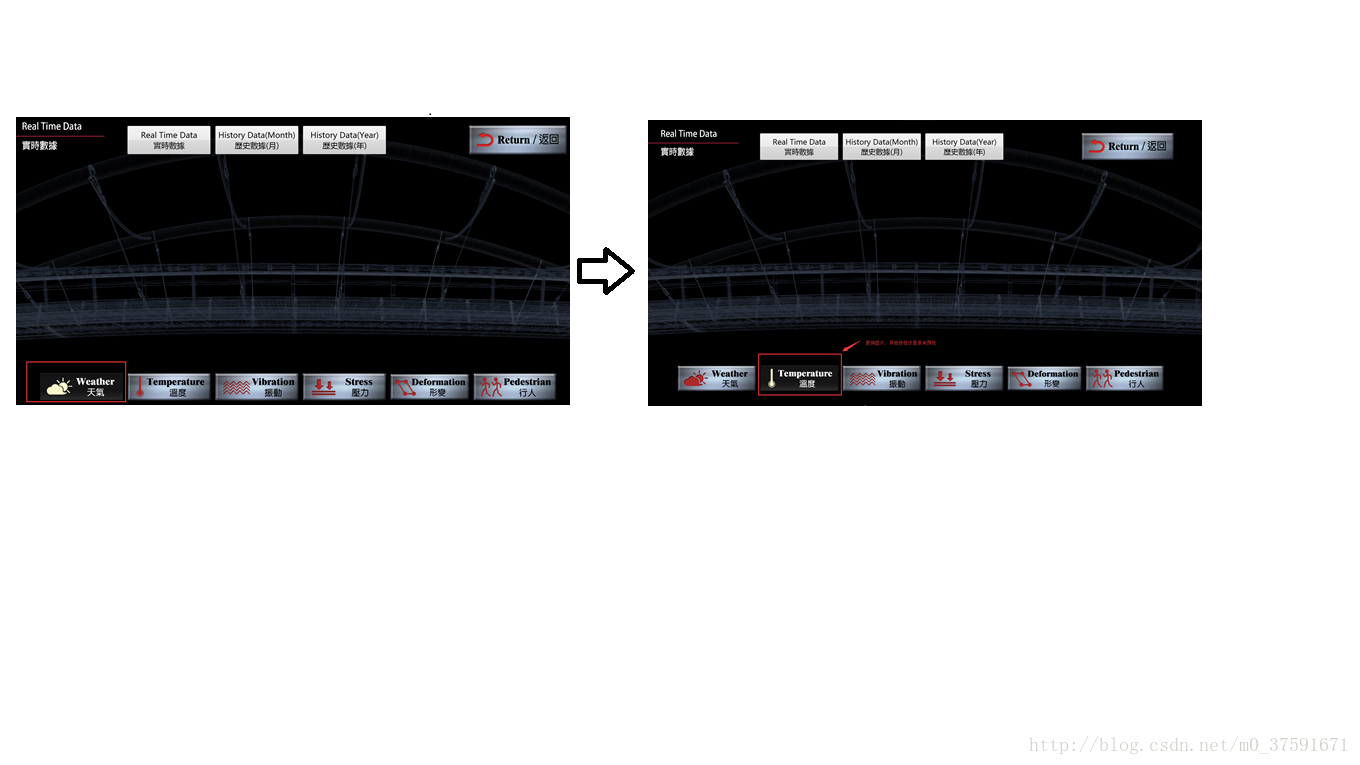
2.实现思路:
2.1 在每一次点击的时候,遍历当前容器中所有Button,但是我们这里只需要下面六个,然后根据按钮的名称,来依次给按钮背景图片赋予相应的路径,即还原到普通普片的路径;在给点击的按钮背景图片赋予高亮图片的路径。
2.2 还原到普通普片的路径
//还原到普通普片的路径

 public static void BackToUsedPicture(UIElement uIElement)

        {

             //遍历当前容器中所有Button

            List<Button> btnList=FindChirldHelper.FindVisualChild<Button>(uIElement);

            foreach (var item in btnList)

            {

                Image img = new Image();

                if (item.Name== "Weather_btn")

                {

                    img.Source = new BitmapImage(new Uri("../../Images/MonitorData/weatherBUTTON.jpg", UriKind.Relative));

                }

                else if (item.Name == "Temperature_btn")

                {

                    img.Source = new BitmapImage(new Uri("../../Images/MonitorData/temperatureBUTTON.jpg", UriKind.Relative));

                }

                else if (item.Name == "Vibration_btn")

                {

                    img.Source = new BitmapImage(new Uri("../../Images/MonitorData/virbrationBUTTON.jpg", UriKind.Relative));

                }

                else if (item.Name == "Stress_btn")

                {

                    img.Source = new BitmapImage(new Uri("../../Images/MonitorData/stressBUTTON.jpg", UriKind.Relative));

                }

                else if (item.Name == "Deformation_btn")

                {

                    img.Source = new BitmapImage(new Uri("../../Images/MonitorData/DeformationBUTTON.jpg", UriKind.Relative));

                }

                else if (item.Name == "Pedestria_btn")

                {

                    img.Source = new BitmapImage(new Uri("../../Images/MonitorData/peopleBUTTON.jpg", UriKind.Relative));

                }

                item.Content = img;

            }

        }
2.3 寻找当前容器中某种控件的 方法:
public static class FindChirldHelper

    {

       public static List<T> FindVisualChild<T>(DependencyObject obj) where T : DependencyObject

        {

            try

            {

                List<T> TList = new List<T> { };

                for (int i = 0; i < VisualTreeHelper.GetChildrenCount(obj); i++)

                {

                    DependencyObject child = VisualTreeHelper.GetChild(obj, i);

                    if (child != null && child is T)

                    {

                        TList.Add((T)child);

                        List<T> childOfChildren = FindVisualChild<T>(child);

                        if (childOfChildren != null)

                        {

                            TList.AddRange(childOfChildren);

                        }

                    }

                    else

                    {

                        List<T> childOfChildren = FindVisualChild<T>(child);

                        if (childOfChildren != null)

                        {

                            TList.AddRange(childOfChildren);

                        }

                    }

                }

                return TList;

            }

            catch (Exception ee)

            {

                MessageBox.Show(ee.Message);

                return null;

            }

        }

    }
3.3 上端使用:
 private void Weather_btn_Click(object sender, RoutedEventArgs e)

        {

            ChangeButtonToLight((Button)sender);

        }

  public void ChangeButtonToLight(Button button)

        {

            ChangeButtonImage.BackToUsedPicture(this);

            Image img = new Image();

            if (button.Name == "Weather_btn")

            {

                img.Source = new BitmapImage(new Uri("../../Images/MonitorData/weatherBUTTONLight.png", UriKind.Relative));

            }

            else if (button.Name == "Temperature_btn")

            {

                img.Source = new BitmapImage(new Uri("../../images/MonitorData/temperatureBUTTONLight.png", UriKind.Relative));

            }

            else if (button.Name == "Vibration_btn")

            {

                img.Source = new BitmapImage(new Uri("../../Images/MonitorData/virbrationBUTTON.jpg", UriKind.Relative));

            }

            else if (button.Name == "Stress_btn")

            {

                img.Source = new BitmapImage(new Uri("../../Images/MonitorData/stressBUTTON.jpg", UriKind.Relative));

            }

            else if (button.Name == "Deformation_btn")

            {

                img.Source = new BitmapImage(new Uri("../../Images/MonitorData/DeformationBUTTON.jpg", UriKind.Relative));

            }

            else if (button.Name == "Pedestria_btn")

            {

                img.Source = new BitmapImage(new Uri("../../Images/MonitorData/peopleBUTTON.jpg", UriKind.Relative));

            }

            button.Content = img;

        }
WPF遍历当前容器中某种控件的方法的更多相关文章
- WPF 遍历资源字典中的控件
object obItem=this.FindResource("canvasdt"); if (obItem is System.Windows.DataTemplate) { ...
- WPF中TreeView控件SelectedItemChanged方法的MVVM绑定
问题描述:左侧treeview控件中点击不同类别的节点时,右侧的页面会显示不同的权限.比如对于My Publications,拥有Modify和Delete两种权限,对于My Subscription ...
- 在VS2010中ActiveX控件注册方法,使用regsvr32命令
上一篇小编展示了如何设置VS2010自带的ActiveX控件的容器测试程序,现在为大家演示一下如何注册ActiveX控件. 首先简单了解一下ActiveX控件的知识,ActiveX控件:简单来说,就是 ...
- 关于如何获取Google 官方 NavgationView中的控件的方法
最近在想要寻找一个好集成的SlidingMenu,看上了官方的DrawLayout,简单易集成 然后如果想动态改变DrawLayout头部的HeaderVIew的资源的话需要先获取到控件 方法如下 n ...
- wpf怎么使用WindowsFormsHost(即winform控件)
原文:wpf怎么使用WindowsFormsHost(即winform控件) 使用方法: 1.首先,我们需要向项目中的引用(reference)中添加两个动态库dll,一个是.NET库中的System ...
- Git使用总结 Asp.net生命周期与Http协议 托管代码与非托管代码的区别 通过IEnumerable接口遍历数据 依赖注入与控制反转 C#多线程——优先级 AutoFac容器初步 C#特性详解 C#特性详解 WPF 可触摸移动的ScrollViewer控件 .NET(C#)能开发出什么样的APP?盘点那些通过Smobiler开发的移动应用
一,原理 首先,我们要明白Git是什么,它是一个管理工具或软件,用来管理什么的呢?当然是在软件开发过程中管理软件或者文件的不同版本的工具,一些作家也可以用这个管理自己创作的文本文件,由Linus开发的 ...
- WPF中自定义的DataTemplate中的控件,在Window_Loaded事件中加载机制初探
原文:WPF中自定义的DataTemplate中的控件,在Window_Loaded事件中加载机制初探 最近因为项目需要,开始学习如何使用WPF开发桌面程序.使用WPF一段时间之后,感 ...
- 示例:WPF中Slider控件封装的缓冲播放进度条控件
原文:示例:WPF中Slider控件封装的缓冲播放进度条控件 一.目的:模仿播放器播放进度条,支持缓冲任务功能 二.进度: 实现类似播放器中带缓存的播放样式(播放区域.缓冲区域.全部区域等样式) 实现 ...
- WPF中Ribbon控件的使用
这篇博客将分享如何在WPF程序中使用Ribbon控件.Ribbon可以很大的提高软件的便捷性. 上面截图使Outlook 2010的界面,在Home标签页中,将所属的Menu都平铺的布局,非常容易的可 ...
随机推荐
- mysql字符设置乱码问题
在操作系统中对于任意一个字符而言是没有编码格式概念的:同样的字母在不同的编码集里面可能代表不同的东西:关键在于你用什么样的软件打开它,软件本身是以什么样的编码格式来显示你的字符,那么你的字符当前就是什 ...
- Linux 设置文件默认打开方式
比如说我安装了一个绿色版的sublime(.tar解压出来的不是.deb) 但是现在我右键不能打开,不能添加为默认打开方式...这个时候就比较尴尬了... 我总不能每次都cd到安装目录下然后termi ...
- poweroff---关闭计算机操作系统并且切断系统电源。
poweroff命令用来关闭计算机操作系统并且切断系统电源. 语法 poweroff(选项) 选项 -n:关闭操作系统时不执行sync操作: -w:不真正关闭操作系统,仅在日志文件“/var/log/ ...
- python学习日记-180823
列表 a=[ ] 1.负数下标:a=[-1]指的是列表a最后一个下标,-2指倒数第二个下标 2.切片——利用切片获得子列表 a[1:4]——'1'切片开始处的下标,‘4’切片结束处的下标(不包括此下标 ...
- 洛谷——P1314 聪明的质监员
https://www.luogu.org/problem/show?pid=1314 题目描述 小T 是一名质量监督员,最近负责检验一批矿产的质量.这批矿产共有 n 个矿石,从 1到n 逐一编号,每 ...
- ubuntu mysql 无法启动 简单排查
自己的站点非常久没有去上了,想打开发现竟然打不开了.所以就找了一系列的原因. vps不行了 dns解析出问题了 域名出问题了 简单排查之后,我的vps服务商用的是 ***(bandwagonhost) ...
- 跟着辛星用PHP的反射机制来实现插件
我的博文的前一篇解说了PHP的反射机制是怎么回事,假设读者还不清楚反射机制,能够搜索下或者看我的博文,都是不错的选择.我们開始解说一下怎么用PHP来实现插件机制.所谓插件机制.就是我们定义一个接口.即 ...
- 在Fedora 14 alpha 下测试Kvm情况(视频)
今天刚忙完,便抽空做了fc14下的虚拟机的测试,总体感觉在2.6.35的kernel下启动和配置虚拟机的速度比原来要快乐许多,下面就带着各位体验一下吧.(硬件测试环境:IBM R52,2g内存,物理机 ...
- WPF 入门《数据绑定》
简单而言, 数据绑定是一种关系, 这种关系告诉WPF 从一个源目标对象中提取一些信息, 并且使用该信息设置为目标对象的属性.目标属性总是依赖项属性, 并且通常位于WPF元素中. 然而, 源对象可以是任 ...
- SpringMVC,Mybatis,FreeMarker连接mycat示例(一)
首页 > 程序开发 > 软件开发 > Java > 正文 SpringMVC,Mybatis,FreeMarker连接mycat示例(一) 项目结构如图: 首先是各种配置文件, ...