
C#之用户自定义控件
一、新建用户自定义控件
如下图所示,想通过LED的点击来实现亮和灭使用去控制下位机。
LED亮:

LED灭:

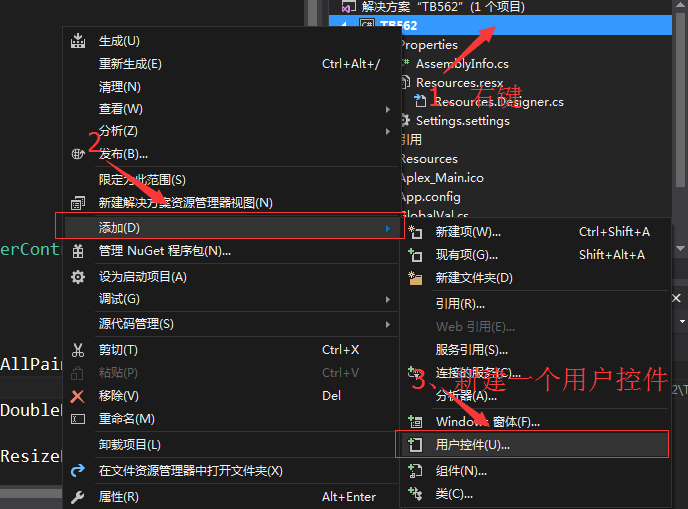
首先新建一个用户控件类,名字为LedControl.cs,如下图所示步骤:
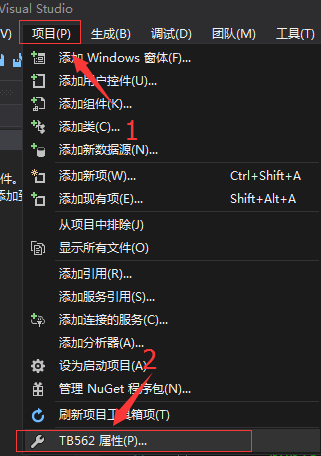
在资源中,添加现有文件中加入图片

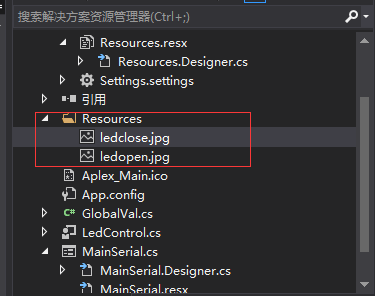
加入的图片可以在Resources中看到列表
编译成功后,在工具箱中看到新建出来的用户控件:

二、新建用户控件的源码及注释
using System;

using System.Collections.Generic;

using System.ComponentModel;

using System.Drawing;

using System.Data;

using System.Linq;

using System.Text;

using System.Threading.Tasks;

using System.Windows.Forms;

namespace TB562

{

    public partial class LedControl : UserControl

    {

        public LedControl()

        {

            InitializeComponent();

            this.SetStyle(ControlStyles.AllPaintingInWmPaint, true);        //禁止擦除背景

            this.SetStyle(ControlStyles.DoubleBuffer, true);                //启用双缓冲,双缓冲为了解决控件刷新闪烁的问题

            this.SetStyle(ControlStyles.ResizeRedraw, true);                //调整大小时重绘

            this.SetStyle(ControlStyles.Selectable, true);                  //控件可以接收焦点

            this.SetStyle(ControlStyles.SupportsTransparentBackColor, true);//透明效果

            this.SetStyle(ControlStyles.UserPaint, true);                   //自绘

            this.BackColor = Color.Transparent;                             //获取系统定义的颜色

            this.Cursor = Cursors.Hand;                                     //表达鼠标移动到控件上面会变成手势光标

            this.Size = new Size(87, 27);                                   //自定义控件的大小尺寸

        }

        //定义一个公共属性

        bool isCheck = false;

        /// <summary>

        /// 是否选中

        /// </summary>

        public bool Checked

        {

            set { isCheck = value;this.Invalidate();}                 // 用Invalidate()使区域无效就可触发该控件的重画

            get { return isCheck; }

        }

        public enum CheckStyle

        {

            style1,

            style2,

            style3,

            style4,

        };

        CheckStyle checkStyle = CheckStyle.style1;//定义多种控件样式选择

        /// <summary>

        /// 样式

        /// </summary>

        public CheckStyle CheckStyleX

        {

            set { checkStyle = value; } //

            get { return checkStyle; }

        }

        public event EventHandler CheckChanged;

        //鼠标点击的触发事件

        private void LedControl_Click(object sender, EventArgs e)

        {

            isCheck = !isCheck;

            this.Invalidate();                              //Invalidate将控件标记为重绘,触发重写OnPaint

        }

        protected override void OnPaint(PaintEventArgs e)   //重写控件的事件

        {

            Bitmap bitMapOn = null;

            Bitmap bitMapOff = null;

            if (checkStyle == CheckStyle.style1)

            {

                bitMapOn = global::TB562.Properties.Resources.ledopen;              //资源文件中图片的文件名ledopen定义

                bitMapOff = global::TB562.Properties.Resources.ledclose;            //资源文件中图片的文件名ledopen定义

            }

            Graphics g = e.Graphics;  //创建画布

            Rectangle rec = new Rectangle(0, 0, this.Size.Width, this.Size.Height);//矩形的位置和大小

            if (isCheck)

            {

                g.DrawImage(bitMapOn, rec);   //画LED灯开的图像

            }

            else

            {

                g.DrawImage(bitMapOff, rec);  //画LED灯关的图像

            }

        }

    }

}
另外要使用自定义控件前还需要先使用,如下:
                    ledControl1.Enabled = true;

                    ledControl2.Enabled = true;

                    ledControl3.Enabled = true;

                    ledControl4.Enabled = true;

                    ledControl5.Enabled = true;

                    ledControl6.Enabled = true;

                    ledControl7.Enabled = true;

                    ledControl8.Enabled = true;

                    ledControl9.Enabled = true;
三、参考文档
https://www.cnblogs.com/dyllove98/archive/2013/07/05/3174536.html
https://www.cnblogs.com/yelanggu/p/6224587.html
http://blog.sina.com.cn/s/blog_752ca76a0100qjub.html
by 羊羊得亿
2018-01-22 ShenZhen
C#之用户自定义控件的更多相关文章
- mvc 母版页、用户自定义控件
母版页(Master) 1.母版页是与Controller无关的,母版页只是一个View文件,而没有任何Controller与之相对应. 2.其实在ASP.NET MVC中View的aspx与母版页并 ...
- WPF中添加Winform用户自定义控件
过程:创建WPF工程->创建Winform用户自定义控件工程->WPF中引用控件->添加到Xaml页面 1.首先在WPF工程的解决方案上右击选择添加新建项目: 选择Windows窗体 ...
- C#用户自定义控件(含源代码)-透明文本框
using System; using System.Collections; using System.ComponentModel; using System.Drawing; using Sys ...
- Winform中用户自定义控件中外部设置子控件属性的方法
假设我们新建立一个用户自定义控件,由一个lable1和pictureBox1组成 此时我们在外部调用该控件,然后想动态改变lable1的值,我们该怎么办? 假设实例化的用户控件名为UserContro ...
- Web用户自定义控件
在新建项的时候,选择Web用户控件,可用来自定义自己的控件,做好后,直接拖到页面即可使用自定义控件与WEB交互,需要在 自定义控件里面 写 属性,如: public string CityID { g ...
- ASP.NET用户自定义控件配置
一直以来开发中碰到要写自定义控件的时候总是习惯性的找度娘,而没有自己记住,结果今天就悲剧了,找了半天才找到,想想还是自己积累起来吧! 第一种配置方式: 配置写在webconfig文件中,位置如下: w ...
- asp.net用户自定义控件传参
asp.net自定义控件传参的方式有2中: ①字段的方式 在自定义控件的.ascx.cs中定义一个字段,然后在调用页面的page_load方法里面传入参数. 如 在自定义控件中设置字段 publ ...
- WinForm用户自定义控件,在主窗体加载时出现闪烁;调用用户控件出现闪烁,需要鼠标才能够显示
转载自:http://www.dotblogs.com.tw/rainmaker/archive/2012/02/22/69811.aspx 解决方案: 在调用用户控件的窗体里面添加一下代码: pro ...
- Silverlight用户自定义控件件中增加属性和方法
下面的例子在用户控件MyCpmzSelect中增加了一个myCaption属性 public static readonly DependencyProperty myCaptionProperty ...
随机推荐
- [ZJOI2012]旅游 对偶图 树的直径
Code: // luogu-judger-enable-o2 #include<cstdio> #include<iostream> #include<algorith ...
- GIL解释锁及进程池和线程池
官方介绍 ''' 定义: In CPython, the global interpreter lock, or GIL, is a mutex that prevents multiple nati ...
- Delayer 基于 Redis 的延迟消息队列中间件
Delayer 基于 Redis 的延迟消息队列中间件,采用 Golang 开发,支持 PHP.Golang 等多种语言客户端. 参考 有赞延迟队列设计 中的部分设计,优化后实现. 项目链接:http ...
- caioj 1074 动态规划入门(中链式1:最小交换合并问题)
经典的石子合并问题!!! 设f[i][j]为从i到j的最大值 然后我们先枚举区间大小,然后枚举起点终点来更新 f[i][j] = min(f[i][k] + f[k+1][j] + sum(i, j) ...
- 编译bash实现history的syslog日志记录
摘要: 原创作品,允许转载,转载时请务必以超链接形式标明文章 原始出处 .作者信息和本声明.否则将追究法律责任.http://koumm.blog.51cto.com/703525/1763145 一 ...
- 理解ThreadLocal类
1 ThreadLocal是什么 早在JDK 1.2的版本号中就提供java.lang.ThreadLocal,ThreadLocal为解决多线程程序的并发问题提供了一种新的思路. 使用这个工具类能够 ...
- 服务器性能监控tips
一.tops 第一行 当前时间/已运行时间/登录用户数/最近 5 10 15分钟平均负载(平均进程数 cat /proc/loadavg) 除了前3个数字表示平均进程数量外,后面的1个分数,分母表示系 ...
- Gym - 100637B Lunch 规律
题意:n个点,给定起点和终点,可以每次可以走一格或两格,走一格则需要一个代价,每个格子只能走一次,问从起点到终点并经过每一个点的最小代价 思路:这题我没看出什么道理,先打了个暴力,结果发现了个相当坑的 ...
- 一张图了解javaJwt
1.什么是javaJwt? JSON Web Tokens are an open, industry standard RFC 7519 method for representing claims ...
- 开源计算机集群监控Ganglia应用视频
Ganglia源于Berkeley发起的一个开源集群监视项目,设计用于监测数上千节点的计算机集群.它包含gmond.gmetad以及一个Web前端.可以用来监控系统处理器 .内存.硬盘 I/O.网络流 ...