
Entity Framework Code-First(10.2):Entity Mappings
Entity Mappings using Fluent API:
Here, we will learn how to configure an entity using Fluent API.
We will use the following Student and Standard domain classes of the school application.
public class Student

{

    public Student()

    {

    }

    public int StudentID { get; set; }

    public string StudentName { get; set; }

    public DateTime? DateOfBirth { get; set; }

    public byte[]  Photo { get; set; }

    public decimal Height { get; set; }

    public float Weight { get; set; }

    public Standard Standard { get; set; }

}

public class Standard

{

    public Standard()

    {

    }

    public int StandardId { get; set; }

    public string StandardName { get; set; }

    public ICollection<Student> Students { get; set; }

 }
Configure Default Schema:
First, let's configure a default schema for the tables in the database. However, you can change the schema while creating the individual tables. The following example sets the default Admin schema.
public class SchoolContext: DbContext

{

    public SchoolDBContext(): base()

    {

    }

    public DbSet<Student> Students { get; set; }

    public DbSet<Standard> Standards { get; set; }

    protected override void OnModelCreating(DbModelBuilder modelBuilder)

    {

        //Configure default schema

        modelBuilder.HasDefaultSchema("Admin");

    }

}
Map Entity to Table:
Code-First will create the database tables with the name of DbSet properties in the context class - Students and Standards in this case. You can override this convention and can give a different table name than the DbSet properties, as shown below.
namespace CodeFirst_FluentAPI_Tutorials

{

    public class SchoolContext: DbContext

    {

        public SchoolDBContext(): base()

        {

        }

        public DbSet<Student> Students { get; set; }

        public DbSet<Standard> Standards { get; set; }

        protected override void OnModelCreating(DbModelBuilder modelBuilder)

        {

                //Configure default schema

            modelBuilder.HasDefaultSchema("Admin");

            //Map entity to table

            modelBuilder.Entity<Student>().ToTable("StudentInfo");

            modelBuilder.Entity<Standard>().ToTable("StandardInfo","dbo");

        }

    }

}
As you can see in the above example, we start with the Entity<TEntity>() method. Most of the time, you have to start with the Entity<TEntity>() method to configure it using Fluent API. We have used ToTable() method to map Student entity to StudentInfo and Standard entity to StandardInfo table. Notice that StudentInfo is in Admin schema and StandardInfo table is in dbo schema because we have specified dbo schema for StandardInfo table.
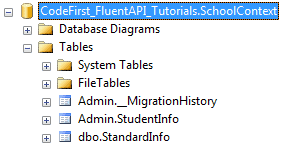
Map Entity to Multiple Table:
The following example shows how to map Student entity to multiple tables in the database.
namespace CodeFirst_FluentAPI_Tutorials

{

    public class SchoolContext: DbContext

    {

        public SchoolDBContext(): base()

        {

        }

        public DbSet<Student> Students { get; set; }

        public DbSet<Standard> Standards { get; set; }

        protected override void OnModelCreating(DbModelBuilder modelBuilder)

        {

            modelBuilder.Entity<Student>().Map(m =>

            {

                m.Properties(p => new { p.StudentId, p.StudentName});

                m.ToTable("StudentInfo");

            }).Map(m => {

                m.Properties(p => new { p.StudentId, p.Height, p.Weight, p.Photo, p.DateOfBirth});

                m.ToTable("StudentInfoDetail");

            });

            modelBuilder.Entity<Standard>().ToTable("StandardInfo");

        }

    }

}
As you can see in the above example, we mapped some properties of Student entity to StudentInfo table and other properties to StudentInfoDetail table using Map() method. Thus, Student entity will split into two tables, as shown below.
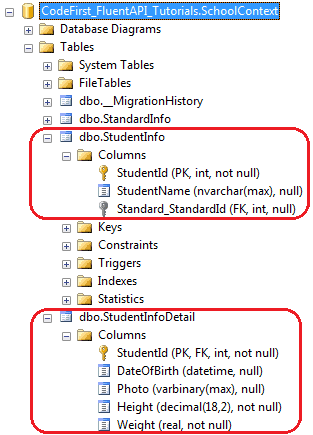
Map method need the delegate method as a parameter. You can pass Action delegate or lambda expression in Map method, as shown below.
using System.Data.Entity.ModelConfiguration.Configuration;

namespace CodeFirst_FluentAPI_Tutorials

{

    public class SchoolContext: DbContext

    {

        public SchoolDBContext(): base()

        {

        }

        public DbSet<Student> Students { get; set; }

        public DbSet<Standard> Standards { get; set; }

        protected override void OnModelCreating(DbModelBuilder modelBuilder)

        {

            modelBuilder.Entity<Student>().Map(delegate(EntityMappingConfiguration<Student> studentConfig)

            {

                studentConfig.Properties(p => new { p.StudentId, p.StudentName });

                studentConfig.ToTable("StudentInfo");

            });

            Action<EntityMappingConfiguration<Student>> studentMapping = m =>

            {

                m.Properties(p => new { p.StudentId, p.Height, p.Weight, p.Photo, p.DateOfBirth });

                m.ToTable("StudentInfoDetail");

            };

            modelBuilder.Entity<Student>().Map(studentMapping);

            modelBuilder.Entity<Standard>().ToTable("StandardInfo");

        }

    }

}
Entity Framework Code-First(10.2):Entity Mappings的更多相关文章
- Entity Framework Code-First(10.3):Property Mappings
Property Mappings using Fluent API: Here, we will learn how to configure properties of an entity cla ...
- Entity Framework Code first(转载)
一.Entity Framework Code first(代码优先)使用过程 1.1Entity Framework 代码优先简介 不得不提Entity Framework Code First这个 ...
- ASP.NET MVC深入浅出系列(持续更新) ORM系列之Entity FrameWork详解(持续更新) 第十六节:语法总结(3)(C#6.0和C#7.0新语法) 第三节:深度剖析各类数据结构(Array、List、Queue、Stack)及线程安全问题和yeild关键字 各种通讯连接方式 设计模式篇 第十二节: 总结Quartz.Net几种部署模式(IIS、Exe、服务部署【借
ASP.NET MVC深入浅出系列(持续更新) 一. ASP.NET体系 从事.Net开发以来,最先接触的Web开发框架是Asp.Net WebForm,该框架高度封装,为了隐藏Http的无状态模 ...
- Entity Framework Code First (三)Data Annotations
Entity Framework Code First 利用一种被称为约定(Conventions)优于配置(Configuration)的编程模式允许你使用自己的 domain classes 来表 ...
- Entity Framework Code First (二)Custom Conventions
---------------------------------------------------------------------------------------------------- ...
- Entity Framework Code First (一)Conventions
Entity Framework 简言之就是一个ORM(Object-Relational Mapper)框架. Code First 使得你能够通过C#的类来描述一个模型,模型如何被发现/检测就是通 ...
- Entity Framework Code First (七)空间数据类型 Spatial Data Types
声明:本文针对 EF5+, Visual Studio 2012+ 空间数据类型(Spatial Data Types)是在 EF5 中引入的,空间数据类型表现有两种: Geography (地理学上 ...
- Entity Framework Code First (四)Fluent API - 配置属性/类型
上篇博文说过当我们定义的类不能遵循约定(Conventions)的时候,Code First 提供了两种方式来配置你的类:DataAnnotations 和 Fluent API, 本文将关注 Flu ...
- Entity Framework Code First (八)迁移 Migrations
创建初始模型和数据库 在开始使用迁移(Migrations)之前,我们需要一个 Project 和一个 Code First Model, 对于本文将使用典型的 Blog 和 Post 模型 创建一个 ...
随机推荐
- 对类型化数组(Typed Array)与ArrayBuffer的理解 转囧囧
类型化数组(Typed Array)也是HTML5中新引入的API.用一句话解释类型化数组就是:它是JS操作二进制数据的接口. 众所周知,直接操作二进制数据可以使程序更为高效, 尽管JS对常规数组做了 ...
- 算法(Algorithms)第4版 练习 2.2.9
package com.qiusongde; import edu.princeton.cs.algs4.In; import edu.princeton.cs.algs4.StdOut; publi ...
- 启动Hadoop时DFSZKFailoverController没有启动
在启动Hadoop成功后,并没有报错信息,jps查看进程,发现DFSZKFailoverController没有启动成功,后来发现是因为防火墙的原因,关掉重试就OK了 systemctl stop f ...
- 转 Java Classloader机制解析
转 Java Classloader机制解析 发表于11个月前(2014-05-09 11:36) 阅读(693) | 评论(0) 9人收藏此文章, 我要收藏 赞1 慕课网,程序员升职加薪神器,点 ...
- Oracle备份和恢复
--什么是脱机备份 脱机备份也叫冷备份,首先管理员使用 shutdown immediate 命令关闭数据库的服务. 之后复制需要的文件,包括数据文件和控制文件等相关内容复制到磁盘的其他位置.当 数据 ...
- Codeforces 163A Substring and Subsequence:dp【子串与子序列匹配】
题目链接:http://codeforces.com/problemset/problem/163/A 题意: 给你两个字符串a,b,问你有多少对"(a的子串,b的子序列)"可以匹 ...
- git忽略文件和目录
******************************************************** http://jingxuan.io/progit/2-Git%E5%9F%BA%E7 ...
- PHP不用第三变量交换2个变量的值的解决方法
以前做过一道php面试题是这样的:不使用第三个变量实现交换两个变量的值.一般都是借助第三个中间变量来实现原来两个变量的值交换,但是这道题却要求不能使用中间变量,这对于初学者来说也算是一个难题了.网上找 ...
- 素数环:NYOJ--488--dfs||hdu-1016-Prime Ring Problem
/* Name: NYOJ--488--素数环 Author: shen_渊 Date: 15/04/17 15:30 Description: DFS,素数打个表,37以内就够用了 */ #incl ...
- codeforces 515C C. Drazil and Factorial(水题,贪心)
题目链接: C. Drazil and Factorial time limit per test 2 seconds memory limit per test 256 megabytes inpu ...