
About the Apple Captive Network Assistant
If you’re a mac user, you likely have seen a strange popup window appear on your computer when you try to connect to the internet at a hotel, coffee shop or airport. It looks like this:
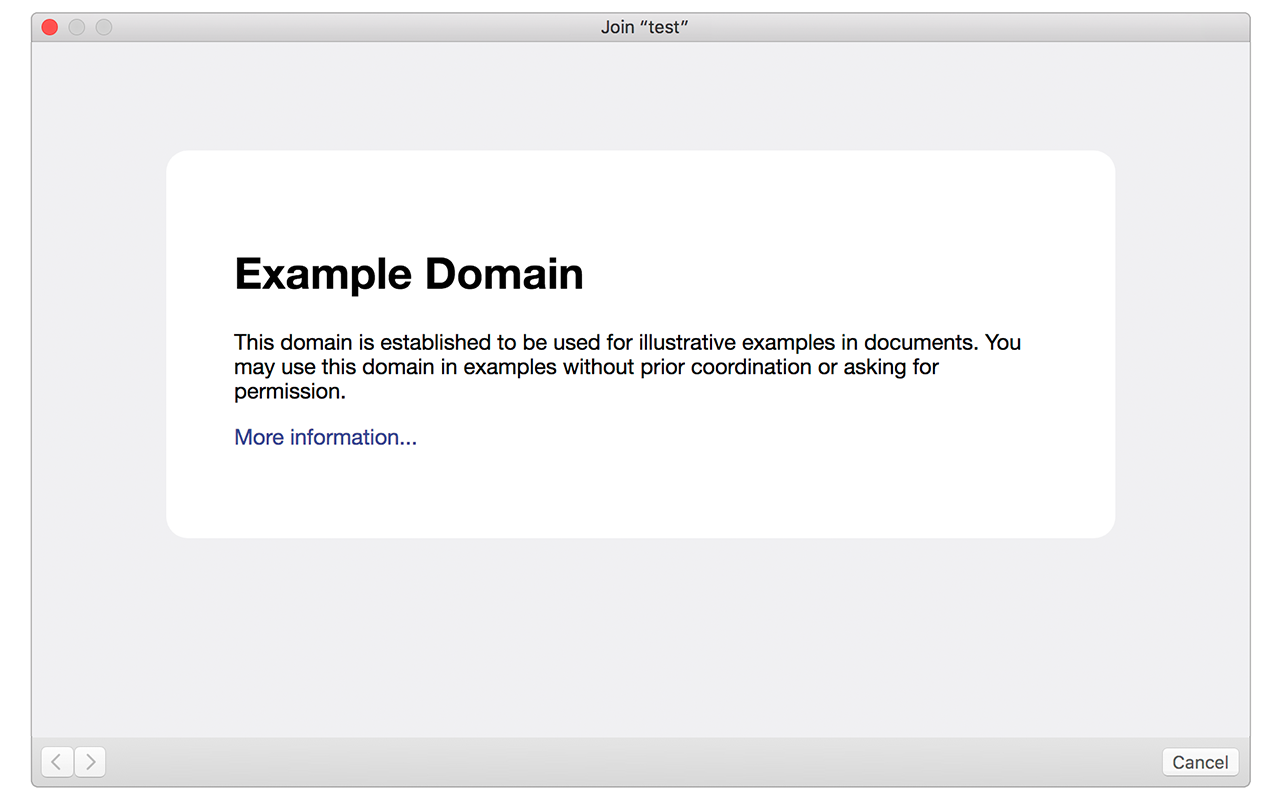
This popup is a utility built in to Mac OS called the Captive Network Assistant (CNA). The idea was to make it easier for users to authenticate on visitor-based WiFi networks that require some form of authentication (usually initiated from a web form) to get online.
They are referred to as “captive” networks as the user is held captive - unable to browse the web freely - until they accept the terms and conditions, purchase access, etc.
How it works
To check if the user is on a captive network, a “probe” process runs immediately after the user associates with the WiFi SSID. On macOS 10.12.1, a request is made to following URL:
http://captive.apple.com/hotspot-detect.html
If the source of the page is simply the text Success, the process assumes the user is on a normal network and does not display a popup. If, however, the URL does not return the success message due to forced captive portal redirection, the CNA popup is trigged and the captive portal page is displayed in the popup.
Limitations
On macOS 10.12.1, the CNA popup is a hardcoded browser window that has limited browser functionality. It displays a browser window that is 900px wide by 572px tall. It has other limitations that are important to be aware of:
- It cannot save cookies
- It cannot launch new tabs or other browser windows
- It cannot display
window.alert()orwindow.confirm()javascript popups - It cannot be resized
It's now supporting window.alert() and window.confirm() on iOS 11.2.2, but no cookies yet
CNA Preview Tool
I created a really simple preview tool for previewing how pages look inside the CNA popup. You check it out here. Keep in mind that preview pages must allow themselves to be iframed.
Captive Network Assistant in Safari does not support Session Storage
I am building an Angular 2 application. The application is bootstrapped when a user joins the wifi network and they are redirected to the application which is rendered in a Captive Portal. The application works in all the other browsers with the exception of Safari for OS X.
I cannot debug this but from researching the behavior of OS X it seems that the Captive Portal Assistant launches some limited browser which does not support Session Storage.
This is breaking my application because when the appellation is bootstrapped it needs to store flags in Session storage before it redirects the user to the login page. Those flags are what the login page uses to determine if the user entered the application via the wifi redirect or the application url.
How do I get around this problem? I have researched and have not found any solution to my problem. Our application basically works from the point of a user attempting to access the private wifi network and this needs to work on a Mac.
window.sessionStorage availability and fall back to cookies if it's unavailable.About the Apple Captive Network Assistant的更多相关文章
- Network Assistant (Alpha)版使用说明
Network Assistant (网络助手)使用说明 本软件是一款帮助同学方便Ip更改,小蝴蝶断线重连,一键wifi,定时关机的软件.它集成 ...
- 我了解到的新知识之—Apple Captive Portal 网页认证登陆公共Wifi
因为今天一个用户遇到选择公司WiFi后,无法弹出网页认证登陆界面的问题,随即上网搜索相关信息,因为公司内没有VPN,无法FQ,只能用bing来搜索一下相关信息了. Captive Portal听起来好 ...
- 无线热点登陆认证原理探究---captive portal
什么是Captive Portal 大家肯定都连过公共场所的wifi热点,比如麦当劳等地方的.他们的wifi往往一连上去就会弹出一个要求登录或者微信关注之类的页面,只有在这个页面完成操作了才能正常访问 ...
- 无线热点登陆认证原理探究---captive portal 什么是Captive Portal
什么是Captive Portal 大家肯定都连过公共场所的wifi热点,比如麦当劳等地方的.他们的wifi往往一连上去就会弹出一个要求登录或者微信关注之类的页面,只有在这个页面完成操作了才能正常访问 ...
- 苹果手机连接Wifi认证机制
Wifi状态保持方法和nas设备 https://patents.google.com/patent/CN106793171A/zh 基于ios终端的离线wifi热点认证方法和认证系统 https:/ ...
- 手机连接wifi自动弹窗的原理及其实现方案
一.手机连上wifi后会自动弹窗的原理 生活中,有很多需要认证的路由器,手机连接wifi热点后会自动弹出一个网页,让用户输入账号和密码,比如星巴克,肯地基,麦当劳,甚至是火车站和机场的候车室.其实这是 ...
- 个人整理的一些iOS Entitlements
收集了不少Entitlement,当然也肯定有遗漏.有的就是key的字面意思,就不多做解释.不过有的虽然字面意思好理解,不过具体的用处不太清楚,就写的Unknown use.在替换entitlemen ...
- 获取wifi热点
https://stackoverflow.com/questions/31555640/how-to-get-wifi-ssid-in-ios9-after-captivenetwork-is-de ...
- Arduino Nano + WIZ550io = 简易上网
我爱Arduino Nano – 这是一个非常好外形小巧却功能齐全的Arduino Uno.然而.当我去将它连接到互联网,全部的干净利落小巧也消失在大尺寸的以太网盾底下了. 只是,我近期发现了一个更好 ...
随机推荐
- Python编程学习笔记 随时更新
import urllib.request import re url = 'http://stock.sohu.com/news/' html = urllib.request.urlopen(ur ...
- HDU 1166.敌兵布阵-完全版线段树(单点增减、区间求和)
生活艰辛,且行且珍惜. 先水一篇博客再去补题,要不然又忘记写博客了. 计划系统的刷一遍线段树专题,自己给自己找虐(自作孽不可活),从基础的到后面的,所有的都挂了题,刷题不,大兄弟? 线段树可真有意思, ...
- bzoj 1067: [SCOI2007]降雨量
题目链接: bzoj 1067: [SCOI2007]降雨量 题解: 很简单的一道题,但代码里有许多细节需要注意,切容易出错,调了三个小时OTZ 做一个st表维护区间最大值就 在获得年份在序列中的po ...
- Java StringBuffer与StringBuider
String 的值是不可变的,每次对String的操作都会生成新的String对象,不仅效率低,而且耗费大量内存空间. StringBuffer类和String类一样,也用来表示字符串,但是Strin ...
- Android Developer -- Bluetooth篇 开发实例之一 扫描设备
第一步:声明Bluetooth Permissions <!-- 设置蓝牙访问权限 --> <uses-permission android:name="android.p ...
- Winform 遍历 ListBox中的所有项
foreach(DataRowView row in listBox.Items ) { MessageBox.Show(row["displayMember"].ToString ...
- DotnetBrowser高级教程-(5)使用内置的MVC UI框架-EasyMvc
如果DotnetBrowser只是实现了内置chrome浏览器和web/web socket server,似乎还不是很完美.因此,最新的DotnetBrowser已经内置对easy mvc控件的支持 ...
- python pip安装lxml失败(转)
今天想要试试beautifulsoup4,安装的时候很顺利,然后就准备安装lxml作为解析器,没想到安装时pip直接给我报了一整页的错误. 解决过程 查看了一下错误提示,其中有如下一段: ****** ...
- textureView
textureView是用来访问texture的一部分的 cubemap 和 mipmap会用到这个 for(face =0;face<6;face++) setrendertarget(tex ...
- smarty在循环的时候计数来显示这是第几次循环的功能
想必有很多人比较喜欢这个smarty循环的时候有个变量增加的功能或比较需要这个功能吧?其实不需要额外的变量,当然你也许根本用不了.我们用smarty内置的就可以了.就是smarty有foreach和s ...