
springMVC 框架的xml配置文件的说明
springMVC框架xml文件配置的说明,直接上代码:
我们介绍四个xml文件配置以及xml内容的理解:application.xml、spring-mvc.xml、pom.xml 和 web.xml
application.xml
<?xml version="1.0" encoding="UTF-8"?>

<beans xmlns="http://www.springframework.org/schema/beans"

    xmlns:xsi="http://www.w3.org/2001/XMLSchema-instance" xmlns:context="http://www.springframework.org/schema/context"

    xmlns:aop="http://www.springframework.org/schema/aop"

    xsi:schemaLocation="

           http://www.springframework.org/schema/beans

           http://www.springframework.org/schema/beans/spring-beans-3.0.xsd

           http://www.springframework.org/schema/aop

           http://www.springframework.org/schema/aop/spring-aop-3.0.xsd

           http://www.springframework.org/schema/context

           http://www.springframework.org/schema/context/spring-context-3.0.xsd">

       <!-- 自动扫描注解的bean -->

    <context:component-scan base-package="com.oracle.service" />

</beans>
spring为基于注解注入bean提供四个注解,再将组件交给spring来管理,在application.xml文件里,添加自动扫描需要实例化bean的包的路径
<context:component-scan base-package="com.oracle.service" />
spring-mvc.xml
<?xml version="1.0" encoding="UTF-8"?>

<beans xmlns="http://www.springframework.org/schema/beans"

    xmlns:xsi="http://www.w3.org/2001/XMLSchema-instance"

    xmlns:p="http://www.springframework.org/schema/p"

    xmlns:c="http://www.springframework.org/schema/c"

    xmlns:util="http://www.springframework.org/schema/util"

    xmlns:aop="http://www.springframework.org/schema/aop"

    xmlns:mvc="http://www.springframework.org/schema/mvc"

    xmlns:tx="http://www.springframework.org/schema/tx"

    xmlns:context="http://www.springframework.org/schema/context"

    xmlns:ehcache="http://www.springmodules.org/schema/ehcache"

    xsi:schemaLocation="http://www.springframework.org/schema/beans http://www.springframework.org/schema/beans/spring-beans-3.1.xsd

        http://www.springframework.org/schema/util http://www.springframework.org/schema/util/spring-util-3.1.xsd

        http://www.springframework.org/schema/tx http://www.springframework.org/schema/tx/spring-tx-3.1.xsd

        http://www.springframework.org/schema/context http://www.springframework.org/schema/context/spring-context-3.1.xsd

        http://www.springframework.org/schema/mvc http://www.springframework.org/schema/mvc/spring-mvc-3.1.xsd

        http://www.springframework.org/schema/aop http://www.springframework.org/schema/aop/spring-aop-3.1.xsd

        http://www.springmodules.org/schema/ehcache http://www.springmodules.org/schema/cache/springmodules-ehcache.xsd">

        <!-- 避免IE执行AJAX时,返回JSON出现下载文件 -->

    <!-- 支持JSON数据格式 -->

    <bean class="org.springframework.web.servlet.mvc.annotation.AnnotationMethodHandlerAdapter">

        <property name="messageConverters" >

            <list>

                <ref bean="mappingJacksonHttpMessageConverter" />

            </list>

        </property>

    </bean>

    <bean id="mappingJacksonHttpMessageConverter"

        class="org.springframework.http.converter.json.MappingJacksonHttpMessageConverter">

    </bean>

     <!-- 对模型视图名称的解析,即在模型视图名称添加前后缀 -->

    <bean class="org.springframework.web.servlet.view.InternalResourceViewResolver">

        <property name="prefix" value="/WEB-INF/views/" />

        <property name="suffix" value=".jsp" /><!--可为空,方便实现自已的依据扩展名来选择视图解释类的逻辑 -->

    </bean>

    <context:component-scan base-package="com.oracle.controller" />

    </beans>
spring-mvc.xml和application.xml也可以合并成一个xml,spring-mvc.xml中配置了Jason数据格式、对视图模型的解析和对controller层的自动扫描(注入bean)
pom.xml
<project xmlns="http://maven.apache.org/POM/4.0.0" xmlns:xsi="http://www.w3.org/2001/XMLSchema-instance"

  xsi:schemaLocation="http://maven.apache.org/POM/4.0.0 http://maven.apache.org/maven-v4_0_0.xsd">

  <modelVersion>4.0.0</modelVersion>

  <groupId>oracle.com</groupId>

  <artifactId>MavenPro</artifactId>

  <packaging>war</packaging>

  <version>0.0.1-SNAPSHOT</version>

  <name>MavenPro Maven Webapp</name>

  <url>http://maven.apache.org</url>

  <properties>

        <!-- spring版本号 -->

        <spring.version>3.2.8.RELEASE</spring.version>

        <!-- log4j日志文件管理包版本 -->

        <slf4j.version>1.6.6</slf4j.version>

        <log4j.version>1.2.12</log4j.version>

        <!-- junit版本号 -->

        <junit.version>4.12</junit.version>

        <!-- mybatis版本号 -->

        <mybatis.version>3.2.1</mybatis.version>

    </properties>

  <dependencies>

    <dependency>

      <groupId>junit</groupId>

      <artifactId>junit</artifactId>

      <version>3.8.1</version>

      <scope>test</scope>

    </dependency>

    <!-- 添加Spring依赖 -->

        <dependency>

            <groupId>org.springframework</groupId>

            <artifactId>spring-core</artifactId>

            <version>${spring.version}</version>

        </dependency>

        <dependency>

            <groupId>org.springframework</groupId>

            <artifactId>spring-webmvc</artifactId>

            <version>${spring.version}</version>

        </dependency>

        <dependency>

            <groupId>org.springframework</groupId>

            <artifactId>spring-context</artifactId>

            <version>${spring.version}</version>

        </dependency>

        <dependency>

            <groupId>org.springframework</groupId>

            <artifactId>spring-context-support</artifactId>

            <version>${spring.version}</version>

        </dependency>

         <dependency>

            <groupId>org.springframework</groupId>

            <artifactId>spring-web</artifactId>

            <version>${spring.version}</version>

        </dependency>

        <!--spring单元测试依赖 -->

        <dependency>

            <groupId>org.springframework</groupId>

            <artifactId>spring-test</artifactId>

            <version>${spring.version}</version>

            <scope>test</scope>

        </dependency>

        <!--添加Jason依赖 -->

        <dependency>

            <groupId>org.codehaus.jackson</groupId>

            <artifactId>jackson-mapper-asl</artifactId>

            <version>1.9.13</version>

        </dependency>

        <dependency>

            <groupId>com.fasterxml.jackson.core</groupId>

            <artifactId>jackson-annotations</artifactId>

            <version>2.6.3</version>

        </dependency>

        <dependency>

            <groupId>com.fasterxml.jackson.core</groupId>

            <artifactId>jackson-core</artifactId>

            <version>2.6.3</version>

        </dependency>

        <dependency>

            <groupId>com.fasterxml.jackson.core</groupId>

            <artifactId>jackson-databind</artifactId>

            <version>2.6.3</version>

        </dependency>

  </dependencies>

  <build>

    <finalName>MavenPro</finalName>

    <plugins>

          <plugin>

            <groupId>org.apache.tomcat.maven</groupId>

            <artifactId>tomcat7-maven-plugin</artifactId>

            <version>2.2</version>

               <configuration>

                  <path>/mavenPro</path>

                  <port>8081</port>

                  <server>tomcat7</server>

               </configuration>

        </plugin>

    </plugins>

  </build>

</project>
pom.xml 文件配置是添加jar包及其所依赖jar包和一些组件(tomcat)
web.xml
<?xml version="1.0" encoding="UTF-8"?>

<web-app

    xmlns:xsi="http://www.w3.org/2001/XMLSchema-instance"

    xmlns="http://java.sun.com/xml/ns/javaee" xmlns:web="http://java.sun.com/xml/ns/javaee/web-app_2_5.xsd"

    xsi:schemaLocation="http://java.sun.com/xml/ns/javaee http://java.sun.com/xml/ns/javaee/web-app_3_0.xsd"

    id="WebApp_ID" version="3.0">

 <!-- 加载Spring的配置文件 -->

    <context-param>

        <param-name>contextConfigLocation</param-name>

        <param-value>classpath:application.xml</param-value>

    </context-param>

    <listener>

        <description>spring监听器</description>

        <listener-class>org.springframework.web.context.ContextLoaderListener</listener-class>

    </listener>

  <!-- 防止spring内存溢出监听器 -->

    <listener>

        <listener-class>org.springframework.web.util.IntrospectorCleanupListener</listener-class>

    </listener>

    <!-- spring mvc servlet -->

    <servlet>

        <description>spring mvc servlet</description>

        <servlet-name>springMvc</servlet-name>

        <servlet-class>org.springframework.web.servlet.DispatcherServlet</servlet-class>

        <init-param>

            <description>spring mvc 配置文件</description>

            <param-name>contextConfigLocation</param-name>

            <param-value>classpath:spring-mvc.xml</param-value>

        </init-param>

        <load-on-startup>1</load-on-startup>

    </servlet>

    <servlet-mapping>

        <servlet-name>springMvc</servlet-name>

        <url-pattern>*.do</url-pattern>

    </servlet-mapping>

    <filter>

        <description>字符集过滤器</description>

        <filter-name>encodingFilter</filter-name>

        <filter-class>org.springframework.web.filter.CharacterEncodingFilter</filter-class>

        <init-param>

            <description>字符集编码</description>

            <param-name>encoding</param-name>

            <param-value>UTF-8</param-value>

        </init-param>

    </filter>

    <filter-mapping>

        <filter-name>encodingFilter</filter-name>

        <url-pattern>/*</url-pattern>

    </filter-mapping>

    <welcome-file-list>

        <welcome-file>index.jsp</welcome-file>

        <welcome-file>index.html</welcome-file>

    </welcome-file-list>

</web-app>
配置了application.xml和spring-mvc.xml之后,javaEE还不知道这两个文件的存在,web.xml就是实现这样的功能,其中还配置了监听器和过滤器,监听器是监听JavaEE对application.xml和spring-mvc.xml加载情况,过滤器是在启动项目的时候,过滤字符集,防止前后台交互的时候,出现中文乱码。
再讲一下pom.xml 中插件tomcat的一些配置
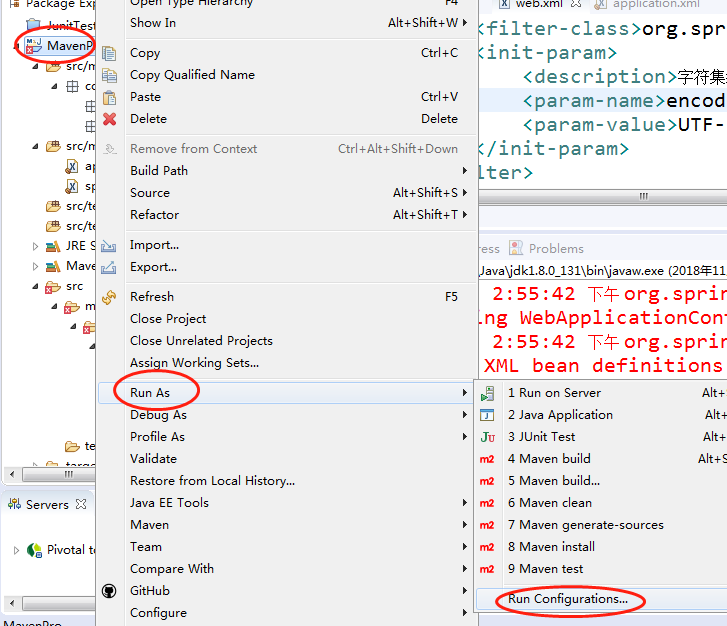
右键项目名,选择“Run As” =>“Run Configuration”,如下图:
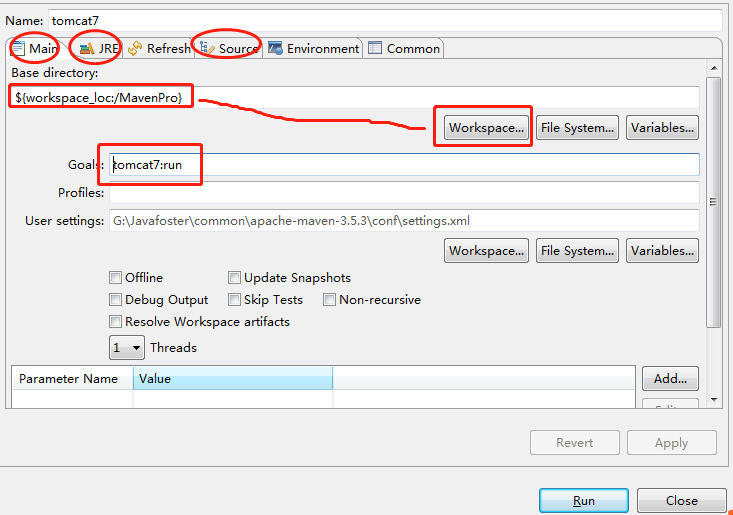
弹出以下窗口,我们配置Main 、JRE和Source这三个即可,在Main中,WorkSpace中选择当前项目,Goal中,填写XXX:run,
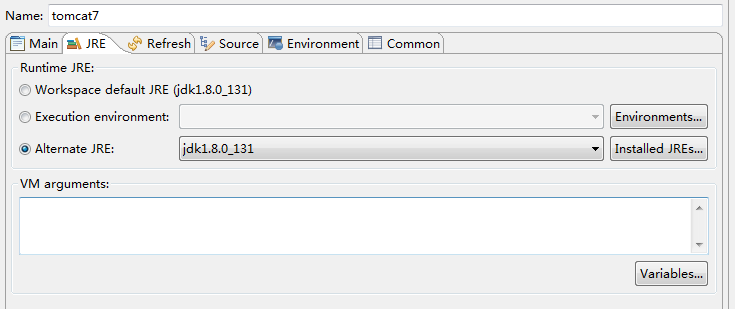
JRE中选择JDK
Resouce中add“Workspace”,点击应用,点击Run即可。

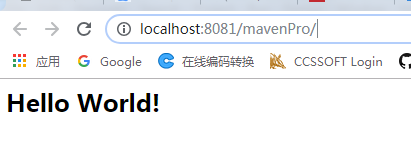
运行结果:
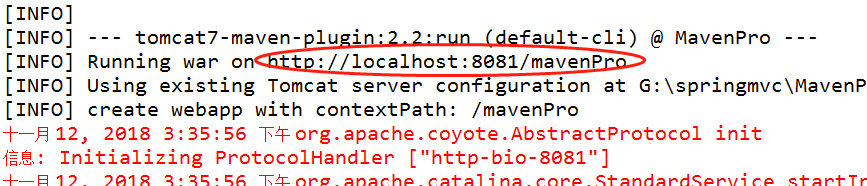
在浏览器中输入该地址,即可进入欢迎页了,截图如下:
springMVC 框架的xml配置文件的说明的更多相关文章
- spring框架-spring.xml配置文件
运行的时候会报错的,因为写到<bean>标签里面去了,肯定会报错的,要记得把注释删掉,就不会报错了,这样写注释是为了方便下次自己看. <?xml version="1.0& ...
- 学习日记_SSH框架web.xml配置文件篇
1.参考一:http://www.blogjava.net/yxhxj2006/archive/2012/07/09/382632.html 2.参考二: <!-- web 容器启动spring ...
- SpringMVC框架 SpringMVC的获取01
---恢复内容开始--- SpringMVC通过实现MVC模式,很好地将数据.业务与展现进行了分离.从MVC的角度来说,SpringMVC和Struts2非常类似,但SpringMVC采用了可插拔的组 ...
- springmvc框架中的核心对象DispatcherServlet
SpringMVC是Spring中的模块,它实现了mvc设计模式,首先用户发起请求,请求到达SpringMVC的前端控制器(DispatcherServlet),前端控制器根据用户的url请求处理器映 ...
- SpringMVC框架入门配置 IDEA下搭建Maven项目
初衷:本人初学SpringMVC的时候遇到各种稀奇古怪的问题,网上各种技术论坛上的帖子又参差不齐,难以一步到位达到配置好的效果,这里我将我配置的总结写到这里供大家初学SpringMVC的同僚们共同学习 ...
- [转]SpringMVC框架入门配置 IDEA下搭建Maven项目
初衷:本人初学SpringMVC的时候遇到各种稀奇古怪的问题,网上各种技术论坛上的帖子又参差不齐,难以一步到位达到配置好的效果,这里我将我配置的总结写到这里供大家初学SpringMVC的同僚们共同学习 ...
- SSM:spring+springmvc+mybatis框架中的XML配置文件功能详细解释(转)
原文:https://blog.csdn.net/yijiemamin/article/details/51156189# 这几天一直在整合SSM框架,虽然网上有很多已经整合好的,但是对于里面的配置文 ...
- 0927-转载:SSM:spring+springmvc+mybatis框架中的XML配置文件功能详细解释
这篇文章暂时只对框架中所要用到的配置文件进行解释说明,而且是针对注解形式的,框架运转的具体流程过两天再进行总结. spring+springmvc+mybatis框架中用到了三个XML配置文件:web ...
- SSM:spring+springmvc+mybatis框架中的XML配置文件功能详细解释
这几天一直在整合SSM框架,虽然网上有很多已经整合好的,但是对于里面的配置文件并没有进行过多的说明,很多人知其然不知其所以然,经过几天的搜索和整理,今天总算对其中的XML配置文件有了一定的了解,所以拿 ...
随机推荐
- spring cloud 使用Eureka作为服务注册中心
什么是Eureka? Eureka是在AWS上定位服务的REST服务. Eureka简单示例,仅作为学习参考 在pom文件引入相关的starter(起步依赖) /*定义使用的spring cloud ...
- C++中类的静态成员变量
1,成员变量的回顾: 1,通过对象名能够访问 public 成员变量: 2,每个对象的成员变量都是专属的: 3,成员变量不能在对象之间共享: 1,在做程序设计中,成员变量一般是私有的.至少不是公有的: ...
- 【题解】Beads
题目描述 Zxl有一次决定制造一条项链,她以非常便宜的价格买了一长条鲜艳的珊瑚珠子,她现在也有一个机器,能把这条珠子切成很多块(子串),每块有k(k>0)个珠子,如果这条珠子的长度不是k的倍数, ...
- 超強的Linux指令解釋網站《explainshell.com》,學Linux必備!
ExplainShell 官方網站:http://explainshell.com/ 原始碼下載:https://github.com/idank/explainshell 用瀏覽器打該explain ...
- Linux Kernel中所應用的數據結構及演算法
Linux Kernel中所應用的數據結構及演算法 Basic Data Structures and Algorithms in the Linux kernel Links are to the ...
- [unity基础教程]Unity3D实现动态载入游戏资源(转)
用Unity3D制作基于web的网络游戏,不可避免的会用到一个技术-资源动态载入.比方想载入一个大场景的资源,不应该在游戏的開始让用户长时间等待全部资源的载入完成.应该优先载入用户附近的场景资源.在游 ...
- Codeforces The Child and Toy
The Child and Toy time limit per test1 second On Children's Day, the child got a toy from Delayyy as ...
- 什么是restful风格?
文章参考 RESTful API 设计指南--阮一峰 概念 一种软件架构风格.设计风格,而不是标准,只是提供了一组设计原则和约束条件.它主要用于客户端和服务器交互类的软件.基于这个风格设计的软件可以更 ...
- MAC如何与linux服务器传递文件
scp命令可以从本地拷贝文件到Linux服务器,也可以将Linux服务器文件下载到本地 将远程/root/articaleFetch/dist目录下文件和文件夹拷贝到dist文件夹 scp root@ ...
- 深入学习Redis持久化
一.Redis高可用概述 在介绍Redis高可用之前,先说明一下在Redis的语境中高可用的含义. 我们知道,在web服务器中,高可用是指服务器可以正常访问的时间,衡量的标准是在多长时间内可以提供正常 ...