
android开关控件Switch和ToggleButton
序:今天项目中用到了开关按钮控件,查阅了一些资料特地写了这篇博客记录下。
1.Switch
        <Switch

            android:id="@+id/bt"

            android:layout_width="wrap_content"

            android:layout_height="wrap_content"

            android:textOn="开启"

            android:layout_marginLeft="20dp"

            android:textOff="关闭"

            android:showText="true"

            android:thumb="@drawable/shape_thum"

            android:track="@drawable/select_bg_switch"

            />

这里layout_width:这能设置整个布局的宽度,不能设置具体的Switch的大小,需要使用switchMinWidth属性来设置。
thumb:文字所携带的背景,设置为背景色进行隐藏。不设置会出现一个背景框。
track:设置开关的背景图片,类似于button的background。
textoff、texton:设置开关时的文字显示。
2.ToggleButton
<ToggleButton

            android:layout_width="80dp"

            android:layout_height="20dp"

            android:id="@+id/toggle"

            android:layout_centerHorizontal="true"

            android:background="@drawable/shape_track_on"

            android:textOff="off"

            android:textOn="on"

            android:layout_marginLeft="20dp"

            />
3.效果图
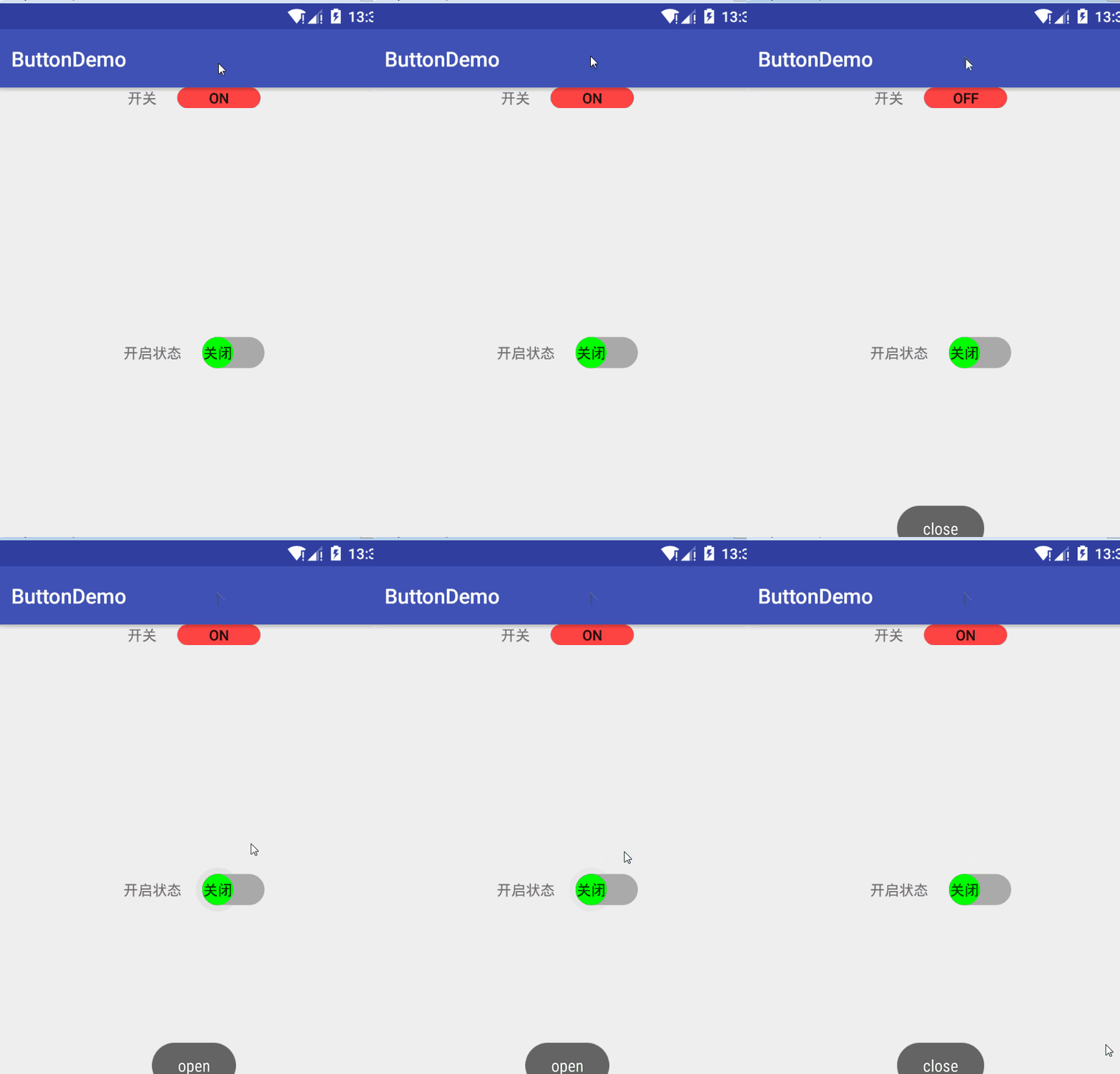
1.布局
activity_main.xml
<RelativeLayout xmlns:android="http://schemas.android.com/apk/res/android"

    xmlns:app="http://schemas.android.com/apk/res-auto"

    android:layout_width="match_parent"

    android:layout_height="match_parent">

    <LinearLayout

        android:layout_width="match_parent"

        android:layout_height="wrap_content"

        android:gravity="center"

        android:orientation="horizontal"

        android:layout_marginTop="30dp"

        >

        <TextView

            android:layout_width="wrap_content"

            android:layout_height="wrap_content"

            android:text="开关"

            />

        <ToggleButton

            android:layout_width="80dp"

            android:layout_height="20dp"

            android:id="@+id/toggle"

            android:layout_centerHorizontal="true"

            android:background="@drawable/shape_track_on"

            android:textOff="off"

            android:textOn="on"

            android:layout_marginLeft="20dp"

            />

    </LinearLayout>

    <LinearLayout

        android:layout_width="wrap_content"

        android:layout_height="wrap_content"

        android:orientation="horizontal"

        android:layout_centerInParent="true"

        >

        <TextView

            android:layout_width="wrap_content"

            android:layout_height="wrap_content"

            android:text="开启状态"

            />

        <Switch

            android:id="@+id/bt"

            android:layout_width="wrap_content"

            android:layout_height="wrap_content"

            android:textOn="开启"

            android:layout_marginLeft="20dp"

            android:textOff="关闭"

            android:showText="true"

            android:thumb="@drawable/shape_thum"

            android:track="@drawable/select_bg_switch"

            />

    </LinearLayout>

</RelativeLayout>
shape_thum.xml
<?xml version="1.0" encoding="utf-8"?>

<shape xmlns:android="http://schemas.android.com/apk/res/android" android:shape="oval">

    <solid android:color="#0f0"/>

    <size android:height="30dp" android:width="30dp"/>

</shape>
shape_track_off.xml
<?xml version="1.0" encoding="utf-8"?>

<shape xmlns:android="http://schemas.android.com/apk/res/android" android:shape="rectangle">

    <corners android:radius="30dp"/>

    <solid android:color="@android:color/darker_gray"/>

</shape>
shape_track_on,xml
<?xml version="1.0" encoding="utf-8"?>

<shape xmlns:android="http://schemas.android.com/apk/res/android" android:shape="rectangle">

    <corners android:radius="30dp"/>

    <solid android:color="@android:color/holo_red_light"/>

</shape>
select_bg_switch.xml
<?xml version="1.0" encoding="utf-8"?>

<selector xmlns:android="http://schemas.android.com/apk/res/android" >

    <item android:state_checked="true" android:drawable="@drawable/shape_track_on"/>

    <item android:state_checked="false" android:drawable="@drawable/shape_track_off"/>

</selector>
Mainactivity
public class MainActivity extends AppCompatActivity {

    private Switch aSwitch;

    private ToggleButton toggle;

    @Override

    protected void onCreate(Bundle savedInstanceState) {

        super.onCreate(savedInstanceState);

        setContentView(R.layout.activity_main);

        aSwitch=findViewById(R.id.bt);

        toggle=findViewById(R.id.toggle);

        //状态改变监听

        aSwitch.setOnCheckedChangeListener(new CompoundButton.OnCheckedChangeListener() {

            @Override

            public void onCheckedChanged(CompoundButton buttonView, boolean isChecked) {

                if(isChecked){

                    Toast.makeText(MainActivity.this,"open",Toast.LENGTH_SHORT).show();

                }else{

                    Toast.makeText(MainActivity.this,"close",Toast.LENGTH_SHORT).show();

                }

            }

        });

        //状态改变监听

        toggle.setOnCheckedChangeListener(new CompoundButton.OnCheckedChangeListener() {

            @Override

            public void onCheckedChanged(CompoundButton buttonView, boolean isChecked) {

                if(isChecked){

                    Toast.makeText(MainActivity.this,"open",Toast.LENGTH_SHORT).show();

                }else{

                    Toast.makeText(MainActivity.this,"close",Toast.LENGTH_SHORT).show();

                }

            }

        });

    }

}
android开关控件Switch和ToggleButton的更多相关文章
- android自己定义开关控件
近日在android项目要使用开关控件.可是android中自带的开关控件不太惬意,所以就打算通过自己定义View写一个开关控件 ios的开关控件当然就是我要仿照的目标. 先上图: waterma ...
- Android 开源控件与常用开发框架开发工具类
Android的加载动画AVLoadingIndicatorView 项目地址: https://github.com/81813780/AVLoadingIndicatorView 首先,在 bui ...
- Android之控件使用
Android系统为我们提供了大量的控件,例如:开关控件.单选按钮.多选按钮.单选菜单等等,那么这些控件如何使用呢?本篇我将带领大家一道学习一下如何使用这些控件.所谓无图无真相,先让大家看一下效果图: ...
- android 基础控件(EditView、SeekBar等)的属性及使用方法
android提供了大量的UI控件,本文将介绍TextView.ImageView.Button.EditView.ProgressBar.SeekBar.ScrollView.WebView ...
- Android基本控件之Menus
在我们的手机中有很多样式的菜单,比如:我们的短信界面,每条短信,我们长按都会出现一个菜单,还有很多的种类.那么现在,我们就来详细的讨论一下安卓中的菜单 Android的控件中就有这么一个,叫做Menu ...
- UISwitch 开关控件
UISwitch iOS中的开关控件,只有两种状态,打开或关闭. aSwitch.tintColor = [UIColor redColor]; //关闭状态下的渲染颜色 aSwitch.onTint ...
- Android给控件添加触摸回调
Android给控件添加触摸回调 脑补一个场景,一个页面点击某个按钮会弹出PopupWindow,然后点击PopupWindow以外的任意位置关闭 效果图 实现方法 可以在布局的最外层容器监听触摸事件 ...
- weui-switch开关控件,表单提交后如何取值
最近在学习weui这个框架,做了一些小的试验,发现weui-switch控件直接提交不能获取到表单信息,在segmentfault上发现也有人提了这个问题,有人说可以设置一个隐含标签来捕获开关的状态, ...
- [Xcode 实际操作]四、常用控件-(6)UISwitch开关控件的使用
目录:[Swift]Xcode实际操作 本文将演示开关控件的基本用法. 开关控件有两个互斥的选项,它是用来打开或关闭选项的控件. 在项目导航区,打开视图控制器的代码文件[ViewController. ...
随机推荐
- C# 动态加载WebService
项目中需要用到WebService的方式来进行两个服务之间的方法调用,之前都是在项目中添加服务引用的方式来实现,但是这种方式有一个弊端,就是如果提供WebService服务的一方的IP.端口一旦变更, ...
- Git的其他一些使用案例
按照格式输出提交号 作者 时间 git log --pretty=format:"%h %an %cd" --date=iso 获取所有远程的tag和他的commit sha1 g ...
- linux字符界面下root用户无法登录成功
os: rhel5.6_x86_64 ———————————————————————————————————————————— 故障:图形界面登录正常,其他一切正常,但是切换到字符界面时,输入用户ro ...
- U-boot分析与移植(3)----U-boot stage2分析
一来到void start_armboot (void)函数,马上出现两个很重要的数据结构gd_t和bd_t 1.gd_t : global data数据结构定义,位于文件 include/asm-a ...
- DNS 解析流程
DNS( Domain Name System)是“域名系统”的英文缩写,是一种组织成域层次结构的计算机和网络服务命名系统,它用于TCP/IP网络,它所提供的服务是用来将主机名和域名转换为IP地址的工 ...
- Flask之性能
5.5 性能 一.不同角度的网站性能 普通用户认为的网站性能 网站性能对于普通用户来说,最直接的体现就是响应时间.用户在浏览器上直观感受到的网站响应速度,即从客户端发送请求,到服务器返回响应内容的时间 ...
- oracle10g Error in invoking target 'install' of makefile
oracle10g series error error in invoking target 'install' of makefile /u01/app/oracle/oracle/product ...
- MySQL OSC(在线更改表结构)原理
1 OSC介绍 在我们的数据库操作中,更改表结构是一个常见的操作,而当我们的表数据量非常大时,我们更改表结构的时间是非 常的长,并且在跟改期间,会生成一个互斥锁,阻塞对整个表的所有操作,这样,对于我们 ...
- java之yield(),sleep(),wait()区别详解-备忘笔记(转)
1.sleep() 使当前线程(即调用该方法的线程)暂停执行一段时间,让其他线程有机会继续执行,但它并不释放对象锁.也就是说如果有synchronized同步快,其他线程仍然不能访问共享数据.注意该方 ...
- 【原创】基于UDP广播的局域网Web Window Service日志跟踪小工具
一直感觉Web开发或者windows服务的日志跟踪调试不是很方便 特别是在生产环境服务器上面 目前一般的解决方案是通过各种日志工具把错误信息和调试信息 ...