
2.Border Layout 自定义一个Layout来完成布局。
目标:
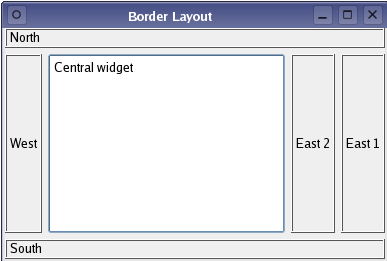
1.添加控件的函数 void QLayout::addWidget ( QWidget * w )
在这个例子里面我们重载这个函数 void addWidget ( QWidget * w, int position)
2.添加到布局里面的都是QLayoutItem。我们把QLayoutItem和position封装成一个结构体ItemWrapper。
QList <ItemWrapper *> list。 私有变量list来管理布局中控件数量。
阅读官方文档:
To make your own layout manager, implement the functions addItem(), sizeHint(), setGeometry(), itemAt() and takeAt(). You should also implement minimumSize() to ensure your layout isn't resized to zero size if there is too little space. To support children whose heights depend on their widths, implement hasHeightForWidth() and heightForWidth().
1.先考虑布局的尺寸问题(布局的长度和宽度问题)
QSize BorderLayout::sizeHint() const 返回布局的理想的长度和宽度。
QSize BorderLayout::minimumSize() const 空间不够时,布局所需的最小的长度和宽度(布局不能少于这个最小的长度和宽度)
我们设计一个 QSize BorderLayout::calculateSize(SizeType sizeType) const函数来计算
enum SizeType { MinimumSize, SizeHint }
QSize BorderLayout::sizeHint() const { return calculateSize(SizeHint ); }
QSize BorderLayout::minimumSize() const { return calculateSize(MinimumSize); }
calculateSize函数中,我们遍历布局中的每个控件,计算出理想尺寸和最小尺寸
QSize BorderLayout::calculateSize(SizeType sizeType) const

{

    QSize totalSize;

    for(int i=; i<list.size(); i++) {

        ItemWrapper *wrapper = list.at(i);

        QLayoutItem *item = wrapper->item;

        Position position = wrapper->position;

        QSize itemSize;

        if(sizeType == MinimumSize)

            itemSize = item->minimumSize();

        else

            itemSize = item->sizeHint();

        if(position == North || position == South || position == Central) {

            totalSize.rheight() += itemSize.rheight();

        }

        if(position == West || position == East || position == Central) {

            totalSize.rwidth() += itemSize.rwidth();

        }

    }

    return totalSize;

}
2.添加控件的方法,添加控件也就是把控件添加到list中去
void QLayout::addItem ( QLayoutItem * item ) [pure virtual] 这个函数在应用程序中程序员不调用。
void addWidget ( QWidget * w, Position position) 最常用的添加控件方法。我们这里重载该函数,添加一个参数 position
void add(QLayoutItem *item, Position position) 我们实现add函数来添加控件
void BorderLayout::addItem(QLayoutItem *i)

{

    add(i, West);

}

void BorderLayout::addWidget(QWidget *w, Position position)

{

    add(new QWidgetItem (w), position);

}

void BorderLayout::add(QLayoutItem *i, Position position)

{

    list.append(new ItemWrapper(i, position));

}
3.查找和删除控件的方法
QLayoutItem * itemAt(int index) const; 返回索引下的QLayoutItem
QLayoutItem * takeAt(int index); 删除索引下的QLayoutItem 并返回QLayoutItem的值
QLayoutItem * BorderLayout::itemAt(int index) const

{

    ItemWrapper *wrapper = list.value(index);

    if(wrapper)

        return wrapper->item;

    else

        return ;

}

QLayoutItem * BorderLayout::takeAt(int index)

{

    if(index >=  && index < list.size()) {

        ItemWrapper *wrapper = list.takeAt(index);

        return wrapper->item;

    }

    return ;

}
list中takeat函数删除索引是index的值
4.布局中控件的数量,布局的高度是否依赖其宽度,布局的延伸方向。
Qt::Orientations expandingDirections() const;
bool hasHeightForWidth() const;
int count() const;
Qt::Orientations BorderLayout::expandingDirections() const

{

    return Qt::Horizontal | Qt::Vertical;

}

bool BorderLayout::hasHeightForWidth() const

{

    return false;

}

int BorderLayout::count() const

{

    return list.size();

}
5。我们现在知道有多少控件,每个控件的尺寸,整个布局的尺寸。
但是控件摆放在整个布局中那个位置,如何摆放。这里需要void setGeometry(const QRect &rect)函数。
QLayout::setGeometry(rect). 获得布局的整个矩形大小。
然后设施每个QLayoutItem的setGeometry函数。把每个控件放在指定的位置
void BorderLayout::setGeometry(const QRect &rect)

{

    ItemWrapper *center = ;

    int northHeight = ;

    int southHeight = ;

    int centerHeight = ;

    int westWidth = ;

    int eastWidth = ;

    int i = ;

    QLayout::setGeometry(rect);

    for(i = ; i < list.size(); i++) {

        ItemWrapper *wrapper = list.at(i);

        QLayoutItem *item  = wrapper->item;

        Position position = wrapper->position;

        if(position == North) {

            item->setGeometry(QRect(rect.x(), northHeight, rect.width(), item->sizeHint().height()));

            northHeight += item->geometry().height() + spacing();

        }

        else if(position == South) {

            item->setGeometry(QRect(item->geometry().x(), item->geometry().y(), rect.width(),

                              item->sizeHint().height()));

            southHeight += item->geometry().height() + spacing();

            item->setGeometry(QRect(rect.x(), rect.y()+rect.height()-southHeight+spacing(),

                              item->geometry().width(), item->geometry().height()));

        }

        else if(position == Central)

            center = wrapper;

    }

    centerHeight = rect.height() - northHeight - southHeight;

    for(i = ; i < list.size(); i++) {

        ItemWrapper *wrapper = list.value(i);

        QLayoutItem *item  = wrapper->item;

        Position position = wrapper->position;

        if(position == West) {

            item->setGeometry(QRect(westWidth, northHeight, item->sizeHint().width(), centerHeight));

            westWidth += item->geometry().width() + spacing();

        }

        else if(position == East) {

            item->setGeometry(QRect(item->geometry().x(), item->geometry().y(),

                              item->sizeHint().width(), centerHeight));

            eastWidth += item->geometry().width() + spacing();

            item->setGeometry(QRect(rect.width() - eastWidth + spacing(), northHeight,

                              item->geometry().width(), item->geometry().height()));

        }

    }

    if(center) {

        center->item->setGeometry(QRect(westWidth, northHeight,

                                  rect.width() - westWidth - eastWidth, centerHeight));

    }

}
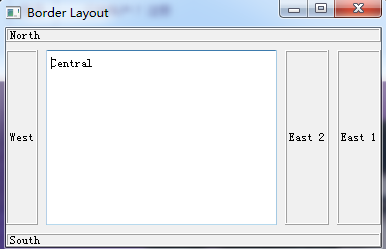
效果图:
源代码: https://github.com/Satius/qt5/tree/master/qtbase/examples/widgets/layouts/borderlayout
2.Border Layout 自定义一个Layout来完成布局。的更多相关文章
- 自定义View(7)官方教程:自定义View(含onMeasure),自定义一个Layout(混合组件),重写一个现有组件
Custom Components In this document The Basic Approach Fully Customized Components Compound Controls ...
- 自定义View Layout过程 (3)
目录 目录 1. 知识基础 具体请看我写的另外一篇文章:(1)自定义View基础 - 最易懂的自定义View原理系列 2. 作用 计算View视图的位置. 即计算View的四个顶点位置:Left.To ...
- Customize the View Items Layout 自定义视图项目布局
In this lesson, you will learn how to customize the default editor layout in a Detail View. For this ...
- 自定义一个更好用的SwipeRefreshLayout(弹力拉伸效果详解)(转载)
转自: 自定义一个更好用的SwipeRefreshLayout(弹力拉伸效果详解) 前言 熟悉SwipeRefreshLayout的同学一定知道,SwipeRefreshLayout是android里 ...
- 在Dynamics CRM中自定义一个通用的查看编辑注释页面
关注本人微信和易信公众号: 微软动态CRM专家罗勇 ,回复162或者20151016可方便获取本文,同时可以在第一时间得到我发布的最新的博文信息,follow me! 注释在CRM中的显示是比较特别, ...
- [WPF 自定义控件]自定义一个“传统”的 Validation.ErrorTemplate
1. 什么是Validaion.ErrorTemplate 数据绑定模型允许您将与您Binding的对象相关联ValidationRules. 如果用户输入的值无效,你可能希望在应用程序 用户界面 ( ...
- Android The layout "activity_main" in layout has no declaration in the base layout folder
报错: The layout "activity_main" in layout has no declaration in the base layout folder; thi ...
- SpringMVC 自定义一个拦截器
自定义一个拦截器方法,实现HandlerInterceptor方法 public class FirstInterceptor implements HandlerInterceptor{ /** * ...
- jQuery Validate 表单验证插件----自定义一个验证方法
一.下载依赖包 网盘下载:https://yunpan.cn/cryvgGGAQ3DSW 访问密码 f224 二.引入依赖包 <script src="../../scripts/j ...
随机推荐
- 5,基于关系和超链接的 API
Tutorial 5: Relationships & Hyperlinked APIs At the moment relationships within our API are repr ...
- SPOJ1812 Longest Common Substring II
题意 A string is finite sequence of characters over a non-empty finite set Σ. In this problem, Σ is th ...
- C++输入流和输出流、缓冲区
一.C++输入流和输出流 输入和输出的概念是相对程序而言的. 键盘输入数据到程序叫标准输入,程序数据输出到显示器叫标准输出,标准输入和标准输出统称为标准I/O,文件的输入和输出叫文件I/O. cout ...
- 【HTML5】Canvas绘图详解-1
----->Canvas绘制基础 1,线条绘制 1-1,线条组成的图形和beginPath 案例:绘制由不同颜色的线条组成的图案 1-2,多边形的填充和closePath 案例:绘制封闭具有填充 ...
- Tomcat起了一个测试桩,调用该测试桩无响应
有时在测试新业务流程时因为涉及多个不同接口的调用,而这些被调用的服务端因为网络权限或开发进度问题暂时对我们不可达,那么我们可以通过模拟接口返回来完成我们新业务的测试.这次碰到的问题是我明明起了该测试桩 ...
- 获取DOS命令的返回值.
procedure CheckResult(b: Boolean); begin if not b then raise Exception.Create(SysErrorMessage(GetLas ...
- android httpclient 设置超时
3.X是这样的 HttpClient httpClient=new DefaultHttpClient();4.3是这样的CloseableHttpClient httpClient = HttpCl ...
- 【转】理解JMeter聚合报告(Aggregate Report)
Aggregate Report 是 JMeter 常用的一个 Listener,中文被翻译为“聚合报告”.今天再次有同行问到这个报告中的各项数据表示什么意思,顺便在这里公布一下,以备大家查阅. 如果 ...
- Java-Runoob-高级教程:Java 9 新特性
ylbtech-Java-Runoob-高级教程:Java 9 新特性 1.返回顶部 1. Java 9 新特性 Java 9 发布于 2017 年 9 月 22 日,带来了很多新特性,其中最主要的变 ...
- 第六章 深入分析ClassLoader工作机制
补充(非书中): Java 源程序(.java 文件)在经过 Java 编译器编译之后就被转换成 Java 字节代码(.class 文件).类加载器负责读取Java字节代码,并转换成 java.lan ...