
Linux: Ensure X Window System is not installed
参考 2.2.2 Ensure X Window System is not installed
X window System是什么
The X Window System provides a Graphical User Interface (GUI) where users can have multiple windows in which to run programs and various add on. The X Windows system is typically used on workstations where users login, but not on servers where users typically do not login.
删除X window System,为了安全
有时候对系统的安全检查会提示:Ensure X Window System is not installed
Unless your organization specifically requires graphical login access via X Windows, remove it to reduce the potential attack surface.
Run the following command to remove the X Windows System packages.
sudo dnf remove xorg-x11*
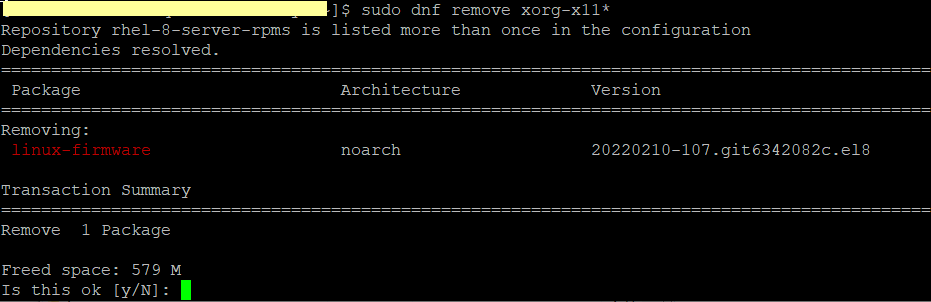
Java包有对xorg-x11-fonts的依赖,
Many Linux systems run applications which require a Java runtime. Some Linux Java packages have a dependency on specific X Windows xorg-x11-fonts.
可以在安装java后,通过下面命令删除xorg-x11* 的依赖包(试过可行)
sudo dnf remove xorg-x11*
也可以使用Java headless 版本(没有试过)
One workaround to avoid this dependency is to use the "headless" Java packages for your specific Java runtime, if provided by your distribution
Linux: Ensure X Window System is not installed的更多相关文章
- Linux X Window System运行原理和启动过程
本文主要说明X Window System的基本运行原理,其启动过程,及常见的跨网络运行X Window System. 一) 基本运行原理 X Window System采用C/S结构,但和我们常见 ...
- Linux学习-什么是 X Window System
Unix Like 操作系统不是只能进行服务器的架设而已,在美编.排版.制图.多媒体应用上也是有其 需要的. 这些需求都需要用到图形接口 (Graphical User Interface, GUI) ...
- RHEL5.8使用yum安装X Window System
硬件配置:4C+16GB 操作系统:Red Hat Enterprise Linux Server release 5.8 (Tikanga) 服务器中使用的是RHEL5.8操作系统,只安装了基本的功 ...
- X Window System介绍
1.概述 X Window System是1984年由麻省理工学院(MIT)和DEC公司共同开发研究的,是执行在UNIX系统上的视窗系统.严格地说,X Window System并非一个软件, ...
- CentOS 6.4安装本地yum源,并安装X Window System
1.为DVD创建一个挂载目录 [root@localhost ~]# mkdir /media/CentOS 2.在Linux下挂载CentOS DVD(虚拟机挂载DVD不说了,应该都会) [root ...
- Linux Find Out Last System Reboot Time and Date Command 登录安全 开关机 记录 帐号审计 历史记录命令条数
Linux Find Out Last System Reboot Time and Date Command - nixCraft https://www.cyberciti.biz/tips/li ...
- Windows 上编译 corefx 源码生成 Linux 上可用的 System.Data.SqlClient.dll
最近在排查一个奇怪的 EF Core 查询速度慢的问题,需要在 corefx 2.2.3 的 System.Data.SqlClient 源码中打点. github 上签出 corefx 的源代码,运 ...
- Linux上制作Window启动盘
Linux上制作Window启动盘 注意: U盘在Linux中的标签(依具体情况而定:执行df查看) U盘 ----- /dev/sdb4 格式化U盘 建立U盘的启动分区 安装关键工具 ms-sys ...
- Linux进程通信之System V消息队列
System V消息队列是Open Group定义的XSI,不属于POSIX标准.System V IPC的历史相对很早,在上个世70年代后期有贝尔实验室的分支机构开发,80年代加入System V的 ...
- Linux Foundation Secure Boot System Released
As promised, here is the Linux Foundation UEFI secure boot system. This was actually released to us ...
随机推荐
- 05#Web 实战:可拖拽的侧边栏
效果演示图 可拖拽的左.右侧边栏的使用情况还是挺多的,博客园后台管理的左侧边栏就可以拖拽哟!效果演示如下图: HTML 代码 <div class="container"&g ...
- OpenAI Chat completion API 入门指南
Chat completion API 入门指南 ChatGPT 由 OpenAI 最先进的语言模型 gpt-3.5-turbo 提供支持. 使用 OpenAI API,您可以使用 GPT-3.5-t ...
- java.sql.SQLException: Access denied for user ‘root‘@‘localhost‘ (using password: YES)问题
此报错大多数存在的问题为mysql密码错误,需要去JDBC文件中寻找url查看是否密码错误.
- RuntimeError: Expected all tensors to be on the same device, but found at least two devices, cuda:0 and cpu!
错误原因:数据有的在cpu上有的在gpu上debug:断点到出错位置查看类型,或者打印`x.is_cuda`查看修改:将cpu上的数据通过`.to(device)`加载到gpu上
- 数据库多表连接查询中使用group by分组语句,Expression #1 of SELECT list is not in GROUP BY clause and contains nonaggregated column 'XXX' which is not functionally dependent on columns in GROUP BY claus
需求描述: 要是用两表联合查询,并对查询的结果进行分组:sql如下: 1 SELECT 2 a.`id`, 3 a.`fr_num`, 4 b.`ent_status` 5 FROM 6 `table ...
- mybatis日志打印到控制台
mybatis: configuration:# 日志输出到控制台 log-impl: org.apache.ibatis.logging.stdout.StdOutImpl
- SAP 采购订单行项目客制化字段增强
需求: 在采购订单行项目中新增客制化字段,区分采购的项目中的物料是量产还是研发物料 开发步骤 主要使用二代增强出口:MM06E005 创建增强项目 事务码T-code:CMOD 创建项目ZEMM001 ...
- vue3 使用clodop打印插件实现不预览直接打印
一.下载安装C-LODOP https://www.lodop.net/download.html 解压文件后点击exe程序,启用服务 将上述的 LodopFuncs.js 文件放到工程某个文件下 二 ...
- 使用vue+iview创建自己的对话框组件
通过对别的案例反复研究,终于总结出自己对于使用vue+iview创建组件的步骤: 第一步:编辑新建对话框组件(子组件) <template> <div> <!-- mod ...
- notepad++ 配置Java 环境
(1)设计新建文件的类型与编码方式: (2)安装插件NppExec (3)插件配置 (4)编辑并配置命令: 找到Advance Options; 在红中找到Java,点击 (5)运行结果查看: (6) ...