
spring-boot-learning-监听事件
Springboot扩展了Spring的ApplicatoionContextEvent,提供了事件:
ApplicationStartingEvent:框架启动事件
ApplicationEnvironmentPreparedEvent: springboot 对应Evironment已经准备完毕了,但是上下文还没有创建。
ApplicationContextInitializedEvent: 上下文初始化
ApplicationPreparedEvent: springboot 上下文context创建完成,但是bean没有完全加载
ApplicationStartedEvent: springboot 启动开始执行的事件
ApplicationReadyEvent : 调用Runners接口完毕
ApplicationFailedEvent:启动异常执行事件
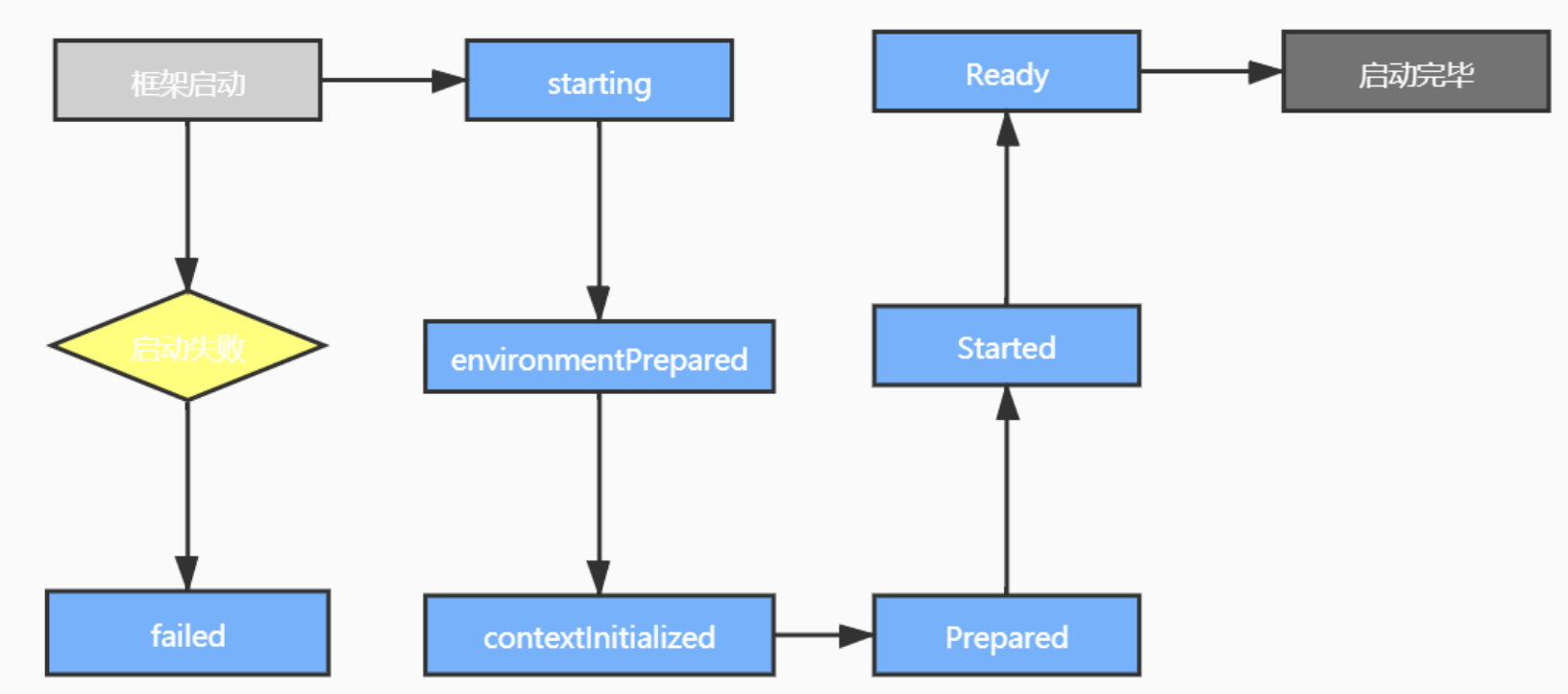
 * springboot自带的事件。

 * ApplicationStartingEvent

 * Spring Application启动事件。事件产生的时机为ApplicationListeners注册之后,Environment或ApplicationContext可用之前,
    事件源为Spring Application自身,ApplicationStartingEvent在生命周期过程中可能会被修改,请谨慎使用。


 * ApplicationEnvironmentPreparedEvent

 * 事件产生的时机为Spring Application已经启动,Environment第一次可用。


 * ApplicationPreparedEvent

 * 事件产生的时机为Spring Application已经启动,Application Context已经完全准备好但是还没有进行刷新,在该阶段已经开始加载Bean定义并且Environment已经完全可用。


 * ApplicationStartedEvent

 * 事件产生的时机为Application Context已经完成刷新,ApplicationRunner application和CommandLineRunner调用之前。


 * ApplicationReadyEvent

 * Spring Application已经准备好对外提供服务。


 * ApplicationFailedEvent

 * 应用启动失败
自定义监听器的步骤:
1,建立监听类继承ApplicationListener
2, 继承方法onApplicationEvent
3, 在resource建立文件夹/META-INF/spring.factories
4, 文件里写入:
org.springframework.context.ApplicationListener=\

com.quan.sbrabbit.Listener.QuanListenerEnvPreparedEvent ,com.quan.sbrabbit.Listener.QuanListenerStartedEvent,com.quan.sbrabbit.Listener.QuanListenerPreparedEvent
/**

 * spring boot 对应Enviroment已经准备完毕,但此时上下文context还没有创建。在该监听中获取到ConfigurableEnvironment

 * 后可以对配置信息做操作,例如:修改默认的配置信息

 */

public class QuanListenerEnvPreparedEvent implements ApplicationListener<ApplicationEnvironmentPreparedEvent> {

    @Override

    public void onApplicationEvent(ApplicationEnvironmentPreparedEvent event) {

        ConfigurableEnvironment environment = event.getEnvironment();

        MutablePropertySources sources =environment.getPropertySources();

        if (sources != null){

            Iterator<PropertySource<?>> iterator = sources.iterator();

            while (iterator.hasNext()){

                PropertySource<?> propertySource = iterator.next();

                System.out.println(propertySource.getName());

                System.out.println(propertySource.getSource());

                System.out.println(propertySource.getClass());

            }

            System.out.println("监听到ApplicationEnvironmentPreparedEvent");

//            for (PropertySource<?> p :

//                    sources) {

//                System.out.println(p.getName());

//                System.out.println(p.getSource());

//                System.out.println(p.getClass());

//            }

        }

    }

}
/**

 * pring boot上下文context创建完成,但此时spring中的bean是没有完全加载完成的。

 * 在获取完上下文后,可以将上下文传递出去做一些额外的操作。

 * 值得注意的是:在该监听器中是无法获取自定义bean并进行操作的。

 */

public class QuanListenerPreparedEvent implements ApplicationListener<ApplicationPreparedEvent> {

    @Override

    public void onApplicationEvent(ApplicationPreparedEvent event) {

        ConfigurableApplicationContext context = event.getApplicationContext();

        context.toString();

        System.out.println("监听到ApplicationPreparedEvent");

    }

}
public class QuanListenerStartedEvent implements ApplicationListener<ApplicationStartedEvent> {

    @Override

    public void onApplicationEvent(ApplicationStartedEvent event) {

        SpringApplication application = event.getSpringApplication();

        System.out.println(application);

        //控制台或日志中会默认显示一个Banner,关闭这个东西

        application.setBannerMode(Banner.Mode.OFF);

        System.out.println("监听到applicationStartedEvent");

    }

}
加入:
org.springframework.context.ApplicationListener=\

com.quan.sbrabbit.Listener.QuanListenerEnvPreparedEvent ,com.quan.sbrabbit.Listener.QuanListenerStartedEvent,com.quan.sbrabbit.Listener.QuanListenerPreparedEvent
运行输出:
监听到ApplicationEnvironmentPreparedEvent

  .   ____          _            __ _ _

 /\\ / ___'_ __ _ _(_)_ __  __ _ \ \ \ \

( ( )\___ | '_ | '_| | '_ \/ _` | \ \ \ \

 \\/  ___)| |_)| | | | | || (_| |  ) ) ) )

  '  |____| .__|_| |_|_| |_\__, | / / / /

 =========|_|==============|___/=/_/_/_/

 :: Spring Boot ::        (v2.3.3.RELEASE)

2020-09-01 14:10:32.063  WARN 99192 --- [           main] o.s.boot.StartupInfoLogger               : InetAddress.getLocalHost().getHostName() took 5004 milliseconds to respond. Please verify your network configuration (macOS machines may need to add entries to /etc/hosts).

2020-09-01 14:10:37.067  INFO 99192 --- [           main] com.quan.sbrabbit.SbrabbitApplication    : Starting SbrabbitApplication on quandeMacBook-Pro.local with PID 99192 (/Users/quan/Desktop/ALLLL/sbrabbit/target/classes started by quan in /Users/quan/Desktop/ALLLL/sbrabbit)

2020-09-01 14:10:37.068  INFO 99192 --- [           main] com.quan.sbrabbit.SbrabbitApplication    : No active profile set, falling back to default profiles: default

监听到ApplicationPreparedEvent

2020-09-01 14:10:37.491  INFO 99192 --- [           main] .s.d.r.c.RepositoryConfigurationDelegate : Bootstrapping Spring Data Elasticsearch repositories in DEFAULT mode.

2020-09-01 14:10:37.505  INFO 99192 --- [           main] .s.d.r.c.RepositoryConfigurationDelegate : Finished Spring Data repository scanning in 11ms. Found 0 Elasticsearch repository interfaces.

2020-09-01 14:10:37.509  INFO 99192 --- [           main] .s.d.r.c.RepositoryConfigurationDelegate : Bootstrapping Spring Data Reactive Elasticsearch repositories in DEFAULT mode.

2020-09-01 14:10:37.511  INFO 99192 --- [           main] .s.d.r.c.RepositoryConfigurationDelegate : Finished Spring Data repository scanning in 2ms. Found 0 Reactive Elasticsearch repository interfaces.

2020-09-01 14:10:37.762  INFO 99192 --- [           main] o.s.b.w.embedded.tomcat.TomcatWebServer  : Tomcat initialized with port(s): 9898 (http)

2020-09-01 14:10:37.768  INFO 99192 --- [           main] o.apache.catalina.core.StandardService   : Starting service [Tomcat]

2020-09-01 14:10:37.769  INFO 99192 --- [           main] org.apache.catalina.core.StandardEngine  : Starting Servlet engine: [Apache Tomcat/9.0.37]

2020-09-01 14:10:37.838  INFO 99192 --- [           main] o.a.c.c.C.[Tomcat].[localhost].[/]       : Initializing Spring embedded WebApplicationContext

2020-09-01 14:10:37.839  INFO 99192 --- [           main] w.s.c.ServletWebServerApplicationContext : Root WebApplicationContext: initialization completed in 740 ms

2020-09-01 14:10:38.006  INFO 99192 --- [           main] o.s.s.concurrent.ThreadPoolTaskExecutor  : Initializing ExecutorService 'applicationTaskExecutor'

2020-09-01 14:10:38.502  WARN 99192 --- [           main] o.s.data.convert.CustomConversions       : Registering converter from class org.springframework.data.geo.Point to interface java.util.Map as writing converter although it doesn't convert to a store-supported type! You might want to check your annotation setup at the converter implementation.

2020-09-01 14:10:38.502  WARN 99192 --- [           main] o.s.data.convert.CustomConversions       : Registering converter from interface java.util.Map to class org.springframework.data.geo.Point as reading converter although it doesn't convert from a store-supported type! You might want to check your annotation setup at the converter implementation.

2020-09-01 14:10:38.503  WARN 99192 --- [           main] o.s.data.convert.CustomConversions       : Registering converter from class org.springframework.data.elasticsearch.core.geo.GeoPoint to interface java.util.Map as writing converter although it doesn't convert to a store-supported type! You might want to check your annotation setup at the converter implementation.

2020-09-01 14:10:38.503  WARN 99192 --- [           main] o.s.data.convert.CustomConversions       : Registering converter from interface java.util.Map to class org.springframework.data.elasticsearch.core.geo.GeoPoint as reading converter although it doesn't convert from a store-supported type! You might want to check your annotation setup at the converter implementation.

2020-09-01 14:10:38.604  INFO 99192 --- [           main] o.s.d.elasticsearch.support.VersionInfo  : Version Spring Data Elasticsearch: 4.0.3.RELEASE

2020-09-01 14:10:38.604  INFO 99192 --- [           main] o.s.d.elasticsearch.support.VersionInfo  : Version Elasticsearch Client in build: 7.6.2

2020-09-01 14:10:38.605  INFO 99192 --- [           main] o.s.d.elasticsearch.support.VersionInfo  : Version Elasticsearch Client used: 7.6.2

2020-09-01 14:10:38.605  INFO 99192 --- [           main] o.s.d.elasticsearch.support.VersionInfo  : Version Elasticsearch cluster: 6.8.4

2020-09-01 14:10:38.605  WARN 99192 --- [           main] o.s.d.elasticsearch.support.VersionInfo  : Version mismatch in between Elasticsearch Client and Cluster: 7.6.2 - 6.8.4

2020-09-01 14:10:38.688  INFO 99192 --- [           main] o.s.b.w.embedded.tomcat.TomcatWebServer  : Tomcat started on port(s): 9898 (http) with context path ''

2020-09-01 14:10:38.698  INFO 99192 --- [           main] com.quan.sbrabbit.SbrabbitApplication    : Started SbrabbitApplication in 16.941 seconds (JVM running for 22.495)

org.springframework.boot.SpringApplication@4a163575

监听到applicationStartedEvent
自定义事件:必须继承抽象类ApplicationEvent
public class QuanEvent extends ApplicationEvent {

    /**

     * Create a new {@code ApplicationEvent}.

     *

     * @param source the object on which the event initially occurred or with

     *               which the event is associated (never {@code null})

     */

    public QuanEvent(String source) {

        super(source);

        System.out.println("事件  "+source);

    }

}
自定义监听器:监听自己定义的事件
public class QuanListenerQuanEvent implements ApplicationListener<QuanEvent> {

    @Override

    public void onApplicationEvent(QuanEvent event) {

        System.out.println("监听到QuanEvent");

    }

}
在完成springboot启动事件ApplicationStaredEvent中发布事件:
public class QuanListenerStartedEvent implements ApplicationListener<ApplicationStartedEvent> {

    @Override

    public void onApplicationEvent(ApplicationStartedEvent event) {

        event.getApplicationContext().publishEvent(new QuanEvent("hello"));

    }

}
最后加上监听器的配置:
在spring.factories追加:
,com.quan.sbrabbit.Listener.QuanListenerQuanEvent
运行结果:
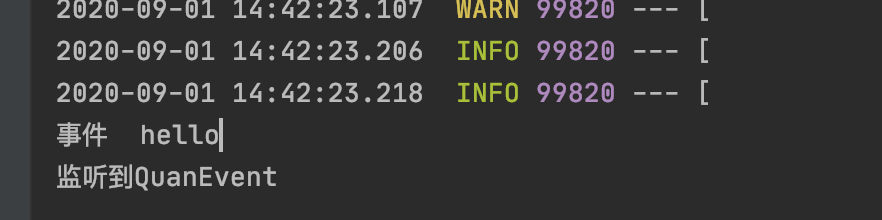
也可以使用注解进行监听器的编写(这时候只需要将监听器加载到bean容器里面就行,)
使用注解@EventListener
@Component

public class QuanListenerQuanEvent  {

    @EventListener

    public void onApplicationEvent(QuanEvent event) {

        System.out.println("监听到QuanEvent");

    }

}
监听事件的原理:
@FunctionalInterface

public interface ApplicationListener<E extends ApplicationEvent> extends EventListener {

    /**

     * Handle an application event.

     * @param event the event to respond to

     */

    void onApplicationEvent(E event);

}
监听器触发机制:
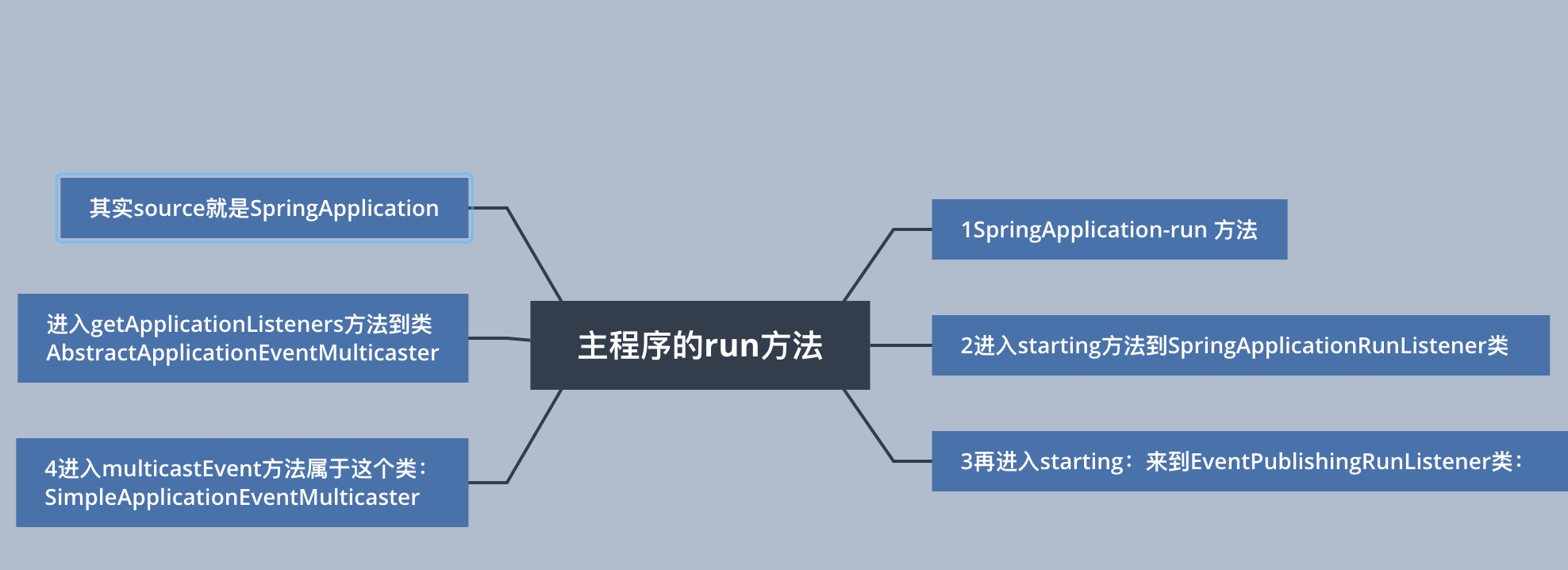
SpringApplication-run 方法

public ConfigurableApplicationContext run(String... args){

    SpringApplicationRunListeners listeners = getRunListeners(args);

    listeners.starting();

}

进入starting方法到SpringApplicationRunListener类

    void starting() {

        for (SpringApplicationRunListener listener : this.listeners) {

            listener.starting();

        }

    }

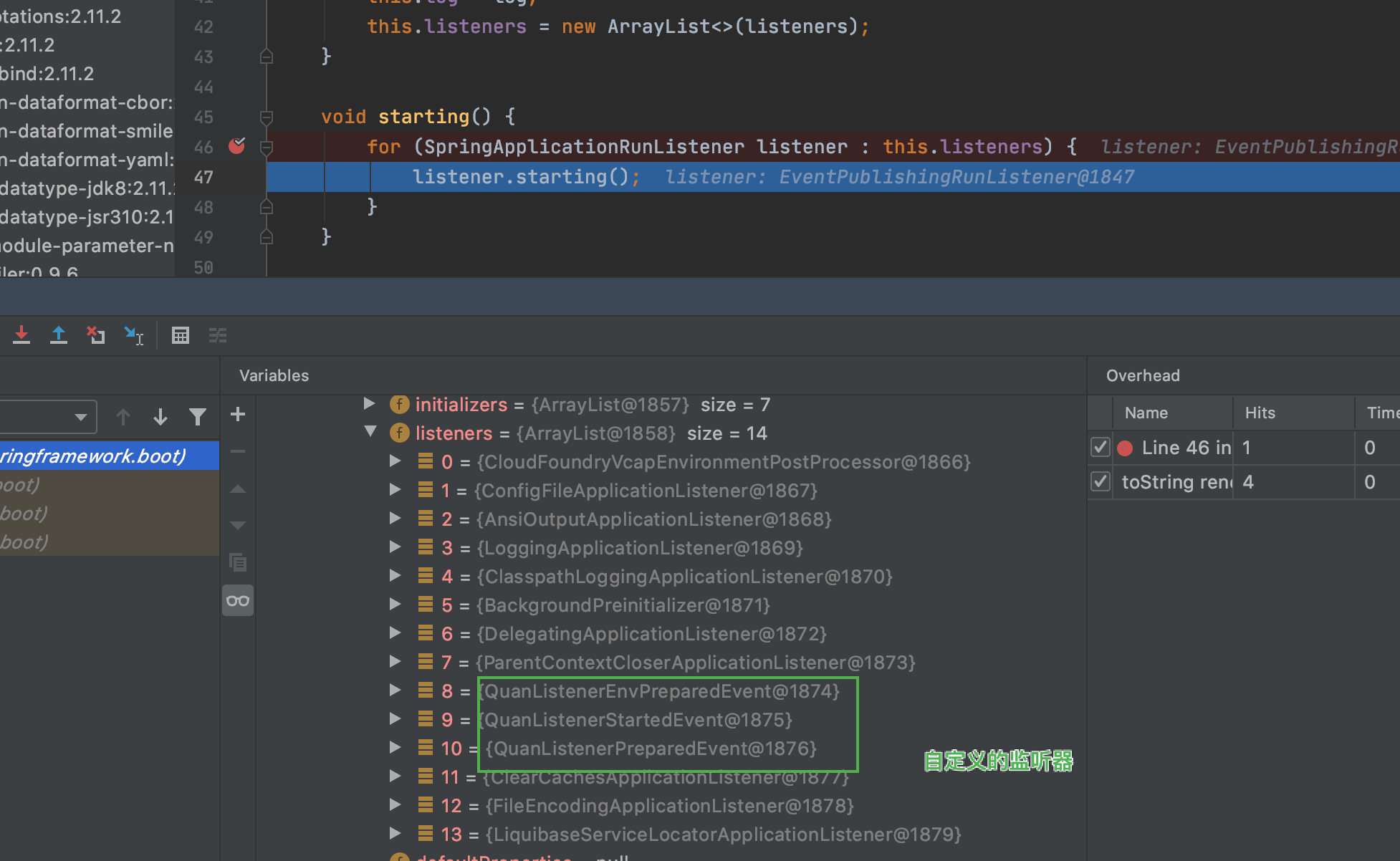
    遍历所有的SpringApplicationRunListener

再进入starting:来到EventPublishingRunListener类:

    @Override

    public void starting() {

        this.initialMulticaster.multicastEvent(new ApplicationStartingEvent(this.application, this.args));

    }

调用广播器发送

进入multicastEvent方法属于这个类:SimpleApplicationEventMulticaster

@Override

    public void multicastEvent(final ApplicationEvent event, @Nullable ResolvableType eventType) {

        ResolvableType type = (eventType != null ? eventType : resolveDefaultEventType(event));

        Executor executor = getTaskExecutor(); //获得线程池

        for (ApplicationListener<?> listener : getApplicationListeners(event, type)) {//获取对当前event感兴趣的监听器列表

            if (executor != null) {

                executor.execute(() -> invokeListener(listener, event));

            }

            else {

                invokeListener(listener, event);

            }

        }

    }

进入getApplicationListeners方法到类AbstractApplicationEventMulticaster

protected Collection<ApplicationListener<?>> getApplicationListeners(

            ApplicationEvent event, ResolvableType eventType) {

        Object source = event.getSource();//获得事件来源

其实source就是SpringApplication
spring-boot-learning-监听事件的更多相关文章
- Spring boot实现监听Redis key失效事件实现和其它方式
需求: 处理订单过期自动取消,比如下单30分钟未支付自动更改订单状态 用户绑定隐私号码当订单结束取消绑定等 解决方案1: 可以利用redis自带的key自动过期机制,下单时将订单id写入redis,过 ...
- 【Redis系列】Spring boot实现监听Redis key失效事件
talk is cheap, show me the code. 一.开启Redis key过期提醒 方式二:修改配置文件 redis.conf # 默认 notify-keyspace-events ...
- spring boot实战(第二篇)事件监听
http://blog.csdn.net/liaokailin/article/details/48186331 前言 spring boot在启动过程中增加事件监听机制,为用户功能拓展提供极大的便利 ...
- spring扩展点之三:Spring 的监听事件 ApplicationListener 和 ApplicationEvent 用法,在spring启动后做些事情
<spring扩展点之三:Spring 的监听事件 ApplicationListener 和 ApplicationEvent 用法,在spring启动后做些事情> <服务网关zu ...
- 利用spring的ApplicationListener监听某一类事件的发生
1.ApplicationListener在使用过程中可以监听某一事件的发生,可以做出相应的处理,这个方式不常用,但是在特殊情况下面还是有用的. 2.导包pom.xml <project xml ...
- springboot13 发布和监听事件
spring中的事件驱动模型Event(也叫发布订阅模式),是观察者模式的一个典型的应用 好处:业务解耦,在不影响原来业务逻辑的情况下,加入其它业务 场景: app上线后已实现用户注册功能,现需要在用 ...
- zookeeper 监听事件 PathChildrenCacheListener
zookeeper 监听事件 PathChildrenCacheListener PathChildrenCacheListener一次父节点注册,监听每次子节点操作,不监听自身和查询. 1.测试类: ...
- zookeeper 监听事件 NodeCacheListener
zookeeper 监听事件 NodeCacheListener NodeCacheListener一次注册,每次监听,但是监听不到操作类型,不知道是增加?删除?还是修改? 1.测试类: packag ...
- zookeeper 监听事件 CuratorWatcher
zookeeper 监听事件 CuratorWatcher CuratorWatcher一次注册只监听一次,不监听查询. 1.监听测试类 package com.qy.learn.zk.curator ...
- Redis集群环境下的键值空间监听事件实现方案
一直想记录工作中遇到的问题和解决的方法,奈何没有找到一方乐土,最近经常反思,是否需要记录平时的点滴,后台还是决定下定决心记录一些,以便以后用到的时候找不着,实现这样的一个功能主要也是业务所需要的. 需 ...
随机推荐
- Linux系列——常规基础操作
1.配置IP a.若安装桌面版系统,直接GUI画面配置,操作直观.简单 b.若安装非桌面版系统,进行如下配置: 1).ifconfig命令(临时配置,重启后失效) ifconfig eth ...
- 攻防世界Web_ics_05
题目: 题目描述:其他破坏者会利用工控云管理系统设备维护中心的后门入侵系统 题目场景: 1.进入云平台设备中心界面,查看以下源码发现?page= ,(点下云平台设备维护中心url里也能出?page ...
- 小甲鱼 python——第一课作业!
0: python是脚本语言把?虽然不是很清楚什么是脚本语言就是了.复制一下: 脚本语言(英语:Scripting language)是为了缩短传统的"编写.编译.链接.运行"( ...
- RENIX使用模板创建报文——网络测试仪实操
一.简介 RENIX内置多种报文模板,可以直接用来创建一个报文,节省时间 二.操作步骤 1.准备工作:连接机框,占用端口 2.新建或者编辑流 3.切换到 数据包/编辑 界面:点击创建新协议报文 4.在 ...
- OLAP阵营又增一猛将,比肩Power BI不是说说而已!
说到大数据应用最多的技术,不得不提OLAP技术,在国内外,不论传统公司还是互联网公司,都开始利用OLAP技术分析挖掘大数据的价值.也许很多人对OLAP的概念还不是很清楚,简单来说,就把数据处理成数据立 ...
- windev的Trigger触发器,能秒SQL吗?
有朋友问,"你是不是在写论文?" (此处请想象个表情)"好吧,论文继续!" SQL中,触发器可以看成是一种特殊的存储过程,使用inserted临时表来建立数据关 ...
- C# StopWatch程序性能_时间计时器
StopWatch 时间计数器简介: Stopwatch 可以测量一个时间间隔的运行时间,也可以测量多个时间间隔的总运行时间.一般用来测量代码执行所用的时间或者计算性能数据,在优化代码性能上可以使用S ...
- Win11右键菜单怎么修改为传统Win10右键风格?
前言 对于开发者而言,右键菜单会集成一些功能,升级 Win11 的右键菜单反而对开发造成不便,所以修改回传统风格. 修改成果如下 两个步骤改回传统右键风格 第一步:首先用鼠标右键点击开始菜单,选择 w ...
- 网络类型PAN、LAN、WLAN、CAN、MAN、WAN简单介绍
转至:https://www.cnblogs.com/itmacy/p/12290036.html PAN:personal area network 个人区域网络 无线连接:蓝牙,红外,NFC 有线 ...
- elementUI日期选择器 el-date-picker根据所选日期选择禁用
我遇到这样一个场景,需要动态渲染时间表单,但是后端传过来的数据, 这个时候就不能预先找到想要限制的date了,因为连date本身,也是根据后端传来的数据生成的. 如图: 代码如下: //templat ...