
巅峰对决!Spring Boot VS .NET 6
原文作者:Putu Prema
原文链接: https://medium.com/@putuprema/spring-boot-vs-asp-net-core-a-showdown-1d38b89c6c2d
Spring Boot 和 ASP.NET Core 都是企业中流行的 Web 框架, 对于喜欢 C# 的人会使用 ASP.NET Core, 而对于 Java 或 Kotlin 等基于 JVM 的语言,Spring Boot 是最受欢迎的。
这本文中,会对比这两个框架在以下方面有何不同:
- 控制器
- 模型绑定和验证
- 异常处理
- 数据访问
- 依赖注入
- 认证与授权
- 性能
基础项目
这是一个有关订单的基础项目, 非常简单的后端 api, 客户可以创建一个订单来购买一个或多个产品, 我使用了 MySQL 作为数据库,下面是实体关系图。
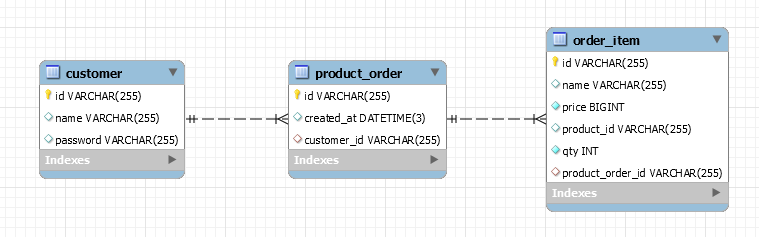
这里使用的框架版本分别是, Spring Boot (v2.5.5) 和 .NET 6, 让我们开始对比吧!
1.控制器
控制器是负责处理传入请求的层, 为了在 Spring Boot 中定义一个控制器,我创建了一个类 ProductOrderController, 然后使用了 @RestController 和 @RequestMapping 注解, 然后在控制器的每个方法上, 可以使用下面的注解来定义支持的 HTTP 方法和路径(可选)。
- @GetMapping
- @PostMapping
- @PutMapping
- @DeleteMapping
- @PatchMapping
如果要绑定到路径变量, 我们可以将参数添加到用@PathVariable 注释的控制器方法中,并指定与参数同名的路由路径模板,下面的 getOrderById() 方法,我们将id绑定为路径变量。
@RestController

@RequestMapping("/v1/orders")

class ProductOrderController(

    private val productOrderService: IProductOrderService

) {

    @GetMapping

    fun getOrders(query: ProductOrderQuery): List<ProductOrderDto> = when {

        query.productId?.isNotEmpty() == true -> productOrderService.getByProductId(query.productId!!)

        query.customerId?.isNotEmpty() == true -> productOrderService.getByCustomerId(query.customerId!!)

        else -> productOrderService.getAllOrders()

    }

    @GetMapping("{id}")

    fun getOrderById(@PathVariable id: String): ProductOrderDto = productOrderService.getById(id)

}
在 .NET Core 中, 控制器和上面是相似的, 首先创建一个 ProductOrderController类, 并继承 ControllerBase ,标记 [ApiController] 特性, 然后通过 [Route] 特性指定基本路径, 然后在控制器的每个方法上, 可以使用下面的特性来定义支持的 HTTP 方法和路径(可选)。
[ApiController]

[Route("v1/orders")]

public class ProductOrderController : ControllerBase

{

    private readonly IProductOrderService _productOrderService;

    public ProductOrderController(IProductOrderService productOrderService)

    {

        _productOrderService = productOrderService;

    }

    [HttpGet]

    public async Task<List<ProductOrderDto>> GetOrders([FromQuery] ProductOrderQuery query)

    {

        List<ProductOrderDto> orders;

        if (!string.IsNullOrEmpty(query.ProductId))

        {

            orders = await _productOrderService.GetAllByProductId(query.ProductId);

        }

        else if (!string.IsNullOrEmpty(query.CustomerId))

        {

            orders = await _productOrderService.GetAllByCustomerId(query.CustomerId);

        }

        else

        {

            orders = await _productOrderService.GetAll();

        }

        return orders;

    }

    [HttpGet("{id}")]

    public async Task<ProductOrderDto> GetOrderById(string id) => await _productOrderService.GetById(id);

}
模型绑定和验证
在 Spring Boot 中, 我们只需要给控制器的方法的参数加上下面的注解
- @RequestParam → 从查询字符串绑定
- @RequestBody → 从请求体绑定
- @RequestHeader → 从请求头绑定
对比表单的请求,不需要给参数加注解就可以绑定。
@RestController

@RequestMapping("/v1/customer")

class CustomerController(

    private val customerService: CustomerService

) {

    @PostMapping("/register")

    fun register(@Valid @RequestBody form: RegisterForm) = customerService.register(form)

    @PostMapping("/login")

    fun login(@Valid @RequestBody form: LoginForm) = customerService.login(form)

}

@RestController

@RequestMapping("/v1/orders")

class ProductOrderController(

    private val productOrderService: IProductOrderService

) {

    @GetMapping

    fun getOrders(query: ProductOrderQuery): List<ProductOrderDto> {

      ...

    }

}
如果要对参数进行验证, 需要添加 spring-boot-starter-validation 依赖项, 然后给 DTO 的属性加上 @NotEmpty、@Length 等注解, 最后给DTO加上 @Valid 即可。
.NET Core 和上面类似, 同样你可以使用下面的特性标记控制器的方法
- [FromQuery] → 从查询字符串绑定
- [FromRoute] → 从路由数据绑定
- [FromForm] → 从表单数据绑定
- [FromBody] → 从请求体绑定
- [FromHeader] → 从请求头绑定
[Route("v1/customer")]

    [ApiController]

    public class CustomerController : ControllerBase

    {

        [HttpPost("register")]

        public async Task<AuthResultDto> Register([FromBody] RegisterForm form) => await _customerService.Register(form);

        [HttpPost("login")]

        public async Task<AuthResultDto> Login([FromBody] LoginForm form) => await _customerService.Login(form);

    }

    [Route("v1/orders")]

    [ApiController]

    public class ProductOrderController : ControllerBase

    {

        [HttpGet]

        public async Task<List<ProductOrderDto>> GetOrders([FromQuery] ProductOrderQuery query)

        {

          .....

        }

    }
模型验证也是类似的, 给 DTO 的属性上加上 [Required]、[MinLength]、[MaxLength] 等特性就可以了。
public class RegisterForm

{

    [Required(ErrorMessage = "Please enter user id")]

    public string UserId { get; set; }

    [Required(ErrorMessage = "Please enter name")]

    public string Name { get; set; }

    [Required(ErrorMessage = "Please enter password")]

    [MinLength(6, ErrorMessage = "Password must have minimum of 6 characters")]

    public string Password { get; set; }

}
异常处理
Spring Boot 的异常处理,主要用 @RestControllerAdvice 和 ExceptionHandler
注解,如下
abstract class AppException(message: String) : RuntimeException(message) {

    abstract fun getResponse(): ResponseEntity<BaseResponseDto>

}
@RestControllerAdvice

class ControllerExceptionHandler : ResponseEntityExceptionHandler() {

    @ExceptionHandler(AppException::class)

    fun handleAppException(ex: AppException, handlerMethod: HandlerMethod): ResponseEntity<BaseResponseDto> {

        return ex.getResponse()

    }

}
在 ASP.NET Core 中,异常处理程序被注册为过滤器/中间件,我们可以创建一个异常处理类,并继承 IExceptionFilter 接口。
public class ControllerExceptionFilter : IExceptionFilter

{

    public void OnException(ExceptionContext context)

    {

        if (context.Exception is AppException exception)

        {

            context.Result = exception.GetResponse();

        }

    }

}
然后注册这个异常过滤器
var builder = WebApplication.CreateBuilder(args);

// Add services to the container.

builder.Services.AddControllers(options =>

{

    options.Filters.Add<ControllerExceptionFilter>();

});
数据访问
在 Spring Boot 中, 你可以使用 Hibernate ORM, 创建一个Repository 接口, 并继承 JpaRepository , 这样就有了开箱即用的基本查询方法,比如 findAll() 和 findById()。
您还可以在定义自定义查询方法。只要遵循严格的方法命名约定,Spring 就会构建这个存储库的实现,包括运行时的所有查询,魔法?是的!
interface IProductOrderRepository : JpaRepository<ProductOrder, String> {

    @EntityGraph(type = EntityGraph.EntityGraphType.FETCH, value = "product-order-graph")

    override fun findById(id: String): Optional<ProductOrder>

    @EntityGraph(type = EntityGraph.EntityGraphType.FETCH, value = "product-order-graph")

    fun findAllByCustomer(customer: Customer): List<ProductOrder>

    @EntityGraph(type = EntityGraph.EntityGraphType.FETCH, value = "product-order-graph")

    @Query("SELECT ord FROM ProductOrder ord JOIN OrderItem item ON item.productOrder = ord WHERE item.productId = :productId")

    fun findAllByProductId(productId: String): List<ProductOrder>

}
而在 .NET Core 中,我们可以使用官方的 Entity Framework ORM, 首先,我们需要创建一个 DB Context 类, 这是 ORM 框架用来连接数据库和运行查询的桥梁。
public class AppDbContext : DbContext

{

    public DbSet<Customer> Customer { get; set; }

    public DbSet<Product> Product { get; set; }

    public DbSet<ProductOrder> ProductOrder { get; set; }

    public DbSet<OrderItem> OrderItem { get; set; }

    public AppDbContext(DbContextOptions<AppDbContext> options) : base(options)

    {

        Customer = Set<Customer>();

        Product = Set<Product>();

        ProductOrder = Set<ProductOrder>();

        OrderItem = Set<OrderItem>();

    }

}
接下来,还需要注册上面的 DB Context,并配置数据库连接字符串
var builder = WebApplication.CreateBuilder(args);

// Add services to the container.

builder.Services.AddDbContext<AppDbContext>(options =>

{

    // Using Pomelo.EntityFrameworkCore.MySql library

    options.UseMySql(builder.Configuration.GetConnectionString("EaterMysql"), ServerVersion.Parse("8.0.21-mysql"));

});
在我们的 Repository 中,我们访问 DB 上下文中的 DbSet 字段来执行查询, 在这里,我们使用 LINQ,这是一组直接融入 C# 语言的 API,用于从各种数据源进行查询。这是我非常喜欢的一项功能,因为它提供了 Fluent API,例如 Where()、Include() 或 OrderBy(),这非常方便!
public class ProductOrderRepository : BaseRepository<ProductOrder>, IProductOrderRepository

{

    public ProductOrderRepository(AppDbContext context) : base(context)

    {

    }

    public Task<ProductOrder?> GetById(string id) => _context.ProductOrder

        .Include(o => o.Customer)

        .Include(o => o.Items)

        .Where(o => o.Id == id)

        .FirstOrDefaultAsync();

    public Task<List<ProductOrder>> GetAllByCustomer(Customer customer) => _context.ProductOrder

        .Include(o => o.Items)

        .Where(o => o.Customer == customer)

        .ToListAsync();

    public Task<List<ProductOrder>> GetAllByProductId(string productId) => _context.ProductOrder

        .Include(o => o.Customer)

        .Include(o => o.Items)

        .Where(o => o.Items.Any(item => item.ProductId == productId))

        .ToListAsync();

}
依赖注入
Spring Boot 中的依赖注入真的非常简单, 只需根据类的角色使用 @Component、@Service 或@Repository 等注解即可,在启动时,它会进行扫描,然后注册。
@Service

class ProductOrderService(

    private val customerRepository: ICustomerRepository,

    private val productOrderRepository: IProductOrderRepository,

    private val mapper: IMapper

) : IProductOrderService {

    // ...

    // ...

    // ...

}
在 .NET Core 中, 服务根据生命周期分成3中类型,单例的,范围的, 瞬时的,并且在启动时手动注册到 DI 容器中
var builder = WebApplication.CreateBuilder(args);

// Add services to the container.

// Services

builder.Services.AddSingleton<IPasswordEncoder, PasswordEncoder>();

builder.Services.AddSingleton<ITokenService, TokenService>();

builder.Services.AddScoped<IProductOrderService, ProductOrderService>();

builder.Services.AddScoped<ICustomerService, CustomerService>();

// Repositories

builder.Services.AddScoped<IProductOrderRepository, ProductOrderRepository>();

builder.Services.AddScoped<ICustomerRepository, CustomerRepository>();
身份验证和授权
在 Spring Boot 中, 首先需要添加依赖 spring-boot-starter-security, 然后,在 build.gradle 文件(或 pom.xml,如果您使用 Maven)中为 JWT 库添加以下依赖项:
implementation("io.jsonwebtoken:jjwt-api:${jjwtVersion}")

implementation("io.jsonwebtoken:jjwt-impl:${jjwtVersion}")

implementation("io.jsonwebtoken:jjwt-jackson:${jjwtVersion}")
接下来, 需要创建一个负责 JWT 令牌解析和验证的过滤器/中间件, 然后重写 doFilterInternal 方法, 编写解析和验证逻辑。
class JwtAuthenticationFilter(

    private val tokenService: ITokenService

) : OncePerRequestFilter() {

    override fun doFilterInternal(

        request: HttpServletRequest,

        response: HttpServletResponse,

        filterChain: FilterChain

    ) {

        val authorization = request.getHeader("Authorization")

        if (authorization == null || !authorization.startsWith("Bearer")) {

            return filterChain.doFilter(request, response)

        }

        val token = authorization.replaceFirst("Bearer ", "")

        val claims = try {

            tokenService.parse(token).body

        } catch (ex: JwtException) {

            SecurityContextHolder.clearContext()

            return

        }

        // Set authentication to tell Spring that the user is valid and authenticated.

        SecurityContextHolder.getContext().authentication = UsernamePasswordAuthenticationToken(claims.id, null, arrayListOf())

        filterChain.doFilter(request, response)

    }

}
要配置和强制执行身份验证,需要先创建一个继承WebSecurityConfigurerAdapter的配置类,并使用 @Configuration 注解, 在这里注册我们上面创建的 JWT 过滤器,并在configure方法中配置哪些端点应该进行身份验证。比如,我允许匿名访问客户登录和注册端点。其他所有内容都应进行身份验证
class ApiAccessDeniedHandler : AccessDeniedHandler {

    override fun handle(

        request: HttpServletRequest,

        response: HttpServletResponse,

        accessDeniedException: AccessDeniedException

    ) {

        response.status = HttpStatus.FORBIDDEN.value()

    }

}
class AuthEntryPoint : AuthenticationEntryPoint {

    override fun commence(

        request: HttpServletRequest,

        response: HttpServletResponse,

        authException: AuthenticationException

    ) {

        response.status = HttpStatus.UNAUTHORIZED.value()

    }

}
@Configuration

class SecurityConfig(

    tokenService: ITokenService

) : WebSecurityConfigurerAdapter() {

    private val jwtAuthenticationFilter = JwtAuthenticationFilter(tokenService)

    @Bean

    fun passwordEncoder(): PasswordEncoder = BCryptPasswordEncoder()

    override fun configure(http: HttpSecurity) {

        http.csrf().disable().cors().disable()

            .addFilterAfter(jwtAuthenticationFilter, UsernamePasswordAuthenticationFilter::class.java)

            .exceptionHandling()

            .accessDeniedHandler(ApiAccessDeniedHandler())

            .authenticationEntryPoint(AuthEntryPoint())

            .and()

            .sessionManagement().sessionCreationPolicy(SessionCreationPolicy.STATELESS)

            .and()

            .authorizeRequests()

            .antMatchers("/v1/customer/register", "/v1/customer/login").permitAll()

            .anyRequest().authenticated()

    }

}
在 ASP.NET Core 中实现 JWT 身份验证和授权非常简单, 首先安装Microsoft.AspNetCore.Authentication.JwtBearer` NuGet 包, 然后,在 Program.cs 文件中配置一些设置,例如密钥、颁发者和到期时间。
var builder = WebApplication.CreateBuilder(args);

// Configure JWT Authentication

builder.Services.AddAuthentication(JwtBearerDefaults.AuthenticationScheme)

    .AddJwtBearer(options =>

    {

        options.SaveToken = true;

        options.RequireHttpsMetadata = true;

        options.TokenValidationParameters = new TokenValidationParameters()

        {

            ValidateAudience = false,

            ValidIssuer = builder.Configuration["JWT:ValidIssuer"],

            IssuerSigningKey = new SymmetricSecurityKey(Encoding.UTF8.GetBytes(builder.Configuration["JWT:Secret"])),

            ClockSkew = TimeSpan.FromSeconds(30)

        };

    });

var app = builder.Build();

// Enable Authentication & Authorization

app.UseAuthentication();

app.UseAuthorization();

app.MapControllers();

app.Run();
如果需要认证,就在控制或者方法上,加上 [Authorize] 特性, 同样,可以加上 [AllowAnonymous] 代表允许匿名访问。
[Route("v1/customer")]

[ApiController]

[Authorize]

public class CustomerController : ControllerBase

{

    [HttpPost("login")]

    [AllowAnonymous]

    public async Task<AuthResultDto> Login([FromBody] LoginForm form) => await _customerService.Login(form);

    [HttpGet]

    public async Task<CustomerDto> GetProfile() => await _customerService.GetProfile();

}
性能
最后是关键的部分,性能, 这两个框架在 QPS 和 内存使用率方面的表现如何?
在这里,我做了一个负载测试,调用一个 API,通过 id 获取一个产品订单。
测试环境
CPU:Intel Core i7–8750H( 4.10 GHz),6 核 12 线程
RAM:32 GB
操作系统:Windows 11
测试设置
我使用的压力测试工具是 K6, 进行了2次测试, 因为我想看看程序预热后性能提高了多少。在每次测试中,前 30 秒将从 0 增加到 1000 个虚拟用户,然后在那里停留 1 分钟。然后再过 30 秒,测试将从 1000 用户减少到 0 用户。
我还将 Golang(使用 Gin 框架和 Gorm)添加到基准测试, 这里只是为了对比 我们都知道 Golang 非常快。

测试结果
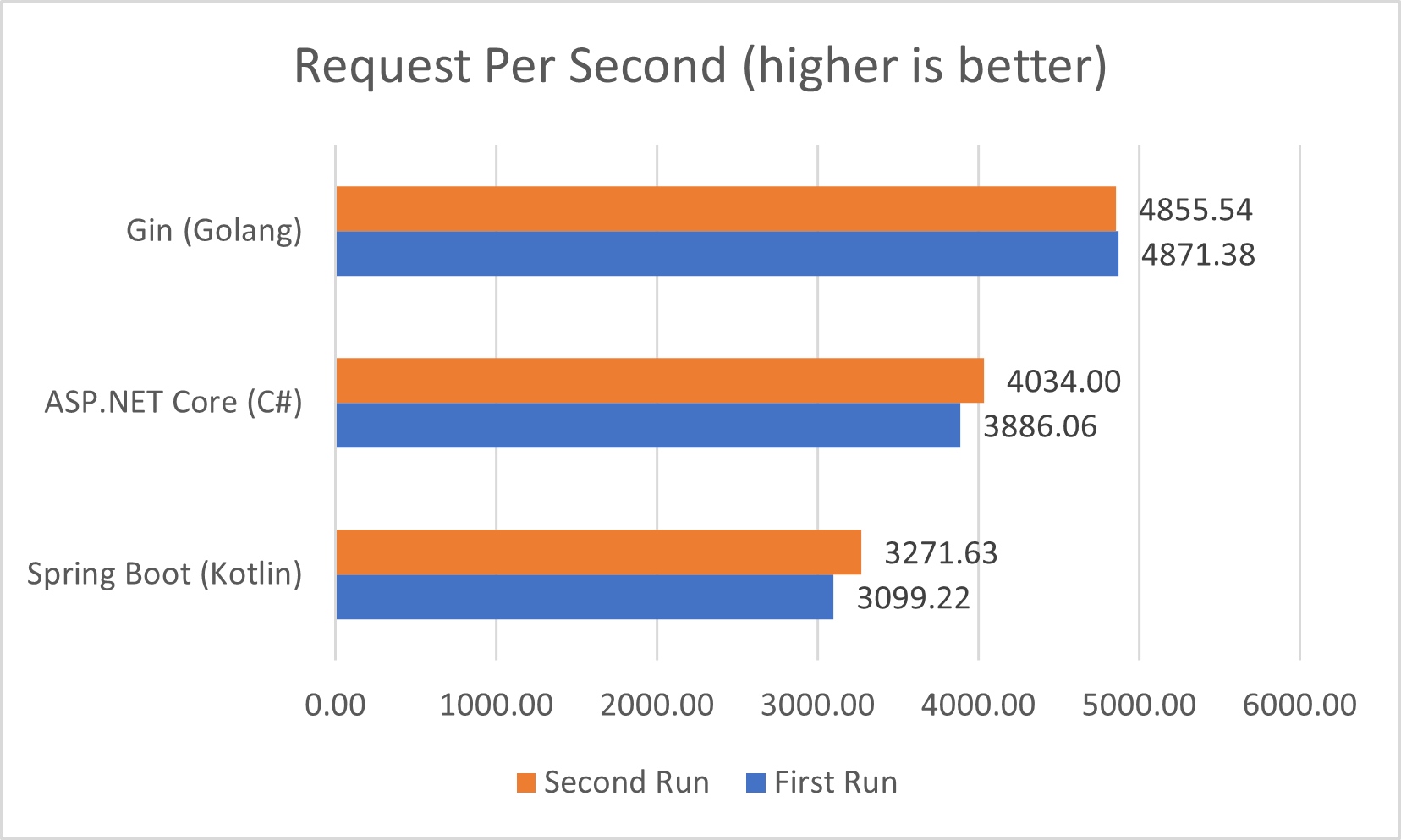
显然,Golang 是最快的,我检查了两者都执行了查询优化,确认没有 N+1 问题,所以在 qps 上 .NET Core 胜出。
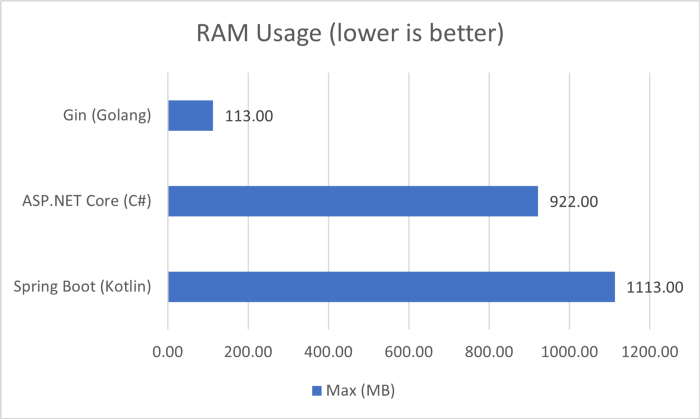
在内存使用方面,Golang 当然是最小的(只有 113 MB!),其次是 .NET Core, 最后就是超过1 GB 内存的 Spring Boot, 另外我观察到的有趣的事情是,测试完成后,Golang 和 .NET Core 的内存消耗分别减少到 10 MB 和 100 MB 左右,而 Spring Boot 保持在 1 GB 以上,直到我终止进程。
最后,Spring Boot 和 ASP.NET Core 都是非常成熟的框架,您都可以考虑使用, 希望对您有用!

巅峰对决!Spring Boot VS .NET 6的更多相关文章
- 玩转spring boot——快速开始
开发环境: IED环境:Eclipse JDK版本:1.8 maven版本:3.3.9 一.创建一个spring boot的mcv web应用程序 打开Eclipse,新建Maven项目 选择quic ...
- 【微框架】之一:从零开始,轻松搞定SpringCloud微框架系列--开山篇(spring boot 小demo)
Spring顶级框架有众多,那么接下的篇幅,我将重点讲解SpringCloud微框架的实现 Spring 顶级项目,包含众多,我们重点学习一下,SpringCloud项目以及SpringBoot项目 ...
- 玩转spring boot——开篇
很久没写博客了,而这一转眼就是7年.这段时间并不是我没学习东西,而是园友们的技术提高的非常快,这反而让我不知道该写些什么.我做程序已经有十几年之久了,可以说是彻彻底底的“程序老炮”,至于技术怎么样?我 ...
- 玩转spring boot——结合redis
一.准备工作 下载redis的windows版zip包:https://github.com/MSOpenTech/redis/releases 运行redis-server.exe程序 出现黑色窗口 ...
- 玩转spring boot——AOP与表单验证
AOP在大多数的情况下的应用场景是:日志和验证.至于AOP的理论知识我就不做赘述.而AOP的通知类型有好几种,今天的例子我只选一个有代表意义的“环绕通知”来演示. 一.AOP入门 修改“pom.xml ...
- 玩转spring boot——结合JPA入门
参考官方例子:https://spring.io/guides/gs/accessing-data-jpa/ 接着上篇内容 一.小试牛刀 创建maven项目后,修改pom.xml文件 <proj ...
- 玩转spring boot——结合JPA事务
接着上篇 一.准备工作 修改pom.xml文件 <project xmlns="http://maven.apache.org/POM/4.0.0" xmlns:xsi=&q ...
- 玩转spring boot——结合AngularJs和JDBC
参考官方例子:http://spring.io/guides/gs/relational-data-access/ 一.项目准备 在建立mysql数据库后新建表“t_order” ; -- ----- ...
- 玩转spring boot——结合jQuery和AngularJs
在上篇的基础上 准备工作: 修改pom.xml <project xmlns="http://maven.apache.org/POM/4.0.0" xmlns:xsi=&q ...
随机推荐
- Linux基础命令---mysqlshow显示数据库
mysqlshow mysqlshow是一个客户端的程序,它可以显示数据库的信息.表信息.字段信息. 此命令的适用范围:RedHat.RHEL.Ubuntu.CentOS.Fedora. 1.语法 ...
- HongYun-ui搭建记录
vue项目windows环境初始化 Element-ui使用 vue2 页面路由 vue SCSS 在VUE项目中使用SCSS ,对SCSS的理解和使用(简单明了) vue axios vue coo ...
- Nested Classes in C++
A nested class is a class which is declared in another enclosing class. A nested class is a member a ...
- 【Linux】【Shell】【Basic】函数
1. 函数:function,把一段独立功能的代码当作一个整体,并为之一个名字:命名的代码段,此即为函数: 注意:定义函数的代码段不会自动执行,在调用时执行:所谓调用函数,在代码中给定函数名即可: 函 ...
- SQL Server中修改“用户自定义表类型”问题的分析与方法
前言 SQL Server开发过程中,为了传入数据集类型的变量(比如接受C#中的DataTable类型变量),需要定义"用户自定义表类型",通过"用户自定义表类型&quo ...
- 结合redis缓存的方式,查询和展示分类信息
package cn.itcast.travel.service.impl;import cn.itcast.travel.dao.CategoryDao;import cn.itcast.trave ...
- PHP之CURL实现含有验证码的模拟登录
博主最近在为学校社团写一个模拟登录教务系统来进行成绩查询的功能,语言当然是使用PHP啦,原理是通过php数据传输神器---curl扩展,向学校教务系统发送请求,通过模拟登录,获取指定url下的内容. ...
- 从离线分析建模到稳健风控升级,为什么说顶象Dinsight实时风控引擎是对的选择?
随着金融业数字化程度进一步加深,互联网垂直电商.消费金融等领域与人们生活的深度融合,数字科技在安全风险控制上已经成为了重要的基石.如何主动防范化解风险,建立智能化的实时风险监测预警体系,加速业务模式转 ...
- 显卡不是你学习 Deep Learning 的借口
显卡不是你学习 Deep Learning 的借口 很多人在学习深度学习的时候会以自己没有 RTX N 卡的理由不动手实操,只满足于看看"娱乐"视频,听几节基础知识.当然,如果只是 ...
- Offset函数(Excel函数集团)
此处文章均为本妖原创,供下载.学习.探讨! 文章下载源是Office365国内版1Driver,如有链接问题请联系我. 请勿用于商业!谢谢 下载地址:https://officecommunity-m ...