
重新整理 .net core 周边阅读篇————AspNetCoreRateLimit 之规则[二]
前言
本文和上文息息相关。
https://www.cnblogs.com/aoximin/p/15315102.html
是紧接着上文invoke来书写的,那么现在来逐行分析invoke到底干了啥。
正文
invoke 是一个方法,那么其一般符合一个套路。
参数检查
参数转换与检查(可能有可能无)
核心处理
返回参数(包括返回void)
那么就按照这个套路来看吧。
先看1和2 步骤吧。
// check if rate limiting is enabled

if (_options == null)

{

	await _next.Invoke(context);

	return;

}

// compute identity from request

var identity = await ResolveIdentityAsync(context);

// check white list

if (_processor.IsWhitelisted(identity))

{

	await _next.Invoke(context);

	return;

}
上面检查是否配置为空,如果为空就将请求转到下一个中间件。
// compute identity from request

var identity = await ResolveIdentityAsync(context);
这个属于参数转换。
查看ResolveIdentityAsync:
public virtual async Task<ClientRequestIdentity> ResolveIdentityAsync(HttpContext httpContext)

{

	string clientIp = null;

	string clientId = null;

	if (_config.ClientResolvers?.Any() == true)

	{

		foreach (var resolver in _config.ClientResolvers)

		{

			clientId = await resolver.ResolveClientAsync(httpContext);

			if (!string.IsNullOrEmpty(clientId))

			{

				break;

			}

		}

	}

	if (_config.IpResolvers?.Any() == true)

	{

		foreach (var resolver in _config.IpResolvers)

		{

			clientIp = resolver.ResolveIp(httpContext);

			if (!string.IsNullOrEmpty(clientIp))

			{

				break;

			}

		}

	}

	return new ClientRequestIdentity

	{

		ClientIp = clientIp,

		Path = httpContext.Request.Path.ToString().ToLowerInvariant().TrimEnd('/'),

		HttpVerb = httpContext.Request.Method.ToLowerInvariant(),

		ClientId = clientId ?? "anon"

	};

}
这种一般先看返回值的,因为其在前方法中起作用的是返回值。
return new ClientRequestIdentity

{

	ClientIp = clientIp,

	Path = httpContext.Request.Path.ToString().ToLowerInvariant().TrimEnd('/'),

	HttpVerb = httpContext.Request.Method.ToLowerInvariant(),

	ClientId = clientId ?? "anon"

};
从这里面可以得知,是通过context,获取了ClientIp、Path、HttpVerb、clientId。
那么前文说过,我们只看下ip部分,那么看下这个ClientIp 是如何获取的吧。
if (_config.IpResolvers?.Any() == true)

{

	foreach (var resolver in _config.IpResolvers)

	{

		clientIp = resolver.ResolveIp(httpContext);

		if (!string.IsNullOrEmpty(clientIp))

		{

			break;

		}

	}

}
前文提及过了。这里再提及一遍。
这个_config 是IRateLimitConfiguration。
然后我们注册了配置:
services.AddSingleton<IRateLimitConfiguration, RateLimitConfiguration>();
RateLimitConfiguration 中的IpResolvers:
public IList<IIpResolveContributor> IpResolvers { get; } = new List<IIpResolveContributor>();
中间件初始化的时候:
_config.RegisterResolvers();
调用了RateLimitConfiguration的RegisterResolvers:
public virtual void RegisterResolvers()

{

	string clientIdHeader = GetClientIdHeader();

	string realIpHeader = GetRealIp();

	if (clientIdHeader != null)

	{

		ClientResolvers.Add(new ClientHeaderResolveContributor(clientIdHeader));

	}

	// the contributors are resolved in the order of their collection index

	if (realIpHeader != null)

	{

		IpResolvers.Add(new IpHeaderResolveContributor(realIpHeader));

	}

	IpResolvers.Add(new IpConnectionResolveContributor());

}
这里IpResolvers 就添加了一些ip的获取方式,这个在上文中细讲了,这里就只说其功能。
那么会到invoke中来,对于ip 限制来说,限制获取了clientip、path、methodverb。
那么invoke对clientip进行了检查,查看是是否在白名单中。
// check white list

if (_processor.IsWhitelisted(identity))

{

	await _next.Invoke(context);

	return;

}
IsWhitelisted 方法:
public virtual bool IsWhitelisted(ClientRequestIdentity requestIdentity)

{

	if (_options.ClientWhitelist != null && _options.ClientWhitelist.Contains(requestIdentity.ClientId))

	{

		return true;

	}

	if (_options.IpWhitelist != null && IpParser.ContainsIp(_options.IpWhitelist, requestIdentity.ClientIp))

	{

		return true;

	}

	if (_options.EndpointWhitelist != null && _options.EndpointWhitelist.Any())

	{

		string path = _options.EnableRegexRuleMatching ? $".+:{requestIdentity.Path}" : $"*:{requestIdentity.Path}";

		if (_options.EndpointWhitelist.Any(x => $"{requestIdentity.HttpVerb}:{requestIdentity.Path}".IsUrlMatch(x, _options.EnableRegexRuleMatching)) ||

				_options.EndpointWhitelist.Any(x => path.IsUrlMatch(x, _options.EnableRegexRuleMatching)))

			return true;

	}

	return false;

}
关注一下这个:
if (_options.IpWhitelist != null && IpParser.ContainsIp(_options.IpWhitelist, requestIdentity.ClientIp))
这里是返回是否在白名单的,如果有兴趣可以看下ContainsIp,里面关于了ip6的处理,虽然现在ip6用的不多,但是可以看看,万一真的有用户用ip6呢。
接下来就看下核心处理逻辑:
var rules = await _processor.GetMatchingRulesAsync(identity, context.RequestAborted);

var rulesDict = new Dictionary<RateLimitRule, RateLimitCounter>();

foreach (var rule in rules)

{

	// increment counter

	var rateLimitCounter = await _processor.ProcessRequestAsync(identity, rule, context.RequestAborted);

	if (rule.Limit > 0)

	{

		// check if key expired

		if (rateLimitCounter.Timestamp + rule.PeriodTimespan.Value < DateTime.UtcNow)

		{

			continue;

		}

		// check if limit is reached

		if (rateLimitCounter.Count > rule.Limit)

		{

			//compute retry after value

			var retryAfter = rateLimitCounter.Timestamp.RetryAfterFrom(rule);

			// log blocked request

			LogBlockedRequest(context, identity, rateLimitCounter, rule);

			if (_options.RequestBlockedBehaviorAsync != null)

			{

				await _options.RequestBlockedBehaviorAsync(context, identity, rateLimitCounter, rule);

			}

			if (!rule.MonitorMode)

			{

				// break execution

				await ReturnQuotaExceededResponse(context, rule, retryAfter);

				return;

			}

		}

	}

	// if limit is zero or less, block the request.

	else

	{

		// log blocked request

		LogBlockedRequest(context, identity, rateLimitCounter, rule);

		if (_options.RequestBlockedBehaviorAsync != null)

		{

			await _options.RequestBlockedBehaviorAsync(context, identity, rateLimitCounter, rule);

		}

		if (!rule.MonitorMode)

		{

			// break execution (Int32 max used to represent infinity)

			await ReturnQuotaExceededResponse(context, rule, int.MaxValue.ToString(System.Globalization.CultureInfo.InvariantCulture));

			return;

		}

	}

	rulesDict.Add(rule, rateLimitCounter);

}
先看核心功能要用到的参数:
var rules = await _processor.GetMatchingRulesAsync(identity, context.RequestAborted);

var rulesDict = new Dictionary<RateLimitRule, RateLimitCounter>();
看下GetMatchingRulesAsync:
public async Task<IEnumerable<RateLimitRule>> GetMatchingRulesAsync(ClientRequestIdentity identity, CancellationToken cancellationToken = default)

{

	var policies = await _policyStore.GetAsync($"{_options.IpPolicyPrefix}", cancellationToken);

	var rules = new List<RateLimitRule>();

	if (policies?.IpRules?.Any() == true)

	{

		// search for rules with IP intervals containing client IP

		var matchPolicies = policies.IpRules.Where(r => IpParser.ContainsIp(r.Ip, identity.ClientIp));

		foreach (var item in matchPolicies)

		{

			rules.AddRange(item.Rules);

		}

	}

	return GetMatchingRules(identity, rules);

}
这个是先获取该ip是否是我们特殊ip处理的规则,然后通过GetMatchingRules 判断其是否符合规则。
GetMatchingRules 应该就是处理核心了。
protected virtual List<RateLimitRule> GetMatchingRules(ClientRequestIdentity identity, List<RateLimitRule> rules = null)

{

	var limits = new List<RateLimitRule>();

	if (rules?.Any() == true)

	{

		if (_options.EnableEndpointRateLimiting)

		{

			// search for rules with endpoints like "*" and "*:/matching_path"

			string path = _options.EnableRegexRuleMatching ? $".+:{identity.Path}" : $"*:{identity.Path}";

			var pathLimits = rules.Where(r => path.IsUrlMatch(r.Endpoint, _options.EnableRegexRuleMatching));

			limits.AddRange(pathLimits);

			// search for rules with endpoints like "matching_verb:/matching_path"

			var verbLimits = rules.Where(r => $"{identity.HttpVerb}:{identity.Path}".IsUrlMatch(r.Endpoint, _options.EnableRegexRuleMatching));

			limits.AddRange(verbLimits);

		}

		else

		{

			// ignore endpoint rules and search for global rules only

			var genericLimits = rules.Where(r => r.Endpoint == "*");

			limits.AddRange(genericLimits);

		}

		// get the most restrictive limit for each period

		limits = limits.GroupBy(l => l.Period).Select(l => l.OrderBy(x => x.Limit)).Select(l => l.First()).ToList();

	}

	// search for matching general rules

	if (_options.GeneralRules != null)

	{

		var matchingGeneralLimits = new List<RateLimitRule>();

		if (_options.EnableEndpointRateLimiting)

		{

			// search for rules with endpoints like "*" and "*:/matching_path" in general rules

			var pathLimits = _options.GeneralRules.Where(r => $"*:{identity.Path}".IsUrlMatch(r.Endpoint, _options.EnableRegexRuleMatching));

			matchingGeneralLimits.AddRange(pathLimits);

			// search for rules with endpoints like "matching_verb:/matching_path" in general rules

			var verbLimits = _options.GeneralRules.Where(r => $"{identity.HttpVerb}:{identity.Path}".IsUrlMatch(r.Endpoint, _options.EnableRegexRuleMatching));

			matchingGeneralLimits.AddRange(verbLimits);

		}

		else

		{

			//ignore endpoint rules and search for global rules in general rules

			var genericLimits = _options.GeneralRules.Where(r => r.Endpoint == "*");

			matchingGeneralLimits.AddRange(genericLimits);

		}

		// get the most restrictive general limit for each period

		var generalLimits = matchingGeneralLimits

			.GroupBy(l => l.Period)

			.Select(l => l.OrderBy(x => x.Limit).ThenBy(x => x.Endpoint))

			.Select(l => l.First())

			.ToList();

		foreach (var generalLimit in generalLimits)

		{

			// add general rule if no specific rule is declared for the specified period

			if (!limits.Exists(l => l.Period == generalLimit.Period))

			{

				limits.Add(generalLimit);

			}

		}

	}

	foreach (var item in limits)

	{

		if (!item.PeriodTimespan.HasValue)

		{

			// parse period text into time spans

			item.PeriodTimespan = item.Period.ToTimeSpan();

		}

	}

	limits = limits.OrderBy(l => l.PeriodTimespan).ToList();

	if (_options.StackBlockedRequests)

	{

		limits.Reverse();

	}

	return limits;

}
这样看起来代码挺多的,但是这种也说明水不水特别深,为什么这么说呢?因为这里面基本没有调用其他的方法,都是写基础逻辑处理。
因为有很多if,那么就通过if来分段看。
var limits = new List<RateLimitRule>();

if (rules?.Any() == true)

{

	if (_options.EnableEndpointRateLimiting)

	{

		// search for rules with endpoints like "*" and "*:/matching_path"

		string path = _options.EnableRegexRuleMatching ? $".+:{identity.Path}" : $"*:{identity.Path}";

		var pathLimits = rules.Where(r => path.IsUrlMatch(r.Endpoint, _options.EnableRegexRuleMatching));

		limits.AddRange(pathLimits);

		// search for rules with endpoints like "matching_verb:/matching_path"

		var verbLimits = rules.Where(r => $"{identity.HttpVerb}:{identity.Path}".IsUrlMatch(r.Endpoint, _options.EnableRegexRuleMatching));

		limits.AddRange(verbLimits);

	}

	else

	{

		// ignore endpoint rules and search for global rules only

		var genericLimits = rules.Where(r => r.Endpoint == "*");

		limits.AddRange(genericLimits);

	}

	// get the most restrictive limit for each period

	limits = limits.GroupBy(l => l.Period).Select(l => l.OrderBy(x => x.Limit)).Select(l => l.First()).ToList();

}
这个一段是对我们特殊ip规则的处理,然后发现里面的逻辑其实是围绕着_options.EnableEndpointRateLimiting展开的。
那么从文档中EnableEndpointRateLimiting是什么呢?
If EnableEndpointRateLimiting is set to false then the limits will apply globally and only the rules that have as endpoint * will apply. For example, if you set a limit of 5 calls per second, any HTTP call to any endpoint will count towards that limit.

If EnableEndpointRateLimiting is set to true, then the limits will apply for each endpoint as in {HTTP_Verb}{PATH}. For example if you set a limit of 5 calls per second for *:/api/values a client can call GET /api/values 5 times per second but also 5 times PUT /api/values.
这上面是说如果EnableEndpointRateLimiting 是false 的话,那么限制只用于端点为"*"的情况。举了一个例子:如果你设置了每秒访问5次,那么你访问任何端点都会被计数。
如果EnableEndpointRateLimiting设置为true,那么限制将适用于每个端点,如{HTTP_Verb}{PATH}。例如,如果你为*:/api/值设置了每秒5次调用的限制,客户端可以每秒5次调用GET /api/值,也可以5次调用PUT /api/值。
说白了就是是否可以设置访问特殊Endpoint的访问限制。
有了上面的文档解释,那么看着代码只要按照这思路去看就行。
接下来看下一个if:
// search for matching general rules

if (_options.GeneralRules != null)

{

	var matchingGeneralLimits = new List<RateLimitRule>();

	if (_options.EnableEndpointRateLimiting)

	{

		// search for rules with endpoints like "*" and "*:/matching_path" in general rules

		var pathLimits = _options.GeneralRules.Where(r => $"*:{identity.Path}".IsUrlMatch(r.Endpoint, _options.EnableRegexRuleMatching));

		matchingGeneralLimits.AddRange(pathLimits);

		// search for rules with endpoints like "matching_verb:/matching_path" in general rules

		var verbLimits = _options.GeneralRules.Where(r => $"{identity.HttpVerb}:{identity.Path}".IsUrlMatch(r.Endpoint, _options.EnableRegexRuleMatching));

		matchingGeneralLimits.AddRange(verbLimits);

	}

	else

	{

		//ignore endpoint rules and search for global rules in general rules

		var genericLimits = _options.GeneralRules.Where(r => r.Endpoint == "*");

		matchingGeneralLimits.AddRange(genericLimits);

	}

	// get the most restrictive general limit for each period

	var generalLimits = matchingGeneralLimits

		.GroupBy(l => l.Period)

		.Select(l => l.OrderBy(x => x.Limit).ThenBy(x => x.Endpoint))

		.Select(l => l.First())

		.ToList();

	foreach (var generalLimit in generalLimits)

	{

		// add general rule if no specific rule is declared for the specified period

		if (!limits.Exists(l => l.Period == generalLimit.Period))

		{

			limits.Add(generalLimit);

		}

	}

}
同样我们应该看:_options.GeneralRules。
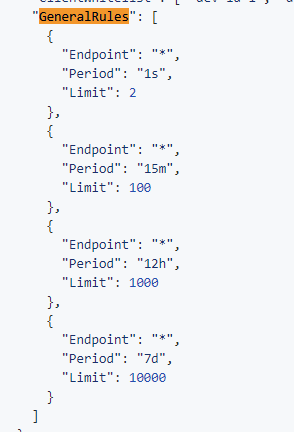
GeneralRules 就是我们限定的规则,里面同样看的是Endpoint是否匹配。
然后看最后一段:
foreach (var item in limits)

{

	if (!item.PeriodTimespan.HasValue)

	{

		// parse period text into time spans

		item.PeriodTimespan = item.Period.ToTimeSpan();

	}

}

limits = limits.OrderBy(l => l.PeriodTimespan).ToList();

if (_options.StackBlockedRequests)

{

	limits.Reverse();

}

return limits;
上面for 循环就是将我们的时间字符串转换为timespan(时间区间),然后从小到大排序一下。
接下来就看下_options.StackBlockedRequests,还是那个老套路看到配置文件查文档。
If StackBlockedRequests is set to false, rejected calls are not added to the throttle counter. If a client makes 3 requests per second and you've set a limit of one call per second, other limits like per minute or per day counters will only record the first call, the one that wasn't blocked. If you want rejected requests to count towards the other limits, you'll have to set StackBlockedRequests to true.
我直接用自己的理解说哈,如果StackBlockedRequests 设置为false,如果被拒绝的请求将不会加入到计数中。如果一个客户端每秒3次请求,你设置了每秒请求一次。那么其他的限制像每分钟和每天的计数器将只没有被拒绝的记录一次。
如果想拒绝的请求请求进行计数,那么你应该设置StackBlockedRequests 为true。
这里面就是说白了,就是拒绝的请求是否进行计数。
当然在这里还没有涉及到计数,StackBlockedRequests为true是将时间区间,从大到小排序了,这将成为后面的一个关键。
这里可以进行一个大胆的猜测,StackBlockedRequests 为fale的情况下,limits 是根据PeriodTimespan 从小到大排序的,也就是说是秒 分 小时 天这样排序的。
根据正常逻辑一般是秒先达到阀值,那么可能计数逻辑就是进行for循环,然后如果到达了限制那么就进行request block,很巧妙的一种设计。
这里可能就有人问了,如果是分到达了限制,那么秒不还是进行计数了吗?
这是没有关系的,因为分里面包含了秒。这里其实解决的是这样的一个问题,比如我在1秒中内请求了60次,那么有59次是失败的,那么如果请求算60次的话,那么会达到每分钟60次的现在,那么这个用户在一分钟内无法请求,故而建议StackBlockedRequests 设置为false。
结
因为篇幅限制,下一节是关于如何计数的。
重新整理 .net core 周边阅读篇————AspNetCoreRateLimit 之规则[二]的更多相关文章
- 重新整理 .net core 周边阅读篇————AspNetCoreRateLimit[一]
前言 整理了一下.net core 一些常见的库的源码阅读,共32个库,记100余篇. 以下只是个人的源码阅读,如有错误或者思路不正确,望请指点. 正文 github 地址为: https://git ...
- 重新整理 .net core 实践篇—————仓储层的具体实现[二十七]
前言 简单整理一下仓储层. 正文 在共享层的基础建设类库中: /// <summary> /// 泛型仓储接口 /// </summary> /// <typeparam ...
- 重新整理 .net core 实践篇————配置应用[一]
前言 本来想整理到<<重新整理.net core 计1400篇>>里面去,但是后来一想,整理 .net core 实践篇 是偏于实践,故而分开. 因为是重新整理,那么就从配置开 ...
- 如何在Visual Studio 2017中使用C# 7+语法 构建NetCore应用框架之实战篇(二):BitAdminCore框架定位及架构 构建NetCore应用框架之实战篇系列 构建NetCore应用框架之实战篇(一):什么是框架,如何设计一个框架 NetCore入门篇:(十二)在IIS中部署Net Core程序
如何在Visual Studio 2017中使用C# 7+语法 前言 之前不知看过哪位前辈的博文有点印象C# 7控制台开始支持执行异步方法,然后闲来无事,搞着,搞着没搞出来,然后就写了这篇博文,不 ...
- .NET Core实战项目之CMS 第二章 入门篇-快速入门ASP.NET Core看这篇就够了
作者:依乐祝 原文链接:https://www.cnblogs.com/yilezhu/p/9985451.html 本来这篇只是想简单介绍下ASP.NET Core MVC项目的(毕竟要照顾到很多新 ...
- .NET Core CSharp初级篇 1-1
.NET Core CSharp初级篇 1-1 本节内容是对于C#基础类型的存储方式以及C#基础类型的理论介绍 基础数据类型介绍 例如以下这句话:"张三是一名程序员,今年15岁重50.3kg ...
- net core体系-web应用程序-4asp.net core2.0 项目实战(CMS)-第二章 入门篇-快速入门ASP.NET Core看这篇就够了
.NET Core实战项目之CMS 第二章 入门篇-快速入门ASP.NET Core看这篇就够了 原文链接:https://www.cnblogs.com/yilezhu/p/9985451.ht ...
- 重新整理 .net core 实践篇————依赖注入应用[二]
前言 这里介绍一下.net core的依赖注入框架,其中其代码原理在我的另一个整理<<重新整理 1400篇>>中已经写了,故而专门整理应用这一块. 以下只是个人整理,如有问题, ...
- NET Core CSharp初级篇 1-3面向对象
.NET Core CSharp初级篇 1-3 本节内容为面向对象初级教程 类 简介 面向对象是整个C#中最核心最有特色的一个模块了,它很好的诠释了程序与现实世界的联系. 面向对象的三大特征:继承.多 ...
随机推荐
- p命名空间和c命名空间
4 p命名空间和c命名空间在通过构造方法或set方法给bean注入关联项时通常是通过constructor-arg元素和property元素来定义的.在有了p命名空间和c命名空间时我们可以简单的把它们 ...
- SpringCloud商品服务调用方式之feign
简介:改造电商项目 order-service服务 调用商品服务获取商品信息 Feign: 伪RPC客户端(本质还是用http) 官方文档: https://cloud.spring.io/sprin ...
- SpringBoot中的application.properties外部注入覆盖
由想要忽略properties中的某些属性,引发的对SpringBoot中的application.properties外部注入覆盖,以及properties文件使用的思考. SpringBoot 配 ...
- 大天使之剑H5游戏超详细图文架设教程
引言 想体验传奇游戏霸服的快乐吗?想体验满级VIP的尊贵吗?想体验一刀99999的爽快吗?各种极品装备装备.翅膀.宠物通通给你,就在大天使之剑! 本文讲解大天使之剑H5游戏的架设教程,想研究H5游戏如 ...
- Python3-sqlalchemy-orm 分组统计
#-*-coding:utf-8-*- #__author__ = "logan.xu" import sqlalchemy from sqlalchemy import crea ...
- Python - 面向对象编程 - 子类方法的重写
继承的详解 https://www.cnblogs.com/poloyy/p/15216652.html 方法的重写 在子类继承父类时,子类会拥有父类的所有属性和方法 但当父类的方法实现不满足子类需要 ...
- 你的 JVM 基础“大厦”稳健吗?
[从 1 开始学 JVM 系列] JVM 对于每位 Java 语言编程者来说无疑是"重中之重",尽管我们每天都在与它打交道,却很少来审视它.了解它,慢慢地,它成为了我们" ...
- cmd中输出换行和转义字符
cmd 中输出换行和转义字符 今天想写一个安装 Windows 任务的 bat 脚本,在命令行界面输出换行和转义一些字符,居然搜索了好久才搜到正确操作,因此记录一下. 在命令行界面输出换行 echo. ...
- scrum项目冲刺_day07总结
摘要:今日完成任务. 1.短信服务正在进行 2.路线规划正在进行 总任务: 一.appUI页面(已完成) 二.首页功能: 1.图像识别功能(已完成) 2.语音识别功能(已完成) 3.垃圾搜索功能 4. ...
- uni-app开发基本知识点
uni-app: 开始:必须要有一个根view结点. 外部文件引用方式的变化: js要require进来,变成了对象. <script> var util = require('../.. ...