
重新整理 .net core 实践篇————配置应用[一]
前言
本来想整理到<<重新整理.net core 计1400篇>>里面去,但是后来一想,整理 .net core 实践篇 是偏于实践,故而分开。
因为是重新整理,那么就从配置开始整理。以下只是个人理解,如有错误,望请指点谢谢。
正文
在我们创建好一个应用的时候,那么出现在我们视野的是一个这样的东西:
public class Program

{

	public static void Main(string[] args)

	{

		CreateHostBuilder(args).Build().Run();

	}

	public static IHostBuilder CreateHostBuilder(string[] args) =>

		Host.CreateDefaultBuilder(args)

			.ConfigureWebHostDefaults(webBuilder =>

			{

				webBuilder.UseStartup<Startup>();

			});

}
看到这种:
CreateHostBuilder(args).Build().Run();
显然是建设者模式。
那么前面的基本就是在做一个构建。
既然是一个建设者模式,那么就来看一下这个的构建器是什么?
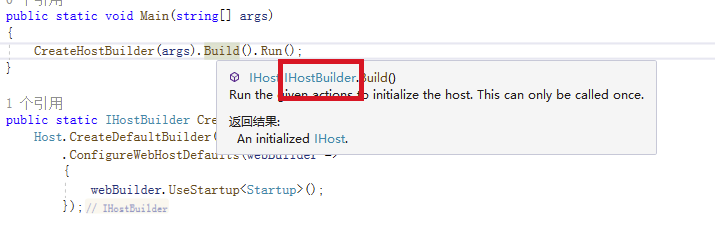
是一个叫做IHOSTBUILDER 的东西哈,而显然从命名上看这是一个接口哈。那么看下这个接口是啥:

跟配置相关得到也就是那几个Configure开头的那4个东西。
后面两个UseServiceProviderFactory后面系列再说。
//

// 摘要:

//     Sets up the configuration for the remainder of the build process and application.

//     This can be called multiple times and the results will be additive. The results

//     will be available at Microsoft.Extensions.Hosting.HostBuilderContext.Configuration

//     for subsequent operations, as well as in Microsoft.Extensions.Hosting.IHost.Services.

//

// 参数:

//   configureDelegate:

//     The delegate for configuring the Microsoft.Extensions.Configuration.IConfigurationBuilder

//     that will be used to construct the Microsoft.Extensions.Configuration.IConfiguration

//     for the application.

//

// 返回结果:

//     The same instance of the Microsoft.Extensions.Hosting.IHostBuilder for chaining.

IHostBuilder ConfigureAppConfiguration(Action<HostBuilderContext, IConfigurationBuilder> configureDelegate);
这个函数的大致意思是说构件一个IConfigurationBuilder,这个the remainder of the build process and application.的配置。
// 摘要:

//     Enables configuring the instantiated dependency container. This can be called

//     multiple times and the results will be additive.

//

// 参数:

//   configureDelegate:

//     The delegate which configures the builder.

//

// 类型参数:

//   TContainerBuilder:

//     The type of builder.

//

// 返回结果:

//     The same instance of the Microsoft.Extensions.Hosting.IHostBuilder for chaining.

IHostBuilder ConfigureContainer<TContainerBuilder>(Action<HostBuilderContext, TContainerBuilder> configureDelegate);
依赖容器相关的哈。
ConfigureHostConfiguration 和 ConfigureServices 这两个就不贴了,分别是一些坏境配置和服务配置。
那么启动一下,看下他们的执行顺序是否和我们代码的书写顺序是否相同,也就是说不管我如何调换顺序他们的执行都是按照某种规则。
那么这里加上log,通过log的方式来查看执行顺序,如下:
public class Program

{

	public static void Main(string[] args)

	{

		CreateHostBuilder(args).Build().Run();

	}

	public static IHostBuilder CreateHostBuilder(string[] args) =>

		Host.CreateDefaultBuilder(args)

			.ConfigureAppConfiguration((builder) =>

			{

				Console.WriteLine("ConfigureAppConfiguration");

			}).ConfigureServices(builder =>

			{

				Console.WriteLine("ConfigureServices");

			}).ConfigureHostConfiguration(builder =>

			{

				Console.WriteLine("ConfigureHostConfiguration");

			})

			.ConfigureWebHostDefaults(webBuilder =>

			{

				Console.WriteLine("ConfigureWebHostDefaults");

				webBuilder.UseStartup<Startup>();

			});

}
startup.cs
public class Startup

{

	public IConfiguration Configuration { get; }

	public Startup(IConfiguration configuration)

	{

		Console.WriteLine("Startup");

		Configuration = configuration;

	}

	// This method gets called by the runtime. Use this method to add services to the container.

	// For more information on how to configure your application, visit https://go.microsoft.com/fwlink/?LinkID=398940

	public void ConfigureServices(IServiceCollection services)

	{

		Console.WriteLine("Startup.ConfigureServices");

		services.AddControllers();

	}

	// This method gets called by the runtime. Use this method to configure the HTTP request pipeline.

	public void Configure(IApplicationBuilder app, IWebHostEnvironment env)

	{

		Console.WriteLine("Startup.Configure");

		if (env.IsDevelopment())

		{

			app.UseDeveloperExceptionPage();

		}

		app.UseRouting();

		app.UseEndpoints(endpoints =>

		{

			endpoints.MapGet("/", async context =>

			{

				await context.Response.WriteAsync("Hello World!");

			});

		});

	}

}
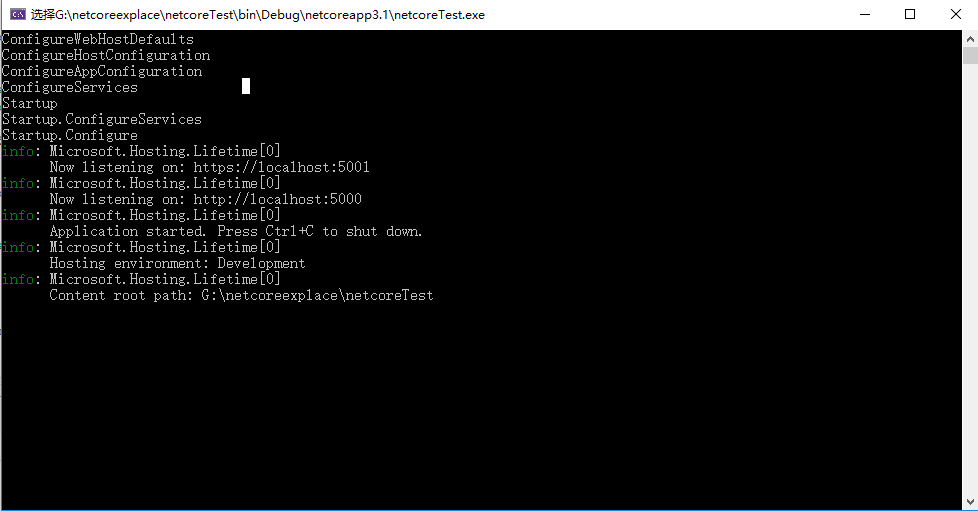
这里可以发现执行顺序和我们的代码的书写顺序并不是一致的。
那么我们再次做一个小小的调换,那么会怎么样呢?
public static IHostBuilder CreateHostBuilder(string[] args) =>

	Host.CreateDefaultBuilder(args)

		.ConfigureWebHostDefaults(webBuilder =>

		{

			Console.WriteLine("ConfigureWebHostDefaults");

			webBuilder.UseStartup<Startup>();

		})

		.ConfigureServices(builder =>

		{

			Console.WriteLine("ConfigureServices");

		})

		.ConfigureAppConfiguration((builder) =>

		{

			Console.WriteLine("ConfigureAppConfiguration");

		})

		.ConfigureHostConfiguration(builder =>

		{

			Console.WriteLine("ConfigureHostConfiguration");

		});

}

发现变化的只有Startup.ConfigureServices 和 ConfigureServices。
这个时候我们大体猜出来了这个启动顺序是按照某种执行顺序执行,且Startup.ConfigureServices 和 ConfigureServices 是同一种类型,并且他们的执行顺序和他们的注册顺序保持一致。
执行顺序如下:

先看一下CreateDefaultBuilder:
public static IHostBuilder CreateDefaultBuilder(string[] args)

{

	var builder = new HostBuilder();

	builder.UseContentRoot(Directory.GetCurrentDirectory());

	builder.ConfigureHostConfiguration(config =>

	{

		config.AddEnvironmentVariables(prefix: "DOTNET_");

		if (args != null)

		{

			config.AddCommandLine(args);

		}

	});

	builder.ConfigureAppConfiguration((hostingContext, config) =>

	{

		var env = hostingContext.HostingEnvironment;

		config.AddJsonFile("appsettings.json", optional: true, reloadOnChange: true)

			  .AddJsonFile($"appsettings.{env.EnvironmentName}.json", optional: true, reloadOnChange: true);

		if (env.IsDevelopment() && !string.IsNullOrEmpty(env.ApplicationName))

		{

			var appAssembly = Assembly.Load(new AssemblyName(env.ApplicationName));

			if (appAssembly != null)

			{

				config.AddUserSecrets(appAssembly, optional: true);

			}

		}

		config.AddEnvironmentVariables();

		if (args != null)

		{

			config.AddCommandLine(args);

		}

	})

	.ConfigureLogging((hostingContext, logging) =>

	{

		var isWindows = RuntimeInformation.IsOSPlatform(OSPlatform.Windows);

		// IMPORTANT: This needs to be added *before* configuration is loaded, this lets

		// the defaults be overridden by the configuration.

		if (isWindows)

		{

			// Default the EventLogLoggerProvider to warning or above

			logging.AddFilter<EventLogLoggerProvider>(level => level >= LogLevel.Warning);

		}

		logging.AddConfiguration(hostingContext.Configuration.GetSection("Logging"));

		logging.AddConsole();

		logging.AddDebug();

		logging.AddEventSourceLogger();

		if (isWindows)

		{

			// Add the EventLogLoggerProvider on windows machines

			logging.AddEventLog();

		}

	})

	.UseDefaultServiceProvider((context, options) =>

	{

		var isDevelopment = context.HostingEnvironment.IsDevelopment();

		options.ValidateScopes = isDevelopment;

		options.ValidateOnBuild = isDevelopment;

	});

	return builder;

}
那么先看下ConfigureWebDefaults 到底干了什么。
internal static void ConfigureWebDefaults(IWebHostBuilder builder)

{

	builder.ConfigureAppConfiguration((ctx, cb) =>

	{

		if (ctx.HostingEnvironment.IsDevelopment())

		{

			StaticWebAssetsLoader.UseStaticWebAssets(ctx.HostingEnvironment, ctx.Configuration);

		}

	});

	builder.UseKestrel((builderContext, options) =>

	{

		options.Configure(builderContext.Configuration.GetSection("Kestrel"));

	})

	.ConfigureServices((hostingContext, services) =>

	{

		// Fallback

		services.PostConfigure<HostFilteringOptions>(options =>

		{

			if (options.AllowedHosts == null || options.AllowedHosts.Count == 0)

			{

				// "AllowedHosts": "localhost;127.0.0.1;[::1]"

				var hosts = hostingContext.Configuration["AllowedHosts"]?.Split(new[] { ';' }, StringSplitOptions.RemoveEmptyEntries);

				// Fall back to "*" to disable.

				options.AllowedHosts = (hosts?.Length > 0 ? hosts : new[] { "*" });

			}

		});

		// Change notification

		services.AddSingleton<IOptionsChangeTokenSource<HostFilteringOptions>>(

					new ConfigurationChangeTokenSource<HostFilteringOptions>(hostingContext.Configuration));

		services.AddTransient<IStartupFilter, HostFilteringStartupFilter>();

		if (string.Equals("true", hostingContext.Configuration["ForwardedHeaders_Enabled"], StringComparison.OrdinalIgnoreCase))

		{

			services.Configure<ForwardedHeadersOptions>(options =>

			{

				options.ForwardedHeaders = ForwardedHeaders.XForwardedFor | ForwardedHeaders.XForwardedProto;

				// Only loopback proxies are allowed by default. Clear that restriction because forwarders are

				// being enabled by explicit configuration.

				options.KnownNetworks.Clear();

				options.KnownProxies.Clear();

			});

			services.AddTransient<IStartupFilter, ForwardedHeadersStartupFilter>();

		}

		services.AddRouting();

	})

	.UseIIS()

	.UseIISIntegration();

}
ConfigureWebDefaults 配置了一些必要的组件。
CreateDefaultBuilder 和 ConfigureWebDefaults 两者可以看到其实就是做一些默认配置让我们的服务能够启动起来。
而后续的配置也就是注册的顺序执行,只是我们的执行顺序晚点罢了。
那么再整理一下,也就是说从原理的执行顺序来说是这样的。
ConfigureHostConfiguration

ConfigureAppConfiguration

ConfigureServices

ConfigureLogging

Configure
以上都是推论。那么直接看源码,因为是构建者模式,所以直接看build。
public IHost Build()

{

	if (_hostBuilt)

	{

		throw new InvalidOperationException("Build can only be called once.");

	}

	_hostBuilt = true;

	BuildHostConfiguration();

	CreateHostingEnvironment();

	CreateHostBuilderContext();

	BuildAppConfiguration();

	CreateServiceProvider();

	return _appServices.GetRequiredService<IHost>();

}
上面的顺序和猜想是一致的。
这里看下BuildHostConfiguration:
private List<Action<IConfigurationBuilder>> _configureHostConfigActions = new List<Action<IConfigurationBuilder>>();

private void BuildHostConfiguration()

{

	var configBuilder = new ConfigurationBuilder()

		.AddInMemoryCollection(); // Make sure there's some default storage since there are no default providers

	foreach (var buildAction in _configureHostConfigActions)

	{

		buildAction(configBuilder);

	}

	_hostConfiguration = configBuilder.Build();

}
那么其实我们按照这种配置,那么其实我们的ConfigureHostConfiguration全部方法都是在_configureHostConfigActions 中,到了builder 的时候就按照我们的注册顺序执行。
那么这里就能解释ConfigureWebHostDefaults 不管顺序都是在最前面,而里面startup的顺序确不一样。
代码解释一波:
public static IHostBuilder ConfigureWebHostDefaults(this IHostBuilder builder, Action<IWebHostBuilder> configure)

{

	return builder.ConfigureWebHost(webHostBuilder =>

	{

		WebHost.ConfigureWebDefaults(webHostBuilder);

		configure(webHostBuilder);

	});

}
ConfigureWebHostDefaults 立即执行,那么log自然就先打印出来了,而其他几个都是延迟执行的。他们的执行顺序和注册顺序有关。
最后再解释一下,webBuilder.UseStartup(); 到底做了什么?
public static IWebHostBuilder UseStartup(this IWebHostBuilder hostBuilder, Type startupType)

{

	var startupAssemblyName = startupType.GetTypeInfo().Assembly.GetName().Name;

	hostBuilder.UseSetting(WebHostDefaults.ApplicationKey, startupAssemblyName);

	// Light up the GenericWebHostBuilder implementation

	if (hostBuilder is ISupportsStartup supportsStartup)

	{

		return supportsStartup.UseStartup(startupType);

	}

	return hostBuilder

		.ConfigureServices(services =>

		{

			if (typeof(IStartup).GetTypeInfo().IsAssignableFrom(startupType.GetTypeInfo()))

			{

				services.AddSingleton(typeof(IStartup), startupType);

			}

			else

			{

				services.AddSingleton(typeof(IStartup), sp =>

				{

					var hostingEnvironment = sp.GetRequiredService<IHostEnvironment>();

					return new ConventionBasedStartup(StartupLoader.LoadMethods(sp, startupType, hostingEnvironment.EnvironmentName));

				});

			}

		});

}
解释一下IsAssignableFrom:
bool res = {TypeA}.IsAssignableFrom({TypeB}) ;

如果TypeA和TypeB类型一样则返回true;

如果TypeA是TypeB的父类则返回true;

如果TypeB实现了接口TypeA则返回true;
可以看到这里做的是一个IStartup 到 Startup的一个依赖注入,且是单例模式,所以肯定的是Startup 里面的方法会在ConfigureHostConfiguration、ConfigureAppConfiguration之后执行,因为其在ConfigureServices 才开始注入依赖的。
结
因为是应用篇,单纯是一些应用需要知道的,所以比较粗糙,具体的详细在原理篇介绍了。上述只是个人的理解,如果错误,望请指点,谢谢。
重新整理 .net core 实践篇————配置应用[一]的更多相关文章
- 重新整理 .net core 实践篇————配置系统之盟约[五]
前言 在asp .net core 中我们会看到一个appsettings.json 文件,它就是我们在服务中的各种配置,是至关重要的一部门. 不管是官方自带的服务,还是我们自己编写的服务都是用它来实 ...
- 重新整理 .net core 实践篇—————配置系统之军令状[七](配置文件)
前言 介绍一下配置系统中的配置文件,很多服务的配置都写在配置文件中,也是配置系统的大头. 正文 在asp .net core 提供了下面几种配置文件格式的读取方式. Microsoft.extensi ...
- 重新整理 .net core 实践篇—————配置系统之间谍[八](文件监控)
前言 前文提及到了当我们的配置文件修改了,那么从 configurationRoot 在此读取会读取到新的数据,本文进行扩展,并从源码方面简单介绍一下,下面内容和前面几节息息相关. 正文 先看一下,如 ...
- 重新整理 .net core 实践篇—————配置系统之强类型配置[十]
前言 前文中我们去获取value值的时候,都是通过configurationRoot 来获取的,如configurationRoot["key"],这种形式. 这种形式有一个不好的 ...
- 重新整理 .net core 实践篇————配置系统——军令(命令行)[六]
前言 前文已经基本写了一下配置文件系统的一些基本原理.本文介绍一下命令行导入配置系统. 正文 要使用的话,引入Microsoft.extensions.Configuration.commandLin ...
- 重新整理 .net core 实践篇—————配置系统之简单配置中心[十一]
前言 市面上已经有很多配置中心集成工具了,故此不会去实践某个框架. 下面链接是apollo 官网的教程,实在太详细了,本文介绍一下扩展数据源,和简单翻翻阅一下apollo 关键部分. apollo 服 ...
- 重新整理 .net core 实践篇————配置中心[四十三]
前言 简单整理一下配置中心. 正文 什么时候需要配置中心? 多项目组并行协作 运维开发分工职责明确 对风险控制有更高诉求 对线上配置热更新有诉求 其实上面都是套话,如果觉得项目不方便的时候就需要用配置 ...
- 重新整理 .net core 实践篇—————服务与配置之间[十一二]
前言 前面基本介绍了,官方对于asp .net core 设计配置和设计服务的框架的一些思路.看下服务和配置之间是如何联系的吧. 正文 服务: public interface ISelfServic ...
- 重新整理 .net core 实践篇————依赖注入应用[二]
前言 这里介绍一下.net core的依赖注入框架,其中其代码原理在我的另一个整理<<重新整理 1400篇>>中已经写了,故而专门整理应用这一块. 以下只是个人整理,如有问题, ...
随机推荐
- 使用 dynamic 类型让 ASP.NET Core 实现 HATEOAS 结构的 RESTful API
上一篇写的是使用静态基类方法的实现步骤: http://www.cnblogs.com/cgzl/p/8726805.html 使用dynamic (ExpandoObject)的好处就是可以动态组 ...
- Redis入门到放弃系列-redis数据类型
Redis数据类型? Redis 提供一些常用的数据类型:Strings.Lists.Sets.Sorted sets.Hashes.Arrays.Bitmap.Streams Strings(字符串 ...
- Django使用数据库(配置数据库,基本的增删改查a)
第一步在setting文件中配置DATABASES设置 然后更改__init__文件 打开APP中models文件,导入并创建数据库 最后打开终端执行以下命令 python manage.py mak ...
- 一本关于HTTP的恋爱日记
1991年 8月 我叫客户端,英文名字 client. 她叫服务端,英文名字 server. 这一年,我们出生了. 是的,我们都是90后. 我爱她,可是她却远在天边. 为了和她可以互诉衷肠,我同时发明 ...
- 下拉框动态显示options遇到的问题
百度后发现,目前资源比较多的就是layui和bootstrap这两种框架了,我是用的bootstrap-select,不知道为啥使用layui的formselect,引入css和js文件后,在sele ...
- Anacoda下报错conda command not found 以及TypeError: __new__() got an unexpected keyword argument 'serialized_options'
在anacoda安装完成后,执行conda list命令,显示command not found 解决方法: 对于anaconda 2 , 输入export PATH=~/anaconda2/bin ...
- 20 行简单实现一个 unstated-next 🎅
前言 unstated-next 基于 React 心智模型(hook+context)而设计的状态管理. 在 react hook 出现之前,有基于单一数据源,使用纯函数修改状态的 redux &a ...
- CppCon 2019 | Back to Basics: RAII and The Rule of Zero
本文整理了Arthur O'Dwyer在CppCon 2019上关于RAII的演讲,演讲的slides可以在此链接进行下载. 在C++程序中,我们往往需要管理各种各样的资源.资源通常包括以下几种: A ...
- SQL Server CDC配合Kafka Connect监听数据变化
写在前面 好久没更新Blog了,从CRUD Boy转型大数据开发,拉宽了不少的知识面,从今年年初开始筹备.组建.招兵买马,到现在稳定开搞中,期间踏过无数的火坑,也许除了这篇还很写上三四篇. 进入主题, ...
- SpringBoot中的自动代码生成 - 基于Mybatis-Plus
作者:汤圆 个人博客:javalover.cc 前言 大家好啊,我是汤圆,今天给大家带来的是<SpringBoot中的自动代码生成 - 基于Mybatis-Plus>,希望对大家有帮助,谢 ...