
C# 基本控件使用练习
自己设计并编写一个 Windows 应用程序,要求用到 TextBox、GroupBox、RadioButton、CheckBox、ComboBox、ListBox 控件。
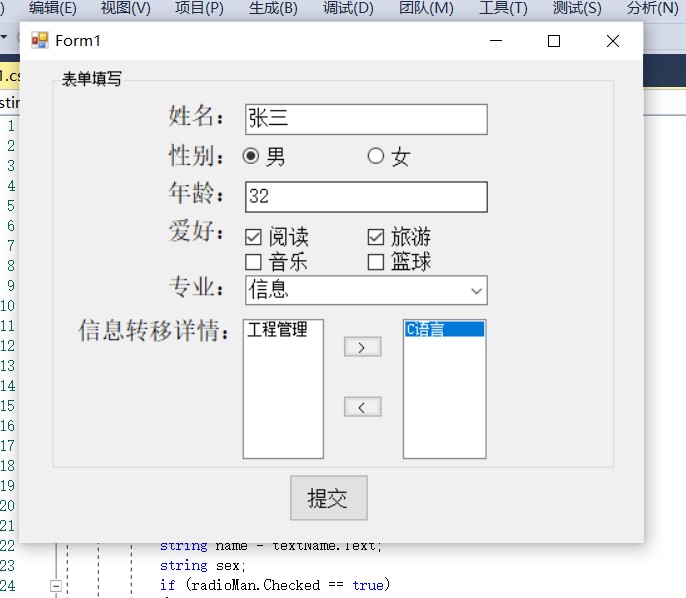

代码如下:
页面1:
using System;

using System.Collections.Generic;

using System.ComponentModel;

using System.Data;

using System.Drawing;

using System.Linq;

using System.Text;

using System.Threading.Tasks;

using System.Windows.Forms;

//页面1

namespace Testing3_2

{

    public partial class Form1 : Form

    {

        public Form1()

        {

            InitializeComponent();

        }

        private void button1_Click(object sender, EventArgs e)

        {

            string name = textName.Text;

            string sex;

            if (radioMan.Checked == true)

            {

                sex = radioMan.Text;

            }

            else

            {

                sex = radioWoman.Text;

            }

            string age = textAge.Text;

            string strclass = comboBox1.Text;

            string strhobby="";

            if (checkBox1.Checked == true)

            {

                strhobby = strhobby + checkBox1.Text+"  ";

            }

            if (checkBox2.Checked == true)

            {

                strhobby = strhobby+checkBox2.Text + "  ";

            }

            if (checkBox3.Checked == true)

            {

                strhobby = strhobby + checkBox3.Text + "  ";

            }

            if (checkBox4.Checked == true)

            {

                strhobby = strhobby + checkBox4.Text + "  ";

            }

            string text = listBox2.Text;

            Form2 frm = new Form2();//实例化form2

            Form2.frms.setLabel(name,sex,age, strclass, strhobby, text);

            this.Hide();//隐藏现在这个窗口

            frm.Show();//打开新窗体

        }

        private void groupBox1_Enter(object sender, EventArgs e)

        {

        }

        private void buttonin_Click(object sender, EventArgs e)

        {

            int i;

            for (i = 0; i < listBox1.SelectedItems.Count; i++)

            {

                string str1 = listBox1.SelectedItems[i] + "";

                if (!(listBox2.Items.Contains(str1)))

                {

                    listBox2.Items.Add(str1);

                }

                listBox1.Items.Remove(str1);

            }

        }

        private void buttonout_Click(object sender, EventArgs e)

        {

            int i;

            for (i = 0; i < listBox2.SelectedItems.Count; i++)

            {

                string str1 = listBox2.SelectedItems[i] + "";

                if (!(listBox1.Items.Contains(str1)))

                {

                    listBox1.Items.Add(str1);

                }

                listBox2.Items.Remove(str1);

            }

        }

        private void textAge_KeyPress(object sender, KeyPressEventArgs e)

        {

            if (e.KeyChar != 8 && !Char.IsDigit(e.KeyChar))

            {

                e.Handled = true;

            }

        }

    }

}
页面2:
using System;

using System.Collections.Generic;

using System.ComponentModel;

using System.Data;

using System.Drawing;

using System.Linq;

using System.Text;

using System.Threading.Tasks;

using System.Windows.Forms;

namespace Testing3_2

{

    public partial class Form2 : Form

    {

        public static Form2 frms = null;

        public Form2()

        {

            InitializeComponent();

            frms = this;

        }

        public void setLabel(string name,string sex,string age,string strclass,string strhobby,string text)

        {

            label1.Text = name;

            label2.Text = sex;

            label3.Text = age;

            label4.Text = strclass;

            label6.Text = strhobby;

            label5.Text = text;

        }

        private void button1_Click(object sender, EventArgs e)

        {

            //this.Close();

            System.Environment.Exit(0);

        }

    }

}
C# 基本控件使用练习的更多相关文章
- JS调用Android、Ios原生控件
在上一篇博客中已经和大家聊了,关于JS与Android.Ios原生控件之间相互通信的详细代码实现,今天我们一起聊一下JS调用Android.Ios通信的相同点和不同点,以便帮助我们在进行混合式开发时, ...
- HTML5 progress和meter控件
在HTML5中,新增了progress和meter控件.progress控件为进度条控件,可表示任务的进度,如Windows系统中软件的安装.文件的复制等场景的进度.meter控件为计量条控件,表示某 ...
- 百度 flash html5自切换 多文件异步上传控件webuploader基本用法
双核浏览器下在chrome内核中使用uploadify总有302问题,也不知道如何修复,之所以喜欢360浏览器是因为帮客户控制渲染内核: 若页面需默认用极速核,增加标签:<meta name=& ...
- JS与APP原生控件交互
"热更新"."热部署"相信对于混合式开发的童鞋一定不陌生,那么APP怎么避免每次升级都要在APP应用商店发布呢?这里就用到了混合式开发的概念,对于电商网站尤其显 ...
- UWP开发必备:常用数据列表控件汇总比较
今天是想通过实例将UWP开发常用的数据列表做汇总比较,作为以后项目开发参考.UWP开发必备知识点总结请参照[UWP开发必备以及常用知识点总结]. 本次主要讨论以下控件: GridView:用于显示数据 ...
- 【踩坑速记】开源日历控件,顺便全面解析开源库打包发布到Bintray/Jcenter全过程(新),让开源更简单~
一.写在前面 自使用android studio开始,就被它独特的依赖方式:compile 'com.android.support:appcompat-v7:25.0.1'所深深吸引,自从有了它,麻 ...
- 对百度WebUploader开源上传控件的二次封装,精简前端代码(两句代码搞定上传)
前言 首先声明一下,我这个是对WebUploader开源上传控件的二次封装,底层还是WebUploader实现的,只是为了更简洁的使用他而已. 下面先介绍一下WebUploader 简介: WebUp ...
- Windows API 设置窗口下控件Enable属性
参考页面: http://www.yuanjiaocheng.net/webapi/create-crud-api-1-put.html http://www.yuanjiaocheng.net/we ...
- VB.NET设置控件和窗体的显示级别
前言:在用VB.NET开发射频检测系统ADS时,当激活已存在的目标MDI子窗体时,被其他子窗体遮住了,导致目标MDI子窗体不能显示. 这个问题怎么解决呢?网上看到一篇帖子VB.NET设置控件和窗体的显 ...
- Win10 UWP开发系列——开源控件库:UWPCommunityToolkit
在开发应用的过程中,不可避免的会使用第三方类库.之前用过一个WinRTXamlToolkit.UWP,现在微软官方发布了一个新的开源控件库—— UWPCommunityToolkit 项目代码托管在G ...
随机推荐
- CF977B Two-gram 题解
Content 给定一个字符串 \(s\),请求出出现次数最多的长度为 \(2\) 的子串. 数据范围:\(2\leqslant |s|\leqslant 100\). Solution 直接求出所有 ...
- AT2686 [ARC080A] 4-adjacent 题解
Content 给定一个长度为 \(n\) 的数列 \(a\),请将其重新排列,使得 \(\forall i\in[1,n-1]\),都有 \(4\mid (a_i\cdot a_{i+1})\),或 ...
- CF1057B DDoS 题解
Content 有一个长度为 \(n\) 的数列 \(a_1,a_2,...,a_n\),求出满足 \(\sum\limits_{i=l}^r a_i>100\times(r-l+1)\) 的区 ...
- Java Record 的一些思考 - 默认方法使用以及基于预编译生成相关字节码的底层实现
快速上手 Record 类 我们先举一个简单例子,声明一个用户 Record. public record User(long id, String name, int age) {} 这样编写代码之 ...
- ligerUI问题
1.checkboxColWidth:990,Grid的复选框的宽度设置为什么不起作用. 2.当grid出现横线不对齐时,可以设置detailColWidth:90,属性进行设置.此属性好像只是针对复 ...
- 分享 NET 5.x 自定义文件日志实现 原汁原味
下面直接贴出实现代码 FileLoggerProvider /// <summary> /// 文件记录器提供商 /// </summary> public class Fil ...
- css实现hover显示下拉菜单
原理比较简单,首先先隐藏下拉菜单即display:none,当鼠标hover后,设置display:block. <style> .menu-title { postion: relati ...
- MySQL 报错:[Err] 1071 - Specified key was too long; max key length is 767 bytes
[Err] 1071 - Specified key was too long; max key length is 767 bytes 这个会出现在MySQ5.7以下版本 因为没有启用innodb_ ...
- IDEA快速创建一个简单的SpringBoot项目(需要联网)
一.点击File-New-Project,选择Spring initializr ,选择jdk1.8及以上 二.填写相关信息,点击Next 3.选择Web -Spring Web,点击Next 4.输 ...
- LeetCode Top 100 Liked 点赞最高的 100 道算法题
作者: 负雪明烛 id: fuxuemingzhu 个人博客: http://fuxuemingzhu.cn/ 公众号:负雪明烛 本文关键词:刷题顺序,刷题路径,好题,top100,怎么刷题,Leet ...