
centos7 配置国内yum源
配置清华大学镜像仓库
URL:https://mirrors.cnnic.cn/
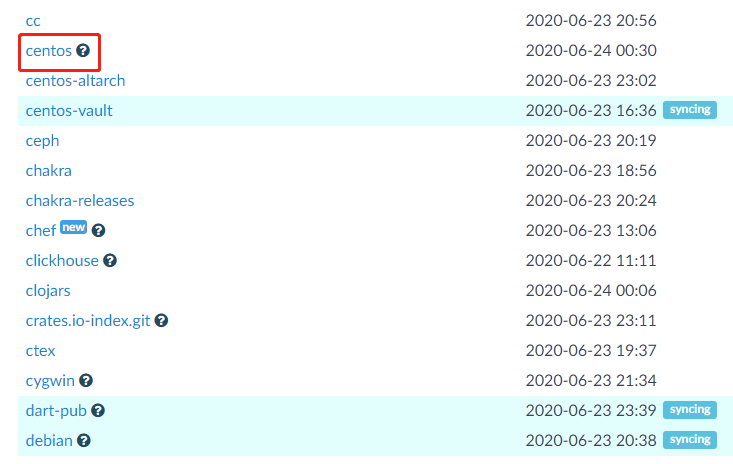
CentOS 镜像使用帮助
https://mirrors.cnnic.cn/help/centos/
建议先备份 CentOS-Base.repo
# sudo cp /etc/yum.repos.d/CentOS-Base.repo /etc/yum.repos.d/CentOS-Base.repo.bak
然后编辑 /etc/yum.repos.d/CentOS-Base.repo 文件,在 mirrorlist= 开头行前面加 # 注释掉;
并将 baseurl= 开头行取消注释(如果被注释的话),把该行内的域名(例如mirror.centos.org)替换为 mirrors.tuna.tsinghua.edu.cn。
或者,你也可以直接使用如下内容覆盖掉 /etc/yum.repos.d/CentOS-Base.repo 文件:(未经充分测试)


# CentOS-Base.repo

#

# The mirror system uses the connecting IP address of the client and the

# update status of each mirror to pick mirrors that are updated to and

# geographically close to the client.  You should use this for CentOS updates

# unless you are manually picking other mirrors.

#

# If the mirrorlist= does not work for you, as a fall back you can try the

# remarked out baseurl= line instead.

#

#

[base]

name=CentOS-$releasever - Base

baseurl=https://mirrors.tuna.tsinghua.edu.cn/centos/$releasever/os/$basearch/

#mirrorlist=http://mirrorlist.centos.org/?release=$releasever&arch=$basearch&repo=os

enabled=1

gpgcheck=1

gpgkey=file:///etc/pki/rpm-gpg/RPM-GPG-KEY-7

#released updates

[updates]

name=CentOS-$releasever - Updates

baseurl=https://mirrors.tuna.tsinghua.edu.cn/centos/$releasever/updates/$basearch/

#mirrorlist=http://mirrorlist.centos.org/?release=$releasever&arch=$basearch&repo=updates

enabled=1

gpgcheck=1

gpgkey=file:///etc/pki/rpm-gpg/RPM-GPG-KEY-7

#additional packages that may be useful

[extras]

name=CentOS-$releasever - Extras

baseurl=https://mirrors.tuna.tsinghua.edu.cn/centos/$releasever/extras/$basearch/

#mirrorlist=http://mirrorlist.centos.org/?release=$releasever&arch=$basearch&repo=extras

enabled=1

gpgcheck=1

gpgkey=file:///etc/pki/rpm-gpg/RPM-GPG-KEY-7

#additional packages that extend functionality of existing packages

[centosplus]

name=CentOS-$releasever - Plus

baseurl=https://mirrors.tuna.tsinghua.edu.cn/centos/$releasever/centosplus/$basearch/

#mirrorlist=http://mirrorlist.centos.org/?release=$releasever&arch=$basearch&repo=centosplus

gpgcheck=1

enabled=0

gpgkey=file:///etc/pki/rpm-gpg/RPM-GPG-KEY-7
Centos 7
# CentOS-Base.repo

#

# The mirror system uses the connecting IP address of the client and the

# update status of each mirror to pick mirrors that are updated to and

# geographically close to the client.  You should use this for CentOS updates

# unless you are manually picking other mirrors.

#

# If the mirrorlist= does not work for you, as a fall back you can try the

# remarked out baseurl= line instead.

#

#

[base]

name=CentOS-$releasever - Base

baseurl=https://mirrors.tuna.tsinghua.edu.cn/centos/$releasever/os/$basearch/

#mirrorlist=http://mirrorlist.centos.org/?release=$releasever&arch=$basearch&repo=os

enabled=1

gpgcheck=1

gpgkey=file:///etc/pki/rpm-gpg/RPM-GPG-KEY-6

#released updates

[updates]

name=CentOS-$releasever - Updates

baseurl=https://mirrors.tuna.tsinghua.edu.cn/centos/$releasever/updates/$basearch/

#mirrorlist=http://mirrorlist.centos.org/?release=$releasever&arch=$basearch&repo=updates

enabled=1

gpgcheck=1

gpgkey=file:///etc/pki/rpm-gpg/RPM-GPG-KEY-6

#additional packages that may be useful

[extras]

name=CentOS-$releasever - Extras

baseurl=https://mirrors.tuna.tsinghua.edu.cn/centos/$releasever/extras/$basearch/

#mirrorlist=http://mirrorlist.centos.org/?release=$releasever&arch=$basearch&repo=extras

enabled=1

gpgcheck=1

gpgkey=file:///etc/pki/rpm-gpg/RPM-GPG-KEY-6

#additional packages that extend functionality of existing packages

[centosplus]

name=CentOS-$releasever - Plus

baseurl=https://mirrors.tuna.tsinghua.edu.cn/centos/$releasever/centosplus/$basearch/

#mirrorlist=http://mirrorlist.centos.org/?release=$releasever&arch=$basearch&repo=centosplus

gpgcheck=1

enabled=0

gpgkey=file:///etc/pki/rpm-gpg/RPM-GPG-KEY-6

#contrib - packages by Centos Users

[contrib]

name=CentOS-$releasever - Contrib

baseurl=https://mirrors.tuna.tsinghua.edu.cn/centos/$releasever/contrib/$basearch/

#mirrorlist=http://mirrorlist.centos.org/?release=$releasever&arch=$basearch&repo=contrib

gpgcheck=1

enabled=0

gpgkey=file:///etc/pki/rpm-gpg/RPM-GPG-KEY-6
Centos 6
最后,更新软件包缓存
# sudo yum makecache
centos7 配置国内yum源的更多相关文章
- centos7配置国内yum源
文章目录 1.什么是yum仓库? 2.yum仓库配置 2.1.阿里镜像仓库配置 2.1.1.配置步骤 2.1.2.epel源 安装和配置 2.1.3.查看yum源 2.2.配置 清华大学镜像仓库 1. ...
- contos 配置国内yum源
contos配置国内yum源 前言 rpm管理软件包的命令,很难用,需要手动解决以来关系,所以最好用 yum 的理念是使用一个中心仓库(repository)管理一部分甚至一个distribution ...
- contos配置国内yum源
contos配置国内yum源 前言 rpm管理软件包的命令,很难用,需要手动解决以来关系,所以最好用 yum 的理念是使用一个中心仓库(repository)管理一部分甚至一个distribution ...
- CentOS7 配置163 yum源(详细步骤)
CentOS7 配置163 yum源 1)下载repo文件 wget http://mirrors.163.com/.help/CentOS7-Base-163.repo 2)备份并替换系统的r ...
- linux 配置本地yum源,配置国内yum源,配置epel源
目录 一.配置本地yum源 二.配置国内yum源和epel源 一.配置本地yum源 1.挂载ISO镜像 mount -o loop /mnt/yum-iso/CentOS-7-x86_64-DVD-1 ...
- 虚拟机centos7配置本地yum源
在虚拟机中要使用yum命令,就要先配置一下yum源,下面就分享一下这个过程: 1. 挂载iso到vmware,首先得确保CD/DVD连接到镜像.可以这样操作 2. 执行下面的命令 # mkdir /m ...
- CentOS6配置国内yum源
在安装完CentOS后为了加快安装.更新rpm包的速度.需要将yum源改为国内源,国内比较快的源有中科大.163.sohu源.下面修改为163源为例子: 首先进入源的配置目录:执行 cd /etc/y ...
- Centos配置国内yum源
网易(163)yum源是国内最好的yum源之一 ,无论是速度还是软件版本,都非常的不错,将yum源设置为163yum,可以提升软件包安装和更新的速度,同时避免一些常见软件版本无法找到.具体设置方法如下 ...
- [转]Centos配置国内yum源
原文地址:http://blog.chinaunix.net/uid-23683795-id-3477603.html 网易(163)yum源是国内最好的yum源之一 ,无论是速度还是软件版本,都非常 ...
随机推荐
- Andrew Ng机器学习算法入门(四):阶梯下降算法
梯度降级算法简介 之前如果需要求出最佳的线性回归模型,就需要求出代价函数的最小值.在上一篇文章中,求解的问题比较简单,只有一个简单的参数.梯度降级算法就可以用来求出代价函数最小值. 梯度降级算法的在维 ...
- Docker为PHP安装gd扩展
安装扩展库的通常命令 docker-php-ext-install 扩展库名 安装gd库需要特殊照顾,步骤如下 //进入PHP容器 //更新软件源 apt update //安装各种库 apt ins ...
- 【springMVC】<mvc:annotation-driven />标签的使用、作用?
不牵扯源码的显式的作用 在使用interceptor时,显式的作用. 这是不配置<mvc:annotation-driven/>标签时的public boolean preHandle(H ...
- 修改wordpress版权信息
修改页脚版权信息位置:找到C:\wamp64\www\wordpress\wp-content\themes\travelify\library\structure\footer-extensions ...
- Jenkins 基础篇 - 安装部署
Jenkins 安装 Jenkins 支持主流的 Linux 发行版系统,同时还支持 macOS.Windows.和 Docker 运行. 具体系统的 Jenkins 安装包可以去官网下载 https ...
- C++逆向分析----多重继承和菱形继承
多重继承 多重继承是指C++类同时继承两个类或两个以上的类. class Test { public: int num1; Test() { num1 = 1; } virtual void Proc ...
- SimpleDateFormat线程不安全的5种解决方案!
1.什么是线程不安全? 线程不安全也叫非线程安全,是指多线程执行中,程序的执行结果和预期的结果不符的情况就叫做线程不安全. 线程不安全的代码 SimpleDateFormat 就是一个典型的线程不 ...
- uboot1: 启动流程和移植框架
目录 0 环境 1 移植框架 3 执行流程 3.0 链接地址 3.1 start.S, 入口 3.2 __main 3.3 board_init_f()和init_sequence_f[] 3.4 r ...
- Form-OCR & CSDNAPP初体验
项目 内容 课程:北航2020春软件工程 博客园班级博客 作业:阅读并撰写博客回答问题 软件案例分析 我在这个课程的目标是 全面地评价一个软件 这个作业在哪个具体方面帮助我实现目标 明确软件开发过程中 ...
- 普里姆(Prim)算法
概览 普里姆算法(Prim算法),图论中的一种算法,可在加权连通图(即"带权图")里搜索最小生成树.即此算法搜索到的边(Edge)子集所构成的树中,不但包括了连通图里的所有顶点(V ...