
Seata分布式事务框架Sample
前言
阿里官方给出了seata-sample地址,官方自己也对Sample提供了很多类型,可以查看学习。 我这里选择演示SpringBoot+MyBatis。
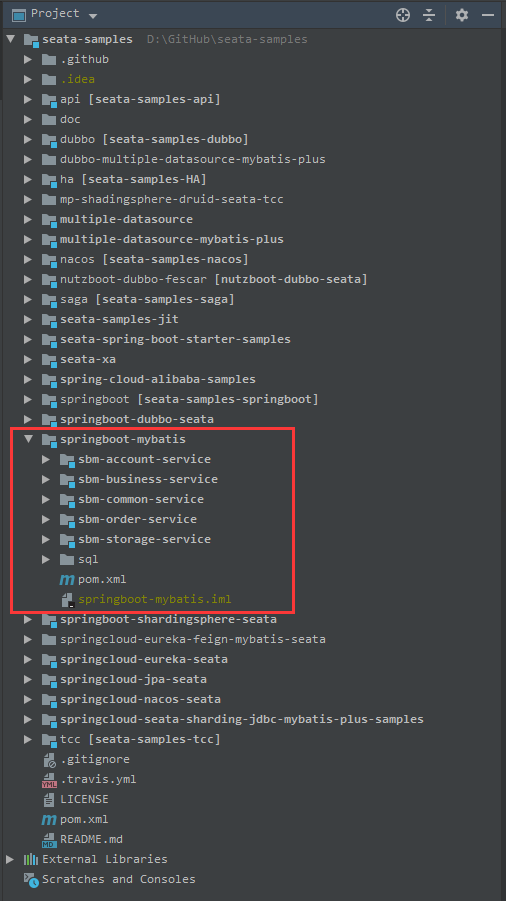
该聚合工程共包括5个module:
- sbm-account-service
- sbm-business-service
- sbm-common-service
- sbm-order-service
- sbm-storage-service
不同Module之间的服务通信使用Rest方式通信。
准备工作
创建数据库
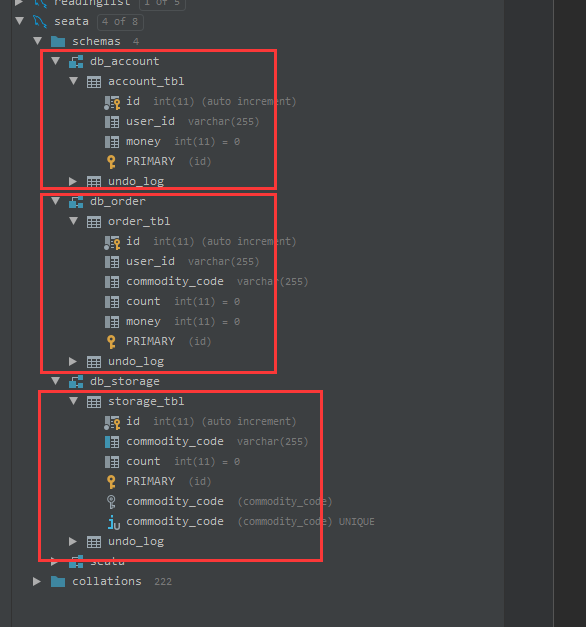
在sql/all_in_one_sql里是演示中需要的sql脚本,共创建了3个schema: db_account, db_order, db_storage, 分别演示三个不同的数据库,每个schema里都有一张undo_log表。
启动Seata-Server
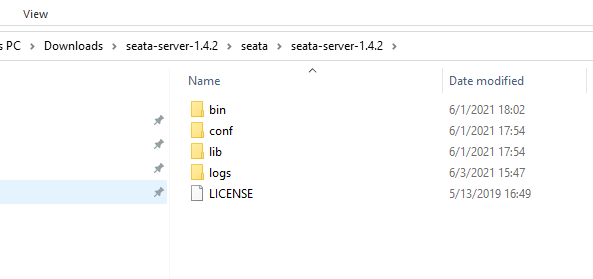
Seata-Server扮演TM的角色,在官网下载http://seata.io/zh-cn/blog/download.html,最新版本为1.4.2。
/conf/registry.conf 中有两个大的节点registry - 注册中心配置选项,config - 配置中心配置选项。
# 注册中心配置

registry {

  # file 、nacos 、eureka、redis、zk、consul、etcd3、sofa

  type = "file"

  nacos {

    application = "seata-server"

    serverAddr = "127.0.0.1:8848"

    group = "SEATA_GROUP"

    namespace = ""

    cluster = "default"

    username = ""

    password = ""

  }

  eureka {

    serviceUrl = "http://localhost:8761/eureka"

    application = "default"

    weight = "1"

  }

  redis {

    serverAddr = "localhost:6379"

    db = 0

    password = ""

    cluster = "default"

    timeout = 0

  }

  zk {

    cluster = "default"

    serverAddr = "127.0.0.1:2181"

    sessionTimeout = 6000

    connectTimeout = 2000

    username = ""

    password = ""

  }

  consul {

    cluster = "default"

    serverAddr = "127.0.0.1:8500"

    aclToken = ""

  }

  etcd3 {

    cluster = "default"

    serverAddr = "http://localhost:2379"

  }

  sofa {

    serverAddr = "127.0.0.1:9603"

    application = "default"

    region = "DEFAULT_ZONE"

    datacenter = "DefaultDataCenter"

    cluster = "default"

    group = "SEATA_GROUP"

    addressWaitTime = "3000"

  }

  file {

    name = "file.conf"

  }

}

# 配置中心配置

config {

  # file、nacos 、apollo、zk、consul、etcd3

  type = "file"

  nacos {

    serverAddr = "127.0.0.1:8848"

    namespace = ""

    group = "SEATA_GROUP"

    username = ""

    password = ""

    dataId = "seataServer.properties"

  }

  consul {

    serverAddr = "127.0.0.1:8500"

    aclToken = ""

  }

  apollo {

    appId = "seata-server"

    ## apolloConfigService will cover apolloMeta

    apolloMeta = "http://192.168.1.204:8801"

    apolloConfigService = "http://192.168.1.204:8080"

    namespace = "application"

    apolloAccesskeySecret = ""

    cluster = "seata"

  }

  zk {

    serverAddr = "127.0.0.1:2181"

    sessionTimeout = 6000

    connectTimeout = 2000

    username = ""

    password = ""

    nodePath = "/seata/seata.properties"

  }

  etcd3 {

    serverAddr = "http://localhost:2379"

  }

  file {

    name = "file.conf"

  }

}
/conf/file.conf - 只有当registry.conf下 config.type=file时才加载file.config中的参数。config.type等于其他值的话则不需要file.config。 seata-server也提供了file.conf.example, 详细的参数介绍也可以查看http://seata.io/zh-cn/docs/user/configurations.html。
## transaction log store, only used in seata-server

store {

  ## store mode: file、db、redis

  mode = "file"

  ## rsa decryption public key

  publicKey = ""

  ## file store property

  file {

    ## store location dir

    dir = "sessionStore"

    # branch session size , if exceeded first try compress lockkey, still exceeded throws exceptions

    maxBranchSessionSize = 16384

    # globe session size , if exceeded throws exceptions

    maxGlobalSessionSize = 512

    # file buffer size , if exceeded allocate new buffer

    fileWriteBufferCacheSize = 16384

    # when recover batch read size

    sessionReloadReadSize = 100

    # async, sync

    flushDiskMode = async

  }

  ## database store property

  db {

    ## the implement of javax.sql.DataSource, such as DruidDataSource(druid)/BasicDataSource(dbcp)/HikariDataSource(hikari) etc.

    datasource = "druid"

    ## mysql/oracle/postgresql/h2/oceanbase etc.

    dbType = "mysql"

    driverClassName = "com.mysql.jdbc.Driver"

    ## if using mysql to store the data, recommend add rewriteBatchedStatements=true in jdbc connection param

    url = "jdbc:mysql://127.0.0.1:3306/seata?rewriteBatchedStatements=true"

    user = "mysql"

    password = "mysql"

    minConn = 5

    maxConn = 100

    globalTable = "global_table"

    branchTable = "branch_table"

    lockTable = "lock_table"

    queryLimit = 100

    maxWait = 5000

  }

  ## redis store property

  redis {

    ## redis mode: single、sentinel

    mode = "single"

    ## single mode property

    single {

      host = "127.0.0.1"

      port = "6379"

    }

    ## sentinel mode property

    sentinel {

      masterName = ""

      ## such as "10.28.235.65:26379,10.28.235.65:26380,10.28.235.65:26381"

      sentinelHosts = ""

    }

    password = ""

    database = "0"

    minConn = 1

    maxConn = 10

    maxTotal = 100

    queryLimit = 100

  }

}
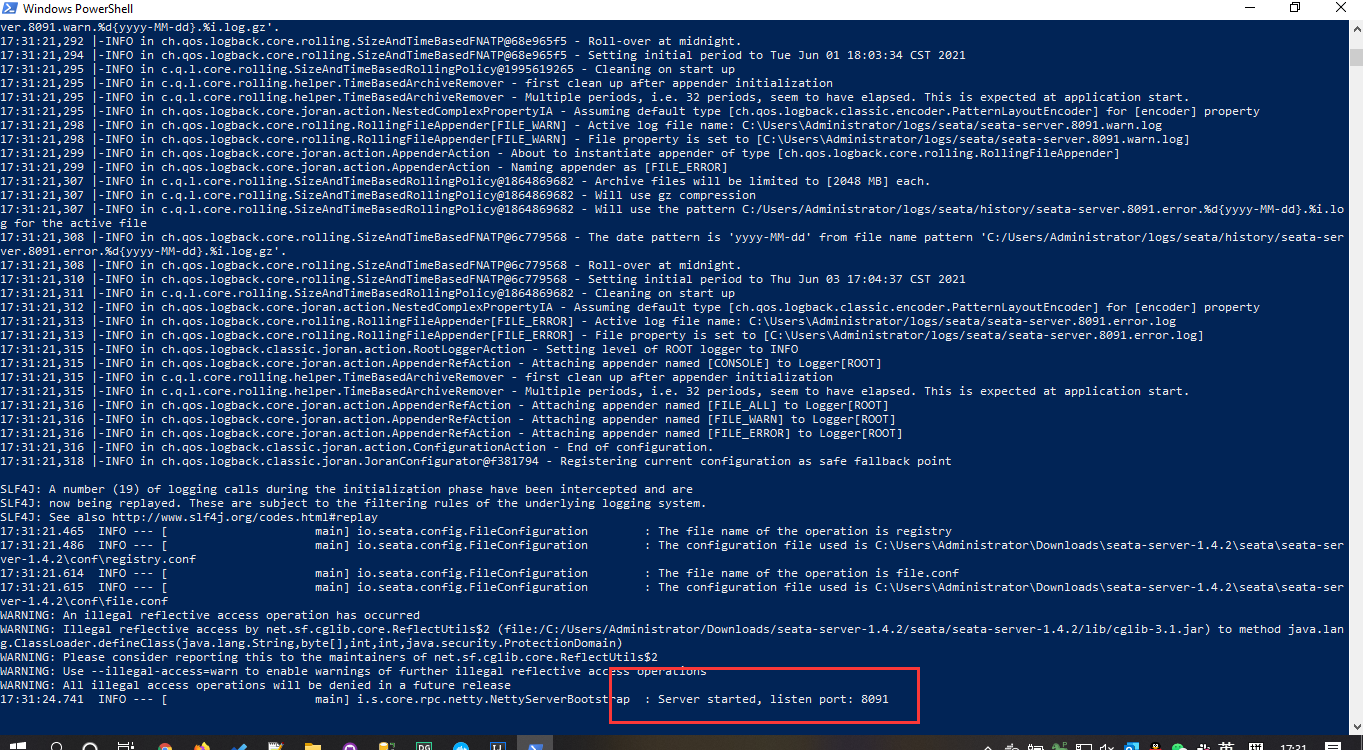
启动服务./bin/seata-server.bat ,默认打开了8091端口。
启动Sample服务
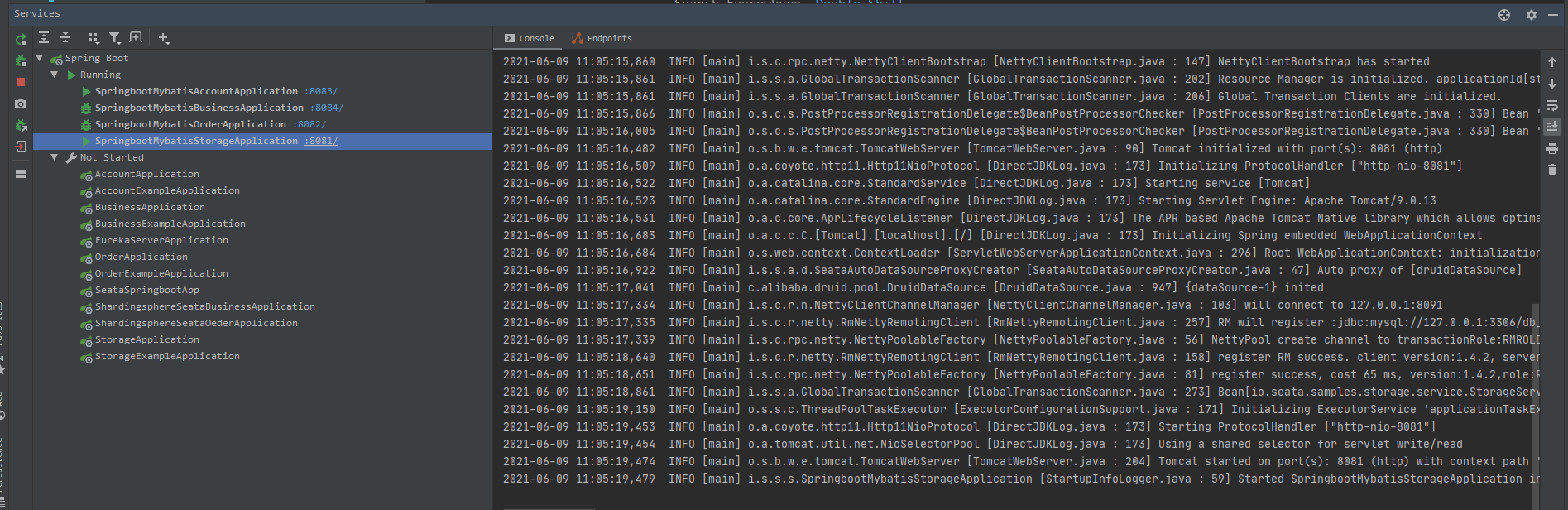
依此启动account-service,business-service,order-service,storage-service。business-service作为业务逻辑的入口分别调用order-service和storage-service。这里就看到了关键注解GlobalTransactional。
4个服务的默认端口分别是8081,8082, 8083,8084。
BusinessService
@Service

public class BusinessService {

    private static final Logger LOGGER = LoggerFactory.getLogger(BusinessService.class);

    @Autowired

    private StorageClient storageClient;

    @Autowired

    private OrderClient orderClient;

    /**

     * 减库存,下订单

     *

     * @param userId

     * @param commodityCode

     * @param orderCount

     */

    @GlobalTransactional

    public void purchase(String userId, String commodityCode, int orderCount) {

        LOGGER.info("purchase begin ... xid: " + RootContext.getXID());

        storageClient.deduct(commodityCode, orderCount);

        orderClient.create(userId, commodityCode, orderCount);

    }

}
OrderClient
@Slf4j

@Component

public class OrderClient {

    @Autowired

    private RestTemplate restTemplate;

    public void create(String userId, String commodityCode, int orderCount) {

        String url = "http://127.0.0.1:8082/api/order/debit?userId=" + userId + "&commodityCode=" + commodityCode + "&count=" + orderCount;

        try {

            restTemplate.getForEntity(url, Void.class);

        } catch (Exception e) {

            log.error("create url {} ,error:", url);

            throw new RuntimeException();

        }

    }

}
StorageClient
@Slf4j

@Component

public class StorageClient {

    @Autowired

    private RestTemplate restTemplate;

    public void deduct(String commodityCode, int orderCount) {

        System.out.println("business to storage " + RootContext.getXID());

        String url = "http://127.0.0.1:8081/api/storage/deduct?commodityCode=" + commodityCode + "&count=" + orderCount;

        try {

            restTemplate.getForEntity(url, Void.class);

        } catch (Exception e) {

            log.error("deduct url {} ,error:", url, e);

            throw new RuntimeException();

        }

    }

}
运行Sample
模拟正常事务提交
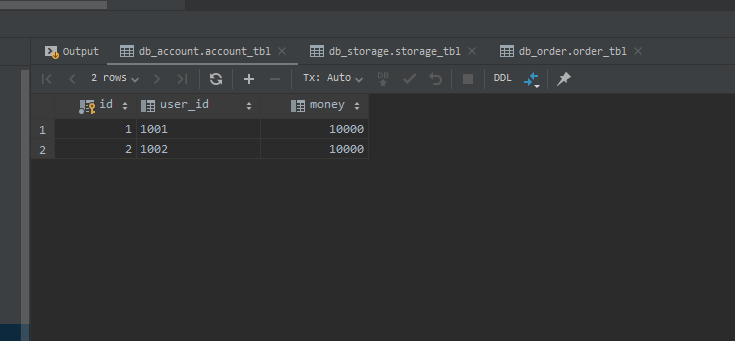
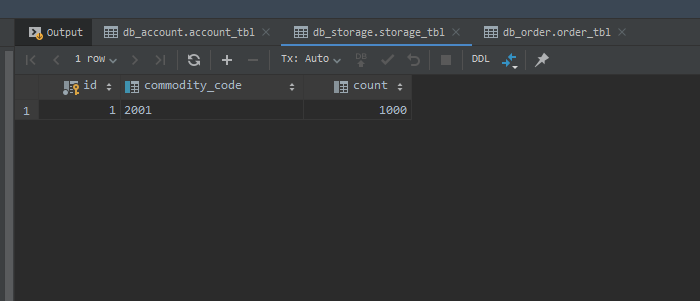
运行Sample前,我们先查看下当前三个服务数据库的数据。
db_account.account_tbl
db_storage.storage_tbl
业务接口在business-service/BusinessController里,我们先来执行下购买下单正常的提交流程。
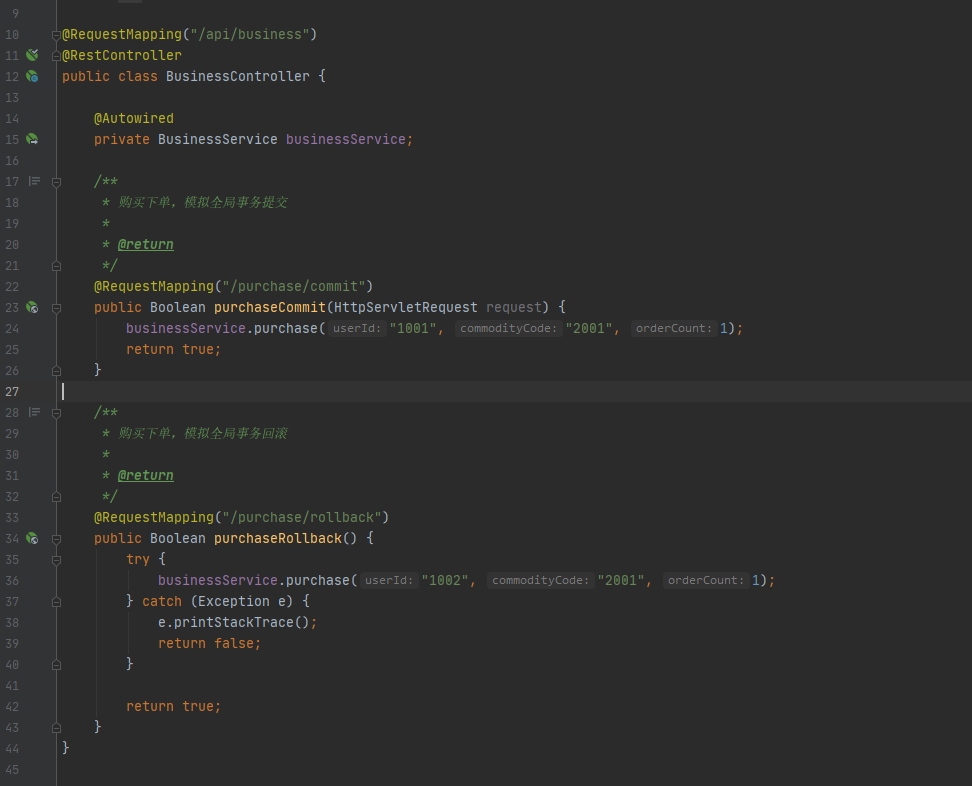
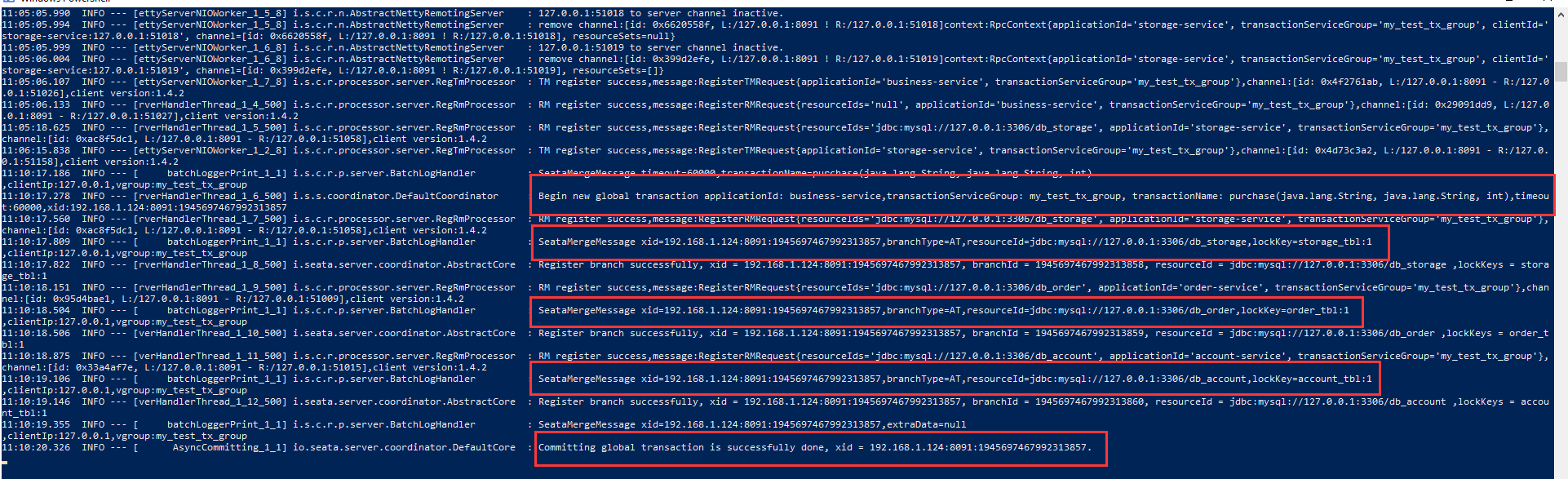
执行接口http://localhost:8094/api/business/purchase/commit/, 执行后,seata-server控制台上会显示全局事务执行的具体日志和执行成功的日志。
执行后我们再查看下数据库。
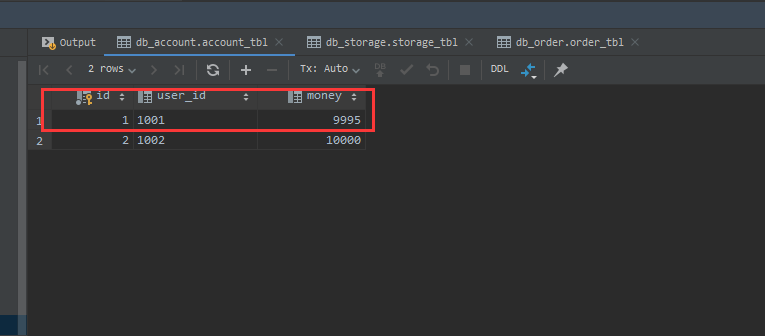
db_account.account_tbl。 user_id对应1001的账户减去了5元(9995)。
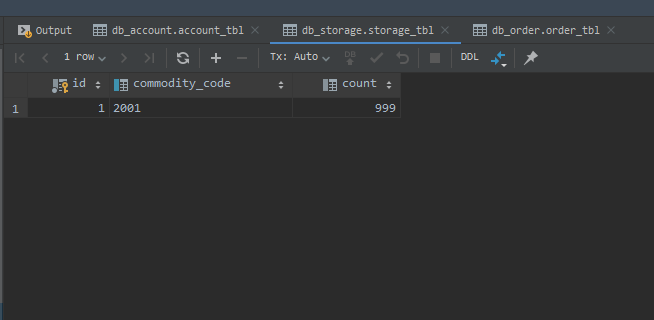
db_storage.storage_tbl
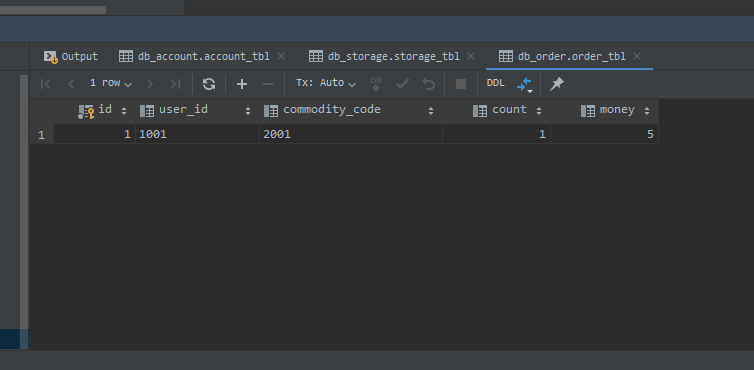
db_order.order_tbl
模拟全局事务回滚
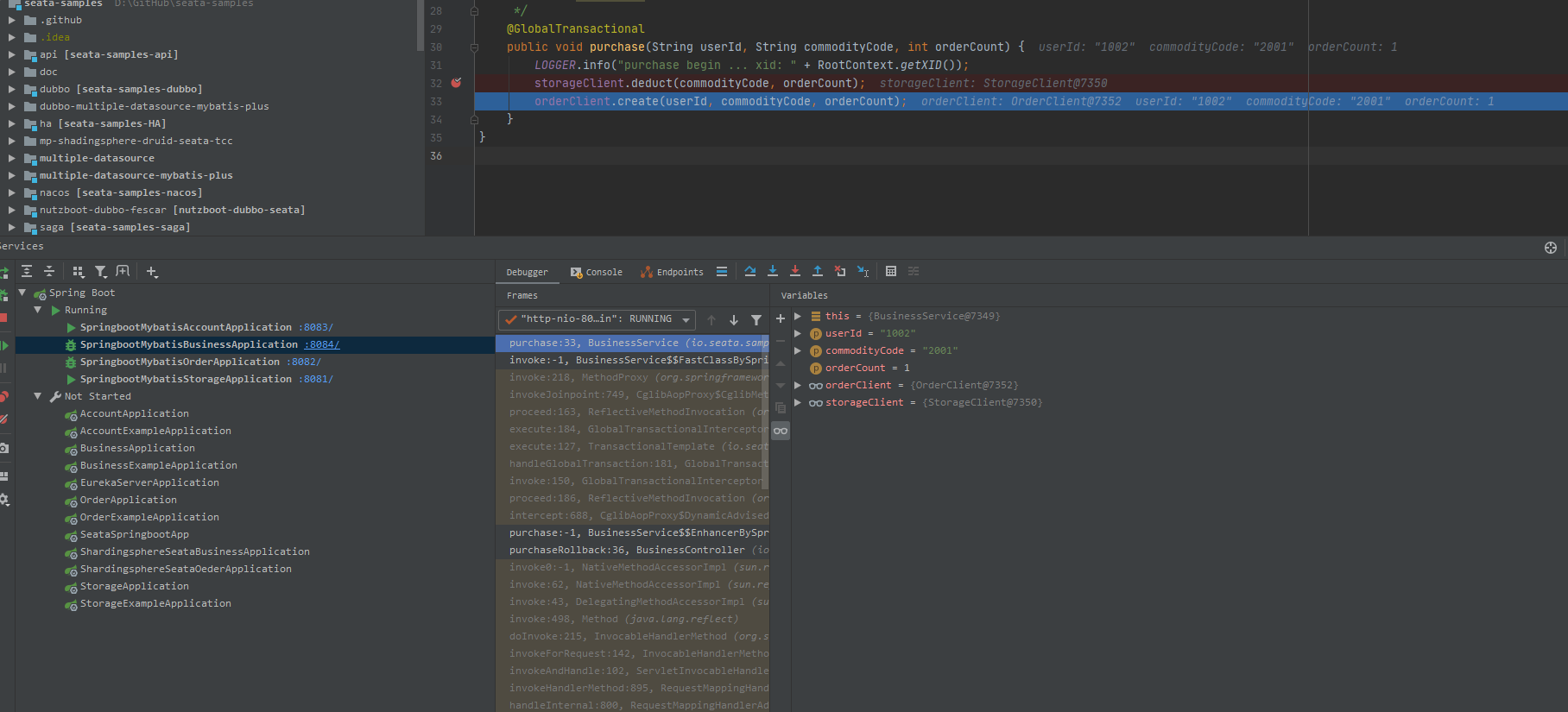
执行接口http://localhost:8084/api/business/purchase/rollback, 这里我们想查看undo_log表的数据,则在BusinessSerivce#purchase断点。
db_storage.undo_log
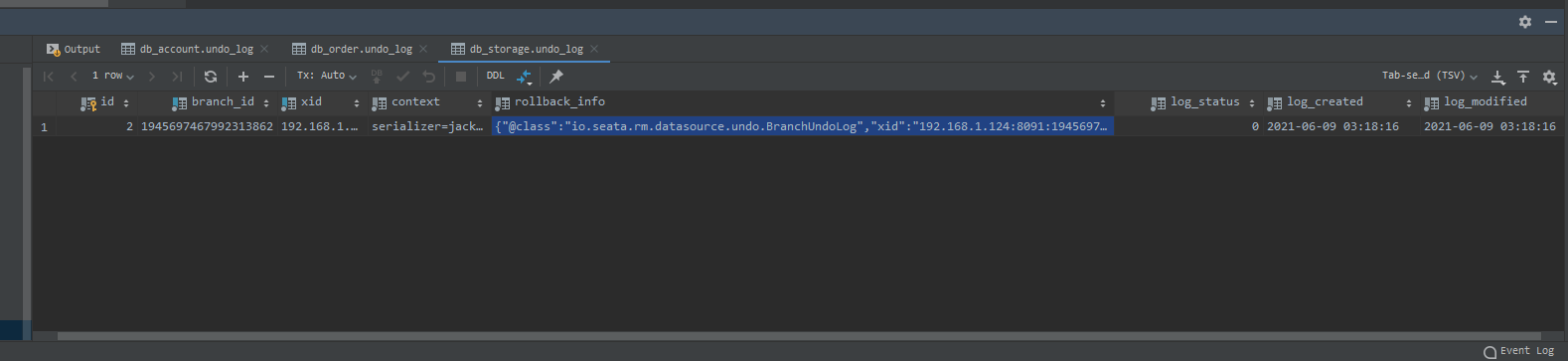
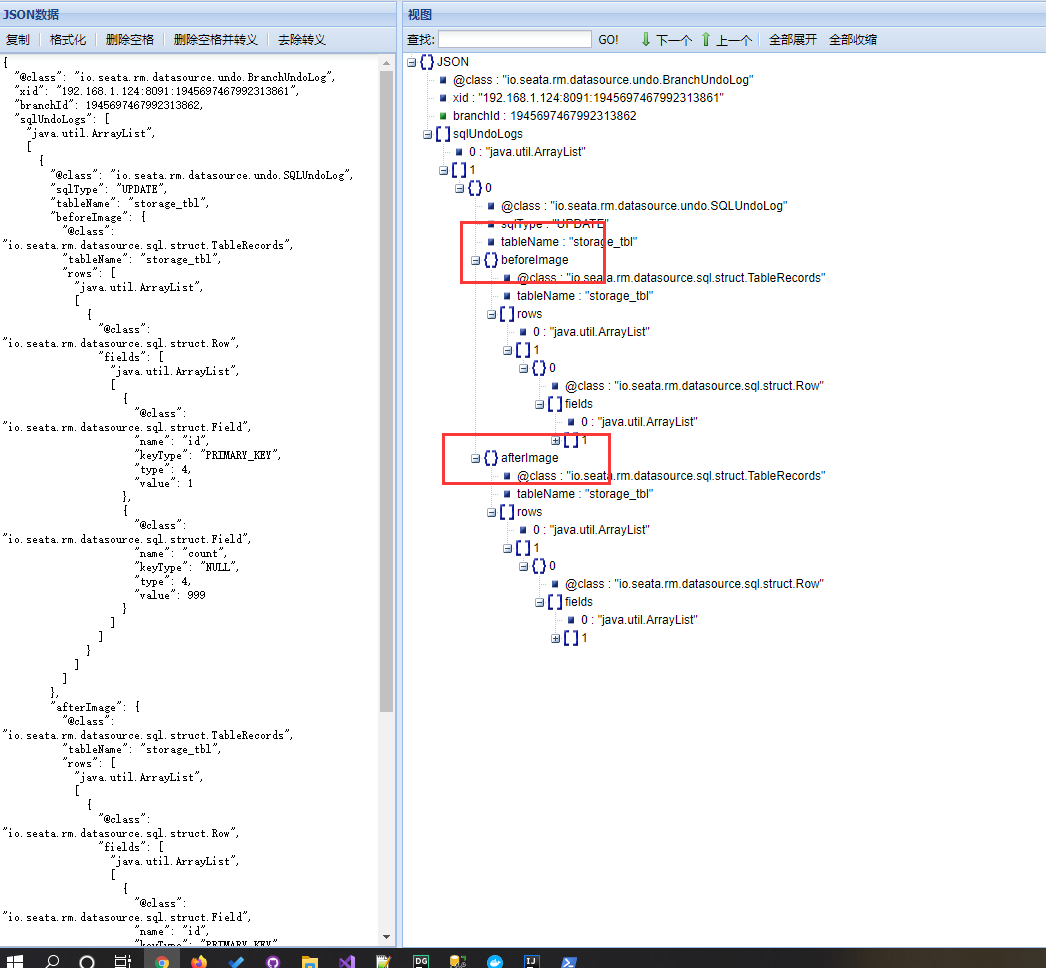
undo_log里最重要的是关注beforeImage和afterImage节点。
全局事务回滚后,undo_log表会清空数据。
Seata分布式事务框架Sample的更多相关文章
- 分布式事务框架Seata及EasyTransaction架构的比对思考
本文将会对比Seata与EasyTransaction两个分布式事务的一些高层设计,相信大家会有收获. Seata的概述 Seata(曾用名Fescar,开源版本GTS)是阿里的开源分布式事务框架,其 ...
- 快速了解阿里微服务热门开源分布式事务框架——Seata
一.Seata 概述 Seata 是 Simple Extensible Autonomous Transaction Architecture 的简写,由 feascar 改名而来. Seata 是 ...
- 开源的分布式事务框架 springcloud Alibaba Seata 的搭建使用 一次把坑踩完。。。
seata的使用 1. Seata 概述 Seata 是 Simple Extensible Autonomous Transaction Architecture 的简写,由 feascar 改名而 ...
- 终于跑通分布式事务框架tcc-transaction的示例项目
1.背景 前段时间在看项目代码的时候,发现有些接口的流程比较长,在各个服务里面都有通过数据库事务保证数据的一致性,但是在上游的controller层并没有对一致性做保证. 网上查了下,还没找到基于Go ...
- Dubbo学习系列之十五(Seata分布式事务方案TCC模式)
上篇的续集. 工具: Idea201902/JDK11/Gradle5.6.2/Mysql8.0.11/Lombok0.27/Postman7.5.0/SpringBoot2.1.9/Nacos1.1 ...
- SpringCloud微服务实战——搭建企业级开发框架(二十七):集成多数据源+Seata分布式事务+读写分离+分库分表
读写分离:为了确保数据库产品的稳定性,很多数据库拥有双机热备功能.也就是,第一台数据库服务器,是对外提供增删改业务的生产服务器:第二台数据库服务器,主要进行读的操作. 目前有多种方式实现读写分离,一种 ...
- 基于Dubbo的分布式事务框架(LCN)
原文地址:http://原文地址:https://github.com/1991wangliang/transaction 基于Dubbo的分布式事务框架(LCN) 该框架依赖Redis/dubbo/ ...
- tcc分布式事务框架解析
前言碎语 楼主之前推荐过2pc的分布式事务框架LCN.今天来详细聊聊TCC事务协议. 2pc实现:https://github.com/codingapi/tx-lcn tcc实现:https://g ...
- 分布式事务框架&解决方案参考
两种开源解决方案框架介绍: https://blog.csdn.net/zyndev/article/details/79604395#_97 LCN: https://www.jianshu.com ...
随机推荐
- hdu1816 + POJ 2723开锁(二分+2sat)
题意: 有m层门,我们在最外层,我们要一层一层的进,每一层上有两把锁,我们只要开启其中的一把们就会开,我们有n组钥匙,每组两把,我们只能用其中的一把,用完后第二把瞬间就会消失,问你最多能开到 ...
- Android平台dalvik模式下java Hook框架ddi的分析(1)
本文博客地址:http://blog.csdn.net/qq1084283172/article/details/75710411 一.前 言 在前面的博客中已经学习了作者crmulliner编写的, ...
- POJ1201基础差分约束
题意: 有一条直线,直线上做多有50000个点,然后给你组关系 a b c表明a-b之间最少有c个点,问直线上最少多少个点. 思路: a-b最少有c个点可以想象a到b+1的距 ...
- Photoshop 第二课 工具-钢笔的使用
钢笔的使用 钢笔→ 是一个非常实用(主要用于)但是非常难操作(会者不难哦~)的工具. 钢笔属性中有三种状态:1.路径:2.形状:3.像素.其中路径和形状是我们最常用的状态.路径是一条用来圈定需要操作的 ...
- xxl-job滥用netty导致的问题和解决方案
netty作为一种高性能的网络编程框架,在很多开源项目中大放异彩,十分亮眼,但是在有些项目中却被滥用,导致使用者使用起来非常的难受. 本篇文章将会讲解xxl-job作为一款分布式任务调度系统是如何滥用 ...
- 安装google cloud sdk报错解决方法总结(超全)
前提:python环境最好是2.7,如果是python3可能会出很多小毛病:能用64位系统就尽量用64位,32位系统安装也很多毛病 一.Error1:Unzip Failed: Error openi ...
- IDEA只有Commit没有Push按钮
问题描述 idea的右上角只有commit按钮,而没有push按钮 问题解决 打开File->Settings->Menus and Toolbars->Navigation Bar ...
- 电脑进入bios和u盘启动快捷键
参考:http://www.jb51.net/os/78638.html 一:联想系列 1:联想笔记本电脑 Thinkpad idea 520 :关机状态下,在左下角用回形针捅小孔,知道出现bios ...
- 提升50%!Presto如何提升Hudi表查询性能?
分享一篇关于使用Hudi Clustering来优化Presto查询性能的talk talk主要分为如下几个部分 演讲者背景介绍 Apache Hudi介绍 数据湖演进和用例说明 Hudi Clust ...
- ZOHO荣登“2020中国ToB行业年度企业影响力”榜单
近日,3WToB行业头条正式揭晓<2020中国ToB行业年度榜单 · 企业影响力榜>. 此次评选,ToB行业头条联合3W集团.50+知名投资机构.60+权威媒体及资深行业人士,进行深度调研 ...