
拖动登录框 HTML+CSS+js
先上效果
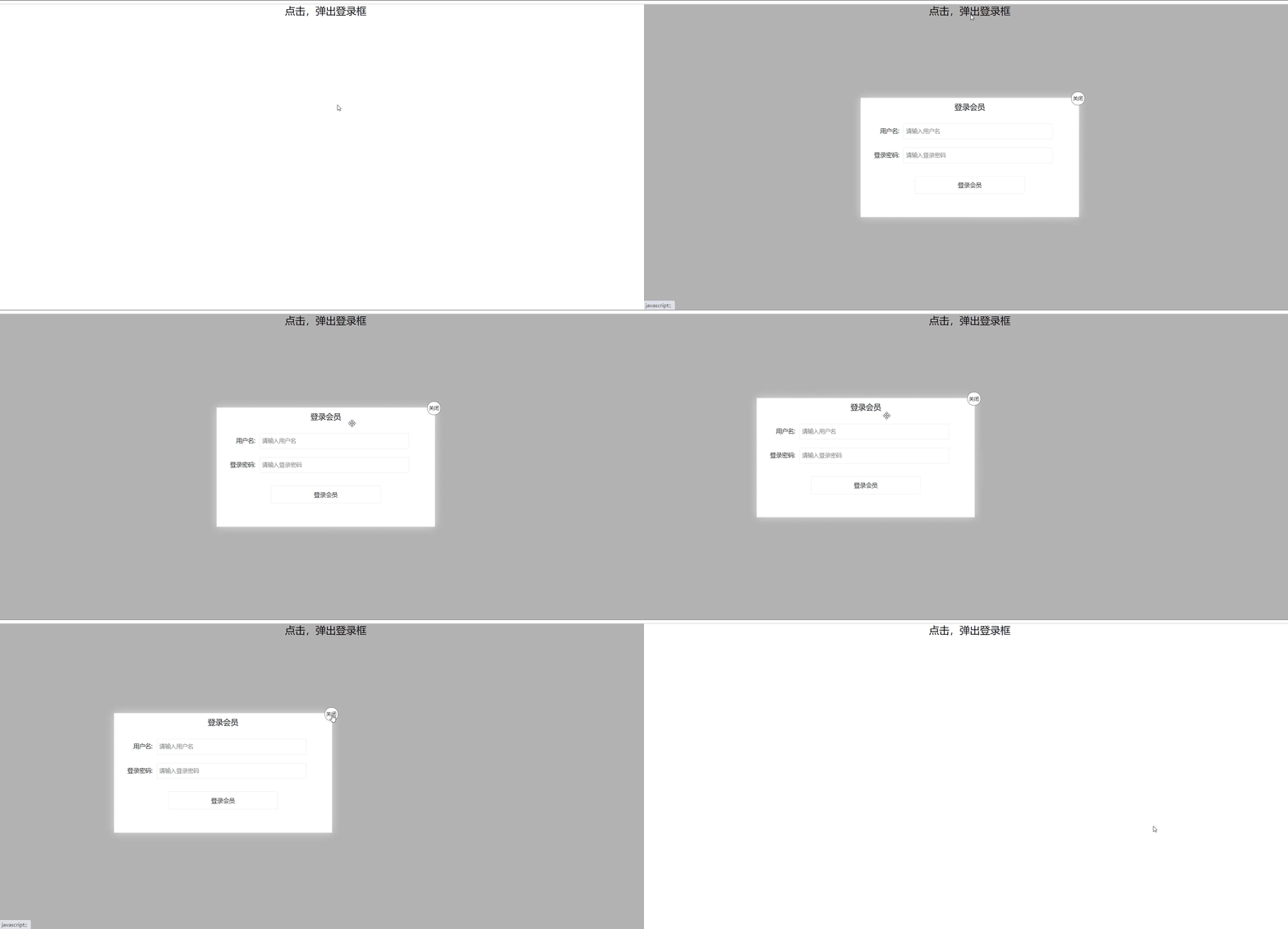
代码
<!DOCTYPE html>

<html lang="en">

<head>

    <meta charset="UTF-8">

    <meta name="viewport" content="width=device-width, initial-scale=1.0">

    <title>拖动登录框</title>

    <Style>

        * {

            margin: 0px;

            padding: 0px;

        }

        a {

            color: black;

            text-decoration: none;

        }

        .one {

            width: 100%;

            text-align: center;

            height: 30px;

            font-size: 24px;

            line-height: 30px;

        }

        .login {

            display: none;

            position: fixed;

            width: 512px;

            height: 280px;

            border: #ebebeb solid 1px;

            left: 50%;

            top: 50%;

            background: #ffffff;

            box-shadow: 0px 0px 20px #ddd;

            z-index: 999;

            transform: translate(-50%,-50%);

        }

        .title {

            position: relative;

            height: 40px;

            width: 100%;

            line-height: 40px;

            font-size: 18px;

            text-align: center;

            cursor: move;

        }

        .title a{

            position: absolute;

            font-size: 12px;

            top: -15px;

            right: -15px;

            width: 30px;

            height: 30px;

            border: 1px solid #666;

            border-radius: 15px;

            text-align: center;

            line-height: 30px;

            background-color: white;

        }

        .con {

           margin-top: 20px;

        }

        .login-input input {

            float: left;

            line-height: 35px;

            height: 35px;

            width: 350px;

            border: #ebebeb solid 1px;

            text-indent: 5px;

        }

        .login-input {

            overflow: hidden;

            margin: 0px 0px 20px 0px;

        }

        .login-input label {

            float: left;

            width: 90px;

            padding-right: 10px;

            text-align: right;

            line-height: 35px;

            height: 35px;

            font-size: 14px;

        }

        .bg {

            display: none;

            width: 100%;

            height: 100%;

            position: fixed;

            top: 0px;

            left: 0px;

            background: rgba(0, 0, 0, .3);

        }

        .button a {

            display: block;

        }

        .button {

            width: 50%;

            margin: 30px auto 0px auto;

            line-height: 40px;

            font-size: 14px;

            border: #ebebeb 1px solid;

            text-align: center;

        }

    </Style>

</head>

<body>

    <div class="one"><a href="javascript:;">点击,弹出登录框</a></div>

    <div class="login">

        <div class="title">登录会员

            <span><a href="javascript:;" id="close">关闭</a></span>

        </div>

        <div class="con">

            <div class="login-input">

                <label>用户名:</label>

                <input type="text" placeholder="请输入用户名" name="" id="name">

            </div>

            <div class="login-input">

                <label>登录密码:</label>

                <input type="text" placeholder="请输入登录密码" name="" id="code">

            </div>

            <div class="button">

                <a href="javascript:;">登录会员</a>

            </div>

        </div>

    </div>

    <div class="bg"></div>

    <script>

        var one = document.querySelector('.one');

        var login = document.querySelector('.login');

        var bg = document.querySelector('.bg');

        //点击弹出背景和登录框

        one.addEventListener('click',function(){

            login.style.display = 'block';

            bg.style.display = 'block';

        })

        //点击关闭,隐藏背景和登录框

        var close = document.querySelector('#close');

        close.addEventListener('click',function(){

            login.style.display = 'none';

            bg.style.display = 'none';

        })

        var title = document.querySelector('.title');

        //拖拽事件

        title.addEventListener('mousedown',function(e){

            //鼠标按下时,获取鼠标在盒子内的坐标

            var x = e.pageX - login.offsetLeft;

            var y = e.pageY - login.offsetTop;

            console.log(x);

            console.log(y);

            //鼠标移动时,把鼠标在页面中的坐标减去鼠标在盒子内的坐标就是left和top值

            document.addEventListener('mousemove',move);

            function move(e){

                login.style.left = e.pageX - x +'px';//返回值不带单位

                login.style.top = e.pageY - y + 'px';

            }

            //鼠标弹起,事件移除

            document.addEventListener('mouseup',function(){

                document.removeEventListener('mousemove',move);

            })

        })

    </script>

</body>

</html>
拖动登录框 HTML+CSS+js的更多相关文章
- js 拟写登录页 可以拖动登录框
<!DOCTYPE html> <html> <head lang="en"> <meta charset="UTF-8&quo ...
- 动态滑动登陆框-Html+Css+Js
动态滑动登陆框 <!DOCTYPE html> <html> <head> <meta charset="utf-8"> <t ...
- JavaScript--结合CSS变形、缩放能拖拽的登录框
上例图: 代码块: <!DOCTYPE html> <html> <head lang="en"> <meta charset=" ...
- html+css+js实现复选框全选与反选
<!DOCTYPE HTML PUBLIC "-//W3C//DTD HTML 4.01 Transitional//EN" "http://www.w3.org/ ...
- HTML和CSS实现的透明登录框效果
实现代码 HTML部分 <!DOCTYPE html> <html lang="en"> <head> <meta charset=&qu ...
- #3使用html+css+js制作网页 制作登录网页
#3使用html+css+js制作网页 制作登录网页 本系列链接 2制作登录网页 2.1 准备 2.1.1 创建文件夹 2.1.2 创建主文件 2.2 html部分 2.2.1 网站信息 2.2.2 ...
- phpmyadmin 4.x 版本无法看到登录框的处理
由于个人dreamhost即将到期问题,购买了一台VPS. 配置了一个CentOS 6.4 Linux 服务器,用Nginx+php-fpm搭建的环境. 这些都是废话,下面是重点: 当搭建后配置php ...
- JQuery+CSS3实现封装弹出登录框效果
原文:JQuery+CSS3实现封装弹出登录框效果 上次发了一篇使用Javascript来实现弹出层的效果,这次刚好用了JQuery来实现,所以顺便记录一下: 因为这次使用了Bootstrap来做一个 ...
- 第一百三十三节,JavaScript,封装库--弹出登录框
JavaScript,封装库--弹出登录框 封装库,增加了两个方法 yuan_su_ju_zhong()方法,将获取到的区块元素居中到页面,chuang_kou_shi_jian()方法,浏览器窗口事 ...
随机推荐
- SOAP与REST API的区别
之前一直想写些RESTful相关的文章,却一直未付诸行动.直到最近接手一个新的项目,对这块重新温习,乘此机会写些相关帖子.欢迎大家评论留言,如有错漏之处,也望各位大佬不令赐教. 话不多说,干活顶上. ...
- 通读《构建之法》与CI/CD工具尝试
项目 内容 这个作业属于哪个课程 2021春季软件工程(罗杰 任健) 这个作业的要求在哪里 作业要求 我在这个课程的目标是 积累软件开发经验,提高工程能力 这个作业在哪个具体方面帮助我实现目标 通读课 ...
- day-26-封装-property装饰器-反射
一.super进阶 在多继承中:严格按照mro顺序来执行 super是按照mro顺序来寻找当前类的下一类 在py3中不需要传参数,自动就帮我们寻找当前类的mro顺序的下一个类中的同名方法 在py2中的 ...
- 在Visual Studio 中使用git——使用git管理源代码(三)
在Visual Studio 中使用git--什么是Git(一) 在Visual Studio 中使用git--给Visual Studio安装 git插件(二) 第三部分:使用git管理源代码 ...
- BLDC有感FOC算法理论及其STM32软硬件实现
位置传感器:旋转编码器 MCU:STM32F405RGT6 功率MOS驱动芯片:DRV8301 全文均假设在无弱磁控制的情况下 FOC算法理论 首先,我们要知道FO ...
- php文件夹下文件批量重命名
php文件夹下文件批量重命名 <?php header("Content-type:text/html;charset=utf-8"); $dir = __DIR__.'./ ...
- 判断post,ajax,get请求的方法
判断post,ajax,get请求的方法 define('IS_GET',isset($_SERVER['REQUEST_METHOD']) ? $_SERVER['REQUEST_METHOD'] ...
- 【Jwt】JSON Web Token
一.什么是JSON Web Token: 首先要明确的是JSON Web Token:是一个开放标准,这个标准定义了一种用于简洁,自包含的用于通信双方之间以JSON对象的形式安全传递信息的方法 而我们 ...
- C/C++ 导入表与IAT内存修正
本章教程中,使用的工具是上次制作的PE结构解析器,如果还不会使用请先看前一篇文章中对该工具的介绍,本章节内容主要复习导入表结构的基础知识点,并通过前面编写的一些小案例,实现对内存的转储与导入表的脱壳修 ...
- poj2987最大权闭包(输出最少建塔个数)
题意: 公司要裁员,每个员工被裁掉之后都会有一定的收益(正或者负),有一些员工之间有限制关系,就是裁掉谁之前必须要先裁掉另一个人,问公司的最大收益和最大收益前提下的最小裁员人数? 思路: ...