
Maven + Jetty + Jersey搭建RESTful服务
IntelliJ IDEA + Maven + Jetty + Jersey搭建RESTful服务
本文参考以下内容:
使用Jersey实现RESTful风格的webservice(一)
Starting out with Jersey & Apache Tomcat using IntelliJ
--------------------------------------------------正文--------------------------------------------------------------
一、在IntelliJ中创建新项目,选择Java Enterprise -> RESTful Web Service -> Setup libery later.

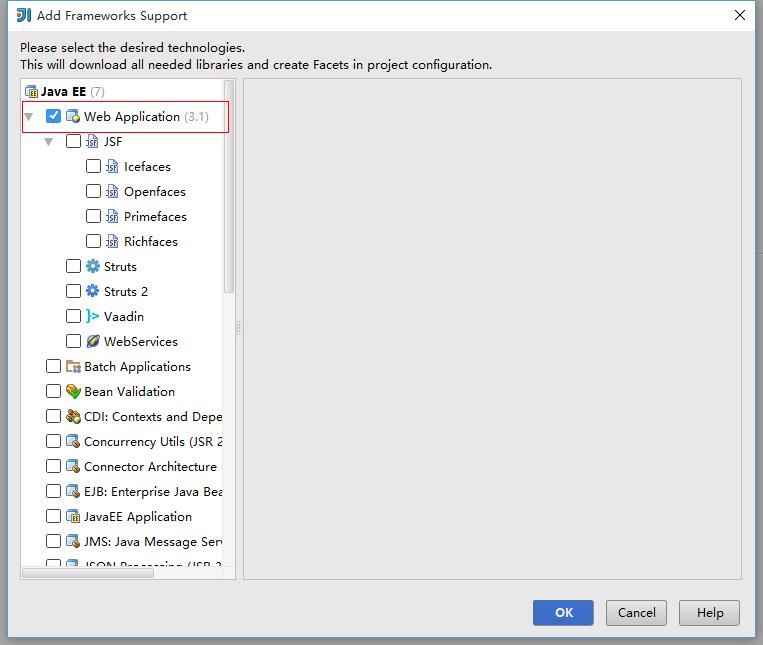
二、创建完项目JerseyDemo后,对项目点击右键 -> Add Frameworks Support,分别勾选Web Application和Maven。其中,web appication为项目增加了web.xml,maven为构建工具。

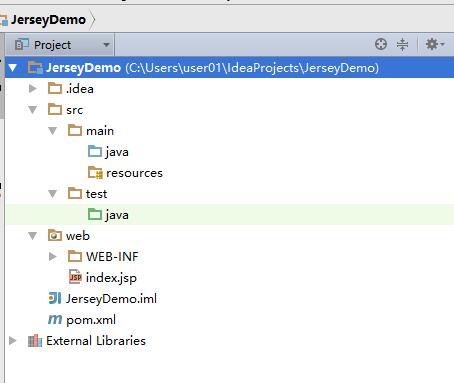
完成之后项目的文件结构如下:
三、在pom.xml中加入jersey和jetty依赖:

<dependencies>

    <dependency>

        <groupId>com.sun.jersey</groupId>

        <artifactId>jersey-bundle</artifactId>

        <version>1.19.1</version>

    </dependency>

    <dependency>

        <groupId>org.mortbay.jetty</groupId>

        <artifactId>jetty</artifactId>

        <version>6.1.25</version>

    </dependency>

    <dependency>

        <groupId>com.sun.jersey</groupId>

        <artifactId>jersey-json</artifactId>

        <version>1.19</version>

    </dependency>

    <dependency>

        <groupId>com.sun.jersey</groupId>

        <artifactId>jersey-servlet</artifactId>

        <version>1.19.1</version>

    </dependency>

 </dependencies>

四、在src/main/java/下创建package和类,这里我创建了一个HelloJsersy类,代码如下:
package com.puyangsky.example;

import javax.ws.rs.*;


//Path注解来设置url访问路径

@Path("/hello")

public class HelloWorld {
   //GET注解设置接受请求类型为GET

    @GET
   //Produces表明发送出去的数据类型为text/plain
   //与Produces对应的是@Consumes,表示接受的数据类型为text/plain
    @Produces("text/plain")

    public String getString() {

        return "hello jersey!";

    }

}
接着使用Jetty创建一个服务器类StartEntity.java:
 1 package com.puyangsky.example;

 2

 3 import com.sun.jersey.api.core.PackagesResourceConfig;

 4 import com.sun.jersey.spi.container.servlet.ServletContainer;

 5 import org.mortbay.jetty.Server;

 6 import org.mortbay.jetty.servlet.Context;

 7 import org.mortbay.jetty.servlet.ServletHolder;

 8

 9 /**

10  * Created by user01 on 2016/4/8.

11  */

12 public class StartEntity {

13     public static void main(String[] args) {

14         Server server = new Server(8090);

15         ServletHolder sh = new ServletHolder(ServletContainer.class);

16         sh.setInitParameter("com.sun.jersey.config.property.resourceConfigClass", PackagesResourceConfig.class.getCanonicalName());

17         sh.setInitParameter("com.sun.jersey.config.property.packages", "com.puyangsky.example");

18         //start server

19         Context context = new Context(server, null);

20         context.addServlet(sh, "/*");

21         try {

22             server.start();

23             server.join();

24         } catch (Exception e) {

25             e.printStackTrace();

26         }

27

28     }

29 }
红色字体标出的第一个是端口号,可以自己设置,第二个是需要你自己修改的,即第一个HelloJersey.java所在的包名。
ok,点击右键,Run "StartEntity.main()"

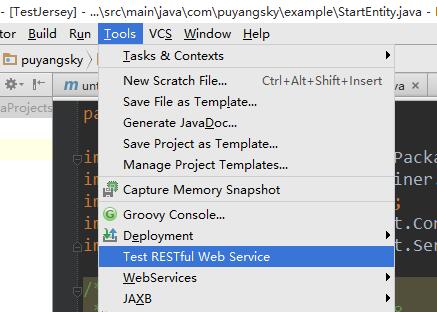
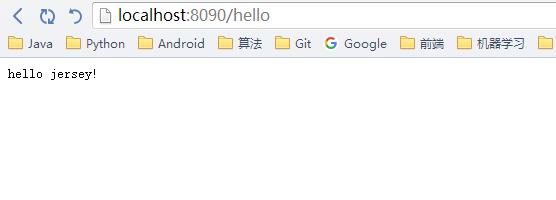
五、在浏览器中访问http://localhost:8090/hello,或使用IntelliJ中的Test RESTful Web Service,结果如下:
大功告成!
------------------------------------------------------一些小建议------------------------------------------------
1、IntellJ的快捷键:
神器之所以是神器,当然有不一样的地方,比如我们想写一个main方法,不用输入一大串,只要输入“psvm”,回车,搞定!
类似的还有输出,只要输入“souf”,右键。类的还有很多,自己去慢慢发现。
2、Jetty占用了端口号没有释放,每次都换一个端口号很麻烦,那么应该怎么办?
因为我是在windows7上做的,那么win+R打开DOS命令行,输入netstat -ano | findstr "8090":
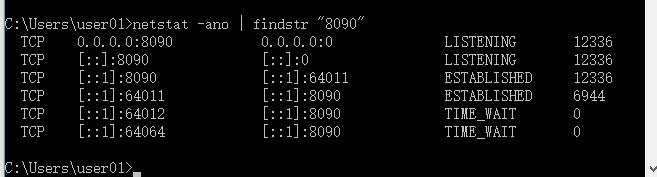
最后一栏为进程ID,pid.所以只要kill掉就ok了,接着输入:taskkill /PID 12336 /F
结果:

这里因为12236已经挂了所以换了个PID,效果一样。
Jersey的更多使用将在下一篇博客中继续介绍。
Maven + Jetty + Jersey搭建RESTful服务的更多相关文章
- IntelliJ IDEA + Maven + Jetty + Jersey搭建RESTful服务
这次参考的是这个博客,完全按照这个我这里会出一些问题,一会再说就是了. https://www.cnblogs.com/puyangsky/p/5368132.html 一.首先新建一个项目,选择Ja ...
- 【Jersey】IntelliJ IDEA + Maven + Jetty + Jersey搭建RESTful服务
本文参考以下内容: 使用Jersey实现RESTful风格的webservice(一) Starting out with Jersey & Apache Tomcat using Intel ...
- Jersey 2 + Maven + Tomcat + IntelliJ IDEA 搭建RESTful服务
本文参考以下内容: [1] Starting out with Jersey & Apache Tomcat using IntelliJ [2] [Jersey]IntelliJ IDEA ...
- jersey2.26+spring5+jpa一步步搭建restful服务
前言 首先,为什么想选择Jersey做restful服务呢?我个人比较喜欢它的插件化设计,可以方便的注入自己的全局处理逻辑.再一个就是可以生成wadl描述文件,供查询服务方法.所以在学习spring的 ...
- 用Jersey构建RESTful服务7--Jersey+SQLServer+Hibernate4.3+Spring3.2
一.整体说明 本例执行演示了用 Jersey 构建 RESTful 服务中.怎样集成 Spring3 二.环境 1.上文的项目RestDemo 2.Spring及其它相关的jar ,导入项目 三.配置 ...
- Jersey实现Restful服务
jersey 是基于Java的一个轻量级RESTful风格的Web Services框架.以下我基于IDEA实现Restful完整Demo. 1.创建maven-web工程,后面就是正常的maven工 ...
- sorl6.0+jetty+mysql搭建solr服务
1.下载solr 官网:http://lucene.apache.org/solr/ 2.目录结构如下 3.启动solr(默认使用jetty部署) 在path路径下将 bin文件夹对应的目录加入,然后 ...
- Jersey搭建Restful服务器 on Ubuntu
自己试着在Ubuntu上搭建一个 1.首先安装eclipse和tomcat sudo apt-get install eclipse tomcat7 -y 2.把tomcat的group assign ...
- 用Jersey构建RESTful服务1--HelloWorld
一.环境1.Eclipse Juno R22. Tomcat 73. Jersey 2.7 下载地址( https://jersey.java.net/download.html) 二.流程1.Ec ...
随机推荐
- 核心游记之 page_address_init
lock_kernel()仅仅虚晃一枪就过去了. 紧接着来的是page_address_init include/linux/mm.h #if defined(CONFIG_HIGHMEM) &a ...
- WPF程序长时间无人操作
在软件开发中为了安全性,特别是那些需要用到用户名和密码登录服务端的程序,常常考虑长期无人操作,程序自动跳转到用户登录界面. 判断程序是否长时间无人操作,有两个依据,第一个是鼠标长时间不动,第二个是鼠标 ...
- 使用Intent 将底层栈里所有的activity都清理掉
可以利用清理历史栈的方法,来巧妙关闭所有activity,首先用一个设置为不可见的activity A来启动程序,这个activity A的作用只是用来垫栈底,只有启动和退出程序才会用到这个activ ...
- android 请求网络 和 httpclient的使用上传下载
访问网络最主要的也就是 http协议了. http协议很简单,但是很重要. 直接上代码了,里面都是1个代码块 代码块的,用哪一部分直接拷出去用就好了. 1.访问网络用 get 和 post 自己组拼 ...
- oracle系统包——dbms_random用法及order by 小结(转)
dbms_random是一个可以生成随机数值或者字符串的程序包. 这个包有initialize().seed().terminate().value().normal().random().strin ...
- Android应用开发学习笔记之绘图
作者:刘昊昱 博客:http://blog.csdn.net/liuhaoyutz 一.绘图常用类介绍 在Android中绘图时,常用到的几个类是Paint.Canvas.Bitmap和Bitmapt ...
- 键盘游戏之canvas--用OO方式写
虽然写的不是很好,但 解释权以及版权仍然归13东倍所有! <!DOCTYPE HTML> <html> <head> <title>canvas-00 ...
- QT操作Excel(通过QAxObject使用了OLE,前提是本地安装了Excel)
新建QT GUI项目,在选择选项中勾选ActiveQT Container. #include <qaxobject.h> QAxObject *obj = new QAxObject(& ...
- Java编码浅析(注意区分三个概念)(转)
编码: (1)外部资源的字符集-----没有读入jvm中的数据都是外部资源 (2)jvm中数据的字符集-----都是unicode (1)和(2)之间发生交互时,如果不指定编码,则使用JVM平台默认字 ...
- Infinite scroll has been called autopagerize, unpaginate, endless pages
http://www.infinite-scroll.com/ Infinite scroll has been called autopagerize, unpaginate, endless pa ...